Scroll through months, staying within a specific Category under Planned Spending
In the Spending Plan, then having opened a specific category within the Planned spending, and then clicking on the directional arrows at the top (which are used to scroll through each month) I would like the specific category screen to stay open rather than returning to the full list of Planned spending categories.
Comments
-
I love this idea! It would be very helpful for those times when you want to compare your spending in one category over time without leaving the Spending Plan. Great idea, thanks for submitting!
0 -
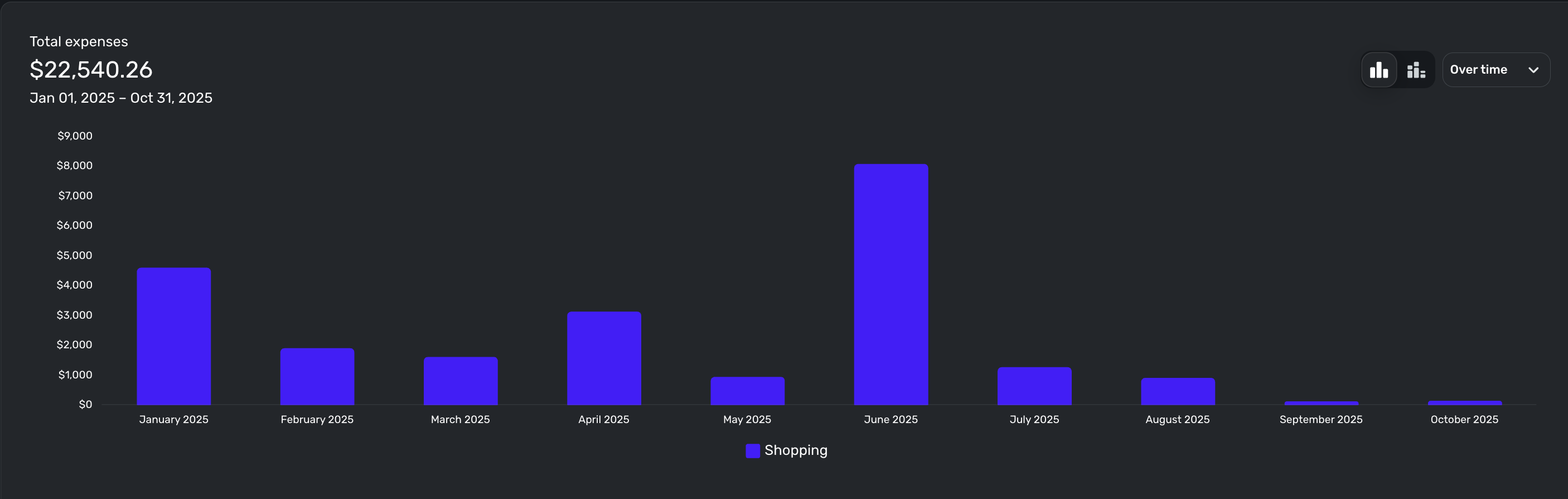
While this sounds like a good idea, i think it might be easier to get that information by running a spending report "over time" and filtering by category (or categories).
For example, here i do year to date filtered by category shopping:
On the top right of that image you can see where i selected "over time"
Filters are set above the report chart.
EDIT: You might notice in June I had a lot of 'shopping' expenses, and months after that it was much lower because I had to pay down that debt so i cut back on shopping.
—
Rob Wilkens - RobWilkens.com0