Spending Plan Does Not Include Business Income & Expense Transactions

I have a ticket open on this issue for reference - Income is not being included within the Spending Plan module even though I am told that is not by design.
Sections like Bills that are assigned to Business categories also do not appear alongside Personal categories (at least on my instance they do.)
Note: At first the expense categories seemed to appear. This it seems is because when I first set up QBP I moved/reassigned certain categories away from Personal parent categories to be sub-categories of a parent Business category. This saved a lot of time setting up Business and the P&L report picked them up.
BUT . . . when reassigning the Recurring Income or Expense reminder (edit the series) to the Business category, the reminders disappear from the Spending Plan.
Comments
-
Hello @Charles Collins,
Thanks for letting us know! The agent you worked with via chat support will be back in touch with you once there is an update on your reported issue, and if you have an inquiry on the issue before then you can reach out to chat support again.
-Coach Jon
-Coach Jon
0 -
Brand new and after getting it all up and running went to do spending plan and noticed no business income showing up either even though it is set as recurring monthly income.
0 -
Hello @galaxygal,
Thanks for reaching out! Can you please supply a screenshot showing the recurring monthly income you mentioned, as well as what your spending plan shows under the income tab? Feel free to redact any personal information. This would be helpful in determining what is happening here.
-Coach Jon
-Coach Jon
0 -
I just spoke to someone online this is their answer which seems absolutely ridiculous to me since this app is marketed as business and personal all in one place.
Coach Marie: Thank you for holding. We apologize for the issue you are experiencing. Our team has informed us that this is an expected behavior, as the Spending Plan was designed to track personal expenses only. To include these expenses in the Spending Plan, you can try changing the categorization to a personal one. Please note that it may take up to 24 hours for the system to recognize the changes after recategorizing the transaction.We understand your concern and we are treating your case as valuable feedback.I have done several tests and won't bother with a redacted screen shot just know that all personal income shows in spending plan and no business income shows. I'll have do a workaround and add business expense categories to personal so I can track for taxes but it just seems like it defeats the purpose of a business and personal app.
I tested out several finance apps this week and finally settled on Simplifi so I will overlook this as this app works just better enough than the others to give me what I really need.
1 -
Hello @galaxygal,
Thanks for following up and letting us know. I have confirmed that this is currently how the Spending Plan works, yes. If you would like, you can create an idea post to add the ability to track business expenses and income in the Spending Plan, that others in the community could vote for and follow for updates!
-Coach Jon
-Coach Jon
0 -
@galaxygal Thanks for posting your experience. I have been considering B&P but was concerned about the website's lack of detailed information, like no detailed info. This is particularly concerning for an app aimed at small business customers.
0 -
@Charles Collins @galaxygal @fcb Thank you for your feedback about the Spending Plan and business transactions. I'd love to speak to each of you three about your needs for business budgeting and our Spending Plan feature. Here is my calendar link: . Understanding your needs will help us add support for your business!
-Coach Tara
2 -
Since I'm new and only imported data for this year as I already closed out last year in my other software, it wasn't a big deal to go in and add my business categories under 'personal' and connect them to the needed tax forms and correct the business transactions to those new personal categories AND correct recurring bills and income. Sounds harder than it was. However, something that should never have had to happen. It just makes me wonder why I paid extra for business when personal obviously would have suited me just fine. I'm glad to see Coach Tara chiming in as it is way more help than I just received in their messenger app.
0 -
@Coach Tara I'd be glad to set up a meeting with you, but background first: I have a separate system for my professional side that handles billing and payments. This will change as I transition to a few side businesses in a few years. I have always tracked personal and business accounts/transactions together in various other platforms, never needing a full-fledged accounting program. Payables is lightweight and more ad hoc, now using Melio. This system works fine for a sole practitioner filing with Schedule C.
Simplifi Personal is working great for this. Tax Reports had a few kinks you're working on. So, I've no clue if B&P solves anything further. Providing a "business" solution requires much more visibility than what your marketing is currently providing on the website for B&P. Where are the specs? For payables, who does the processing and what are fees? T&Cs? Lots of questions. There's no way I'd pay much to "test" for a year. And there's not much about of going backwards from B&P to Personal only and what happens to the data, except for one mention of archiving but no access unless we resubscribe.
Over the years, I've looked at and tested many platforms for my use case, which I suspect is fairly typical. Most have marketing that tends to obfuscate the important details but at least are set up for testing or trialing. Can't with B&P without committing and potentially messing up the data.
0 -
@Coach Tara I have scheduled a calendar discussion session as requested. And to @galaxygal and @coach Marie regarding the response about "Spending Plan was designed to track personal expenses only . . ." that means Quicken either has to create a new Spending Plan used by a business for forecasting recurring revenue (which most businesses have) expected expenses for cash flow budgeting (which most businesses have.)
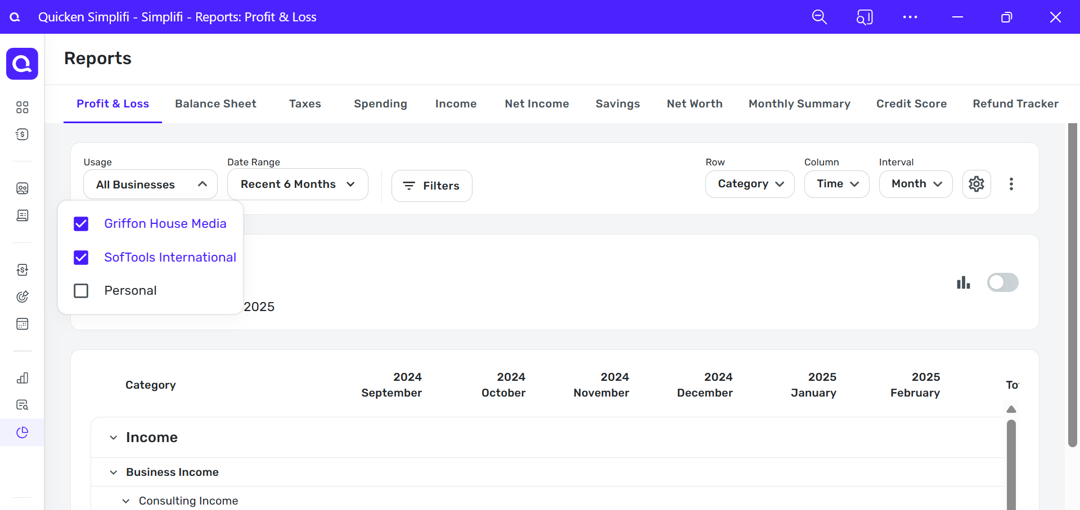
Makes a whole lot more sense especially for the kinds of businesses we are (i.e.) sole proprietors, consultants, etc. to display all income and expenses in the spending plan separated out with a simple filter function to select business income vs. personal income or both for a consolidated view much the same way you can toggle on and off in the profit & loss report.
 0
0 -
@fcb Thank you for all the information and background. I agree that we need to add more details about B&P everywhere. It's a brand new product and we have plenty more work to do to get it added to our entire ecosystem. We're definitely not trying to obfuscate the important details but we also recognize that we plan on adding a lot more features over the next few years and it'll continue to change and improve for all of our users.
Because B&P is built on top of Simplifi, there's no loss of data when you downgrade. You'll see any transactions you've already downloaded or entered including transactions for previous invoices and invoice payments, but you will lose access to certain business only features. Those features include Clients & Projects, Invoices and specific business reports including Profit and Loss, Balance Sheet and Taxes. I hope that helps and still would like to discuss your needs further. Happy to give you a personal demo of the product and get your feedback.
-Coach Tara
0 -
That didn't say much about having a filter inside the spending plan to see business and/personal income and planned expenses in this tool. If people downgrade back to Personal Edition they lose the filtering as the business entities won't exist and the transactions will default back to personal income and expense categories or uncategorized if there is no matching category swap.
Just as an added clarification on this for anyone listening, go to the Bills and Income Planning tool just below the Spending Plan and you will find there all your business and personal income and expenses together in one place. If I'm not mistaken these Recurring and/or Scheduled Transactions show up here since they are recorded in the system for tracking.
So, to carry over the same view "include all" in the Spending Plan tool seems more like an omission rather than by design.
One would think this shouldn't be heavy lifting to "switch it on".
0 -
I can also say that I did end up creating a work expense category in my personal list and linked them all to the appropriate tax forms however when you go to reports and select taxes you only have the option to select business. Go figure.
0

