TreasuryDirect converted bonds incorrect balance

I’m having an issue with the balance shown in my linked TreasuryDirect account. I have bond holdings that were converted from paper bonds to digital holdings in TreasuryDirect. The way they appear on my TD homepage is through a link to “My Converted Bonds” which shows a balance equal to the purchase price of the bonds (not the current value with accrued interest). To see the current value I have to click through two more pages to see “Current Holdings” which shows the current value of the bonds. Is it possible for Simplifi to scrape this data and show the correct current value of my bond holdings? Thanks!
Comments
-
Hello @trewbux,
To assist with this issue, please clarify. Are the converted bond balances not being downloaded into Quicken Simplifi at all, or is it downloading an incorrect balance? On TreasuryDirect's website, are converted bond balances in a separate section from the digital bonds? If they are, what is the exact URL that shows on their website when you are viewing converted bond balances?
I look forward to your response!
-Coach Kristina
0 -
Hi @Coach Kristina,
The converted bonds are showing up in Simplifi, but with the incorrect balance (it shows the purchase price, not current value). They do appear in a separate section of the TreasuryDirect website. From the home page I click “My Converted Bonds” → “SAVINGS BONDS” and then it takes me to a page where I can see the correct current value. The URL of that page is:
Hope this helps. Thanks!
1 -
@trewbux, thanks for the reply!
Please provide the following data so we can take a look at escalating this issue from our end:
- The name of the account, as it appears in Quicken Simplifi.
- The balance for the account in the Accounts List in Quicken Simplifi (this is the list of all accounts and balances on the left side of the Dashboard on the Quicken Simplifi Web App, or the list of all of your accounts when you select "Accounts" from the Quicken Simplifi Mobile App).
- The balance for the account in the Investments Portfolio in Quicken Simplifi (if you have multiple investment accounts, you'll want to filter the page to just this account).
- The balance for the account as displayed on the bank's website.
- A screenshot of the holdings for the account in Quicken Simplifi (if you have multiple investment accounts, you'll want to filter the page to just this account).
- A screenshot of the holdings on the bank's website for a comparison.
- A screenshot of the Accounts Summary page from the bank's website (the page that lists all accounts and balances - feel free to redact any private info) that has a wide enough scope to show the page URL (this must be taken from a web browser and not a mobile browser).
Please also submit your logs via the 'Send Feedback' option:
- Log into the Quicken Simplifi Web App.
- Select Profile from the left-hand navigation bar.
- With the Profile menu open, hold down the Option key for Mac or the Alt key for Windows, and then click Send Feedback.
- Leave all boxes checked, add a brief description of the issue, and then click Send.
-Coach Natalie
-Coach Natalie
0 -
@Coach Natalie How can I provide this data in a private manner?
0 -
@trewbux, you can send the info via a DM to me here in the Community for privacy, and then the conversation would be brought back to this main Community thread.
Alternatively, if you'd prefer a private support experience in general, our Chat or Phone Support Teams would be happy to assist:
Thanks!
-Coach Natalie
-Coach Natalie
0 -
@trewbux, thank you for providing the requested info! We have gotten a ticket filed for this issue and will post back with updates.
-Coach Natalie
CTP-11503
-Coach Natalie
0 -
I have the same issue.
0 -
@clintval, thanks for posting on this topic!
From my understanding, the issues with TreasuryDirect bonds is caused by how the bank is aggregating the data. Since our engineering team is already working on this with our service provider and the financial institution, please go ahead and follow along here for updates.
Let us know if the issue persists after we confirm it should be resolved!
-Coach Natalie
1 -
Hi @Coach Natalie any update on this issue or eta on resolution? Thanks
0 -
@trewbux, thanks for reaching out!
There is no update to provide as of yet, but we will be sure to post back here as soon as we have any news to share. Thanks for your continued patience!
-Coach Natalie
0 -
Hi @Coach Natalie, wondering if there is any update you can provide, or if this is actively being worked? If not, I’ll just delete the account and go back to manually tracking the value. It’s a pain, but at least will let me track my net worth accurately.
0 -
@trewbux, no update yet. I think you are good to track the account manually for now. I can let you know if they need you to reconnect it at any point.
Thanks!
-Coach Natalie
0 -
Hey everyone!
I just wanted to let you all know that the escalation for this issue is still open and ongoing. We are awaiting a fix to be implemented by our service provider. We will continue to keep you all updated here!
Thank you for your patience!
-Coach Natalie
0 -
@trewbux & @clintval, our engineering team would like you both to reconnect your TreasuryDirect accounts to see if the issue is resolved. If the account is already connected, please follow these steps to establish a brand new connection for your existing account:
- Make the account manual by following the steps here.
- Once you see the account(s) listed in the Manual Accounts section under Settings > Accounts, go back through the Add Account flow to reconnect to the bank.
- If the connection is successful, carefully link the account(s) found to your existing Quicken Simplifi account(s) by following the steps here.
Let us know how it goes!
-Coach Natalie
0 -
Hi @Coach Natalie I was able to re-add the account from scratch and it connected successfully, however it’s still showing the purchase price of the bonds and not their current value, just as it was before. So as far as I can tell, this issue has not yet been resolved. Please let me know if any additional info is needed. Thanks
0 -
@trewbux, thank you for giving it a try and posting back!
Let's gather a fresh round of data from you so I can prove that the issue is still occurring:
- The name of the newly added account, as it appears in Quicken Simplifi.
- The balance for the account in the Accounts List in Quicken Simplifi (this is the list of all accounts and balances on the left side of the Dashboard on the Quicken Simplifi Web App, or the list of all of your accounts when you select "Accounts" from the Quicken Simplifi Mobile App).
- The balance for the account in the Investments Portfolio in Quicken Simplifi (if you have multiple investment accounts, you'll want to filter the page to just this account).
- The balance for the account as displayed on the bank's website.
- A screenshot of the holdings for the account in Quicken Simplifi (if you have multiple investment accounts, you'll want to filter the page to just this account).
- A screenshot of the holdings on the bank's website for a comparison.
Please also submit your logs via the 'Send Feedback' option:
- Log into the Quicken Simplifi Web App.
- Select Profile from the left-hand navigation bar.
- With the Profile menu open, hold down the Option key for Mac or the Alt key for Windows, and then click Send Feedback.
- Leave all boxes checked, add a brief description of the issue, and then click Send.
Much appreciated!
-Coach Natalie
0 -
@Coach Natalie I also followed your earlier instructions (make manual accounts, then reconnect) and confirm nothing has changed and the problem persists.
In Simplifi my 2x Treasury Direct accounts are named "Treasury Direct Main" and "My Converted Bonds".
I have $0 in "Treasury Direct Main" so that is not what I'm interested in reporting. However, in "My Converted Bonds" Simplifi reports $250 dollars which is the original value. However Treasury Direct shows both the original value of $250 dollars and current value of $612.60 after some clicking.
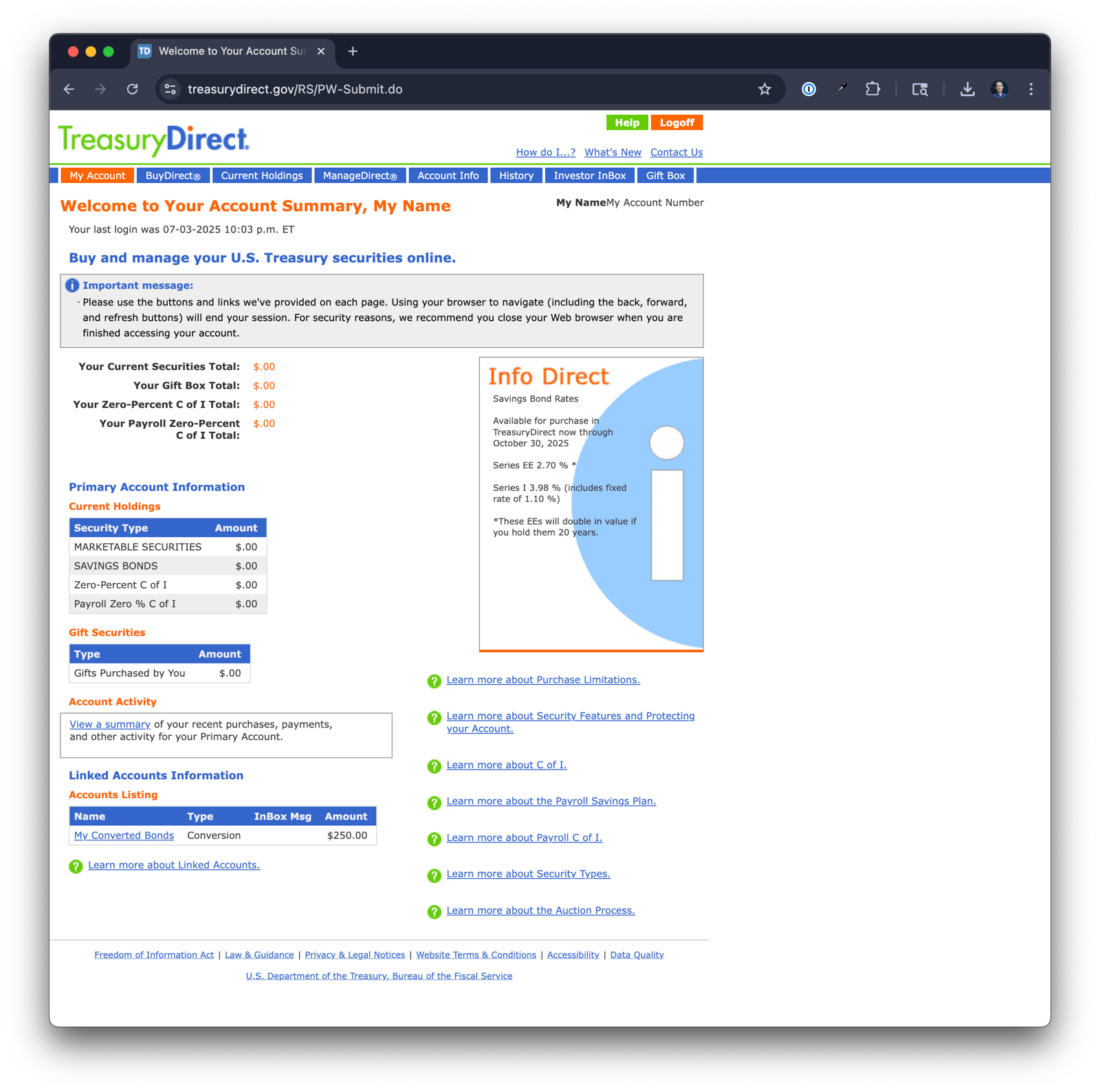
When I first log in to Treasury Direct I see my main account overview:
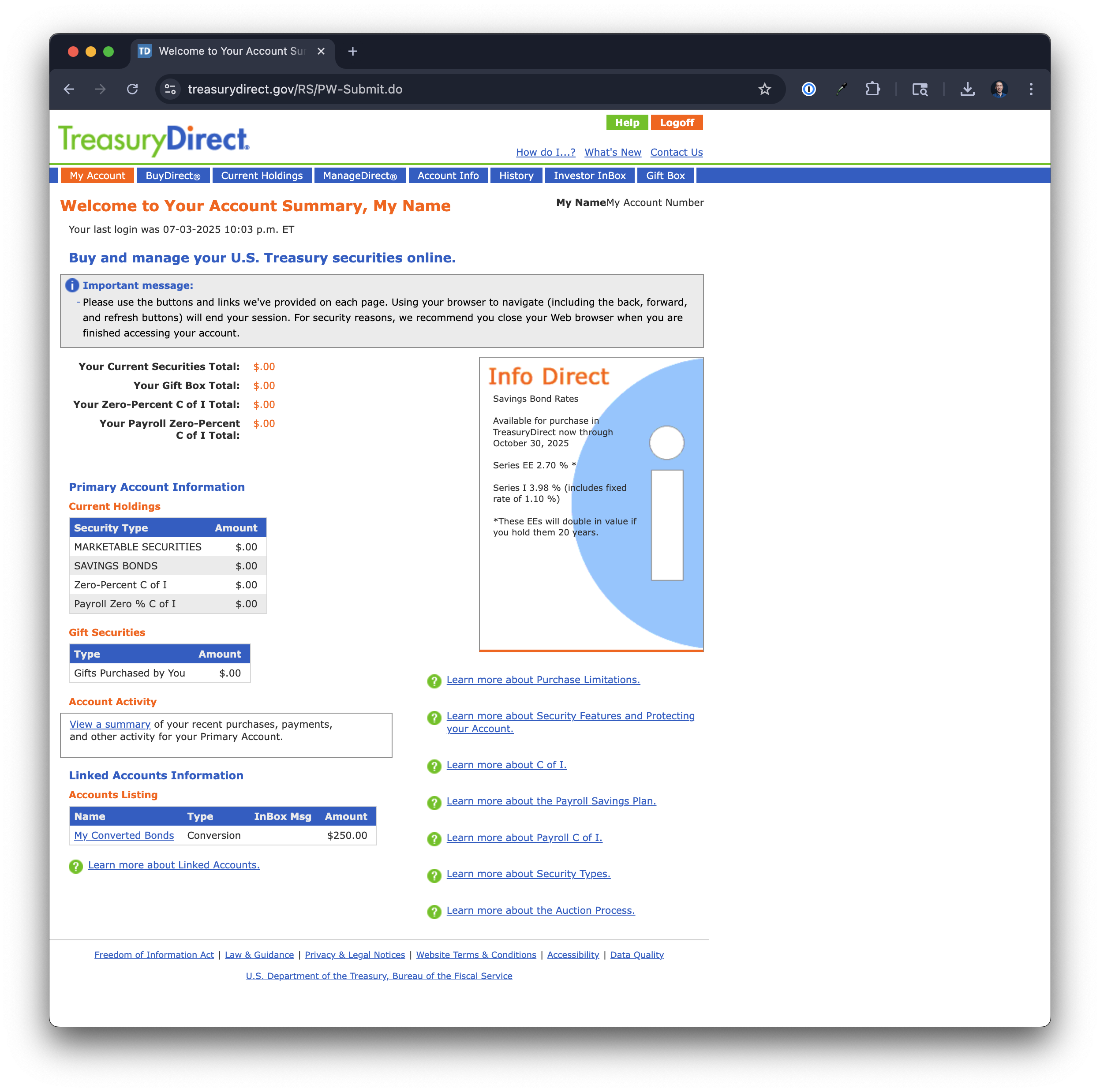
However, when I click "My Converted Bonds" (original value of $250) I see more information:
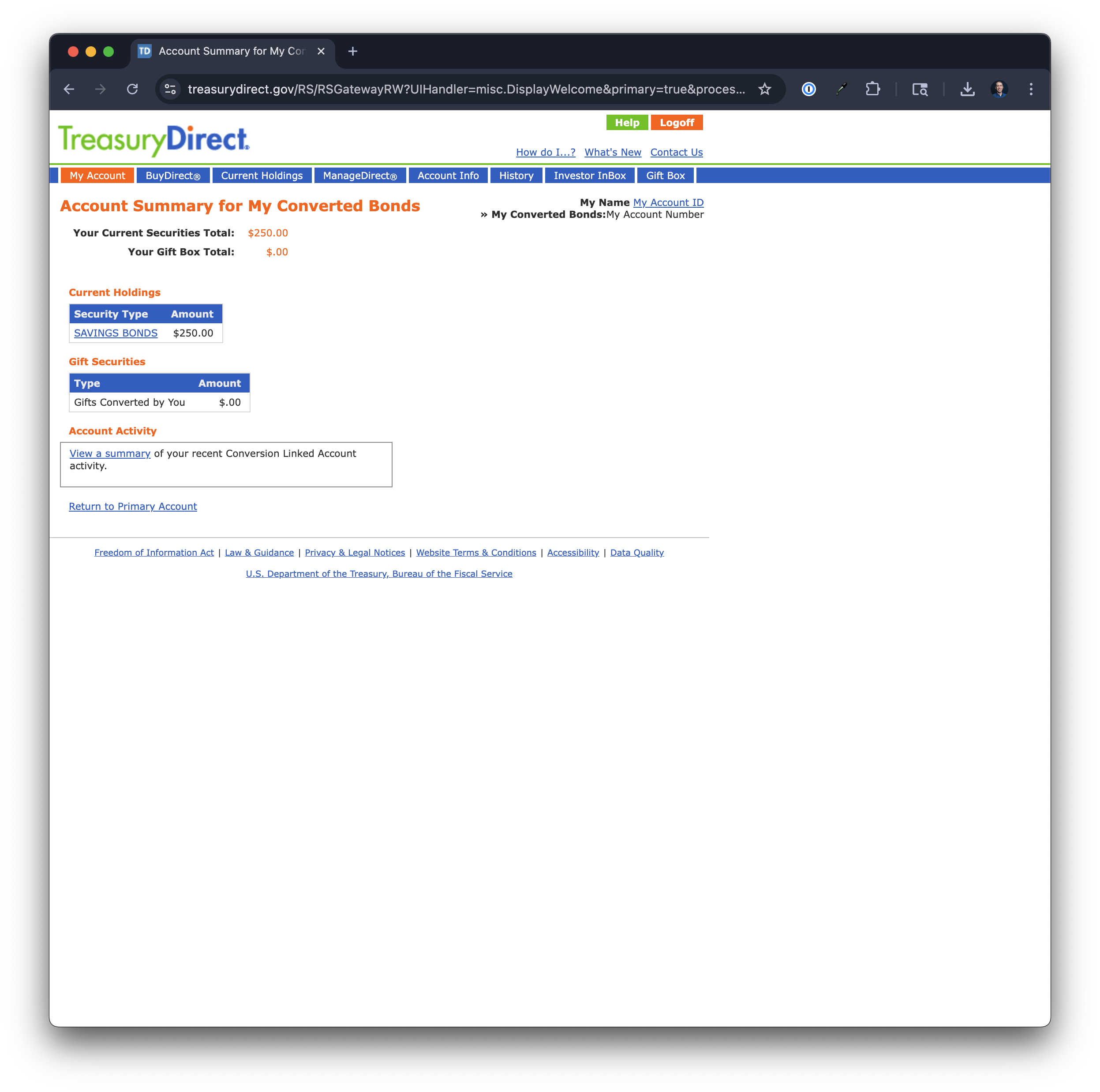
Then if I click "Security Type" I finally see the current value of the securities:
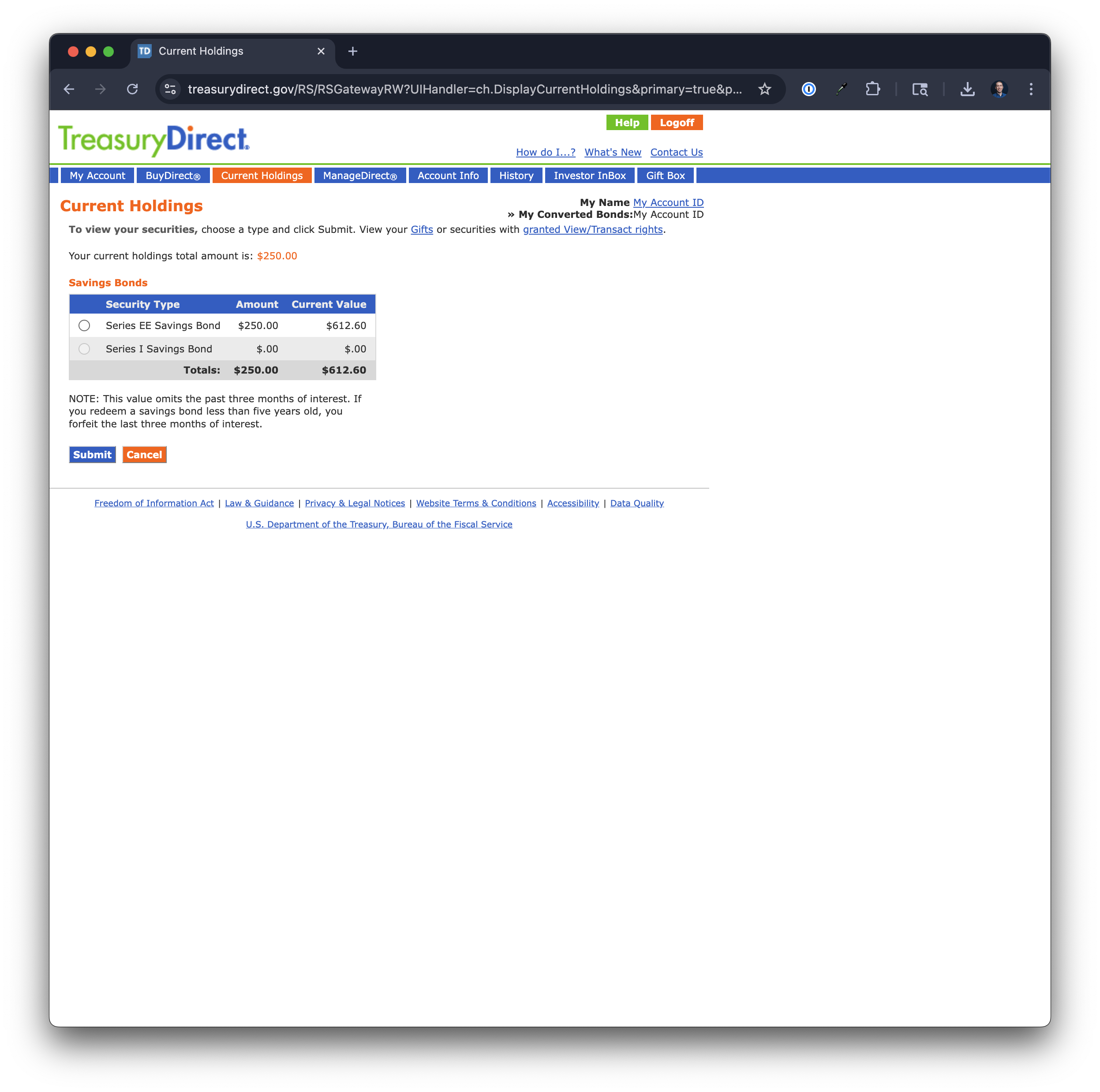
This looks tricky to parse since you'd need to have Simplifi descend into the account, then into the securities each, and tally up their current values which is more meaningful to me than the original values.
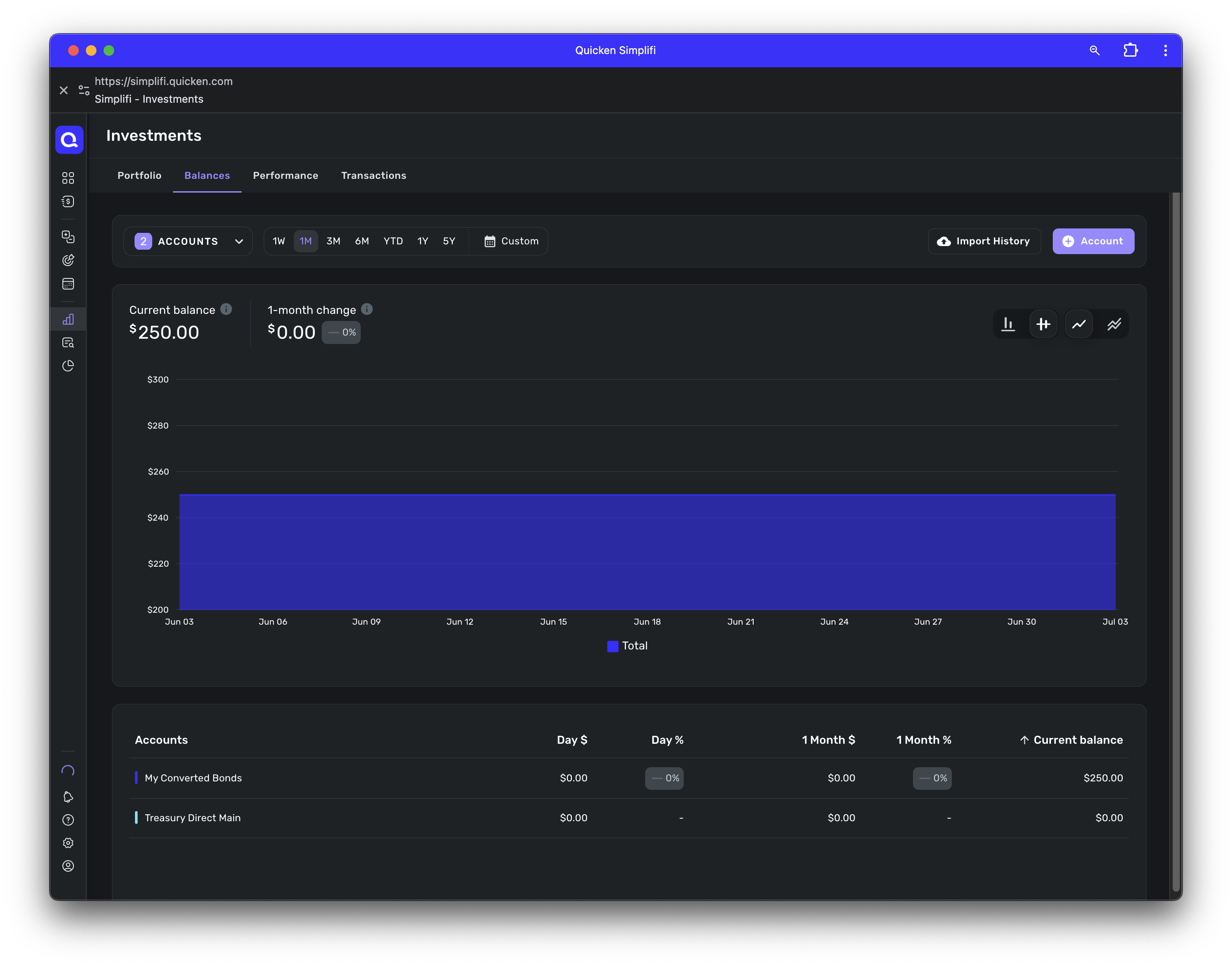
Here is what the above looks like in Simplifi Desktop:
And how it looks in the sidebar:
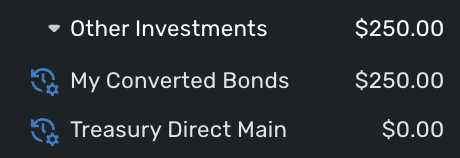 0
0 -
@clintval, thanks for letting us know!
I don't see that you're part of the ticket, so we will likely need to wait for @trewbux to provide the requested info to continue working on the issue. However, I can get you added to the ticket with additional information being provided:
- The balance for the account in the Investments Portfolio in Quicken Simplifi (if you have multiple investment accounts, you'll want to filter the page to just this account).
- A screenshot of the holdings for the account in Quicken Simplifi (if you have multiple investment accounts, you'll want to filter the page to just this account).
- A screenshot of the Accounts Summary page from the bank's website that has a wide enough scope to show the full page URL. This is the landing page after signing in, and typically lists all accounts and balances. You will want to take this from a web browser and not a mobile browser, as well as redact any private info such as account numbers.
Please also submit your logs via the 'Send Feedback' option:
- Log in to the Quicken Simplifi Web App.
- Select Profile from the left-hand navigation bar.
- With the Profile menu open, hold down the Option key for Mac or the Alt key for Windows, and then click Send Feedback.
- Leave all boxes checked, add a brief description of the issue, and then click Send.
Much appreciated!
-Coach Natalie
0 -
@Coach Natalie I sent you a private message with the requested info last week. Can you confirm whether it was received? Thanks!
0 -
@trewbux, I found the DM in your Inbox and got the info from it — thanks!
I don't see that logs have been submitted. We will need these so they can be added to the ticket:
- Log in to the Quicken Simplifi Web App.
- Select Profile from the left-hand navigation bar.
- With the Profile menu open, hold down the Option key for Mac or the Alt key for Windows, and then click Send Feedback.
- Leave all boxes checked, add a brief description of the issue, and then click Send.
Thanks!
-Coach Natalie
0 -
@Coach Natalie thanks for adding me to this ticket. I'm happy to help if it means making Simplifi better!
You asked for a few things of me, but they are all in my July 3rd comment:
On that day, I also upload logs as instructed.
0 -
@clintval, thanks for the reply!
Aside from logs, the information requested in my comment above was not included in your comment on July 3rd:
I don't see a screenshot of the Portfolio Value in Quicken Simplifi, nor the Holdings in Quicken Simplifi. We also need the Account Summary page from the bank's website; if this was provided, please specify which specific image is the landing page after you sign in.
Much appreciated!
-Coach Natalie
0 -
Hi @Coach Natalie, the screenshots were included. I'll repost them here.
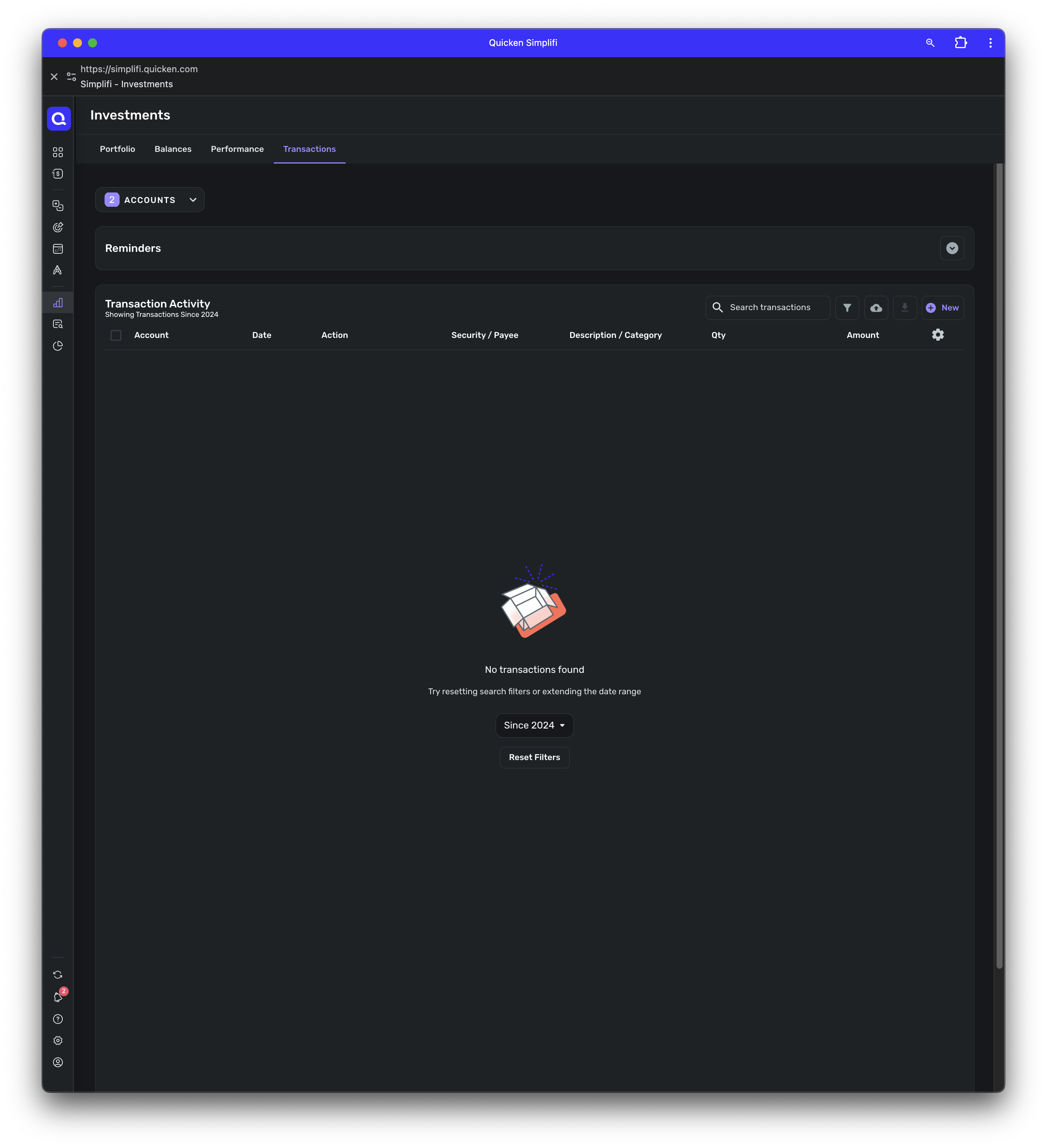
Holdings in Quicken Simplifi and Portfolio Value in Quicken Simplifi: Under the Investments Tab, I filtered down to just the Treasury Direct Main account and the "My Converted Bonds" sub-account. Here are screenshots for all 4 tabs. Oddly the Portfolio "Market value" is $0 despite having a $250 balance. The $250 is the original value of the bonds and the actual value is now ~$600+.
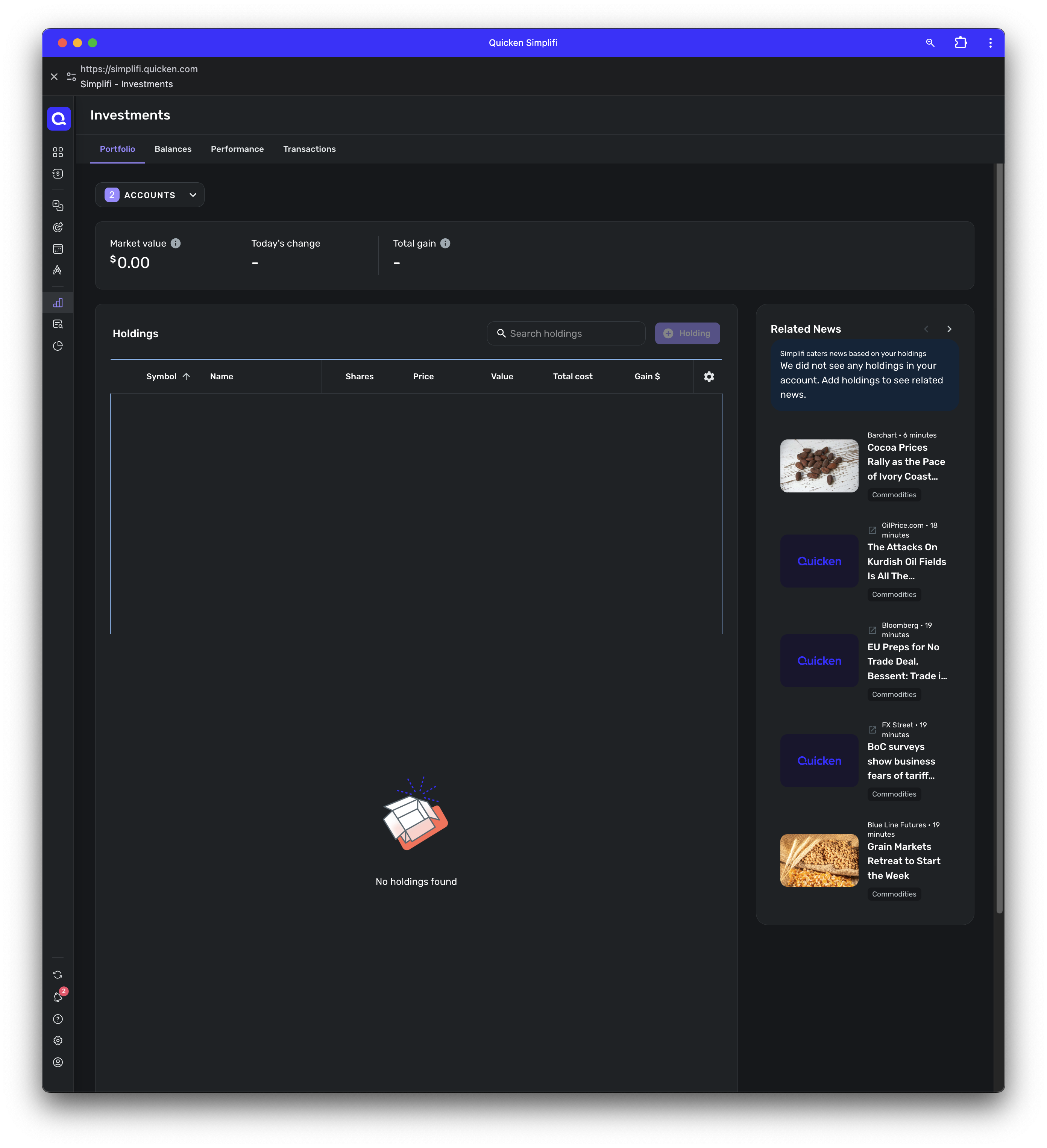
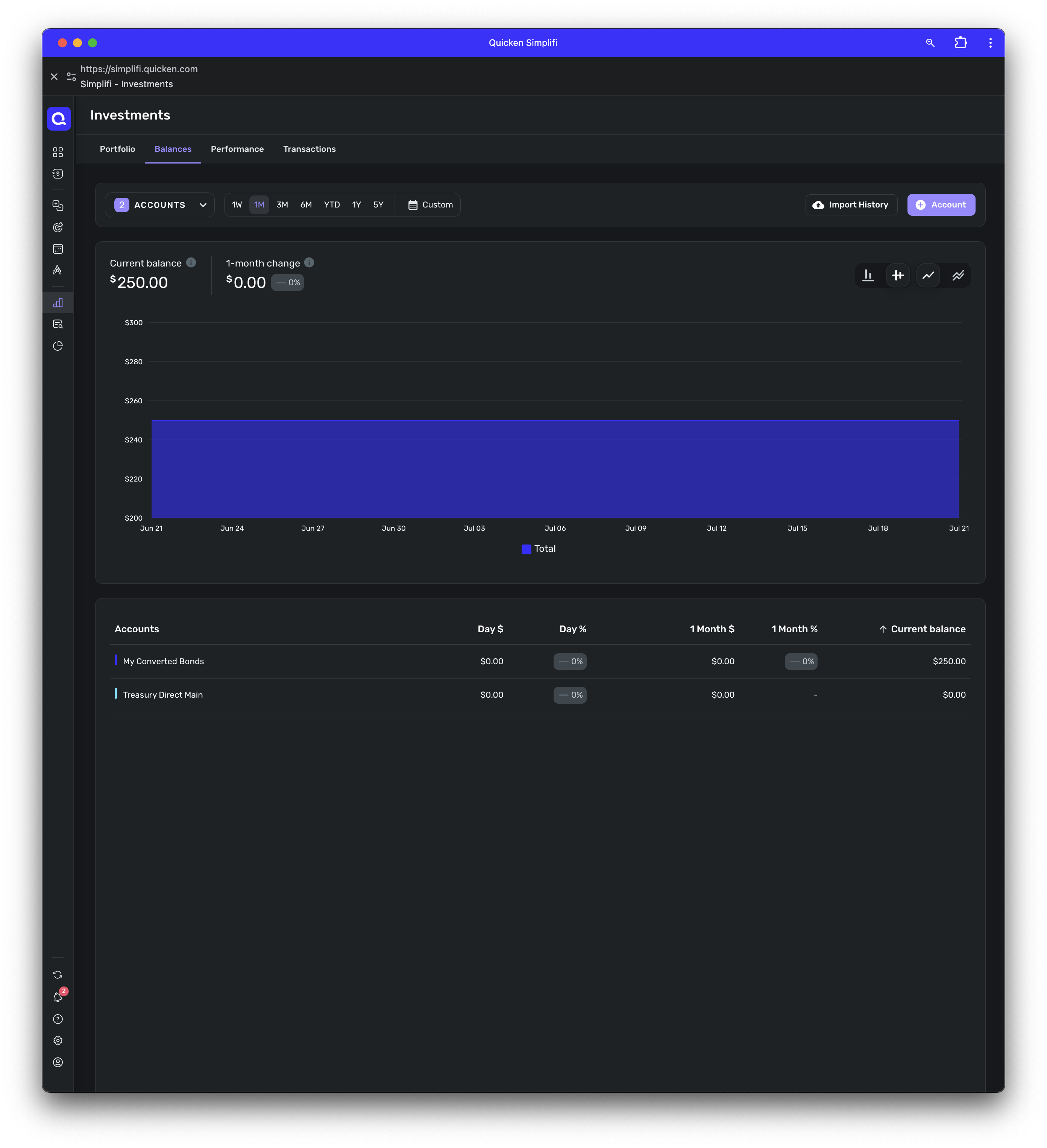
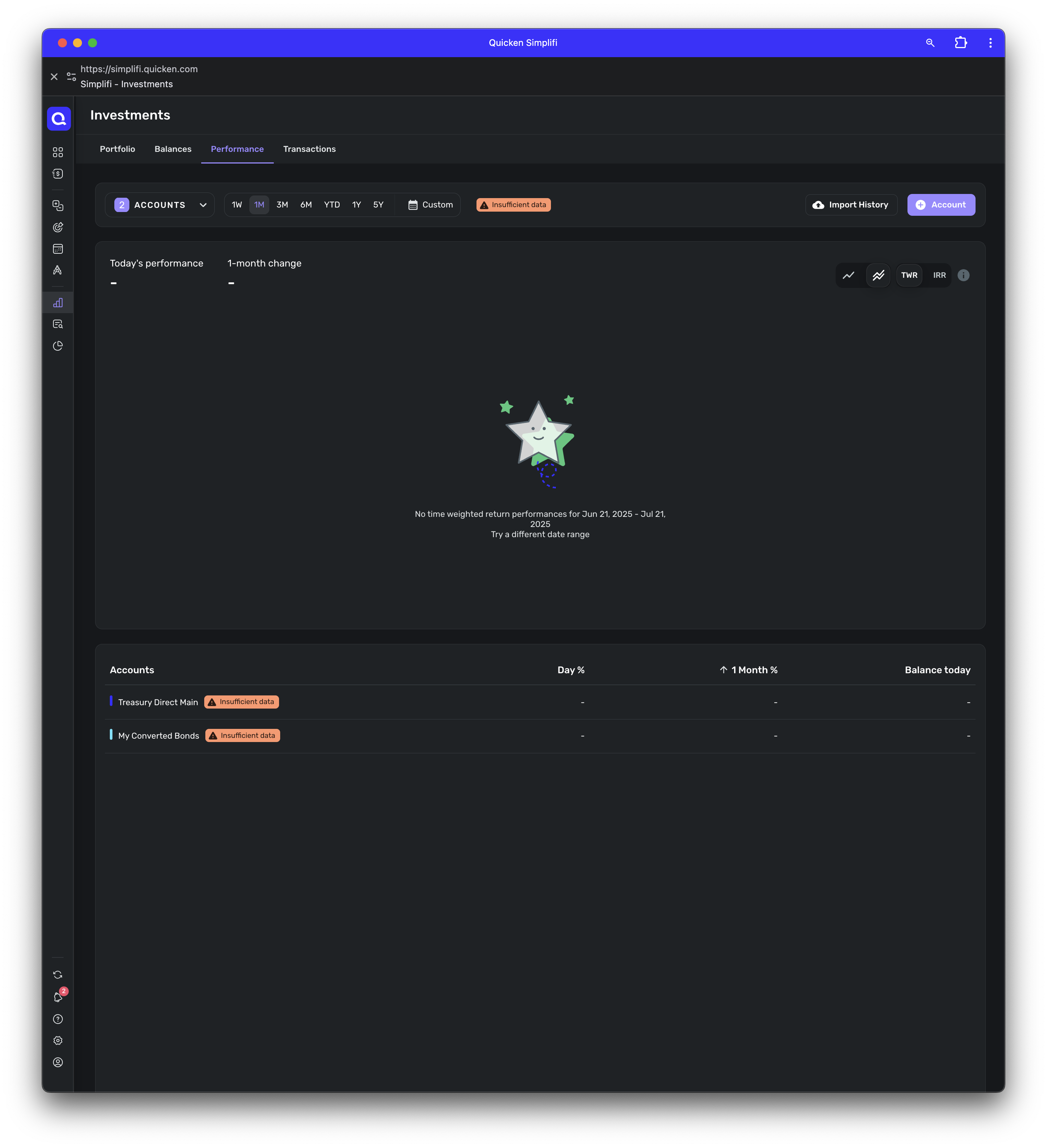
As I wrote in my earlier comment, when I first log in to Treasury Direct I see my main account overview. This is the first landing page after login and shows the main account information. I have $0 worth of assets in this account and all my assets are in a "My Converted Bonds" sub-account.
 0
0 -
@clintval, thanks for providing the Investments Portfolio view in Quicken Simplifi, as well as for confirming the Account Summary page from the bank's website!
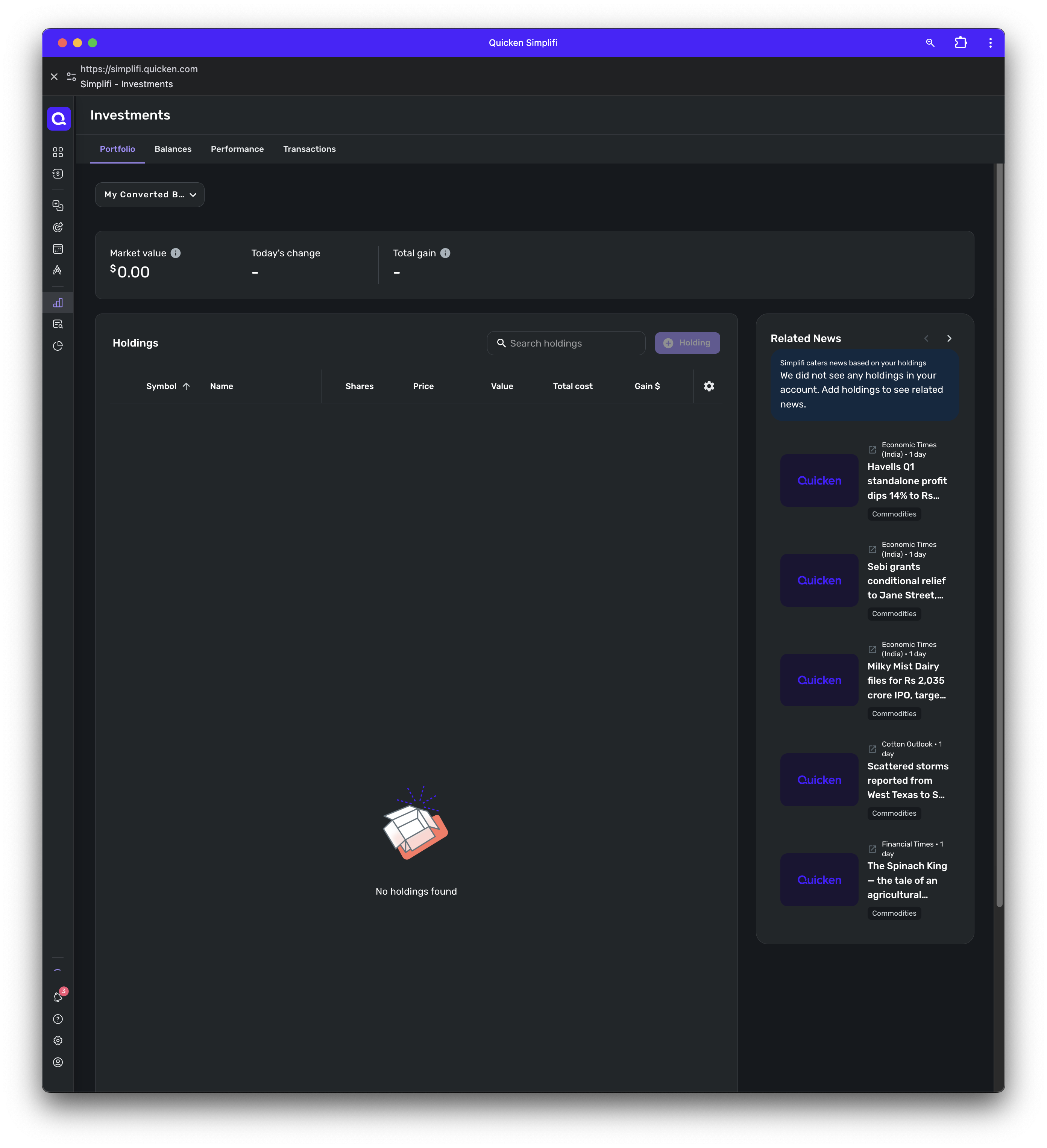
You mentioned prior that this issue pertains only to the 'My Converted Bonds' account, however, I don't see this specific account in the Portfolio view of Quicken Simplifi. Instead, I see "2 Accounts" in the account filter at the top. To clarify, we will need this page filtered to the specific account so we can see the Market Value and the Holdings table for the problematic account. To further clarify, we do not need to see the Balances, Performance, or Transactions pages; just the Portfolio page.
Let us know if further clarity is needed!
-Coach Natalie
0 -
Hi @Coach Natalie I think this is the last screenshot you request:
 0
0 -
@clintval, thank you!
I have gotten you added to the ticket as an additional example. Please follow along here for updates!
CTP-11503
-Coach Natalie
1 -
@clintval, can you give this another try, please? It sounds like our service provider has implemented a fix for your escalation!
@trewbux, I would recommend also checking and then providing the previously requested information so we can re-file your escalation.
Fingers crossed this is fixed for everyone!
-Coach Natalie
0 -
@Coach Natalie I reconnected Treasury Direct just now and nothing has changed. The balance still shows $250 (the original value) in the accounts panel for "My Converted Bonds". When I select the account in Portfolio view, it says there is $0 market value still. The current value is $600+ for this account.
0 -
Same for me. The issue persists.
0 -
@clintval & @trewbux, thank you for the replies!
Please send a fresh round of data so we can get this re-escalated:
- The balance for the account in the Accounts List in Quicken Simplifi (this is the list of all accounts and balances on the left side of the Dashboard on the Quicken Simplifi Web App, or the list of all of your accounts when you select "Accounts" from the Quicken Simplifi Mobile App).
- The balance for the account in the Investments Portfolio in Quicken Simplifi (if you have multiple investment accounts, you'll want to filter the page to just this account).
- The balance for the account as displayed on the bank's website.
- A screenshot of the holdings for the account in Quicken Simplifi (if you have multiple investment accounts, you'll want to filter the page to just this account).
- A screenshot of the holdings on the bank's website for a comparison.
Please also submit your logs via the 'Send Feedback' option:
- Log in to the Quicken Simplifi Web App.
- Select Profile from the left-hand navigation bar.
- With the Profile menu open, hold down the Option key for Mac or the Alt key for Windows, and then click Send Feedback.
- Leave all boxes checked, add a brief description of the issue, and then click Send.
Much appreciated!
-Coach Natalie
0

