Planned Spending shows incorrect "left" amounts on the Mobile App Dashboard (edited)

When I'm on the dashboard of the mobile app, the Spending Plan tile shows the full amount of each of my planned spending categories as being available even though there has been spending in that category.
Here's a screenshot showing an example: in Groceries, I'm overspent by $435, but it shows the full amount of $400 being available.
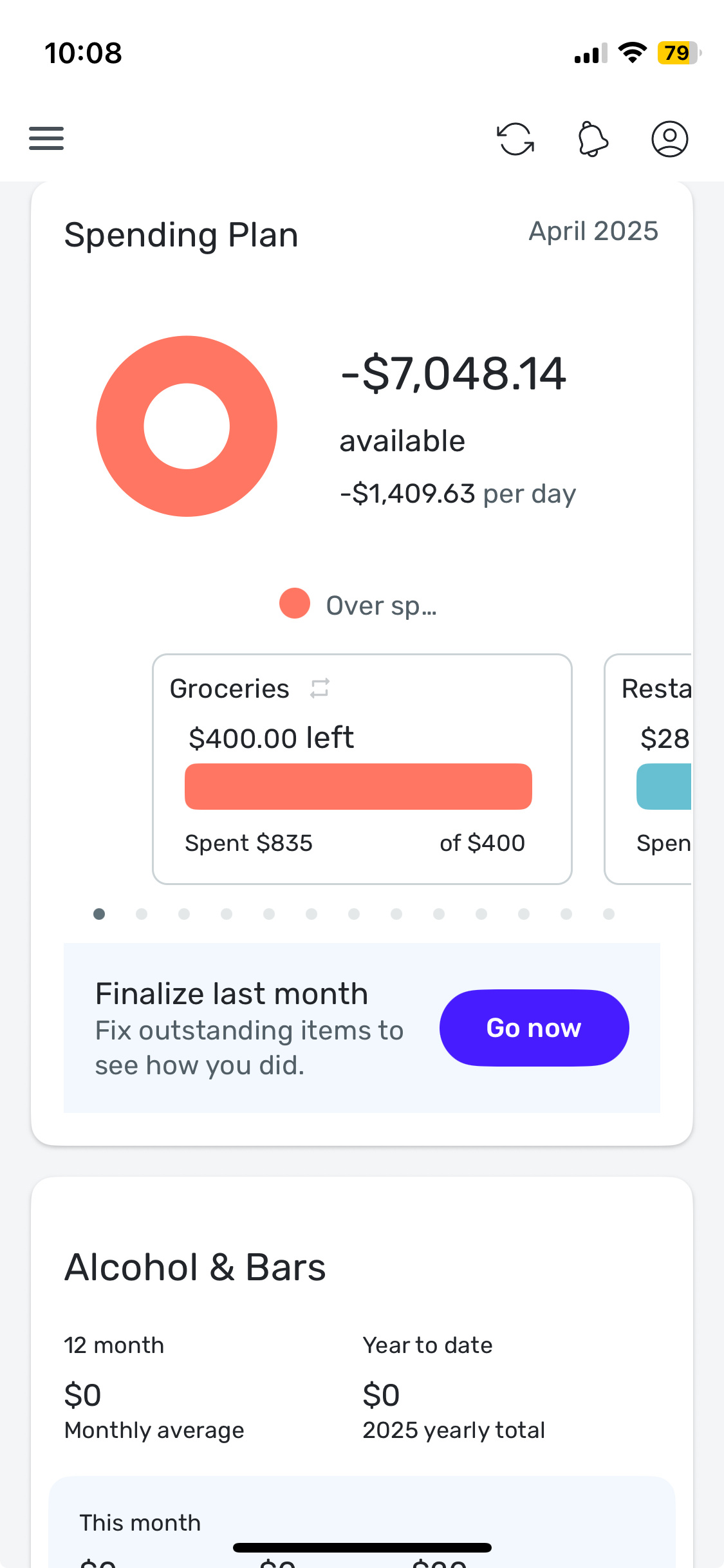
This error is not happening when I go the dedicated Spending Plan section of the mobile app, nor is it happening in the Web version of the software.
Separately, I have been having a similar issue with my Watchlists (which always show $0 of spending no matter how much has actually been spent), which has been ongoing for over a year and I have been told that that error is specific to my personal dataset. So I'm not sure if this is a general bug or something related to my Watchlist issue and also specific to me.
Comments
-
That happened to me but was that I have added all my recurring bills as planned expenses and they were not counting towards my spending. So I deleted them as recurring bills and I just leave it as planned expenses and that was it.
I used this article to better understand the spending plan and how to budget for different situations.
- https://support.simplifi.quicken.com/en/articles/4212702-understanding-your-spending-plan
0 -
That's not what's happening in my case. It is a bug. The screenshot above shows "$400 left" in Groceries, when it's supposed to say "$435 overs pent" (and that's what it says when I click through to the Spending Plan in mobile, and in the web version).
0 -
Yes, looking at that, that's a bug I would agree. It's orange, which it says means 'overspent' but at the same time it's implying something (Anything) is left which is wrong.
—
Rob Wilkens
0 -
Hello @ejs,
Thank you for letting us know you're seeing this issue. Is this happening only in the mobile app? If you haven't already done so, I recommend that you try logging out of the app, then log back in, and test to see if the issue is resolved. Please also make sure you are using the most current version of the app.
If the issue persists, then please provide more information. Is this happening on an Android or Apple device? Is this happening on a tablet, smartphone, or other device?
I look forward to your response!
-Coach Kristina
0 -
@Coach Kristina, yes, as I said in my initial post, this is only happening in the mobile app. I just tried logging out and back in and the issue persists. My app is updated to the latest version (v. 5.29.0), and it's on an Apple iPhone.
1 -
Thank you for your reply,
I tried to replicate the issue using my iPhone, but was unable to do so.
If you haven't already done so, try turning your iPhone off and back on again. If the issue persists after that, please try uninstalling and reinstalling the app.
Let me know how it goes!
-Coach Kristina
0 -
@Coach Kristina, I just tried turning my iPhone off and on again and uninstalling and reinstalling the Quicken app but neither one fixed the issue.
As I mentioned, I have a separate ongoing issue with all of my Watchlists always showing zero dollars (no matter how much is actually spent), so perhaps this issue is related? I have had an open ticket for that issue for over a year now and I don't know what's happening with it. At one point Coach Natalie had advised that it's probably specific to my dataset, since no other users have reported the issue.
1 -
@ejs, thanks for the reply!
To troubleshoot the issue further, please delete and re-create just one of the problematic Planned Spending expenses to see if doing so allows it to show on the Mobile App Dashboard correctly. If the issue persists, please send a screenshot of the Web App Dashboard tile for a comparison. Also, does the issue only occur for the current month, or do you see it in past months as well? Is it specific to just one Planned Spending expense, or do you see it with multiple? If the latter, is it random depending on the month, or is it the same expenses in each month? The more details you provide, the better!
For the Watchlist issue, it looks like it was escalated via Chat Support, so you'd want to reach out to them for an update:
Let us know how the deleting and re-creating goes!
-Coach Natalie
0 -
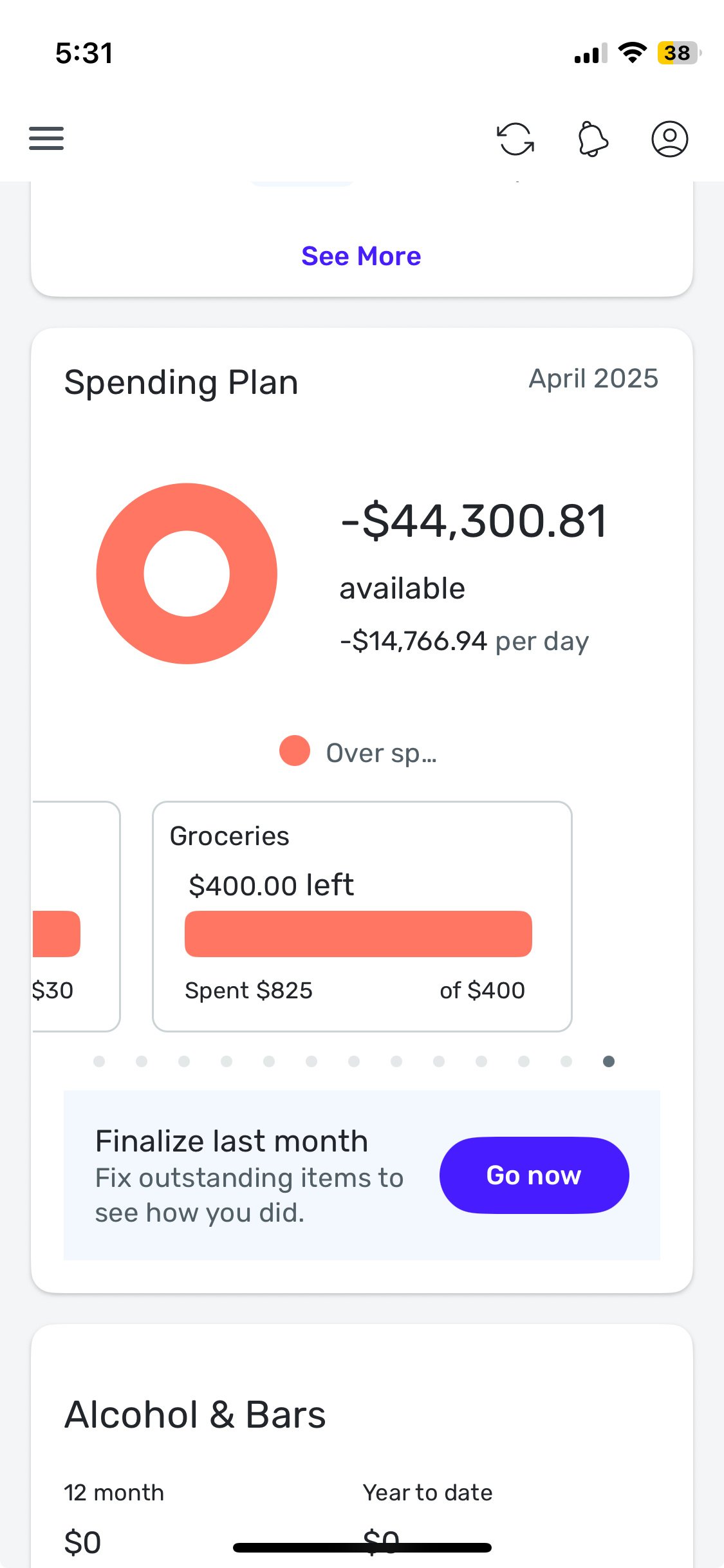
@Coach Natalie, I just tried deleting and recreating one of the Planned Spending categories (Groceries) and the issue persists. Here are screenshots of the mobile tile vs. the website tile:
Mobile:
Website:
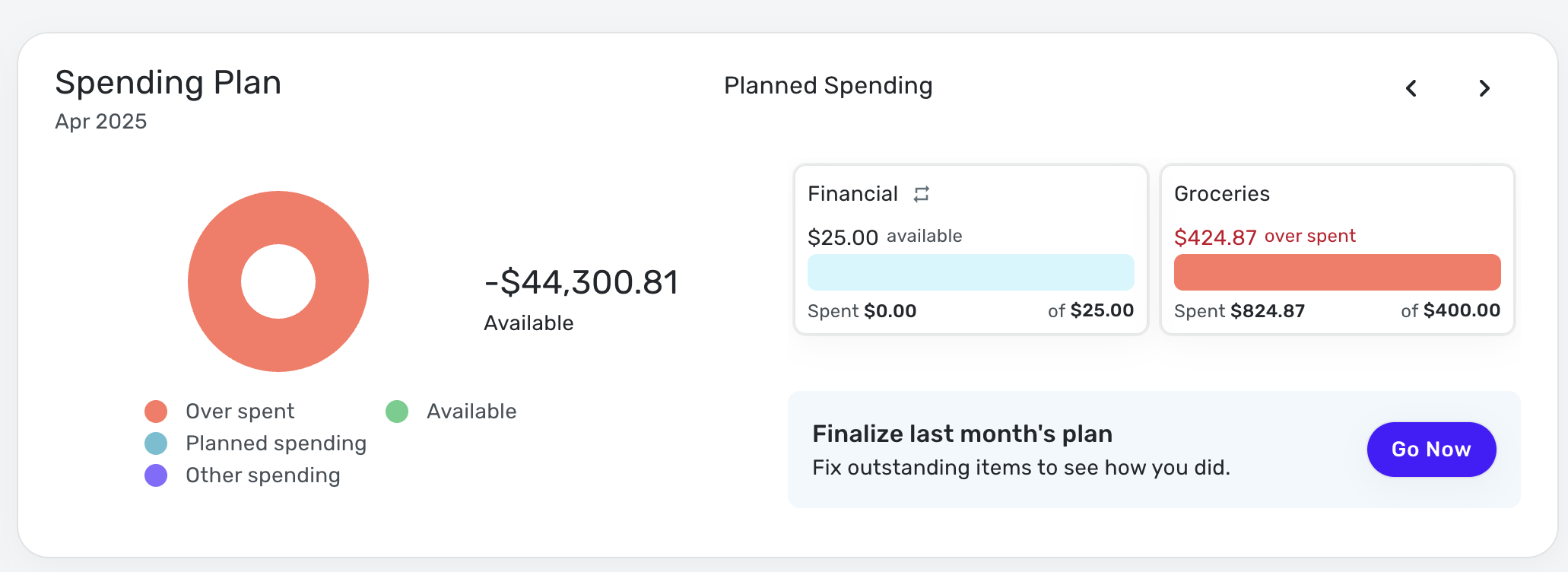
This issue is occurring for all of my Planned Spending categories, but it is only occurring in the tile on the main dashboard page of the mobile app. If I click into the dedicated Planned Spending section of the app, it is correct. So it's only for the current month — I don't think there is a way to view the dashboard tile for previous months, is there?
The Watchlist issue has been ongoing ever since I first signed up for Quicken a year and a half ago. I check in with Chat Support every few months for status updates but I'm never told anything other than that it's continuing to be worked on. I only mentioned it because I thought this issue might be related to that issue.
Thanks for your help!
0 -
@ejs, thanks for giving those steps a try and posting back!
When you say that the issue is happening with all of your Planned Spending expenses, does that include ones that are not overspent and/or ones that have no spending at all? Can you provide another example or two with a comparison from the Web App Dashboard, please?
Also, when viewing the overall totals in your screenshot (the -$44K), they match, so this seems to be a visual bug only on the Mobile App Spending Plan Dashboard tile versus it causing incorrect numbers to be presented — does that sound right? Or do you see incorrect values anywhere else aside from the "left" amount for Planned Spending expenses?
We will also need the following data for an escalation:
- The Make, Model, and OS of your mobile device.
As well as logs submitted from the Web App via the 'Send Feedback' option:
- Log into the Quicken Simplifi Web App.
- Select Profile from the left-hand navigation bar.
- With the Profile menu open, hold down the Option key for Mac or the Alt key for Windows, and then click Send Feedback.
- Leave all boxes checked, add a brief description of the issue, and then click Send.
We look forward to your reply!
-Coach Natalie
0 -
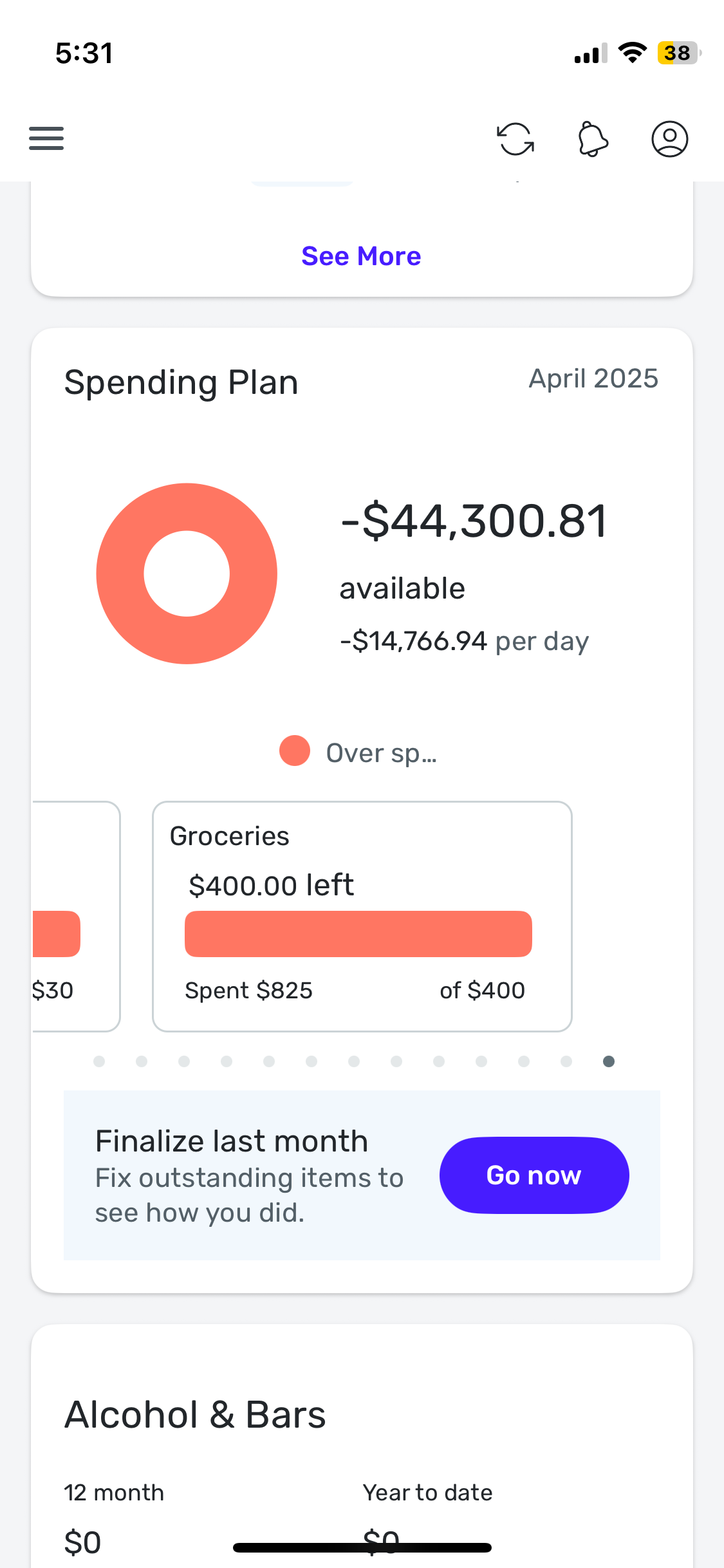
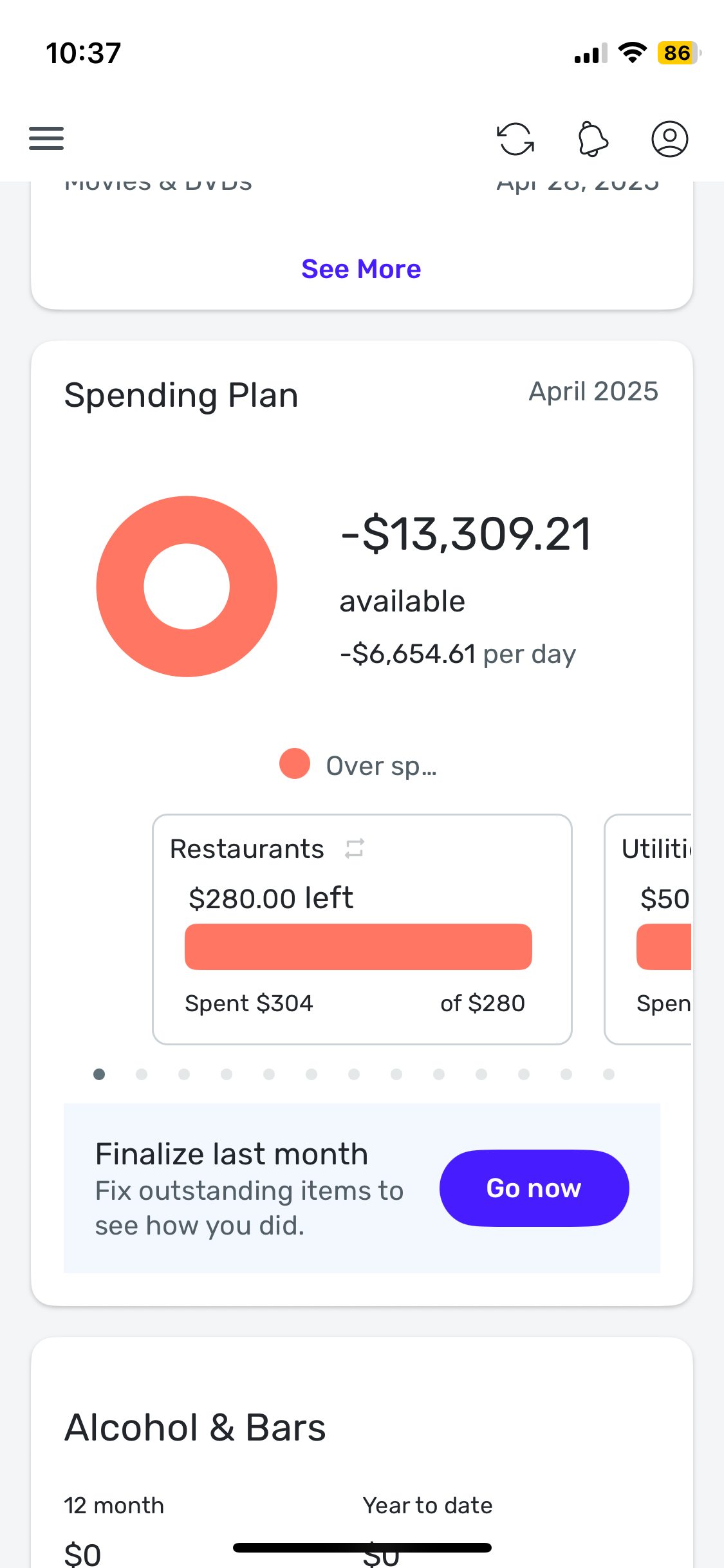
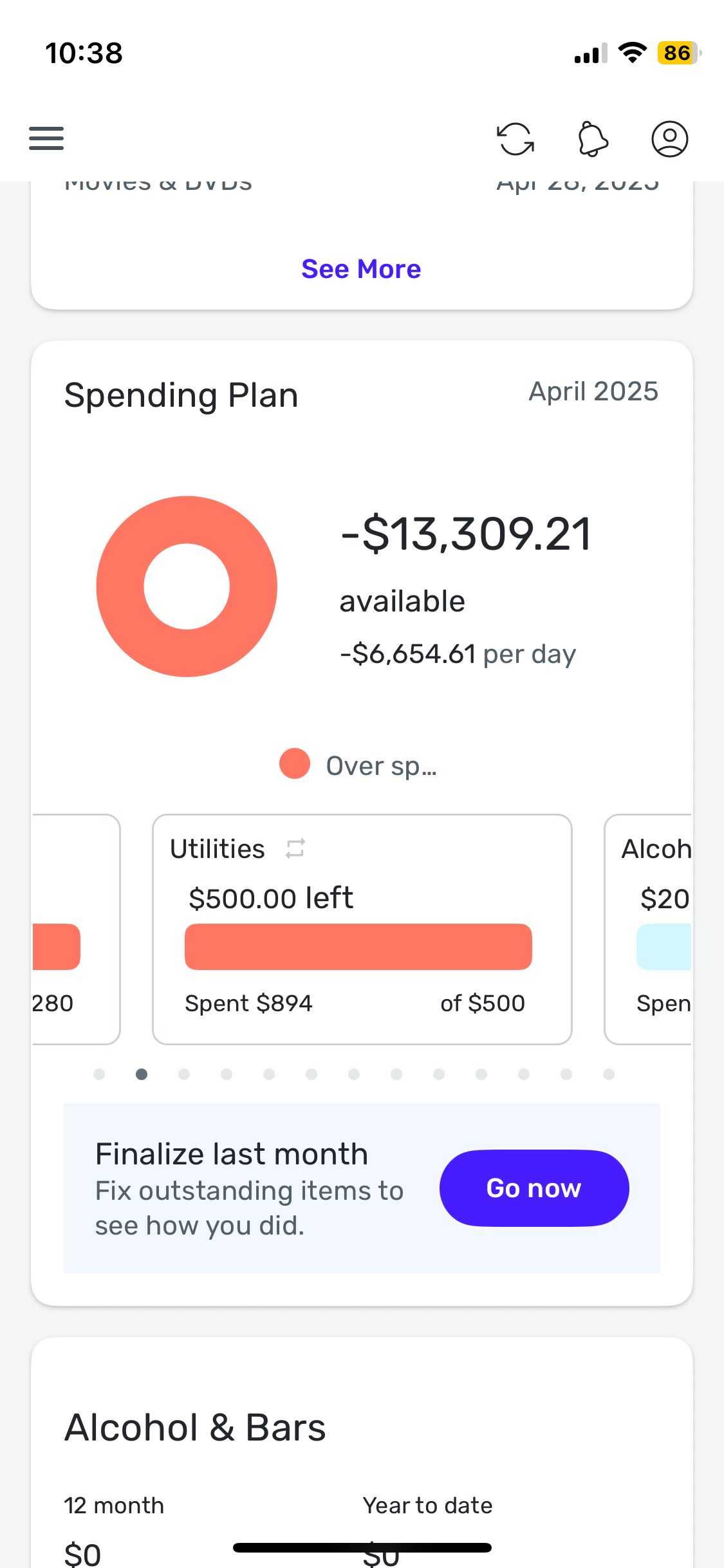
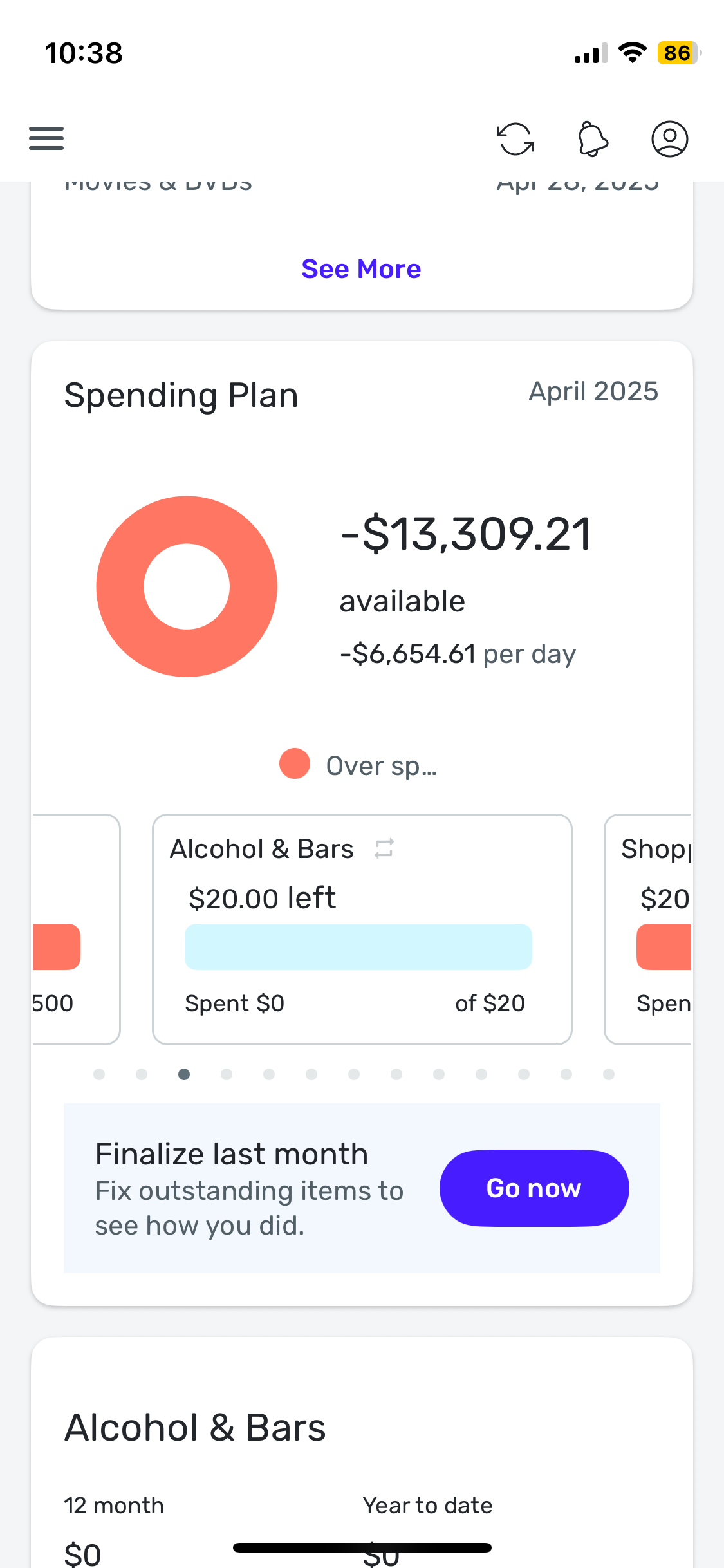
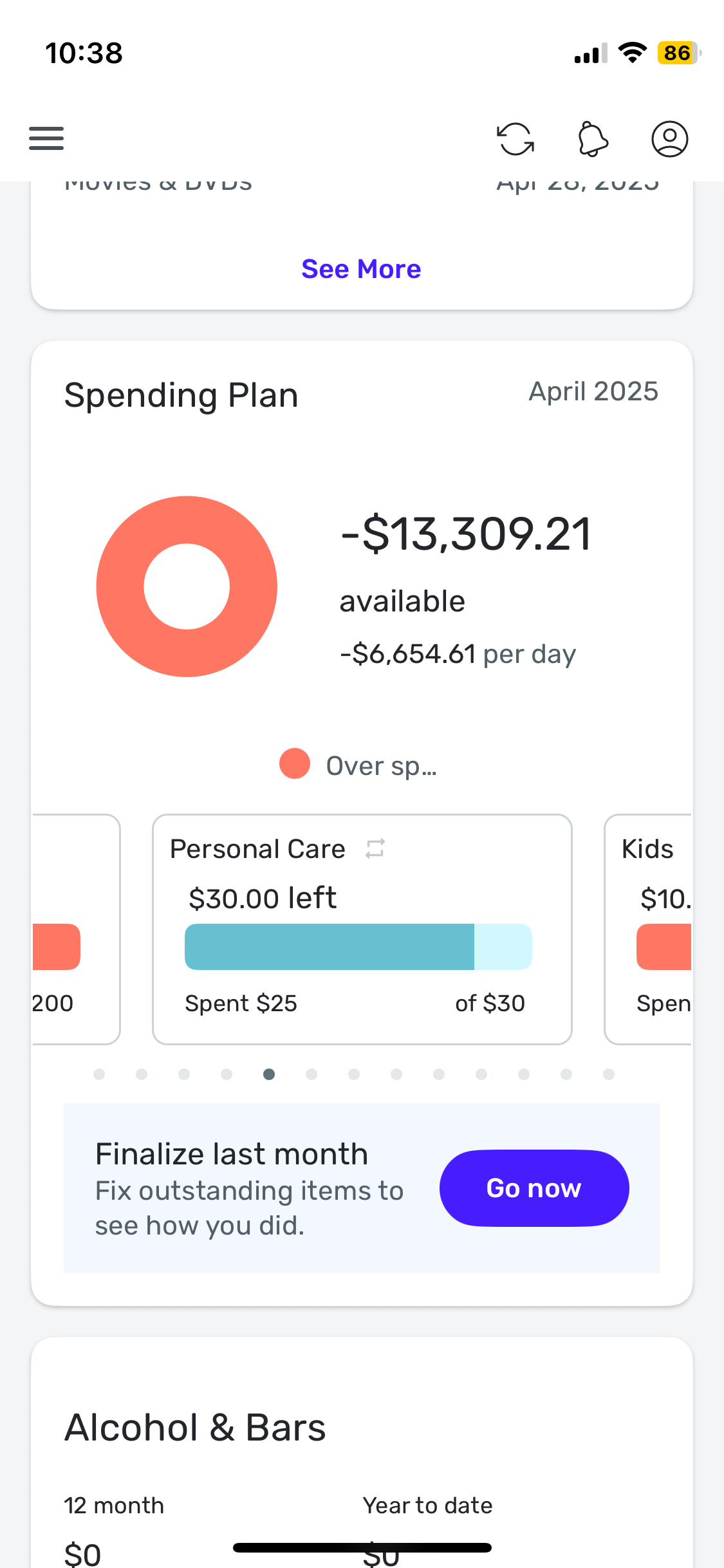
@Coach Natalie, in the dashboard tile, every Planned Spending category shows the entire budgeted amount being available, no matter how much is spent (and whether or not the category is overspent). Here are some more examples (Groceries, Restaurants, and Utilities are all overspent, and Personal Care is underspent, but all of them are showing the full amount as being "left" in the mobile dashboard tile):
Mobile:
Website:
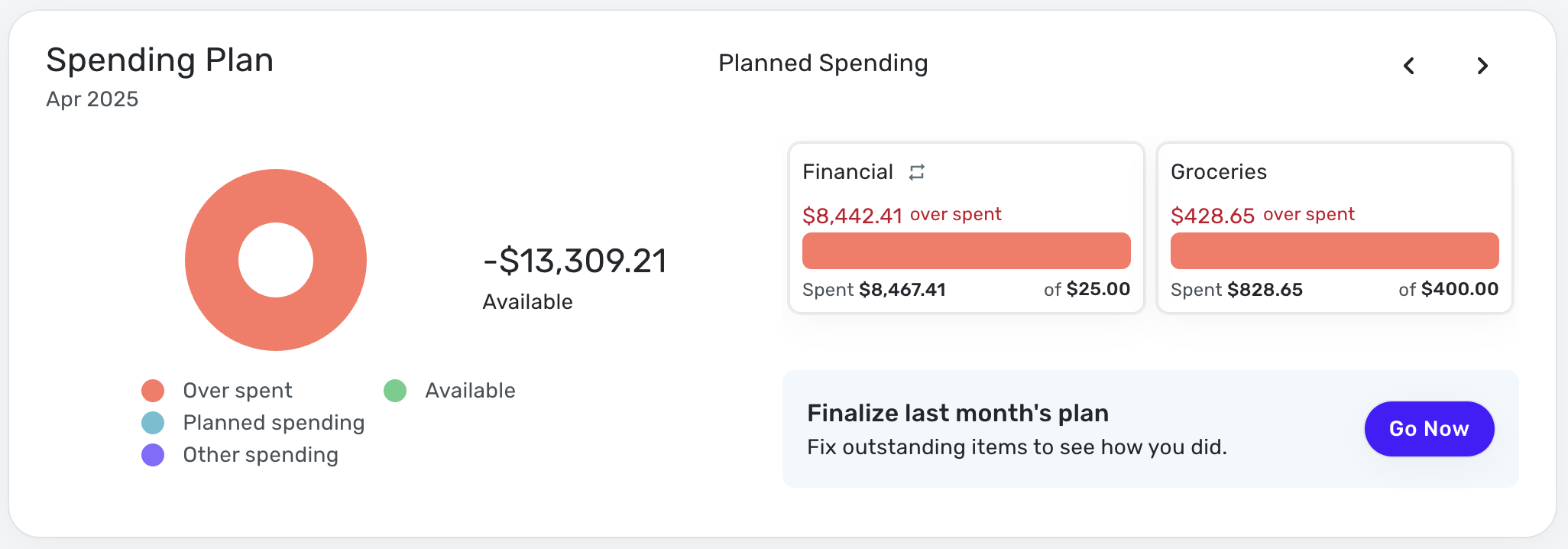
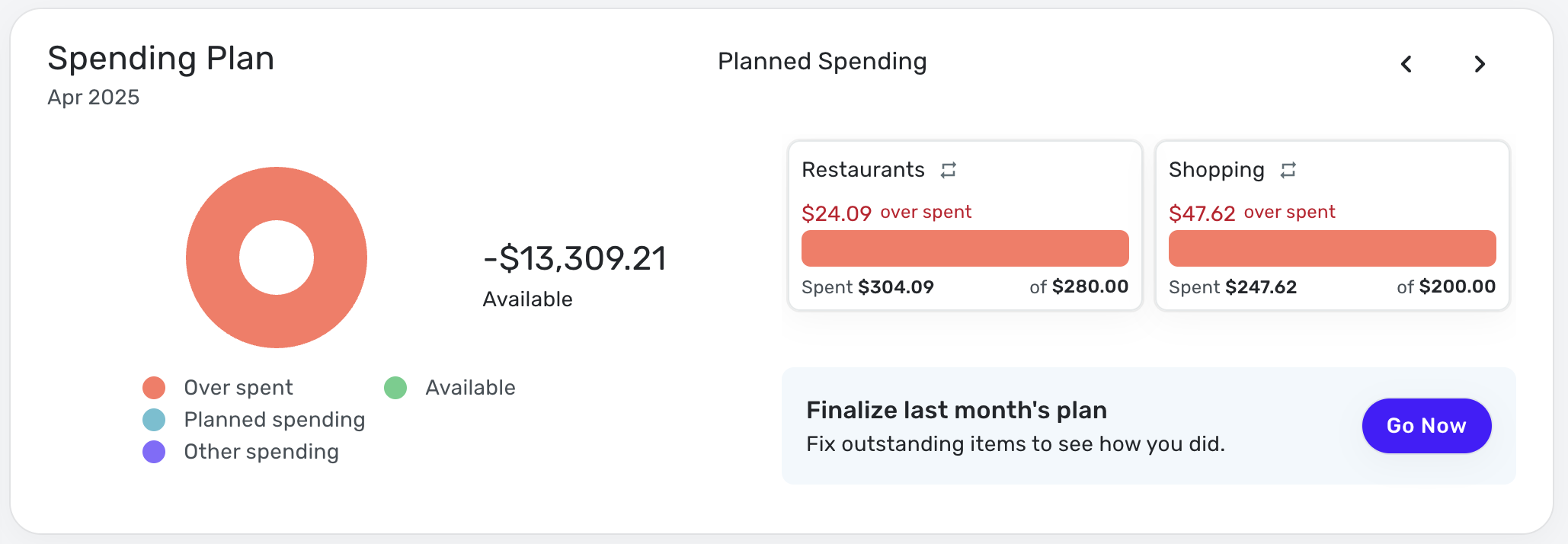
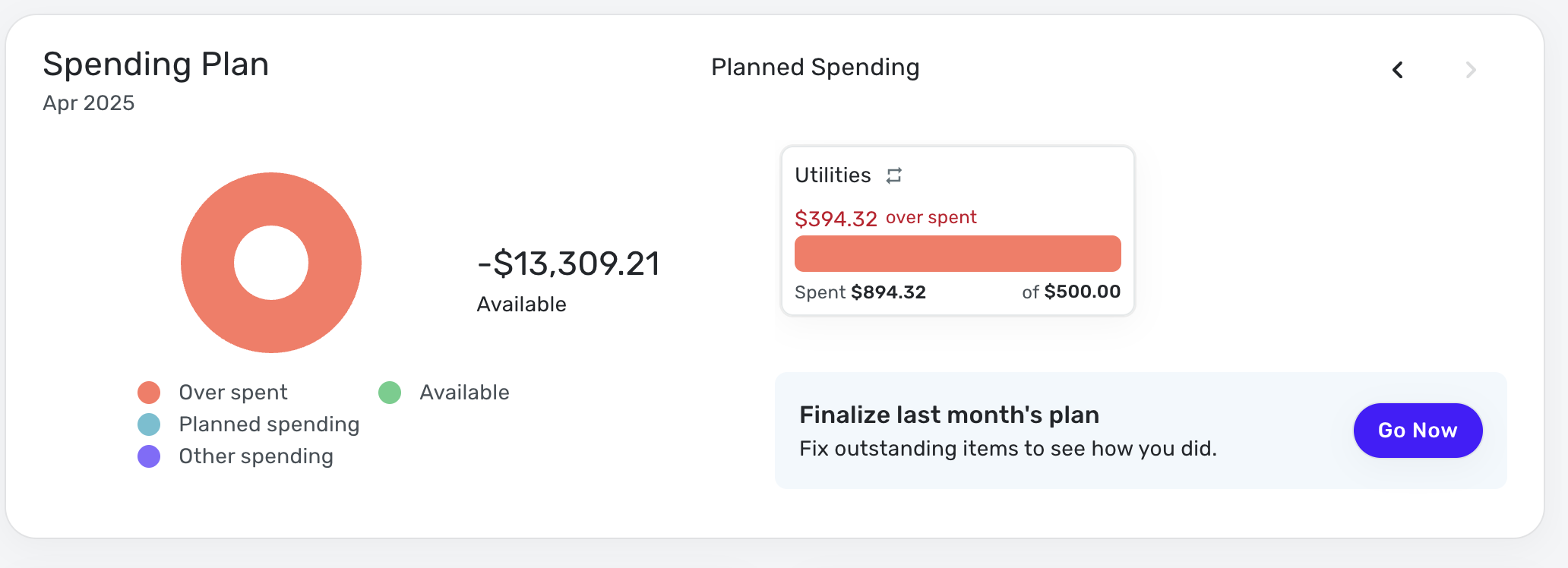
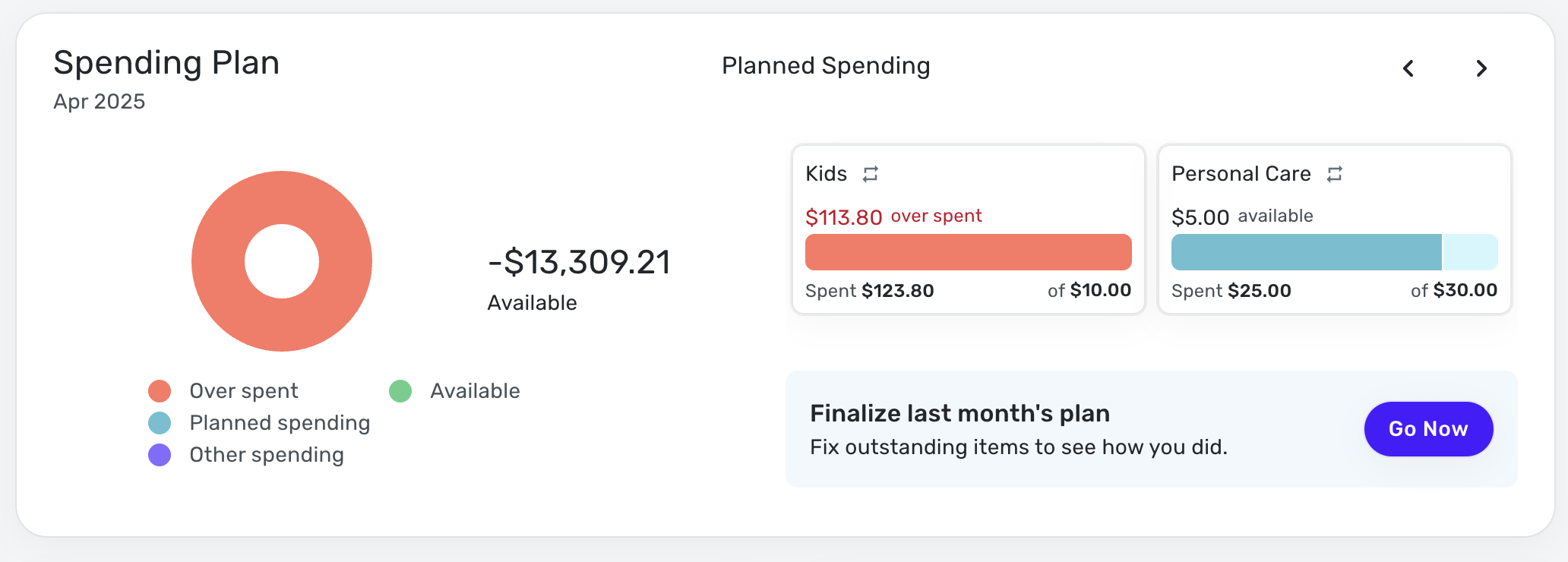
Yes, it does sound correct that this is a visual bug in the Mobile App Spending Plan Dashboard tile display only. Everywhere else the numbers appear to be correct.
My mobile device is an Apple iPhone 12 mini and the OS is iOS 18.4.1.
I submitted the logs as requested.
Thanks again.
0 -
@ejs, thank you!
I submitted an escalation for this issue and will post back here with updates.
SIMPL-26817
-Coach Natalie
0 -
@ejs, I wanted to let you know that the ticket for this issue is still open and being worked on. I will continue to post updates here as they're received.
Thank you for your continued patience!
-Coach Natalie
0


