"Investments" section in the mobile app is showing incorrect balances

Hi there!
The account balances and total value in the "Investments" ⇒ "Balances" tab are incorrect for me. The balance is significantly off for my brokerage accounts, while they are all correct in the "Net Worth", "All Accounts", and "Investments" ⇒ "Performance" / "Holdings" tab calculations.
For reference, I'm using the Android mobile application.
Please help fix this, as all my investment gain/loss information in the "Balances" tab is now incorrect. I can provide screenshots privately if needed.
Comments
-
Hello @krishnak,
Thanks for reaching out! The balance shown for connected investment accounts in the Account List is provided by your financial institution and may vary based on when the account was last refreshed and when share prices are updated. In contrast, the balance in the Investments tab reflects the market value of your holdings using the most recent share price data. This support article goes into more detail on how your Investment balances update:
Regarding those screenshots you mentioned, you can feel free to send those over via DM to me if you prefer, for privacy purposes.
-Coach Jon
-Coach Jon
0 -
Hey @Coach Jon, thanks for explaining this difference. I still don't think this explains the difference I'm seeing though — the balance for the same account has a wildly different value in the "Investments" ⇒ "Balance" tab that doesn't match either market prices or recent-history account balances.
Here's a redacted example (only showing 1 day % change for privacy purposes):
The "Investments" ⇒ "Balance" tab shows a 1-day gain of 21.92%, which is incorrect: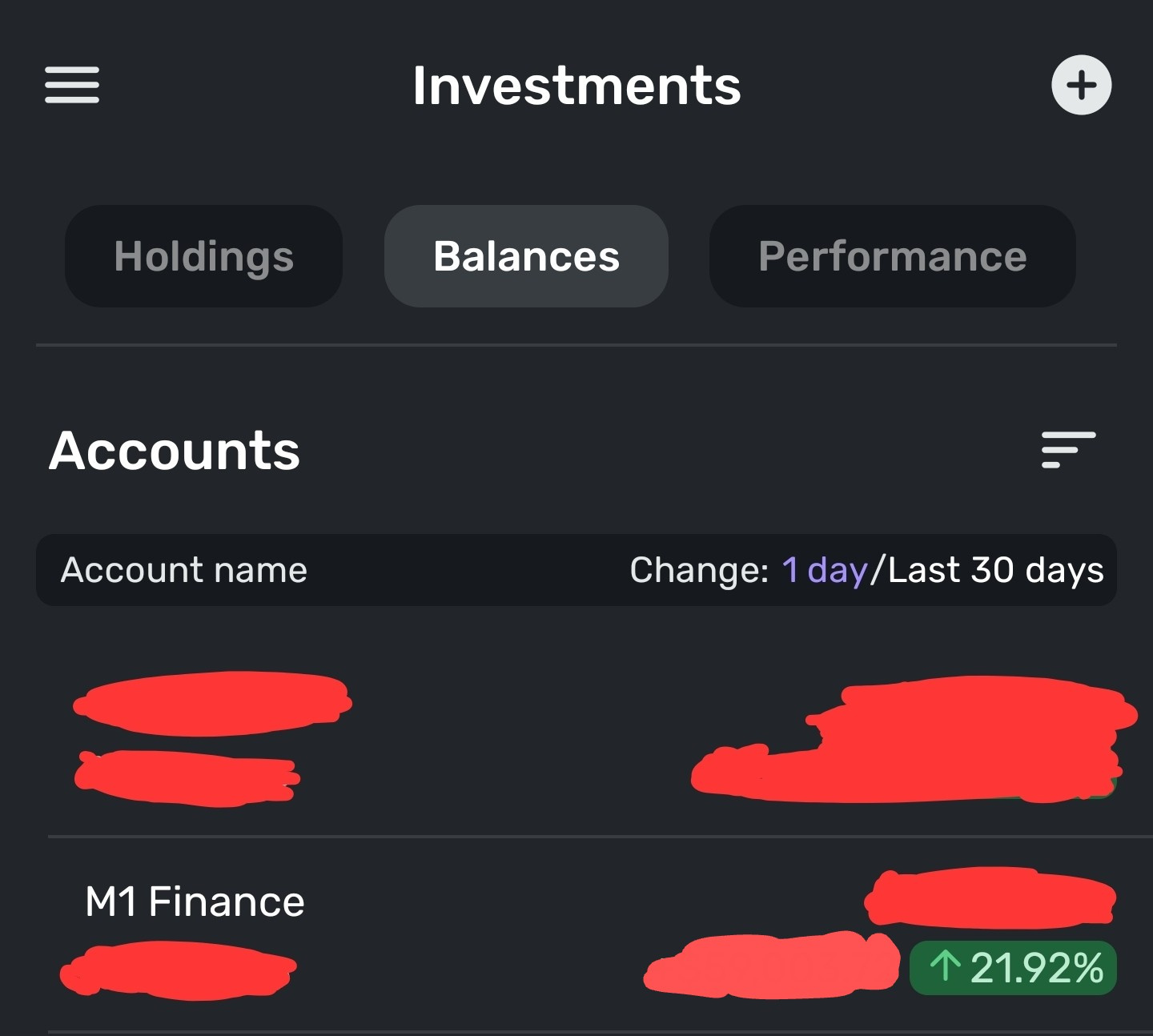
The "Investments" ⇒ "Performance" tab shows a 1-day loss of 0.44%, which is correct:
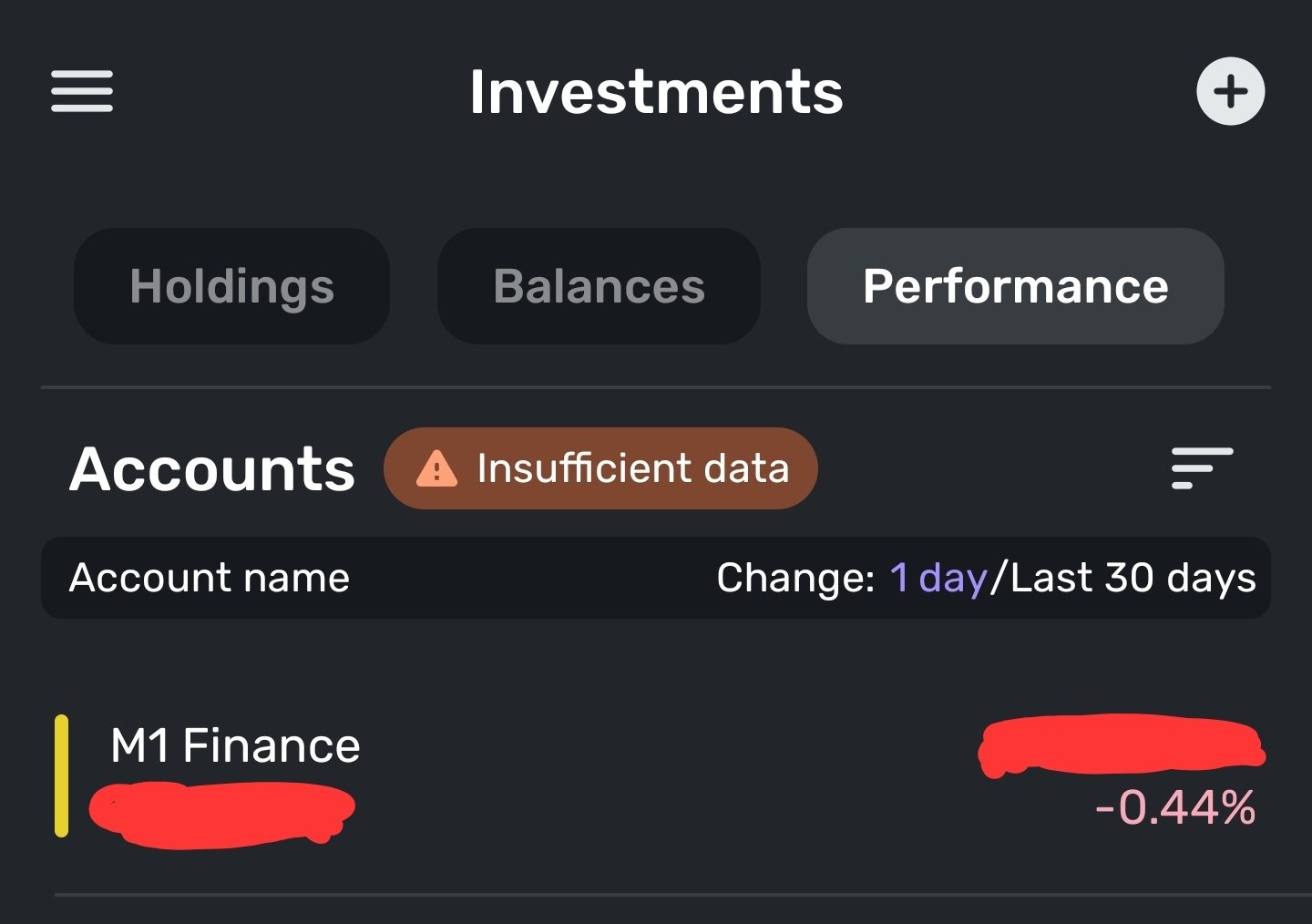
(please ignore the "Insufficient data" error here, as that only is affecting other accounts not shown in the screenshot)
0 -
Hello @krishnak,
Thanks for the reply. Performance values depend on the successful aggregation of your accounts and holdings, as well as the accuracy of your Investment Transactions. Can you let us know if this is a connected or manual investment account? Additionally, do you see the same information within the Quicken Simplifi web application, or is this specific to the mobile application?
-Coach Jon
-Coach Jon
0 -
Hey @Coach Jon : this is a connected account, and the bank is M1 Finance. I just checked the web app and I see the same issue there, so this isn't limited to the mobile app.
There hasn't been any transactions in these accounts apart from weekly deposits. The holdings are also simple: just 2 broad-market ETFs with ticker symbols VTI and VXUS.
0 -
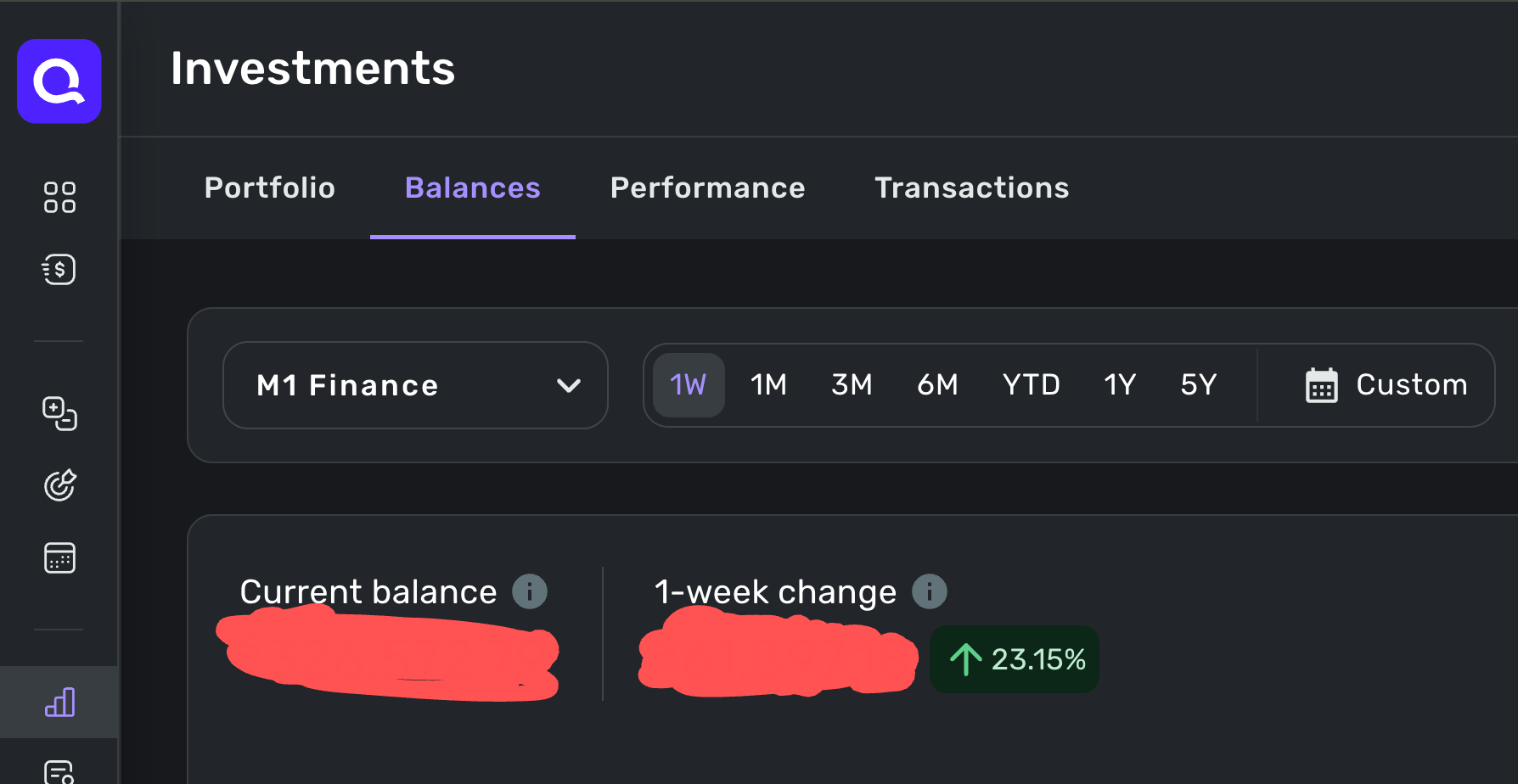
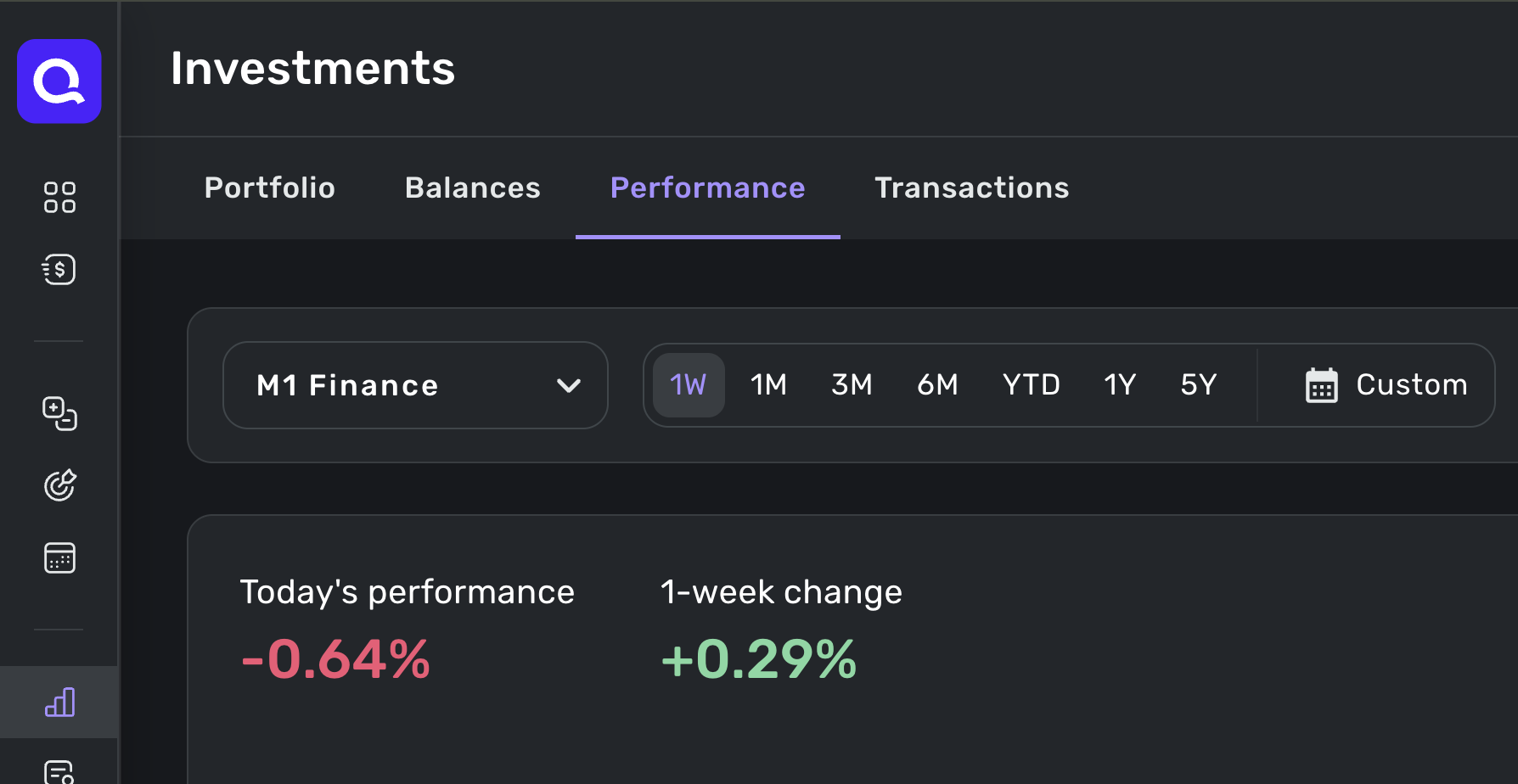
Hey @Coach Jon , sure. The web app has a minimum time window of 1 week for the incorrect tab, not 1 day.
The incorrect "Investments" ⇒ "Balances" tab:
The correct "Investments" ⇒ "Performance" tab:
 0
0 -
Hello @krishnak,
Thanks for the requested screenshots. Since the balance in the Investments tab reflects the market value of your holdings using the most recent share price data, I am not sure if this would be a bug or if the program just hasn't updated as of yet. Are your holdings in your Portfolio all correct?
-Coach Jon
-Coach Jon
0 -
Yep, holdings in the portfolio are correct. And I've noticed this issue has been present for a while -- the incorrect tab has always been incorrect (and doesn't reflect either real time or historical prices)
Can your team try to reproduce the issue?
0 -
Hello @krishnak,
Thanks for the reply. I am not able to reproduce this issue from my side, since this seems like it is only affecting you. Is the actual balance in the Balances tab of Investments a different amount than what is showing in your Portfolio itself? Can you send a screenshot showing the balance differences, if so? You may feel free to DM this information for privacy.
-Coach Jon
-Coach Jon
0 -
Hi @Coach Jon , I wanted to follow up about @krishnak issue. Basically, it is not just them that is having an issue. I have the exact same issue with one of my accounts. Its been going on probably about a year. It is specifically for my TIAA accounts. My understanding is that information about investment accounts are shown in 4 places:
- The account list - this is working fine. The synched balances match the TIAA website.
- The Investments Holdings list - this works okay. Sometimes it doesn't update the shares properly, but in general the values here are the shares I hold multiplied by the recent closing price. In general I have no issues with this tab.
- The Investments Balances list - this is a nightmare. I have no idea where these values are coming from. They do not match the holdings list. Using made up numbers, I will have one account on the holdings list at $10,000 but the same account will show $8,000 on the balances list (off by around 20%). My second TIAA account will show something like $10,000 on holdings but $10,500 on balances. Strangely one account is down while the other is up, but not by similar dollar amounts. This makes daily, weekly, yearly tracking and ratios pointless by default. I will get back to a solution I have found.
- The Investments Performance chart - this works fine. The investment gains and losses charted here seems to be based on either the holdings list or the account list. Whatever it's based on works fine for me. For example, on the Balances list I might see a gain of 21% but on the performance chart I will see something like 0.54%, which is accurate for the day/week. Normally the performance chart matches what I can look up on Yahoo finance.
Now on to my makeshift solution. I have noticed that the strange Balance list error is applied at the current date. So if I go in and manually adjust my report dates to one day before, the gain/loss values all look correct. Well correct but one day old. This is a little bit of a problem with the way the market has been recently. For example, if the market is up 2% I can't see how that affected my accounts until tomorrow. But tomorrow the market fell 1%, so it looks like I did great for the week as I cannot see the most recent drop. But at least this work around works most of the time (sometimes I have to set the date back 2 days instead of 1). Oh and I should clarify, its just the ratios that look correct. The dollar amounts do not appear to be synching back up to the holdings page or the accounts list. But some random daily adjustment is being ignored if I change the dates.
What I would love to see happen: please give us an option on the balances tab to use either the accounts list values or the holding screen values. Since most of my accounts are supported and sync, using the accounts list value would actually be better for me than just having your systems back into the accounts value (holdings multiplied by ending price). Honestly, I am not sure what a synched account would gain by having your systems calculate a value when the official value is provided to you. (I can see a benefit for manual accounts). Interestingly, I think there is a default setting in your app that does just this. One of my accounts syncs but doesn't sync the holdings info. So it has a 0 balance on the holdings screen. Interestingly, it has a balance on the Investments Balance list, and that balance appears to be related to the account list's synched value. If I had the option, I would make every single one of my accounts work like this.
Once again, I wanted to write in to let you know that this problem is not just isolated to krishnak. I have been dealing with this for a long time, but my report date work-around has lessened the pain to where I haven't written in before.
0 -
Please see my response in the other thread.
0
