Account to Account Transfers (A2A): Share your feedback here!
Comments
-
@fcb, thanks for the inquiries!
Though it doesn't seem to answer everything you asked, here is the information we currently have available for A2A:
I hope this helps!
-Coach Natalie
0 -
I have been waiting over 4 months for my feature. Was told that it is only available to users who signed up last year. How can I gain access or when will it be available to the majority of users ? It’s one of the only reasons I paid for the year subscription and I’m not able to take full advantage
0 -
@SRC54, I'm going through old escalations, and I'm wondering if you've been able to add your First US Bank account to A2A yet. If not, I'd like to give the ticket a bump.
Let us know!
-Coach Natalie
0 -
@Coach Natalie No. It just says every time that it fails. It has been blocked and until Simplifi unblocks it, I am not going to be able to set it up. The first time back last fall, the small deposits were refused, and don't know why. Since then, Simplifi just tells me that I cannot do it.

Steve
Quicken Simplifi (Safari & iOS) Since 2021
Quicken Classic (MacOS) Since 2009
MS Money (1991-2009) and Dollars & Sense (1987-1991)0 -
-
I’ve had quicken early access for close to 4 months now. My A2A feature still hasn’t popped up which is a huge inconvenience for me. When will more users gain access to this feature ? it’s one of the main reasons I signed up to manage and move my assets with ease.
0 -
@Fabrice, thanks for posting!
I have merged your post with the official feedback thread for A2A. As soon as we have any news on additional rollouts, we will be sure to post an update here.
Thank you for your patience as this feature is worked on!
-Coach Natalie
0 -
Still having issues with A2A transfers with Flagstar Bank and a couple others. I have 1 CHK and 9 SAV accounts with Flagstar. ALL the Flagstar accounts except one are working beautifully. One SAV account won't connect after multiple tries. Each time, I immediately get this error.
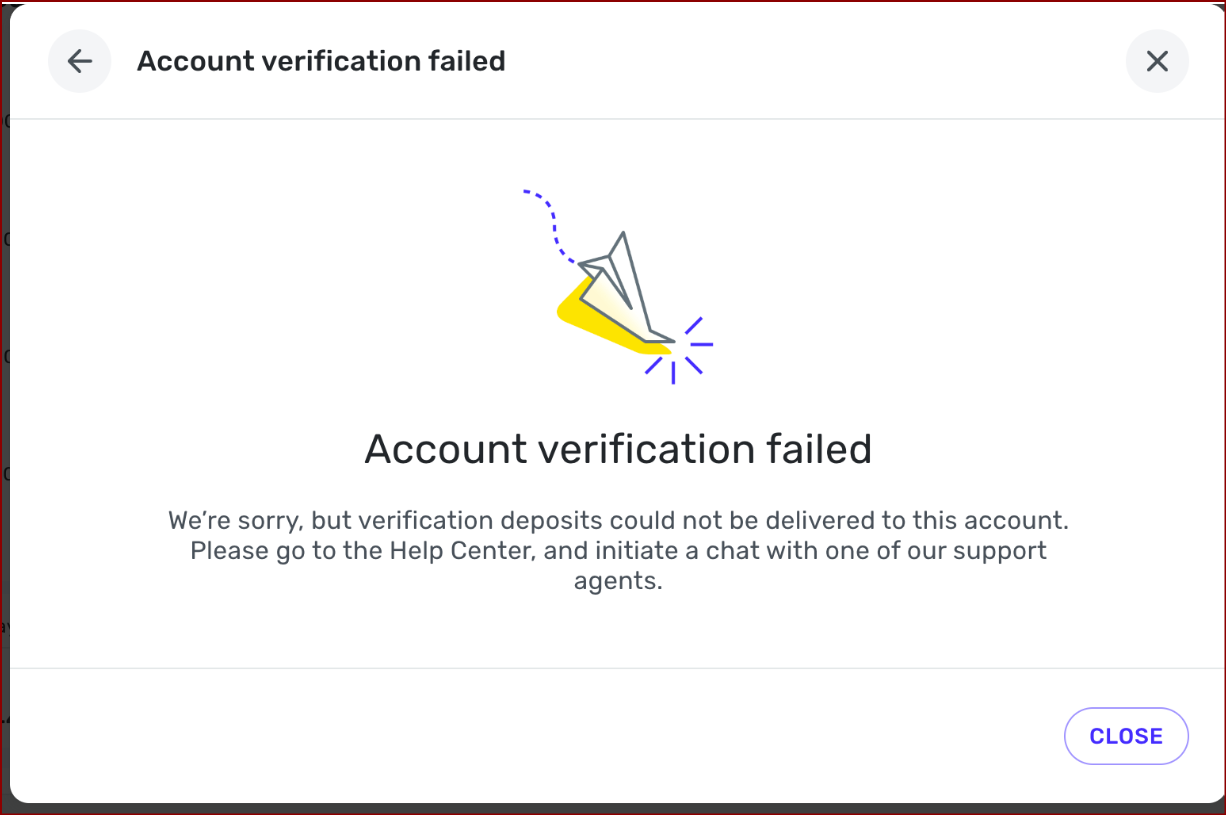
Troubleshooting so far:
- I've worked with chat support.
- I've made the account manual and reattached it. Then tried A2A.
- I've made the account manual and set up a completely NEW account - not using the original account. Then tried A2A.
Could their be an eight account limit per bank? Has anyone else successfully set us A2A transfers for more than 8 accounts at the same bank?
I doubt this is it because I also have problems with another bank that only has 3 accounts. Some work. Others don't.
Chris
Quicken Simplifi user since 2021.
Quicken Desktop user since 2014.
Spreadsheet user since forever.0 -
@Flopbot I think what happens is that the bank refuses for whatever reason and then the provider won't try again. Why the bank refused it is the question. I had my bank refuse a transfer into Savings from Capital One, but it lets me send it to the checking account and then I can transfer to savings. But this checking account is the one that failed with the dreaded message from above.
And now Capital One won't try to link to the local Savings again. However, I was able to get Fidelity to link to the local Savings account.
It is a puzzlement.
Steve
Quicken Simplifi (Safari & iOS) Since 2021
Quicken Classic (MacOS) Since 2009
MS Money (1991-2009) and Dollars & Sense (1987-1991)0 -
Interesting information @SRC54 .
One interesting thing I just noticed. Of the four accounts that have had issues setting up A2A, three of them have Savings Goals attached to them. In fact no account with Savings Goals has ever worked. This probably isn't it either since one problem account doesn't have Savings Goals attached to it. Still, something I should maybe play around with as troubleshooting. Get rid of the Savings Goals and see if it connects. Have to do that later…some day.
Coincidence?
Chris
Quicken Simplifi user since 2021.
Quicken Desktop user since 2014.
Spreadsheet user since forever.1 -
@SRC54 , some day came sooner than I though. I tried removing all the Savings Goals from one of the SAV accounts that wasn't connecting and then I tried re-setting the A2A and it still failed with the yellow paper airplane. After looking at my accounts a little closer, I guess one SAV account that is working successfully does have Savings Goals attached to it so it's probably not that.
@Coach Natalie, for some reason, this post isn't showing up in the Community Homepage. Not sure why.
Chris
Quicken Simplifi user since 2021.
Quicken Desktop user since 2014.
Spreadsheet user since forever.0 -
@Flopbot I'm stumped too. My state bank seems to have an aversion to bank to bank transfers. They offered me a 1 year rate of 4.25% on Savings so I told them they could transfer my my other bank. They just seemed baffled.
Steve
Quicken Simplifi (Safari & iOS) Since 2021
Quicken Classic (MacOS) Since 2009
MS Money (1991-2009) and Dollars & Sense (1987-1991)0 -
Hi, I love the new A2A function. I have used it for two months now. but now it not working for me. I've tried for the last 3 days but I just get an error message it says - Error Code: 500. I've tried all the fixes suggested by the Bot but the real agent suggested I post here. any idea why this is happening? its happening between all my accounts.
Thanks,
Rachel
0 -
@Rachel010145, thanks for posting!
I don't see anything from my end indicating what a 500 error code means for A2A. I think it would help if you started by sharing more details:
- What bank is the issue occurring with?
- What is the sequence of events that occurs, and at what point do you receive the 500 error?
- Do you have A2A enabled with any other banks? If so, do transfers go through with those banks without any issues?
- What specific steps have you taken to troubleshoot the issue?
Let us know!
-Coach Natalie
0 -
I'm trying to narrow this down through troubleshooting. I have four bank accounts accounts with one bank. Some were set up before a bank merger and some were set up after. The bank was called Ossian State Bank, now it is called F&M State Bank.
- Business Checking (6 digits long ends 94) - Pre merger - Fails
- Business Saving (8 digits long ends 04) - Pre merger - Success
- Business Saving (6 digits long ends 42) - Post merger - Fails
- Personal Checking (7 digits long ends 38) - Post merger - Success
The only related patter I can see is that both of the accounts with 6 digit long numbers are returning this error message. The other two were successes. Interestingly, this is a different error message than the crashing paper airplane that I receive with other banks. These two 6 digit account numbers both consist of all numbers.
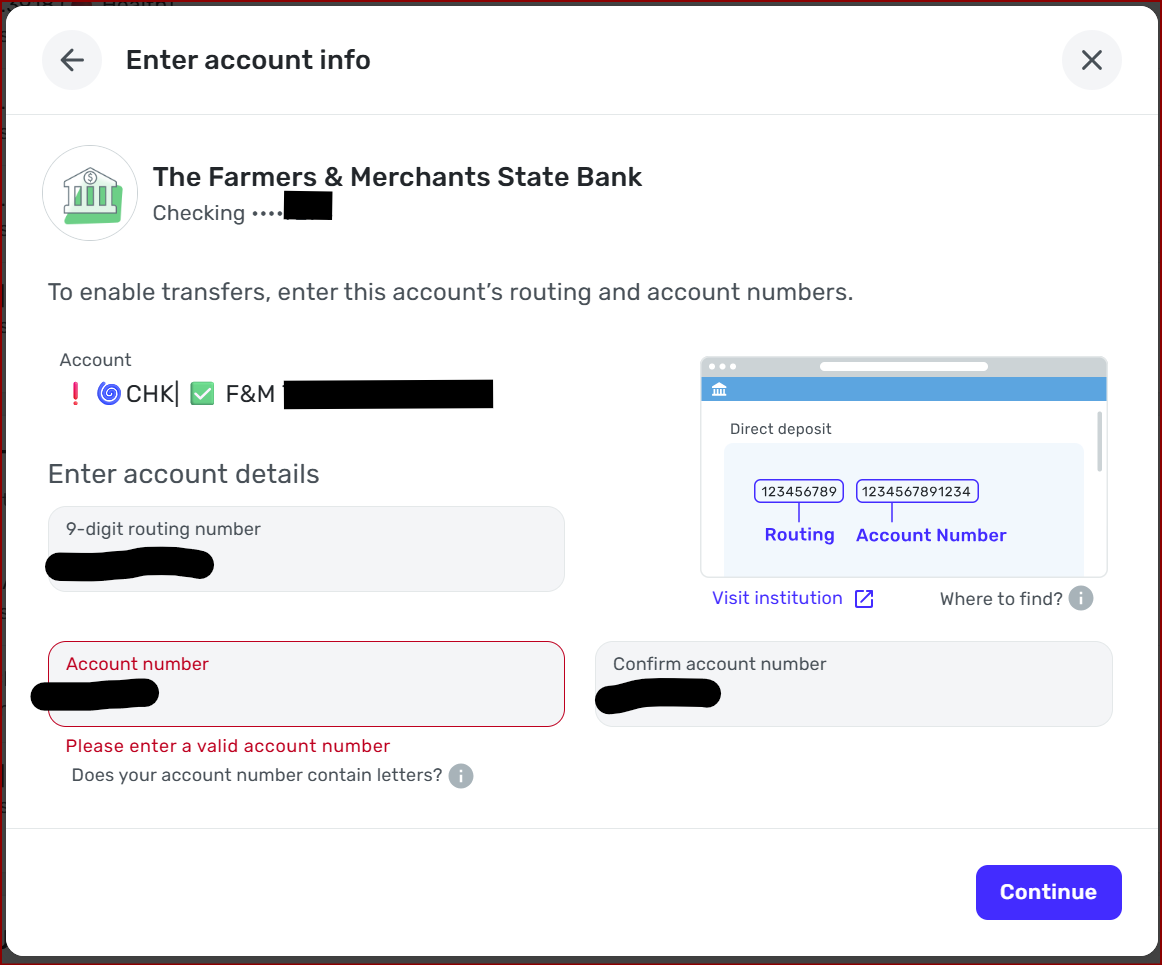
Might the length of the account number be the problem? Maybe it doesn't work with 6-digit long numbers?
I asked the bank and they don't have the ability to make the account number longer.
Chris
Quicken Simplifi user since 2021.
Quicken Desktop user since 2014.
Spreadsheet user since forever.0 -
-
@Flopbot Could you try putting a few zeroes in front of your account number? This might work if the account number is really the problem. But it's worth a try.
The reason I suggest this off the wall thing is that when they changed my Gas Bill account number to 10 digits, my bank's bill pay wouldn't accept it. I tried everything and finally put two zeroes in front of the number, and it worked. My payment has gone through flawlessly every time.
My bank account's number is 7 digits on the checks but they put some zeroes before it on the statements. I have never been able to get A2A to work with it. It tried once and has refused every time, and yes, I tried adding some zeroes. It didn't work though.😪
Steve
Quicken Simplifi (Safari & iOS) Since 2021
Quicken Classic (MacOS) Since 2009
MS Money (1991-2009) and Dollars & Sense (1987-1991)0 -
Hello,
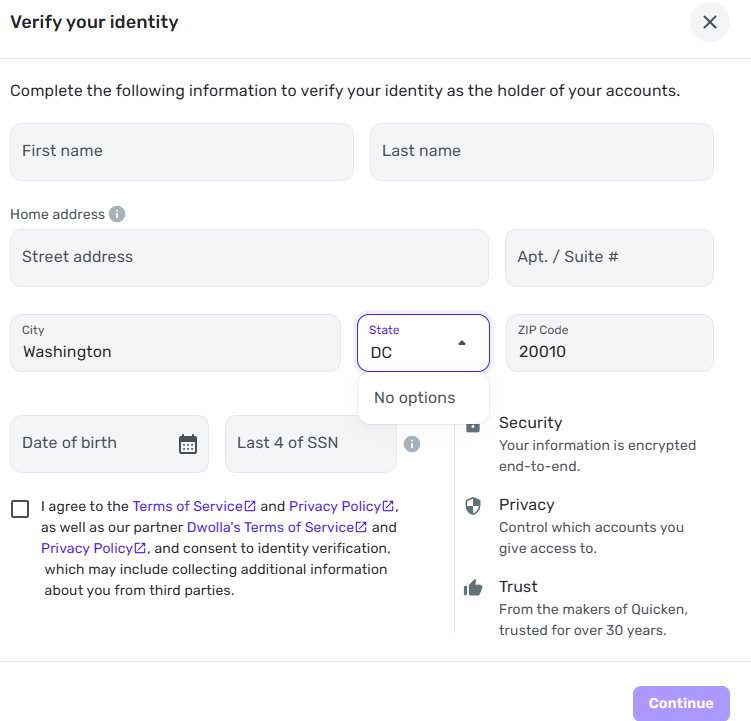
I am interested in setting up the transfer feature to transfer money between accounts. When it asked me to verify and enter my address, I cannot select District of Columbia (DC) as my state in the US. I've seen this before where apps or websites that use a drop down system for addresses sometimes omit DC or Puerto Rico (PR) and it becomes an issue when you can't add them in manually and of course I can't use Maryland or Virginia. Could this be addressed?
Thank you,
David
David
Simplifi user since 2024
Simplifi Web: Windows 10, Microsoft Edge
Simplifi for Android: Samsung Galaxy S23 Ultra, Android 15
0 -
@dcleck, thanks for posting to the Community!
I have merged your post with the dedicated area for A2A feedback. With that, it looks like DC residents need to select Maryland for the state:
I hope this helps!
-Coach Natalie
1 -
Hello
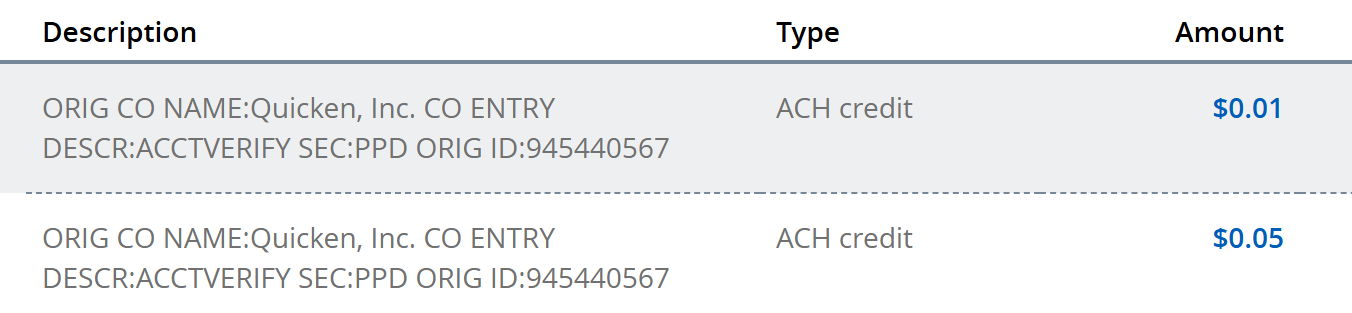
I recently set up A2A transfers and verified my accounts. I noticed the deposits quicken sent for verifications. I am wondering will those deposits be returned now that i've verified the account? and if so how long would that take? I'm looking to close the account and don't want issues for not accounting for 6 cents haha.
Thanks!
David
David
Simplifi user since 2024
Simplifi Web: Windows 10, Microsoft Edge
Simplifi for Android: Samsung Galaxy S23 Ultra, Android 15
0 -
@dcleck - The last time I did this (in March of this year) the deposits were taken back out within 24 hours after I responded by inputting the deposit amounts into the sending bank's verification system.
DryHeat
-Quicken Classic (1990-2020), CountAbout (2021-2024), Simplifi (2025-…)1 -
For Account to Account transfer, could they be made recurring?
i.e. Chase gets direct Deposit on 3rd Wednesday, so sometime after the 21st, I schedule a recurring account to account transfer to either/or/both of my FourLeaf and/or Navy Federal accounts?
—
Rob Wilkens
0 -
@RobWilk, I have merged your post here with the official feedback thread for A2A so your suggestion can be reviewed by the product manager working on this feature.
I hope this helps!
-Coach Natalie
1 -
is this or will this come to the mobile apps ?
—
Rob Wilkens
0 -
@SRC54, I just wanted to let you know that the verification issue with your First US Bank account still has an open escalation. I will continue to follow up with you here when there are updates.
We appreciated your continued patience!
-Coach Natalie
0 -
Thank you!
Steve
Quicken Simplifi (Safari & iOS) Since 2021
Quicken Classic (MacOS) Since 2009
MS Money (1991-2009) and Dollars & Sense (1987-1991)1 -
Hi! Would be wonderful if A2A transfers were appropriately reflected in Cash Flow until they post. As it stands, these transfers are only reflected if you have your balances set to show as "Balance with Pending" — but if your bank's reporting of balances and pending transactions requires you to use the "Bank Balance" display option, then the A2A transfers don't show up in Cash Flow as an expected transfer and so you have to do manual math.
1





