Spending Plan "Income after bills & savings" needs to subtract SG contributions

I am trying to use the Spending Plan (SP) as a budgeting tool. When I contribute to my Savings Goals (SG) the funds add back to my "available" funds, which is not what I want. When I add to SG I set that money aside for another purpose, it is specifically NOT available.
Example: I get paid on the last day of each month. On the first day of each month I contribute to each SG. For round numbers:
Income: $10,000
Bills: $1,000
Subscriptions: $100
Savings Goals: $5,000
Income after bills & savings: $3,900
Planned spending: $3,000
Available: $900.00
Once I contribute to my SG:
Income: $10,000
Bills: $1,000
Subscriptions: $100
Savings Goals: $0 (After 5,000 contributions)
Income after bills & savings: $8,900
Planned spending: $3,000
Available: $5,900 (The $5,000 is not "available" but rather contributed to SG to keep them from the available balance.)
I would really like a way to show that the funds set aside in SG are NOT available funds any longer. (I do understand the thought process is that these funds have not left my account, so technically my net worth has changed by this amount, but the text remains "Income after bills & savings" not "Net worth change this month." The very point of setting money aside in savings goals is to keep that money out of the available spending balance just as the funds have been set aside in the dashboard as savings goals and shows a lower balance as "available."
Each one of my SGs is configured to "subtract your planned contribution in your spending plan" as "Yes, subtract it." So my understanding is that it would subtract these funds in the Spending Plan as funds that are not available any longer.
I could set up a "Planned Spending" entry equal to the amount that I contribute to SGs each month and manually keep this in balance, but this is not an ideal way to handle this simple math problem.
Apologies if this is a duplicate, there are many topics regarding the Spending Plan, but I could not find this exact suggestion.
Lots 1-2-3 (1984-1988)
MYM (Managing Your Money by Andrew Tobias) for DOS (1988-1994)
Quicken for Windows user since (1994-2024) (Still wanting to IMPORT!)
Simplifi by Quicken since (2023-Today)
Comments
-
What you describe should not be happening. I believe something is amiss in how you have your savings goal(s) set up or how the contribution was handled or where the actual cash is located in your bank accounts and is reported back to QS… or you have a glitch in your data set.
When I contribute to my savings goals, my "available" doesn't change unless my actual contribution is more than planned to a given SG in which case my available will be reduced by the amount over my planned contribution.
Danny
Simplifi user since 01/22
”Budget: a mathematical confirmation of your suspicions.” ~A.A. Latimer2 -
This is good news. How do I fix the issue?
Lots 1-2-3 (1984-1988)
MYM (Managing Your Money by Andrew Tobias) for DOS (1988-1994)
Quicken for Windows user since (1994-2024) (Still wanting to IMPORT!)
Simplifi by Quicken since (2023-Today)0 -
Without having more information it's hard to say.
One thing I'm wondering is the "Savings Goals: $0 (After 5000 contributions)." I'm wondering where you are seeing the $0 at. The one place I can think of is in the Accounts list for the account where you hold the real-world cash that you are funding your SG with.
The Spending Plan>Income after bills & savings>Savings Goals should show -$5000 reflecting your planned and/or actual contributions if you set up your SG contributions to be included in the Spending Plan.
If you look in the Spending Plan>Income after bills & savings>Income section, do you see an income event of the $5000? This can happen if you make an actual real-world transfer of the -$5000 to a separate account and didn't exclude the transfer from the Spending Plan.
Is your SG set up to set aside your contributions. The last screen for the SG set up workflow gives you the option to either "Yes, set aside." or "No, don't set aside." If you selected Yes, set aside you will see the SG in your Spending Plan at the bottom of the Income after bills & savings page. If you select No, don't set aside." the Spending Plan ignores the goal for Spending Plan purposes.
As I said, without more information about how you set up your SG and how you handle the actual cash in your bank accounts, it's hard to say why you are seeing the inclusion of the $5000 in your available.
Danny
Simplifi user since 01/22
”Budget: a mathematical confirmation of your suspicions.” ~A.A. Latimer0 -
Thank you for trying to help.
The Savings Goal is Zero AFTER I have made all my contributions. So when I first click on Spending Plan at the beginning of the month I see a negative amount at Savings Goals, but once I have made all of my contributions to my savings goals the amount at the Spending Plan page drops to zero. If I look at "next month" then it still shows a negative amount equal to the monthly contribution amount of my savings goals. The formula for this page remains the same, Income minus Bills minus Subscriptions minus Savings Goals, but once I have made all contributions the savings goal amount falls to zero which essentially adds these contributions back into the available balance for the current month.
Each one of my SGs is configured to "subtract your planned contribution in your spending plan" as "Yes, subtract it." So my understanding is that it would subtract these funds in the Spending Plan as funds that are not available any longer. I have double checked EVERY savings goal twice today. They each indicate "Yes, subtract it" when asked "Subtract your planned contribution in your spending plan." All Savings Goals are set to "Yes, set aside."
Income and Bills does NOT have a transaction for the $5,000. (My actual Savings Goal amount is not a round number, so this would stick out like a sore thumb if it were the case.)
Each time I make a contribution to a Savings Goal the total Savings Goals amount at the main Spending Plan page decreases by the amount of the contribution. This is where I think that the formula is adding the funds that I "set aside" in a savings goal are added back to the available balance.
Are you saying that when you make contributions to a Savings Goal the amount is NOT subtracted on the main Spending Plan page???
Lots 1-2-3 (1984-1988)
MYM (Managing Your Money by Andrew Tobias) for DOS (1988-1994)
Quicken for Windows user since (1994-2024) (Still wanting to IMPORT!)
Simplifi by Quicken since (2023-Today)0 -
@RiversideKid, I just wanted to jump in here and share this article on how Saving Goal contributions are supposed to interact with the Spending Plan:
If you're experiencing something different, I'd say there is an anomaly occurring for your specific dataset, or maybe the Savings Goals themselves. I just contributed to my Goal this month from the Spending Plan, and it still shows the $50 planned amount for the Savings Goals total —

Once I contributed past the monthly amount, the total changed to include the extra, as mentioned by @DannyB —

Perhaps some screenshots would help the Community better understand your situation!
-Coach Natalie
1 -
Are you saying that when you make contributions to a Savings Goal the amount is NOT subtracted on the main Spending Plan page???
No, I'm NOT saying that. SG contributions ARE subtracted on the main Spending Plan page along with bills, subscriptions, planned spending and any "Other spending" that occurs during the month.
The only change is from "virtual" (what you expect all these to add up to for the month) to actual (what you actually end up spending/contributing for the month).
Here are some examples of my SGs and what you should also be seeing:
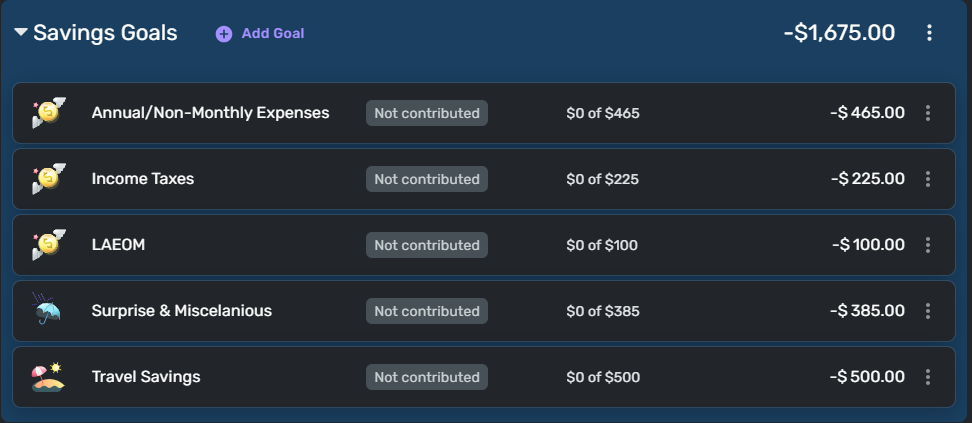
This is what I have planned for my SGs monthly. Note that the total is -$1675.00. From what you wrote above this is what you see before any contributions are made. This is your PLAN.
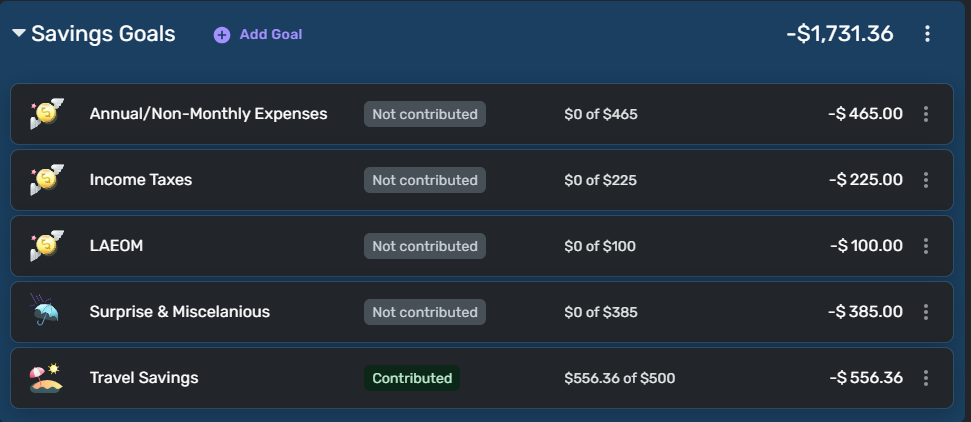
This is my June Spending Plan/Savings Goals as of today (6/2). Note that I contributed $556.36 of $500 to Travel Savings.
If you compare the total for June with the total above, you will see that the amount subtracted (made unavailable) for June is $56.36 greater than what the Spending Plan expects and as a result my total SG deduction for June increased and my available for June was reduced by that additional $56.36.
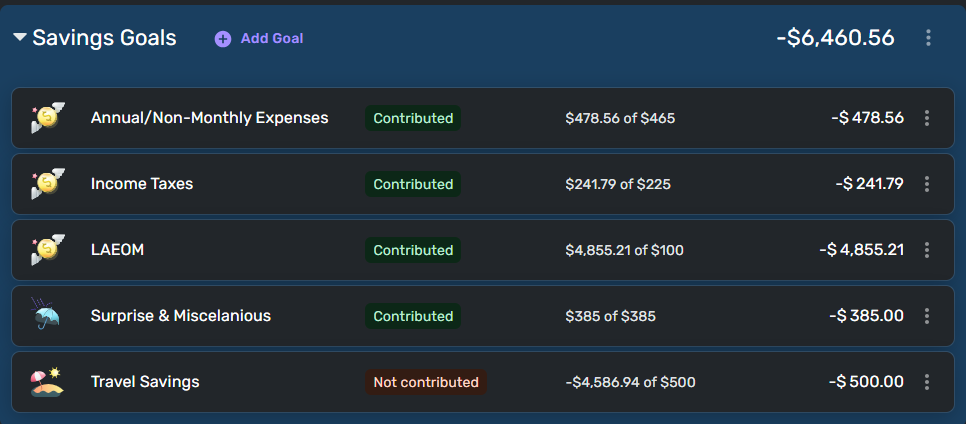
Here are my May SGs. Note that the total amount contributed is the sum of all actual (first four goals) and planned (fifth goal).
(I'm not sure what happened to the Travel Savings goal in May but that doesn't change the illustration.)
You can see that when you contribute to your goals, the amount that is deducted from your Spending Plan total income is equal to:
- The total of all planned contributions
- The total of a mix of both planned and actual
- The total of all actual contributions
If your SGs are set up correctly (as yours apparently are) the total deduction for your SGs should never be ZERO and the total of planned and/or actuals WILL BE deducted from your available for the month.
Along with the article @Coach Natalie linked to above, I hope this helps clarify what you should be seeing, and I concur that if you are seeing something different it's not what is designed or expected.
Danny
Simplifi user since 01/22
”Budget: a mathematical confirmation of your suspicions.” ~A.A. Latimer0 -
When I open the Spending Plan page, I see the numbers above, Income minus bills minus subscriptions minus savings goals minus planned spending equals 'available' in red.
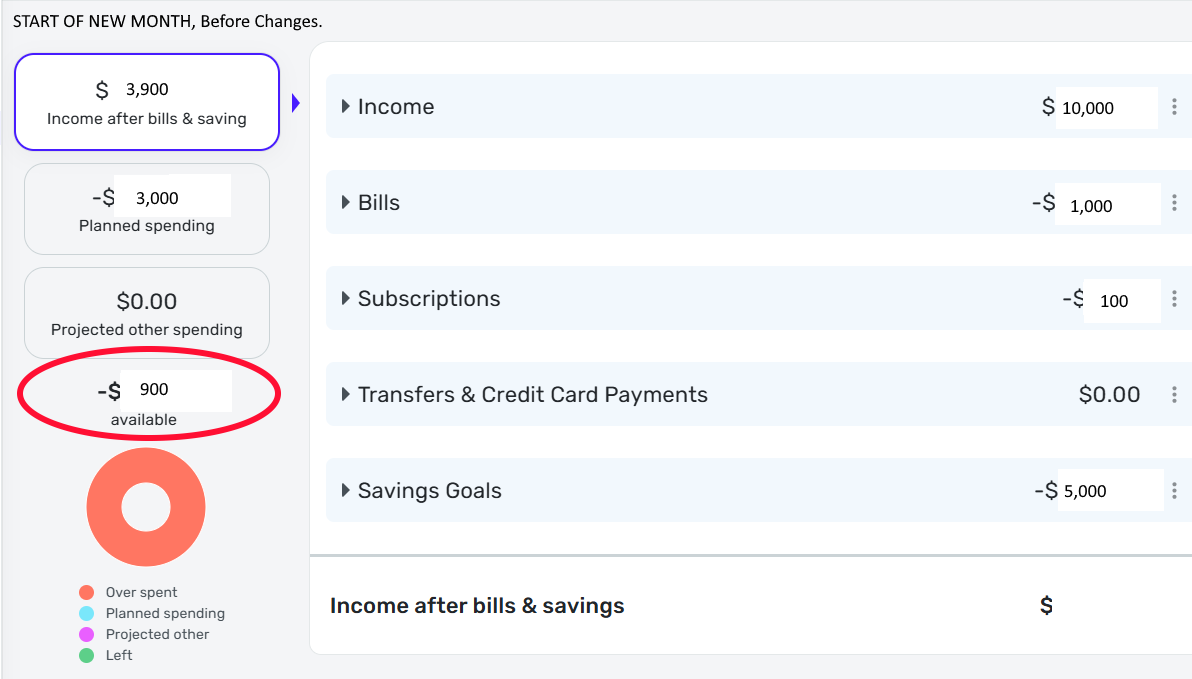
I make only one change, I fund each savings goal and the 'available' in read then rises by the amount that I contributed to the savings goals.
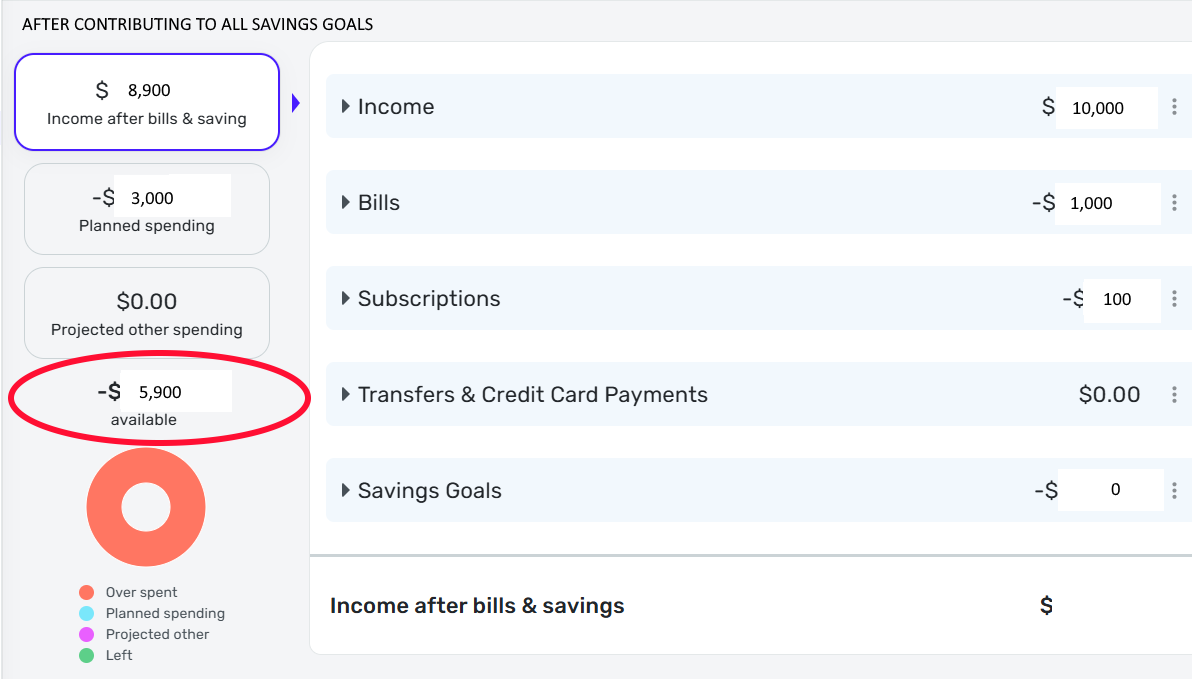
I would love to know the logic of showing more available funds when funds are "set aside" as unavailable, but what I am asking is that the available balance NOT change when funding the savings goals. The amount available has not actually changed by contributing to savings goals. Maybe continue to show the amount that was contributed to Savings Goals rather than dropping this to zero, but when I have made all Savings Goals contributions the SG amount falls to zero in my case, which increases the "available" by the same amount.
Pardon the art work, I am not a graphics person.
Lots 1-2-3 (1984-1988)
MYM (Managing Your Money by Andrew Tobias) for DOS (1988-1994)
Quicken for Windows user since (1994-2024) (Still wanting to IMPORT!)
Simplifi by Quicken since (2023-Today)0 -
@RiversideKid, the Savings Goals total in the Spending Plan, and therefore the leftover Available total for the entire Spending Plan, should not change with Savings Goals contributions, unless you are over-contributing.
I think it would be helpful to see real data from you, where the numbers aren't written over. We would also need to see the details of the Savings Goals you have contributed to. If this is data you don't want to share in the Community, please contact Chat Support for a private support session.
Thank you!
-Coach Natalie
0

