Mortgage Payment Splits

I've left Quicken Business because of too many bugs present and hoping simplifi can do the job. For mortgage payments…I have the mortgage loan set up as a liability and the escrow account, that's used to pay property taxes and insurance, set up as a simple checking account. I am not able to set up the bill reminder as a split transaction nor am I able to set up the actual transaction that downloads as a split transaction either. I'd simply like to set up 3 splits, 1 to transfer to the loan balance, 1 to transfer to the escrow account, and then an expense for the interest. This should be super simple to set up, but I'm really struggling to understand how to do this simple thing. Also, the account used to pay the mortgage is a Cash Management account from an investing company. I can't select that from even to set up a manual transaction to do this. Why can I only select a checking account? This just seems really fundamental to me. Anyone have any suggestions?
Comments
-
Hello @tvanto,
Thanks for reaching out! We do not currently have the ability to split recurring transactions within Quicken Simplifi, but we do have a great idea post for this topic that you can add your vote to here:
For the transaction that is downloading that is unable to be split, can you go into more detail on what specifically is happening in this situation? What account type is the transaction downloading into? Are you receiving an error when you try? Providing screenshots showing the issue would help as well!
As for the Cash Management account, is that account classified as a checking account or an investment account by the financial institution? Let us know!
-Coach Jon
-Coach Jon
0 -
Simplifi does not yet provide for splits in recurring transactions. You have to manually split the transaction after it occurs and appears in the Transactions Activity list. It's a bummer.
The ability to split reminders has been requested since 2019 and has been "submitted for review" — whatever that means. See this discussion for more info:
DryHeat
-Quicken Classic (1990-2020), CountAbout (2021-2024), Simplifi (2025-…)1 -
Investing Accounts so far won't let you set up a transaction as recurring or even let you link it to a current recurring. I got around this by setting it up as a manual recurring from the Spending Plan. That way the Spending Plan takes it into account for income, but after I get the dividends, I have to delete the now redundant reminder. The Cash that come in will show up as income in the spending plan once they are marked as payment/deposit and not excluded from the Spending Plan.
You can turn your Cash Management account into a manual account and then you can have recurring and splits. You cannot split transactions in brokerage accounts. This is what I did in Quicken Classic.
Luckily for me, I was able to change my Cash Management account to a Savings Account, but @Coach Natalie has informed me that this ability is no longer there. I don't understand why because it's the whole purpose of a CM account to act like a checking or High Interest Savings account. We need to get this function back, I think.
Steve
Quicken Simplifi (Safari & iOS) Since 2021
Quicken Classic (MacOS) Since 2009
MS Money (1991-2009) and Dollars & Sense (1987-1991)0 -
@SRC54, Investment Account Types can only be changed to other Investment Account Types as of the 4.57.0 Web Release and the 5.30.0 Mobile Release. Users can no longer perform the action you're recommending.
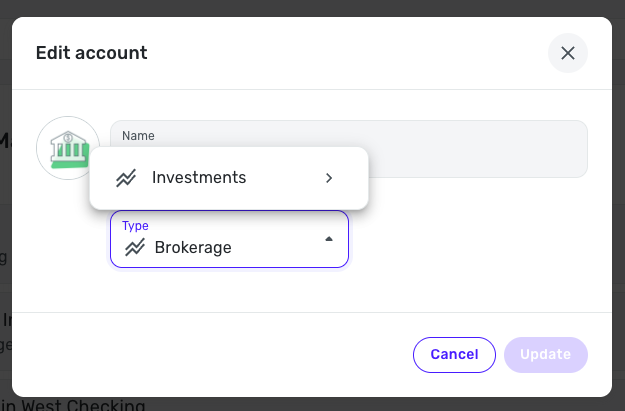
I hope this helps!
-Coach Natalie
0 -
@Coach Natalie Thanks for this information. Sorry I was handing out bogus advice, but I DID change mine a few times during the last few weeks. It had stopped letting me do it in 4.57.0 but the ability came back in a later release for me. That's why I opened the CM account! I guess I was just lucky or the update wasn't fully implemented.
BUT you are correct that today I tried to change my other brokerage, and it won't let me. (I didn't want to change, mind you). I have therefore edited my above advice accordingly.
Do we know why this got changed? Is it permanent? Can we bring it back? Because it's the whole purpose of a Cash Management account to act like a checking account with bill pay, recurring transactions, debit card payments with SPLITS.
Steve
Quicken Simplifi (Safari & iOS) Since 2021
Quicken Classic (MacOS) Since 2009
MS Money (1991-2009) and Dollars & Sense (1987-1991)1 -
@SRC54, the ability to do so was deemed a bug because users were using accounts with actual investments, like holdings and dividend earnings, etc., as checking accounts, which caused other issues.
The CMA issue has been brought up to our engineering and product teams, and they are looking into solutions. That's all the info I have at this time, but hopefully we'll see something to address this soon!
Thanks!
-Coach Natalie
1 -
@Coach Natalie Thanks! I hope they will address it. I have my cash in a single treasury fund and my monthly dividend is downloaded and I tie it to my dividend category. It also shows up in the Spending Plan because it is, of course, income I spend.
I decided to get this CM account (that I didn't really need) because I wanted to see what the issues might be. Quicken Classic Mac does the same thing as Simplifi now does, but Quicken Windows lets you use it classify it as a bank account. I've been dealing with that over at their community. Fidelity says, of course, that it is all a Quicken Company issue.
Anyhow, I was thinking of making a feature suggestion, but since you say they are looking into solutions, I will hold off.
Steve
Quicken Simplifi (Safari & iOS) Since 2021
Quicken Classic (MacOS) Since 2009
MS Money (1991-2009) and Dollars & Sense (1987-1991)0 -
@SRC54, it would be wonderful to have a general request for the ability to change Investment Account Types to non-Investment Account Types. This subject has come up often since the change was made, and no one has created an Idea post thus far. It would give us a place to keep users updated as they look into it!
-Coach Natalie
0 -
Done! Please upvote everyone.
Steve
Quicken Simplifi (Safari & iOS) Since 2021
Quicken Classic (MacOS) Since 2009
MS Money (1991-2009) and Dollars & Sense (1987-1991)2



