Review Marker Switched on After Editing a Transaction

The review marker is being switched on by Simplifi when it is not checked in the transaction.
Select the transaction to be edited (Review Marker is not used).
Open the transaction to edit, and the remove marker is off. (Transaction Edited) When I add the note to the transaction, Simplifi turns the review market on. Simplifi turns on reviewed marker) I read that the review marker requires a manual click to turn it one as it can be used to reconcile statements such as bank, credit card, etc.
This seems to be only happening with “cleared” transactions.
After updating the transaction, then the review market is now showing since Simplifi automatically switched it on. (Review Marker is switched on)
I am doing something incorrectly or do not have the right understanding regarding the review marker.
Dick Davis
Wanting to Migrate from Quicken Classic Premier to Simplifi
Comments
-
I believe Simplifi treats the act of editing a transaction as evidence that it has been reviewed.
DryHeat
-Quicken Classic (1990-2020), CountAbout (2021-2024), Simplifi (2025-…)2 -
I read. Don't recall where in yhw Simplifi read files. That the review marker was a tototall manual click or click off nothing to the effect that it would be done by Simplif during the reviving of a transaction. Hopefully a Coach will respond.
Dick Davis
Wanting to Migrate from Quicken Classic Premier to Simplifi
0 -
Note that it does this when batch editing transactions as well (and it's not obvious from the UI, you wouldn't see it until after you save the edits).
0 -
When I find that docume. I will report as a error in the program.
Dick Davis
Wanting to Migrate from Quicken Classic Premier to Simplifi
0 -
@Dick_Davis, thanks for posting to the Community!
When editing a transaction, Quicken Simplifi will mark it as reviewed. I believe this is due to what @DryHeat mentioned — "I believe Simplifi treats the act of editing a transaction as evidence that it has been reviewed."
If you'd like to see this changed, please be sure to add your vote and feedback to our existing Idea post!
For more details on voting for Ideas here in the Community, please see our FAQ here:
I hope this helps!
-Coach Natalie
1 -
As a further piece of information, the review marker only gets marked as "reviewed" when the a cleared transaction is edited or a pending transaction is changed to cleared.
Dick Davis
Wanting to Migrate from Quicken Classic Premier to Simplifi
0 -
Well, a transaction doesn't get marked automatically as "reviewed" when it clears. In fact, right now the pending transactions marked reviewed are reverting to "not reviewed" when they clear.
Also, I find if you change the information within the ledger line (without opening the transaction window), it won't get marked as reviewed either.
Steve
Quicken Simplifi (Safari & iOS) Since 2021
Quicken Classic (MacOS) Since 2009
MS Money (1991-2009) and Dollars & Sense (1987-1991)0 -
SRC54, I hold a diferrent view. Do I needs to post a video of these to get a agreement?
Dick Davis
Wanting to Migrate from Quicken Classic Premier to Simplifi
0 -
FWIW, I did two experiments altering transactions in the full pop-up window view:
(1) edited a pending transaction note field — transaction changed to "Reviewed"
(2) marked a pending transaction "cleared" — transaction changed to "Reviewed"
DryHeat
-Quicken Classic (1990-2020), CountAbout (2021-2024), Simplifi (2025-…)0 -
@DryHeat Interesting. I think that is what is supposed to happen, and my experience as well.
I don't have any that aren't reviewed right now and it just updated to 4.62 on Web.
@Dick_Davis It has been a known bug that reviewed transactions are getting cleared out when they go from pending to cleared. This didn't used to happen. Maybe it's fixed in 4.62? I will check in the morning when I get some cleared transactions.
It is or was the expected behavior that once you edited a transaction that it was automatically marked reviewed. And that was still happening but once it went from pending to cleared (as above), it reverted to unclear.
Steve
Quicken Simplifi (Safari & iOS) Since 2021
Quicken Classic (MacOS) Since 2009
MS Money (1991-2009) and Dollars & Sense (1987-1991)0 -
Well, this is what happened this morning.
I downloaded several cleared transactions that were already reviewed pending transactions; they went to unreviewed. One of them was a transaction for cash that didn't match; I matched it with the reviewed pending transaction, and it stayed reviewed.
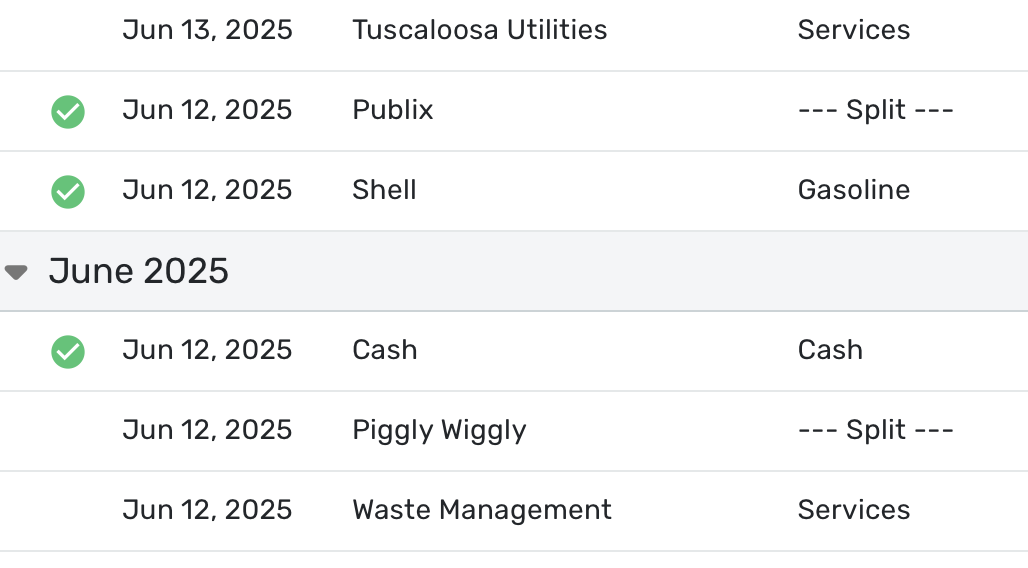
Here is a screenshot. The top three transactions are pending and the bottom three are newly cleared. You can see that Piggly Wiggly and Waste Management that were reviewed pending yesterday are now unreviewed clear. I have now marked them again as reviewed and changed the date of Piggly Wiggly back to June 11.
Tuscaloosa Utilities is newly pending as of this morning. It is correctly shown as unreviewed. Publix and Shell were downloaded yesterday and I marked them reviewed. I also subsequently have marked Tuscaloosa Utilities as reviewed. Tomorrow all 3 of these will clear and be marked unreviewed again.
I don't know how much of all this is caused by my crazy local bank's idiosyncrasies.
Steve
Quicken Simplifi (Safari & iOS) Since 2021
Quicken Classic (MacOS) Since 2009
MS Money (1991-2009) and Dollars & Sense (1987-1991)0





