Vanguard Connection problem - FDP-390 error (edited)

I'm having issues connecting to both Vanguard Brokerage and Vanguard Roth IRA accounts. It was disconnected for like 64 days then I tried to reset the connection and still having troubles.
I have searched around on the discussion board here and found that even while connecting through my mobile app (android) I still have the same issue as connecting from the web or windows app still the same issue.
Has there been any other work arounds or is Intuit/Quicken working on this ? Any feedback is greatly appreciated.
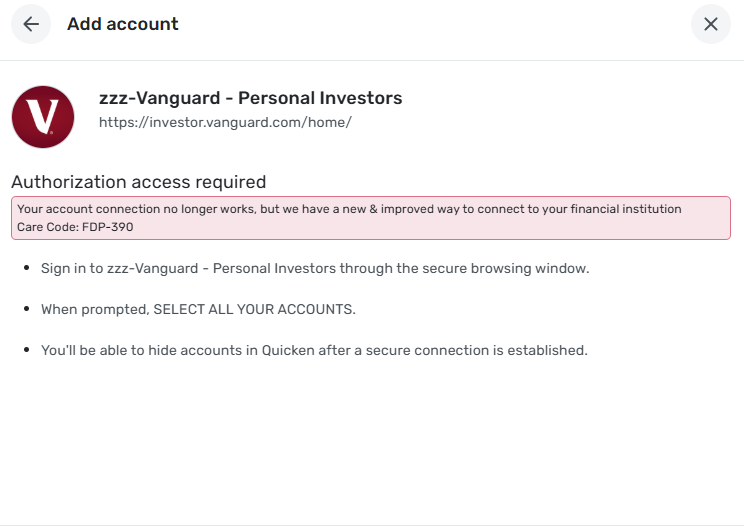
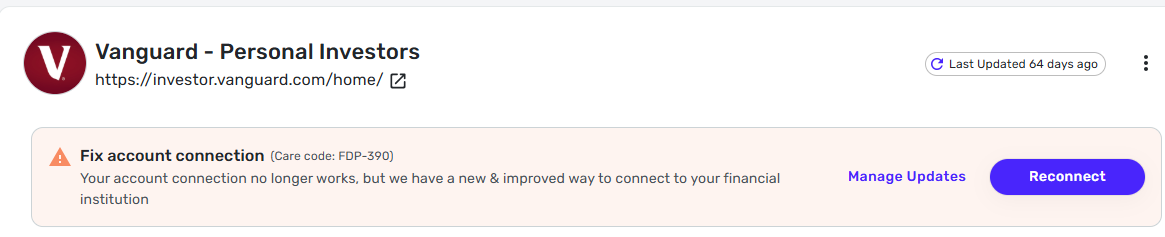
Taylor
Comments
-
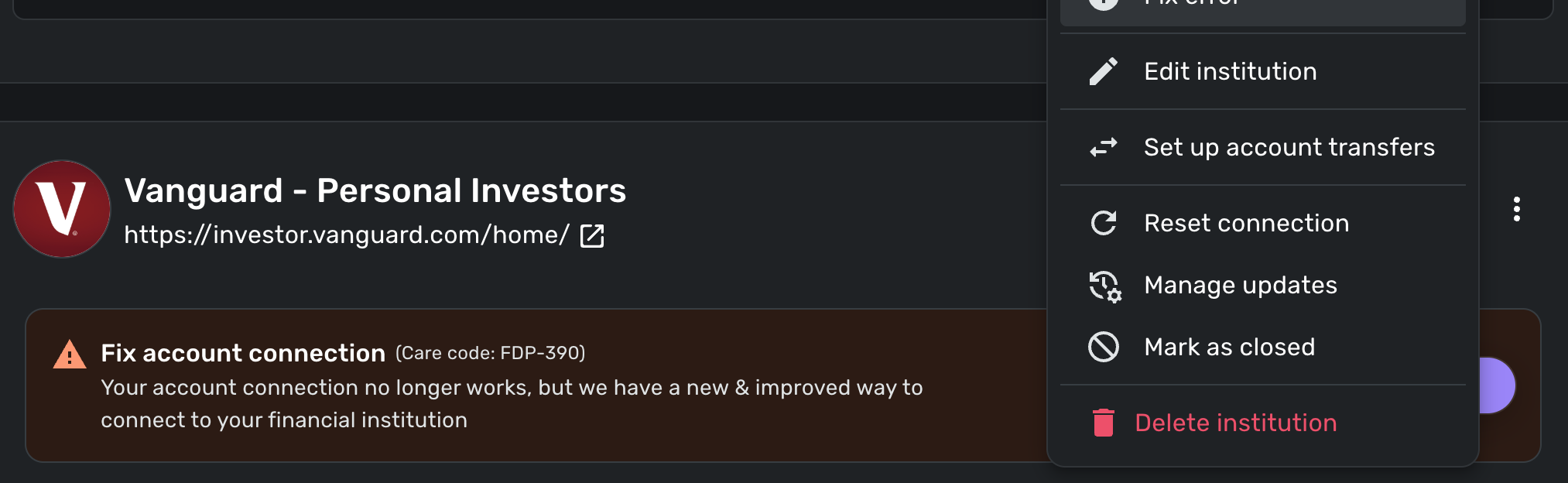
This error still occurs. Tried regular, incognito, and on mobile. There is no "Make manual" option. "Reset connection" doesn't work.
 0
0 -
Hello @getvictor,
Thank you for letting us know you're also seeing an issue with Vanguard. Based on your screenshot, it looks like you're clicking the 3 dots to the right of the financial institution rather than the 3 dots to the right of the account.
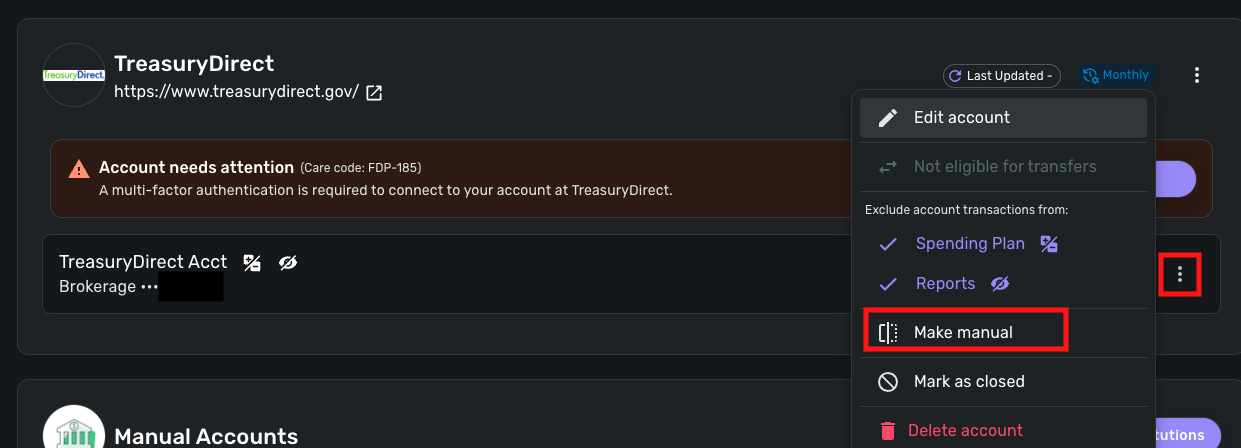
If you look below where you see the error message, it should list your connected account(s). If you click the 3 dots to the right of the account, you should see the option to make it manual.
I hope this helps!
-Coach Kristina
0 -
Hello @Taylor S,
Thanks for reaching out! We are still aware of this known issue and do have an alert for it here that you can follow for updates:
Instead of going through the reconnect method, I would see if establishing a fresh connection, making the account manual, and then re-linking to see if that fixes the current issue. The instructions to do that are:
- Make all of the accounts with the bank manual by following the steps here.
- Once you see the account(s) listed in the Manual Accounts section under Settings > Accounts, go back through the Add Account flow to reconnect to the bank.
- If the connection is successful, carefully link the account(s) found to your existing Quicken Simplifi account(s) by following the steps here.
I would suggest trying this in the mobile application, as most users have experienced success with connecting this way. Let us know!
-Coach Jon
-Coach Jon
0 -
Hi @Coach Jon, thanks for this recommendation.
I made the accounts manual then tried to add the account back in.
While adding the Vanguard account, I'm receiving an error when trying to Enroll the accounts from the Vanguard login. "An error occurred while the digital token access was being processed. Please try again."
Is there a workaround for this? or how can I proceed?
Hopefully this can be fixed soon.
Taylor
0 -
Hello @Taylor S,
Thanks for the reply! Did you try the above instructions from the Quicken Simplifi Mobile application? It may also be that your user token has expired.
- To gain a new token, you will have to revoke Quicken from accessing your bank's website, then reconnect your accounts.
- Navigate to the bank's website, sign in, and then remove Quicken's access from the bank's third-party linked apps.
- Navigate back to Quicken Simplifi and try the above steps I listed previously once more:
Let us know how that goes!
-Coach Jon
-Coach Jon
0 - To gain a new token, you will have to revoke Quicken from accessing your bank's website, then reconnect your accounts.
-
Having the same issue, both on desktop and mobile. Between this issue and the constant connection problems with Barclays, I'm seriously considering terminating my subscription. I'm not convinced these connections are EVER going to be reliable.
1 -
This is not fixed. I went through the process of making my Vanguard accounts manual and reconnecting them with my iOS device. This lasted for a few days but now it's back to exclamation points. My Ally accounts are also having connection problems. This is getting tedious.
0 -
Thanks for letting us know! We are sorry for the recent trouble with Vanguard. I would see if the steps I shared above work to resolve the issue. I would also follow the alert I shared above, as we are actively working on a solution with Vanguard to resolve this issue.
-Coach Jon
-Coach Jon
0 -
After making the accounts manual I had issues adding the account. I had to revoke the Intuit/Quicken token from the Vanguard side, this took some time. I had to call Vanguard as even removing it from the website wouldn't work and calling them had to get it escalated to their support team and then I hadn't received any feedback, call/email or msg back from them. Instead I waited a few days and tried revoking the token again from Vanguard and was finally able to revoke it.
I was then able to add the Vanguard account on Simplifi and link them.
Such a pain of a workaround and hopefully will stay connected and not be a pain in my butt continuously.
Still having issues with my Merrill Lynch account not being able to connect…so seems other accounts still have issues.
Thanks,
Taylor0 -
Is there an ETA for getting this fixed? I have no intention going through the tedious steps listed above. A paid service shouldn't require a complicated series of technical workarounds.
0 -
@dbert721, thanks for joining the discussion!
Please outline in more detail what specifically is occurring with your Vanguard connection so we can best assist you.
-Coach Natalie
0 -
- Launch app from desktop browser
- Login
- See warning icons next to my Vanguard accounts
- Click one of the accounts
- See message "Your account connection no longer works, but we have a new & improved way to connect to your financial institution(Care code: FDP-390)"
- Click "Reconnect"
- Enter Vanguard credentials
- Get Vanguard screen to grant access to Intuit
- Click "Enroll" on that screen
- Get this message: "Authorization access required Your account connection no longer works, but we have a new & improved way to connect to your financial institution Care Code: FDP-390"
- There is a "Sign In" button on that screen, so I try again. Just gets caught in a loop at this point.
FYI, I have no issues authenticating with Vanguard outside of the Intuit apps.
0 -
@dbert721, thanks for the detailed timeline!
Have you tried reconnecting the accounts from the Quicken Simplifi Mobile App instead? If not, I would recommend doing the following:
- Navigate to the bank's website, sign in, and remove Quicken's access from the bank's third-party linked apps.
- Log in to the Quicken Simplifi Mobile App.
- Make all of your Vanguard accounts manual by following the steps here.
- Once you see the account(s) listed in the Manual Accounts section under Settings > Accounts, go back through the Add Account flow to reconnect to the bank.
- Carefully link the account(s) found to your existing Quicken Simplifi account(s) by following the steps here.
Let us know how this works for you!
-Coach Natalie
0 -
If you read the comments above, someone else has already gone through all this pain. I don't have time to call Vanguard and perform all the gymnastics that they did. I expect it just to work.
0


