Morgan Stanley Checking Account Showing Up as a Brokerage

My morgan stanley checking account recently started showing up as a brokerage account and now won't track in my spending plan. How can this get fixed?
Comments
-
Hello @root62,
Thanks for reaching out! Is your account classified as a checking or brokerage account from the bank's side?
Within Quicken Simplifi, Investment accounts have both of the exclude flags for Reports and the Spending Plan set by default. As a result, all transactions for those accounts will be excluded from the Spending Plan and Reports automatically. If there are specific "cash flow" type Investment Transactions in your investment accounts (such as payments and deposits) that you may want to count, you can override the default exclude setting by unselecting Exclude from Reports and/or Exclude from Spending Plan from the transaction directly. All other Investment Transaction types (such as buys and sells) cannot be included at this time, and you will not have the option to change the exclude settings for these types of transactions.
While we wouldn't recommend it for most users, if you always want to have "cash flow" type Investment Transactions included in your Report or Spending Plan calculations, you can modify the exclude setting for the entire account. Once done, all existing and new transactions will reflect the change.
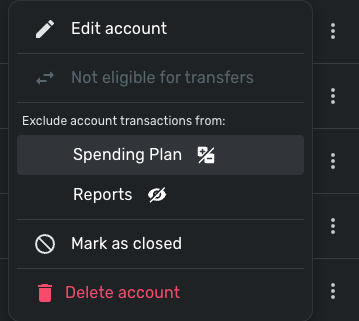
-Coach Jon
-Coach Jon
0 -
It is listed as a checking account from the bank's side. In fact, because of this new issue, I'm trying out alternatives to Simplifi [removed] and they all correctly import the account as a checking account. Only simplifi imports it as a brokerage account and there is no other option (see screen shot below).
I've tried delete the entire connection and reimporting it, and the only option available for importing this account is "investment", even though it previously was correctly imported as a checking account. I really hope this can be fixed because I love the spending plan/daily budget feature of simplifi, but if i can't track the expenses in and out of my main checking account, then this becomes unusable.
The account is a checking account from morgan stanley.
Please advise
0 -
@root62 When you re-established the connection, did you change your MS account to a checking account first and then try to reconnect and link it? The reason I ask is @rdd said this could be a workaround. It would be nice to know whether this actually does still work. I haven't tried it as my (Fidelity Cash Management) is already connected as a checking account.
Also, I understand that they are looking into ways to accommodate these kinds of accounts so maybe this will get fixed in the future. Fingers crossed.
Also, if you will, please add your vote to this feature request:
Steve
Quicken Simplifi (Safari & iOS) Since 2021
Quicken Classic (MacOS) Since 2009
MS Money (1991-2009) and Dollars & Sense (1987-1991)1 -
It doesn't let me change the account to anything but something in the investment account bucket. It looks like in the thread you referenced that they disabled the ability as well.
0 -
Thanks for verifying. If you don't have A LOT of daily transactions for this account, my advice FWIW is to make it a manual account so you can put it where you like and use it as you like until a better solution comes available.
Steve
Quicken Simplifi (Safari & iOS) Since 2021
Quicken Classic (MacOS) Since 2009
MS Money (1991-2009) and Dollars & Sense (1987-1991)0 -
Thanks, all. Really appreciate it!
1


