How to identify a subscription

I would like subscriptions to show the tag in the subscription list. I have several subscriptions with Apple and the payee is either Apple or Apple Services. The subscription list seems to be working because I can assign an exact amount. It also appears I can assign a tag to the subscription form the Settings/All Recurring/Edit window but the only way to see the tag is to edit the subscription. In addition the payee for other subscriptions do not identify the subscription. I guess I could rename the payee but that would not solve the multiple subscriptions form Apple. I see no way to use categories either. I think just adding Tags to the subscription list would solve the problem.. Is there a different setup to fix my problem?
Comments
-
@N4KHQ, thanks for posting your inquiry to the Community!
To clarify, are you referring to showing the Tag that is assigned to a Recurring Subscription Series as a column on the All Recurring > Subscriptions page? If so, I don't see that this is available in Quicken Simplifi, so you're welcome to create an Idea post to request it:
Otherwise, assuming that you're referring to Recurring Subscription Series, I would personally recommend assigning each one a distinct name. I have a couple of Amazon subscriptions — Amazon Prime and Amazon Music — and I name each of my Recurring Series accordingly. Doing so tells me exactly what each subscription is for.
I hope this helps!
-Coach Natalie
1 -
I do the same thing as @Coach Natalie. I have Apple Music and Apple Cloud. The Payee for both is Apple but in Subscriptions I can differentiate them. Of course, you can make the payee's different as well.
My social security recurring says Steve's SS and my wife's says Linda's SS. The payee for both is SSA, but I can tell the difference besides the fact that she gets more than I do! 😉
Steve
Quicken Simplifi (Safari & iOS) Since 2021
Quicken Classic (MacOS) Since 2009
MS Money (1991-2009) and Dollars & Sense (1987-1991)0 -
I use categories to differentiate recurring transactions if the payee is unique. It works well in subscriptions form settings and in the new Income/Expense report. I have 5 Apple subscriptions and the payee for Apple is just Apple. If it is a subscription through the App Store, it says Apple Services. I set the subscription in Simplifi to exact amount to differentiate the subscriptions but when I go to Settings/All Recurring/Subscriptions, only the amount differentiates the apple subscriptions. I can tag them but I have to click edit to see the tag. Am I missing missing something?
As to voting up, I voted up a request for Income/Expense on the Dash Board when I started Simplifi. Don’t think posting a vote up is worth the effort.
0 -
I use categories as well that differ especially for tax categorization. The reason for giving each recurring series a different name was to differentiate them in the recurring list and the Spending Plan so you can tell the difference.
When you go to Settings, All Recurring, you can if you wish edit the series and rename it slightly so you can differentiate them.
However, once they are paid (linked), the Spending Plan will then show the payee for that transaction rather than the series’ name so be aware of that.
Steve
Quicken Simplifi (Safari & iOS) Since 2021
Quicken Classic (MacOS) Since 2009
MS Money (1991-2009) and Dollars & Sense (1987-1991)0 -
@SRC54, once the Reminders are linked to a transaction, the transaction should assume the Payee and Category of the Recurring Series:
- Once linked, Quicken Simplifi will remove the Recurring Reminder from the Bills & Payments view and match it to the downloaded transaction. The Payee and Category of the transaction will also be updated to match the details of the Reminder.
Just wanted to clarify this bit!
-Coach Natalie
0 -
@Coach Natalie Yes. That is what I was trying to say. That he could rename the recurring series to help him differentiate but once he paid (linked) them that the ledger and spending plan would now reflect the payee and the category of the specific transaction.
Steve
Quicken Simplifi (Safari & iOS) Since 2021
Quicken Classic (MacOS) Since 2009
MS Money (1991-2009) and Dollars & Sense (1987-1991)0 -
@SRC54, I'm not sure if we're saying the same thing, but the transaction will change to match the details of the Reminder, not the other way around. Meaning that changing the Recurring Series to distinct names will also retain those distinct names in the Spending Plan when the transaction gets linked to the associated Reminder.
-Coach Natalie
0 -
@Coach NatalieWell again I forget that I am so much more hands on than others. I link transactions after I edit them and they use my payees. Even when I link them I usually edit them so mine are as I wrote.
Steve’s SS becomes SSA once I edit it and split it. Apple Music is Apple but this is a manual account. You are of course right that if it is linked automatically from a download it will overwrite it. I will provide some screenshots later when I get home.
I was trying to say he can make it as he likes but hard to explain at times. Thanks for clarifying and I hope my comments are now clearer.
Steve
Quicken Simplifi (Safari & iOS) Since 2021
Quicken Classic (MacOS) Since 2009
MS Money (1991-2009) and Dollars & Sense (1987-1991)0 -
@SRC54, that totally makes sense! Thanks for clarifying. 🙂
@N4KHQ, I think the bottom line is you have full control over how your Recurring Subscriptions display, as well as how the linked transactions display. Renaming these items to better clarify what they are is definitely the route I'd recommend!
-Coach Natalie
1 -
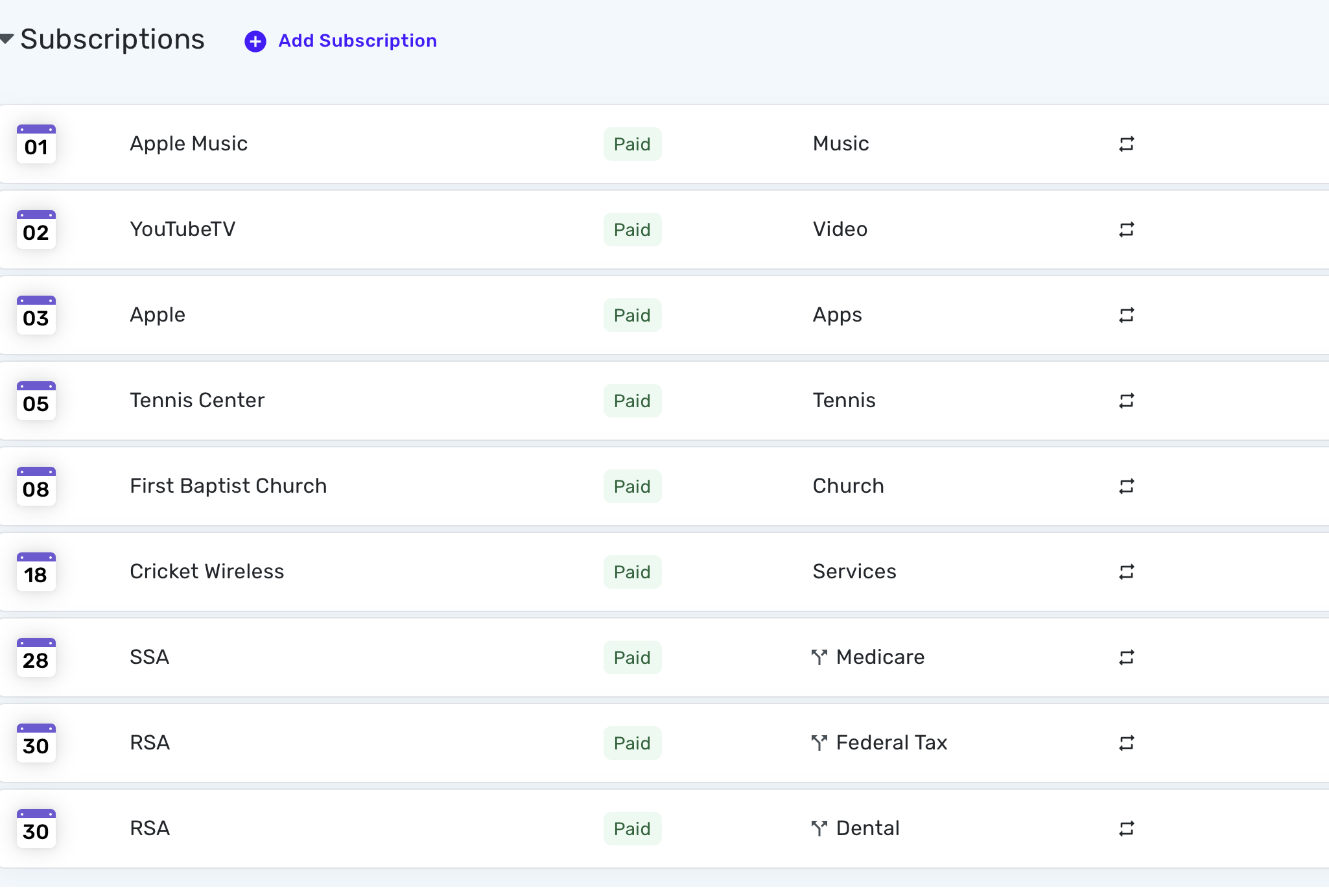
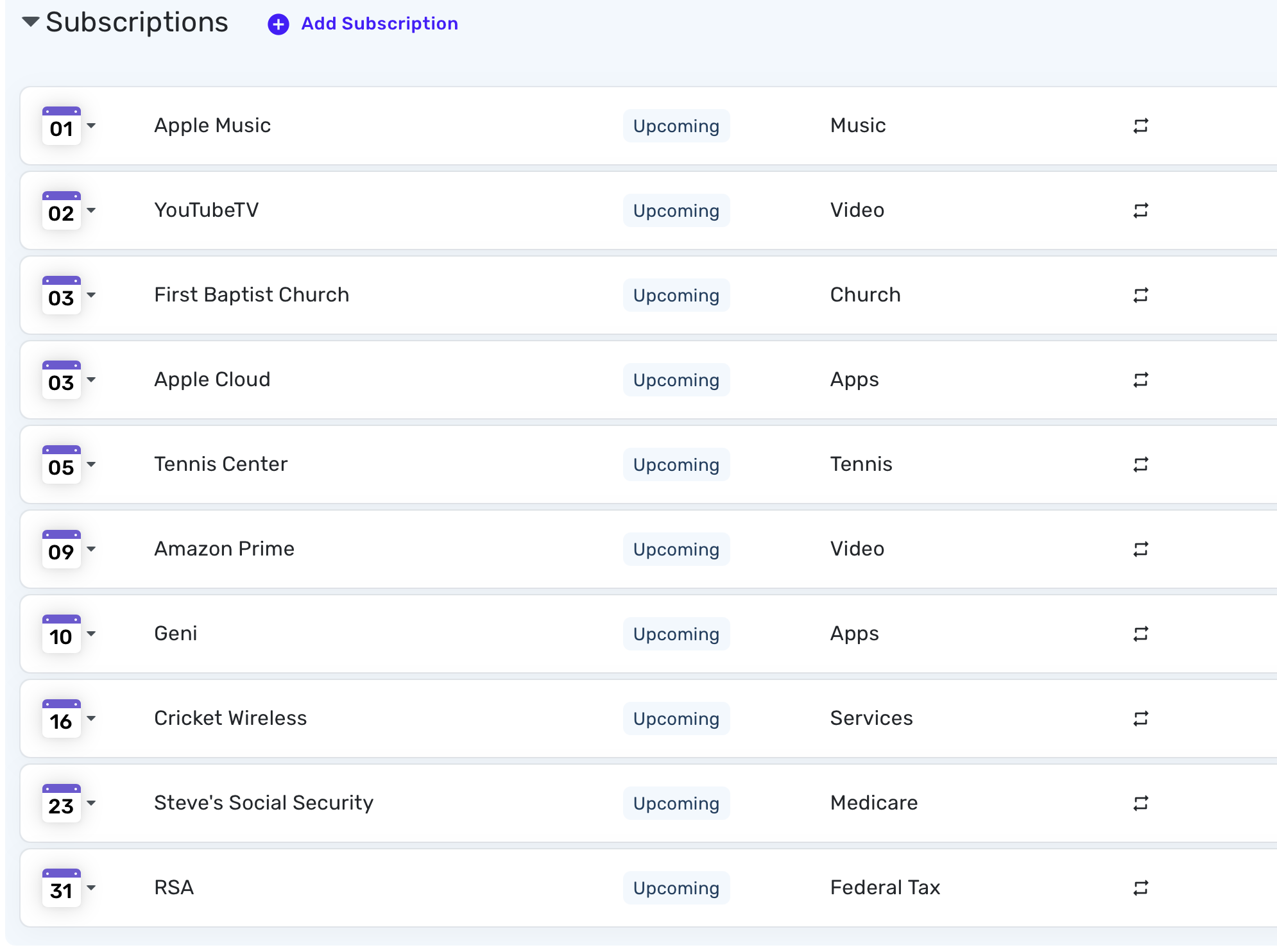
Here are my screenshots for last month's subscriptions (Paid and Linked) and July's Plan.
May 2025: I forgot that I actually do use Apple Music as the payee, but I could just as well make it just Apple.
July 2025: Note that it says Steve's SS and Apple Cloud until I edit and link them. Linda's SS kicks in in August.
I have been meaning to start a thread on how I finally figured out how to make the taxes and Insurance show up in subscriptions while the income part shows up in Income. I am pretty proud of myself over that.
Trying to explain things in writing is not an easy chore, which is why I so appreciate the hard work of the coaches like @Coach Natalie as well the other users. It can be pretty daunting at times. @N4KHQ I hope this discussion gives you some ideas on how to personalize your Simplifi file. And please do consider voting and proposing ideas. Not many software firms actively ask for our input. I would be glad to upvote a suggestion to show tags in the Spending Plan and Recurring transactions list. Sounds like a good idea to me.
Steve
Quicken Simplifi (Safari & iOS) Since 2021
Quicken Classic (MacOS) Since 2009
MS Money (1991-2009) and Dollars & Sense (1987-1991)0 -
@Coach Natalie I don't see how renaming helps the problem I described. I have 3 subscriptions with Apple. The payee is Apple, nothing else. I can separate the three subscriptions using exact amount but the category has to be the same for all three. I can go to settings and assign a different tag to each subscription but when I look at the subscription list I have to edit to see the tag. This is not a major problem but it would be so easy to add tags to the subscription list.
0 -
I think what @Coach Natalie is suggesting is that you change the names in the 3 recurring series so that you can identify which subscription is which. So, for example, you might name them "Apple - Cat," "Apple - Dog," and "Apple - Fish" and give each one the proper amount for that particular subscription. Something like this:
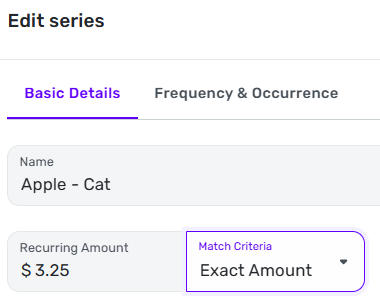
I can't find anything in the support documents that explains how it works, but my experience has been that the Name on the recurring series does not have to exactly match the Payee information from the downloaded transaction. I don't know how close it has to be for the match to be detected, but I have renamed a number of my recurring subscriptions for clarity (only changing the name a little bit) and they have continued to match.
It would be nice if there were a bit more clarity on how the transaction-matching system works, but no one has come forward to explain so far.
DryHeat
-Quicken Classic (1990-2020), CountAbout (2021-2024), Simplifi (2025-…)1 -
@DryHeat Thanks I will give that a try. The rule says anything that contains Apple rename what ever but maybe the exact amount will keep it from renaming Apple Services and the other Apple subscriptions.
Looks like your suggestion is a simple easy fix. I thought I was being requested to change the name that appears on the account or the rule. I won't know for sure until net billing cycle but looks like it will work.
0


