Category for "Credit Card Payment"

When I make credit card payment, Simplifi links two transactions and treats them as transfer:
- Debit from my Checking account
- Credit to my Credit Card account
Now this is great. However, I would like a custom behavior so I could change category automatically for debit transaction to be credit card payment and rename payee, so at the end of the year I can do a quick match of my spendings and credit card bills to ensure things are setup correctly.
While, "Rule" does rename payee, it never changes the category to "Credit Card Payment". I understand this is not a default Simplifi behavior, but I am here to ask if there is anything I can do to avoid manually changing category every month for my 5 credit cards.
Kindly advice!
Comments
-
@fnums "
While, "Rule" does rename payee, it never changes the category to "Credit Card Payment".
Just to clarify… Are you saying that you have tried setting up a rule for the checking account transactions, that the rule is contains both "Rename" and "Update Category" actions, and that the Rename action works but the Update Category action does not?
DryHeat
-Quicken Classic (1990-2020), CountAbout (2021-2024), Simplifi (2025-…)0 -
Correct.
I have a rule that says if a transaction contains "chase" "credit", then rename payee and update category. Rename payee works, update category doesn't work for credit card payments. I have many other rules which also rename payee and update category, they work correctly. Only the category update for credit card payment fails - I suspect it has something do with linked transactions. If there is something I can do to avoid manually update these transactions on monthly basis, that would be really great!
0 -
Sorry, I'm not aware of any option to stop Simplifi from automatically recognizing transfers between accounts. The matching process is described in the article below, but it says nothing about preventing it.
DryHeat
-Quicken Classic (1990-2020), CountAbout (2021-2024), Simplifi (2025-…)0 -
@fnums, thanks for posting to the Community!
The Category Rule is likely being superseded by the design of Quicken Simplifi to automatically detect and link Transfers:
This is something that will likely require manual intervention if you'd like the transactions to not be Linked Transfers. One thing you can try that comes to mind is setting up a Recurring Series for the credit card payment and using the "Credit Card Payment" Category. When transactions are linked to Recurring Reminders, they are supposed to acquire the Payee and Category of the Series, so this may work for you!
Let us know!
-Coach Natalie
0 -
Thanks for response @DryHeat.
@Coach Natalie Thanks, I will give it a try.
2 -
@Coach Natalie Hi, just wanted to update that this did not work out :|
>One thing you can try that comes to mind is setting up a Recurring Series for the credit card payment and using the "Credit Card Payment" Category. When transactions are linked to Recurring Reminders, they are supposed to acquire the Payee and Category of the Series, so this may work for you!
>
thanks for help anyway!0 -
@fnums, thanks for the update!
Have you tried linking from the reminder directly, versus the transaction directly? I ask because there is a bug where transactions don't get updated with the Payee and Category of a Recurring Series when linked, and that may be why this didn't work for you.
Here are the steps for linking from the reminder:
I really feel as though the Payee and Category should update when linked, regardless of the "transfer" aspect, unless you are experiencing the bug mentioned above. Let us know if the alternative linking method works for you!
-Coach Natalie
0 -
I added via ("+Series" button), then searched a transaction, Create, then Edit Series → In "Frequency & Occurrence", I added first 3 and last 3 days of the month (that's when credit card payment are made).
Was I supposed to try something else instead?
0 -
"In "Frequency & Occurrence", I added first 3 and last 3 days of the month (that's when credit card payment are made)"
If I understand correctly, you have set up Frequency & Occurrence like this:

That tells Simplifi that you expect this payment to occur 6 times during the month, not that you expect it to occur once on one of those 6 days. I don't know if that is related to your problem, but it could foul up the matching process.
You should select just one day — the one that you think is most likely. Simplifi will match a transaction that is near that day, even if not on the exact day. For example, a transaction predicted to occur on "2nd Last" will match a transaction that actually occurs a day or two earlier or later.
(I'm not sure how much slack there is in the date matching. People have asked about the matching algorithm, but the Simplifi designers haven't been very open about how it works.)
DryHeat
-Quicken Classic (1990-2020), CountAbout (2021-2024), Simplifi (2025-…)0 -
@DryHeat Thanks, I will give that a try as well this month.
>6 times during the month,
Thanks for the clarification.
> the one that you think is most likely. Simplifi will match a transaction that is near that day, even if not on the exact day.
Precisely, why I had selected 6 days, I usually make CC payments between 29th & 2nd based on time on hand, so had selected multiple days…0 -
FYI, there is a dropdown at the bottom of the Frequency & Occurrence tab called "Preview Next Occurrence" that will show you the results of your selections. You can use it to check to see if things are set up the way you want them to be.
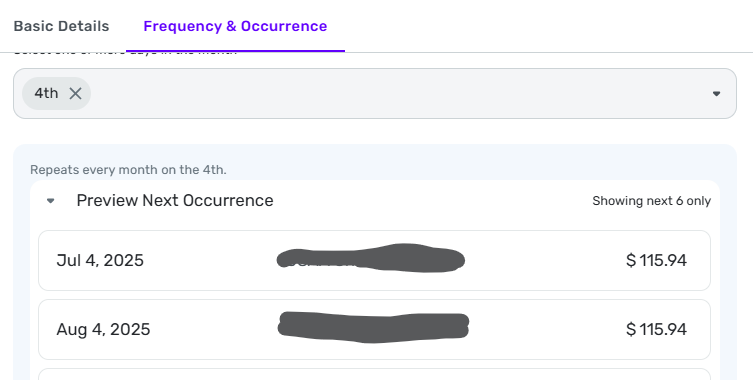
DryHeat
-Quicken Classic (1990-2020), CountAbout (2021-2024), Simplifi (2025-…)0

