Transaction Download - Transaction Detail Not Descriptive Enough

Is there any way to ensure that the transaction description is near-identical to what transaction descriptions would be on the bank statement?
I've noticed that ever since I've imported my transactions from Mint and started using Quicken Simplifi going forward, the transactions aren't as descriptive as they used to be, heck, the transactions now seem to be very generic descriptions of its counterparts when pulling it up against the bank statement. Mint transaction downloads had a lot of details, almost near-identical to what shows up on the bank statement, but now, the transaction details aren't very helpful at all.
Not sure if it's the way I've linked my accounts or if there's a setting somewhere but without this visibility, it sort of defeats the purpose of the tool in my opinion.
Best Answer
-
@LEric9027, thanks for posting your feedback to the Community!
Quicken Simplifi is designed to simplify payees when downloading transactions. Although there is not currently a way to turn this off, you can often use the "Appears on your statement as…" info in the Transaction Detail view to see a little more detail —
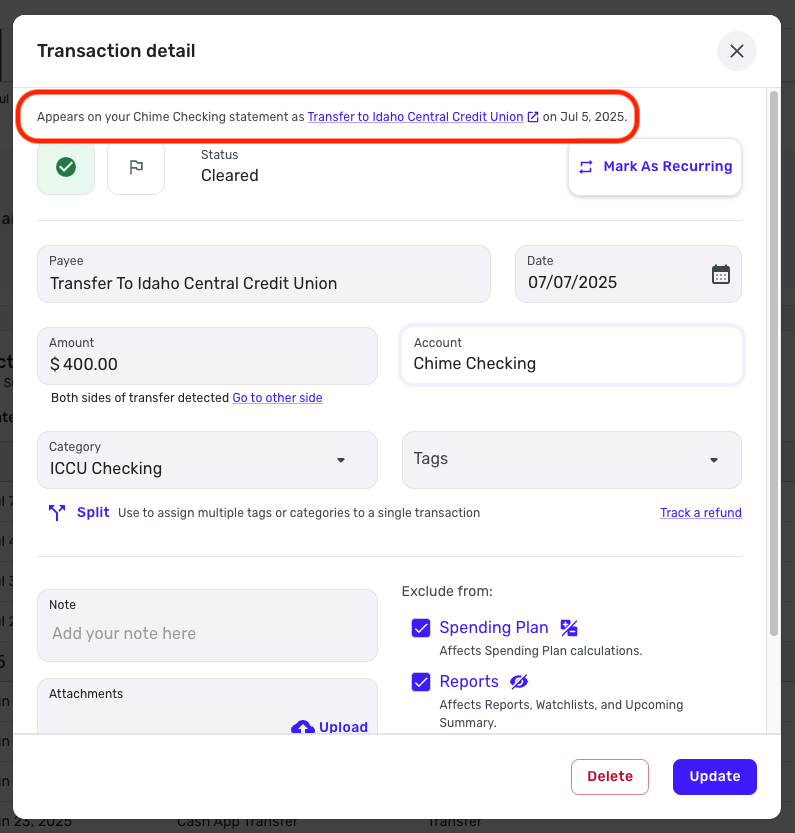
Otherwise, I would recommend adding your vote and feedback to the following Idea post so it's seen by our product team!
-Coach Natalie
0

Answers
-
Is the additional information within the "Appears on your statement as…" section in the Transaction Detail view available as part of the transaction download file?
0 -
I fully agree with this. I disagree with the assertion that Simplifi is "simplifying" the payee info. What is the goal of simplification? To me the goal is to save time and make it less confusing. When I have a dozen Venmo transactions to different businesses or individuals, they ALL show up with a payee of "Venmo" - no futher detail. I have to click into each transaction, look at the detail header at the top, and make a note of who this is for.
How is this designed to simplify anything? If the full detail were there, I just look at my transaction screen and I'm done. However with the way this is designed I have to click each transaction, then make a note for each transaction, then show the Notes column on my transaction screen. This is but one example. I am on my second day of using this service and finding this to be a problem all over the place with how payees are simplified.
This needs to change, or perhaps Simplifi isn't for me.
1 -
@Spoopie, yes, all downloaded transactions will have the "Appears on your statement as…" info.
-Coach Natalie
0 -
Can you advise on where the additional transaction detail within "Appears on your statement as…" shows up on the transaction detail download?
When I download my transactions, the only column that has any transaction details is the "Payee" column. As per my original post, this column is incomplete and does not contain all the transaction details that would otherwise be reflected on my bank statements. The "Payee" column is the only column that has descriptions of the transaction but it isn't sufficient for purposes of properly categorizing my transactions.
0 -
@Spoopie, I sent a screenshot with the "Appears on your statement as…" info circled in my comment above:
Are you using the Quicken Simplifi Web or Mobile App? If you're on the Mobile App, you would scroll all the way to the bottom of the Transaction Detail —
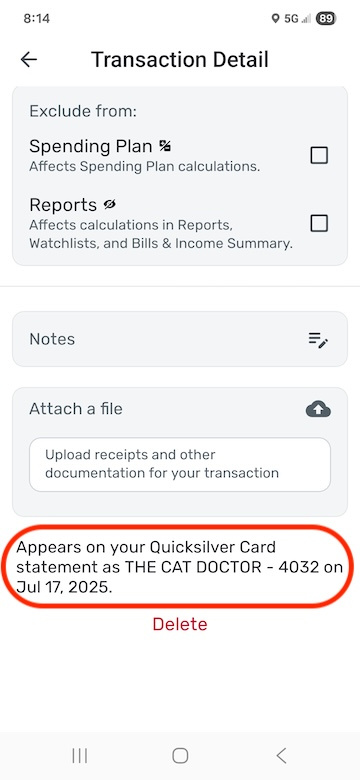
As for the non-descriptive payees, please add your vote and feedback here, as mentioned above:
Thank you!
-Coach Natalie
0