FDP-103 error on Ascensus

Recently Simplifi stopped syncing with Ascensus - RPLink (ascensus.com), prompting me to re sign-in, which did not work to reconnect it and returned an FDP-103 error. The credentials were confirmed as correct on the actual Ascensus website.
Comments
-
@sajsterptl, thanks for posting to the Community!
I was able to confirm the FDP-103 error when viewing your connection attempts from our end. To clarify, you had this account successfully connected in the past, correct? If so, at what point did the FDP-103 error begin?
The first thing I'd recommend doing is establishing a completely fresh connection with the bank to see if doing so clears up the error:
- Make all of the accounts with this bank manual by following the steps here.
- Once you see the account(s) listed in the Manual Accounts section under Settings > Accounts, go back through the Add Account flow to reconnect to the bank.
- If the connection is successful, carefully link the account(s) found to your existing Quicken Simplifi account(s) by following the steps here.
If the FDP-103 error persists after doing so, please thoroughly follow these troubleshooting steps:
- Verify the bank selected is the correct instance– You may see several different instances of your bank; check to see if you’re using the correct one.
- Verify that your login information is correct – Type your password/PIN into a text application to ensure you don’t have any typographical errors. Then, copy and paste your login information into Quicken Simplifi to ensure accuracy.
- Verify your login at the bank’s website – Try to sign in to your bank’s website using the same login credentials to ensure you've not locked yourself out of the account and that the credentials are still valid.
- Check for an app-specific password – Some banks require users to use a specific app password when connecting to a third party. Check with your bank to see if you need to use an app-specific password.
- Update your credentials – Try temporarily updating your password at your bank's website and then try again to connect in Quicken Simplifi. We recommend NOT using the following special characters: & < > / \.
Let us know how it goes!
-Coach Natalie
0 -
I'm also now getting Ascensus FDP-103 error. It used to work, but stopped about 4 days ago, prompting me to re-enter login credentials. But after entering credentials, I get error: "To connect to Ascensus version of Vanguard Plans, you must re-enter your credentials. If that does not work, try entering them on the website at Ascensus version of Vanguard Plans to ensure they are correct. Care Code: FDP-103"
I AM able to successfully sign in on the website.
I already have tried making the existing account manual and then re-adding new account to link. When using either the "Ascensus - RPLink" or "Ascensus version of Vanguard Plans" (both www.ascensus.com) options, it accepts my credentials, and even asks for x-digits of my social security # to verify—suggesting it recognizes the credentials—but then it continues to return the FDP-103 error.
0 -
@ogl, thanks for letting us know!
To clarify, which specific Ascensus bank option were you connected to prior in Quicken Simplifi? If we end up escalating the FDP-103 error, the one you were successfully connected to is the one we'd want to use.
Also, did you thoroughly follow all of the troubleshooting steps provided above? If not, please do so, including temporarily changing your online banking password and avoiding the special characters.
- Verify that your login information is correct – Type your password/PIN into a text application to ensure you don’t have any typographical errors. Then, copy and paste your login information into Quicken Simplifi to ensure accuracy.
- Verify your login at the bank’s website – Try to sign in to your bank’s website using the same login credentials to ensure you've not locked yourself out of the account and that the credentials are still valid.
- Check for an app-specific password – Some banks require users to use a specific app password when connecting to a third party. Check with your bank to see if you need to use an app-specific password.
- Update your credentials – Try temporarily updating your password at your bank's website and then try again to connect in Quicken Simplifi. We recommend NOT using the following special characters: & < > / \.
Let us know!
-Coach Natalie
0 -
I'm not sure how to check which Ascensus bank option I originally had linked, which was updating successfully until last week. Is there a place I can see that in Simplifi settings?
I have NOT tried step (4) — change password— yet. Will do.
0 -
@ogl, thanks for the reply!
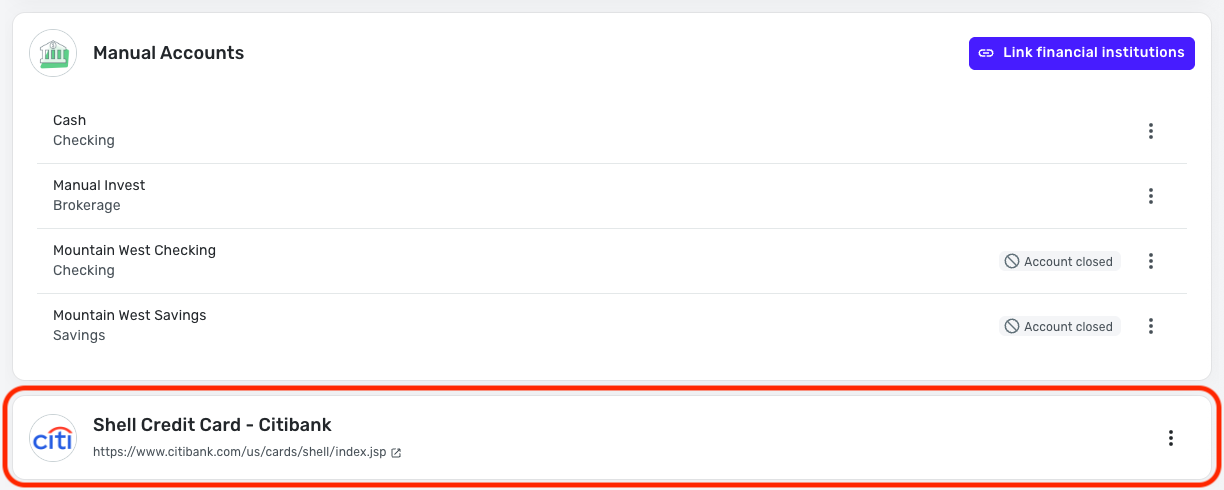
If the account is currently connected, even if it's in an error state, you can determine the financial institution it's connected to under Settings > Accounts:

Since you mentioned that you made the account manual, though, you likely won't be able to tell this way, as the account will be in the Manual Accounts section. However, sometimes disconnected financial institutions will show below the Manual Accounts section, so this may be the best place for you to look.
Let us know how everything goes!
-Coach Natalie
0 -
Ascensus as updated their website. The new i401K (formerly Vanguard) participant login page is:
"https://secure.ascensus.com/login/participant"
1 -
@ogl, thanks for the info!
That may be impacting the situation, but we would need to stick to the regular troubleshooting and data gathering to get the issue escalated as a general. Were you able to confirm which Ascensus option you were successfully connected to prior, as well as perform the password change?
Let us know!
-Coach Natalie
0 -
I am getting the same error - my ascensus account no longer will update. The credentials are verified and will log me into their website.
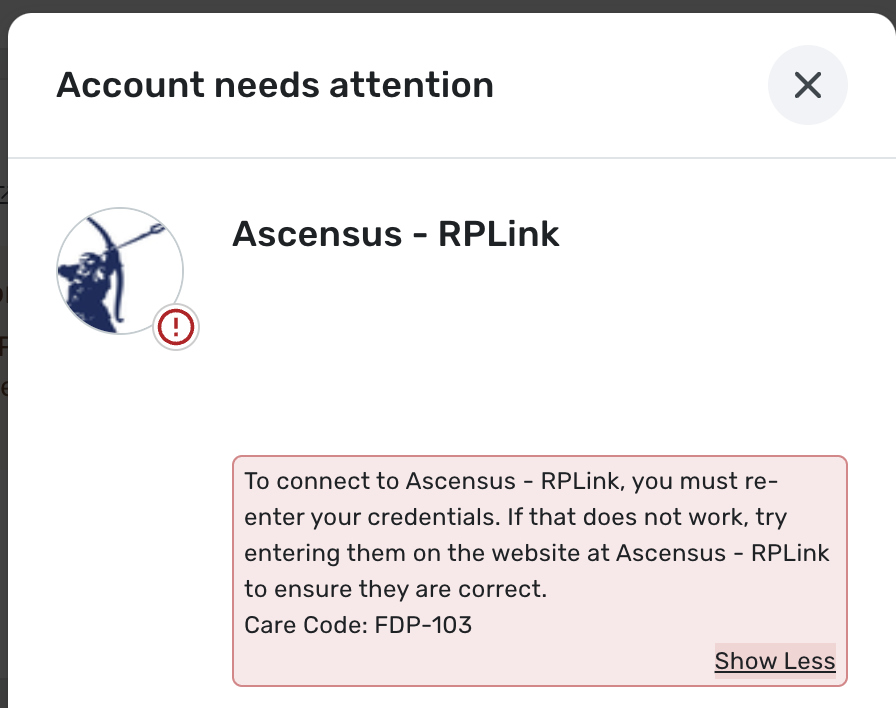
To connect to Ascensus - RPLink, you must re-enter your credentials. If that does not work, try entering them on the website at Ascensus - RPLink to ensure they are correct.
Care Code: FDP-1031 -
@fmandjp, thanks for joining the discussion!
To begin troubleshooting the FDP-103 error, please be sure to follow all of the steps outlined above, including establishing a fresh connection with the bank and temporarily changing your online banking password:
Let us know how it goes!
-Coach Natalie
0 -
Hi! I am also having the same challenges- when I log into ascensus to their page I have to use: myaccount.ascensus.com
I tried all the steps above in troubleshooting also, and with no success! Ascensus did not supply or document needing an app password either.
It does not allow me to remove phone number for security (mfa) but I did check that I selected trust my computer/and browser - for future logins (thinking that was stopping me) but I have not had that issue in the past with quicken products….. and nothing has changed on ascensus side for 2 years….
1 -
@MStar, thanks for going through the steps and letting us know!
To clarify, have you ever had this account connected in Quicken Simplifi, or is this your first time attempting to add it? If the former, which Ascensus option were you connected to, as I see attempts for three different options when checking your connection events from our end?
The data we will need to escalate an FDP-103 error is as follows:
- If applicable, the name of the account(s), as it appears in Quicken Simplifi.
- The name of the account(s), as it appears on the bank's website.
- Has there been any recent changes made to the bank's website or its sign-in process?
- What is the exact URL you use to log in to your account on the bank's website?
- What type of account(s) are you attempting to connect in Quicken Simplifi?
- A screenshot of the Accounts Summary page from the bank's website that has a wide enough scope to show the full page URL. This is the landing page after signing in, and typically lists all accounts and balances. You will want to take this from a web browser and not a mobile browser, as well as redact any private info such as account numbers.
- The format of your password (DO NOT provide your actual password!). For example, "Quicken123$" would be coded as "Xxxxxxx###$", where a capital "X" indicates a capital letter, a lowercase "x" indicates a lowercase letter, and a "#" indicates numbers; the actual special characters used will need to be provided.
Feel free to DM this info to me for privacy. Please also submit your logs via the 'Send Feedback' option:
- Log in to the Quicken Simplifi Web App.
- Select Profile from the left-hand navigation bar.
- With the Profile menu open, hold down the Option key for Mac or the Alt key for Windows, and then click Send Feedback.
- Leave all boxes checked, add a brief description of the issue, and then click Send.
We look forward to hearing back from you!
-Coach Natalie
0 -
Natalie, I can not see which original Ascensus connection option I used. After converting it to a manual account, that no longer shows up. I have also tried changing password. It did not solve the problem. When I try to add new Ascensus linked account in Simplifi, it continues to ask for login info, accepts that and then asks security question (eg, SS# or date of birth), and THEN gives an FDP-103 error.
Please escalate the Ascensus connection issue.
Thanks
1 -
My connection to Ascensus just broke today. This is the latest in a whack-a-mole of broken connections in Simplifi.
Like the others above, I receive an FDP-103 error when I re-entered my credentials, which are correct.
Ascensus recently updated their website login page to secure.ascensus.com/login/participant, though I don't know if that affects anything on Simplifi's end.
0 -
Hello everyone,
I found that this issue has already been escalated from our end, and is a known issue with our service provider. We have created an Alert for you all to follow for updates:
@MStar, you may disregard my latest request for information and follow the Alert as well.
We appreciate everyone's patience as this issue is worked on!
-Coach Natalie
0 -
I am following up on the issue with Ascensus. The alert was opened three weeks ago, but there hasn't been any reported progress.
0 -
Thank you for the update. I’m getting the same error as we and have bookmarked the alert. Hoping for resolution soon!
1 -
There hasn't been any substantive update since this alert was opened on June 26. I hate to mention every time there is a connectivity issue (and they are frequent), but we are paying customers and are entitled to substantive information on what is actually being done to fix problems. What is the ETA on fixing this?
1 -
@samsonite I couldn't agree more. Would also like better communication from this team and some actual ETA's on fixes or current progress.
1 -
@Coach Natalie - can you send us an update on this? I have tried to log in yet again today and received the same error message that started this thread on May 27 (almost three months ago). If I can't track my retirement account on Simplifi, I just do not see any use case for Simplifi given the repeated and longstanding connection problems for major financial institutions (Vanguard, multiple credit cards).
I've also seen comments on other forums getting deleted when they provide even gentle complaints about the lack of responsiveness to customer issues. This is not the kind of customer care that I expect to pay for.
0 -
@samsonite, thanks for following up!
There is no update to provide on the ongoing issue at this time. As soon as we have any news to share, we will be sure to post it to the Alert. Please follow the Alert for updates so you receive those notices when they occur.
In the meantime, you can track the account manually to keep your records up-to-date. Our support article here goes over adding and editing holdings in a manual investment account:
Thank you for your continued patience as this issue is being worked on!
-Coach Natalie
0 -
Hi @Coach Natalie - I hope you can understand that just asking for our patience for months without providing any information on what is actually being done is not acceptable. I appreciate that the coaches do not have insight into what is being done, but we should be told that so that we can pursue information elsewhere or look into options other than Simplifi that better meet our needs.
What is Simplifi's refund policy when accounts do not update for months?
0 -
@samsonite, we definitely understand the frustration and wish there was more we could do.
As for our refund policy, Quicken Simplifi offers a 30-day money-back guarantee. If you'd like to request a refund within or outside of that time range, you would do so by contacting our Chat or Phone Support Team directly:
-Coach Natalie
0 -
I tried once again to connect to Ascensus and received this new error message twice:
"We are unable to connect to Ascensus - RPLink at this time.Care Code: not.found"
Quicken engineers have not fixed a connection to a major institution for three months (since this thread started). The only reason I continue to try to connect is that I paid for a year long subscription, but I have no reason to renew this product. A 30 day money-back guarantee only helps new customers, not existing customers who have already paid ahead for a nonfunctioning product.
0
