Invalid past due notifications

When billed amounts increase, the old amount shows up as past due, when the payment for the new amount seem to be treated as new bills.
Matching on searches could be improved. My search of T-Mobile did not find T-mobile. At the very least matching should be case insensitive. It would also be reasonable if it matched with or without the hyphen or other special characters.
Comments
-
Hello @Julia58,
Thank you for coming to the Community to share your feedback! To help troubleshoot, please provide more information. Are new reminders being automatically created, while old reminders then show as past due? If not, then what is happening? If possible, please provide screenshots of what you are seeing, with personal information redacted.
For your suggestion on searches, I recommend posting a separate discussion with more details. You may also want to take a look at existing feature requests, , to see if someone has already asked for the improvement you'd like to see. If nobody has requested it yet, then you may want to consider creating an Idea post to request it. For information on creating Idea posts, click here.
I look forward to your response!
-Coach Kristina
0 -
I'm not sure, but it sounds like you are downloading the payment transaction for the new amount and it is not being properly linked to the existing recurring reminder. Is that what is happening?
If so, you can try to link the new transaction to the reminder by opening the transaction to edit it and clicking on "Mark as Recurring." I know that sounds wrong, but when you do that one of the options presented is to "Link to existing bill or subscription."
For the future, you can also edit the reminder series and check the Match Criteria. You have a few different options there that may make matching in the future more likely:
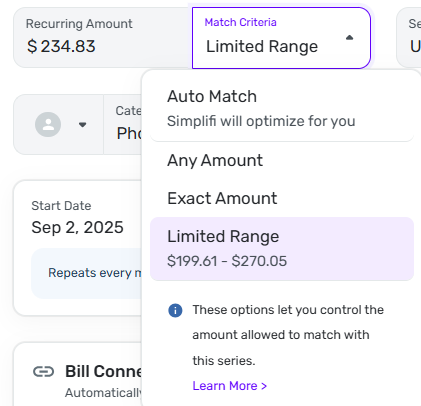
DryHeat
-Quicken Classic (1990-2020), CountAbout (2021-2024), Simplifi (2025-…)0 -
Interesting thought, @Flopbot.
I do occasionally have a recurring bill transaction that QS misses but these usually end up in Other Spending. When this happens, I do what @DryHeat points out and make the connection to the recurring series. After one or two manual "corrections," QS tends to learn and the missed matches stop happening.
I do seem to remember a few times where QS entered a recurring bill in the Spending Plan without making the match and leaving the existing recurring reminder in a past due state. But, again, the few times this has happened for whatever reason, I've done the same as when the actual expense lands in Othe Spending and manually make the connection.
Still, if this is affecting the Prompted Payer badge it's something going on behind the scenes.
Danny
Simplifi user since 01/22
”Budget: a mathematical confirmation of your suspicions.” ~A.A. Latimer0



