Exporting transactions from reports is missing the parent category for splits (edited)

In the new web update, both main and subcategories are downloading correctly (again). That's great, but all split transactions still only download the subcategory and not the main category.
[edited for formatting]
Comments
-
UPDATE: This message was originally posted in a thread entitled "Report export no longer showing categories" and it refers to what is happening when a Report is downloaded as a CSV. The problems with exporting Transactions from a Transaction Activity register are different. I describe those in my post below.
I'm seeing the same problem. Main categories are still missing on split transactions. Only the subcategory is included in the CSV download.
Also, the alert for this issue (see link to alert in @Coach Jon's message below) isn't available for bookmarking anymore. Clicking on the link for the alert in Coach Jon's message returns a "Permission Problem" page.
DryHeat
-Quicken Classic (1990-2020), CountAbout (2021-2024), Simplifi (2025-…)0 -
Hello @PK Millen,
Thanks for reaching out! Can you please provide a screenshot showing the split transactions issue in the CSV file so that we can work on getting this issue reported?
@DryHeat, The alert is now closed due to being resolved, which is why you run into that permissions error when trying to open it.
-Coach Jon
-Coach Jon
0 -
When I download transactions from a Transaction Activity register, split transactions do not show any category at all. They just have "—-Split—-" in the Category column. Like this:

DryHeat
-Quicken Classic (1990-2020), CountAbout (2021-2024), Simplifi (2025-…)0 -
Note: that the category column is showing the sub-category of Taxes. The field should contain:
Taxes:Federal Taxes
And that is the way it worked in the past.
0 -
As stated by multiple people, someone corrected part of the problem but not the entire issue.
0 -
Hello @PK Millen,
When I checked today, I noticed that my exported splits included categories with their subcategories. I wanted to verify if you were seeing the same thing.

Let us know!
-Coach Jon
-Coach Jon
0 -
What you see in the CSV files depends on where you are exporting from. Unfortunately, you don't say what you did to get the result you posted.
Here's what I get when I look at the same transaction exported as CSV from different parts of QBP. (All images are of the same transaction, which has one income split and one expense split.)
Transaction Activity list export: The transaction shows no categories at all, just the word "Split"

The above transaction is actually split into two categories, but neither shows up in the CSV export.
Income Report export: The income split shows up with the subcategory only, not the main category

The subcategory shown in the above image, "… Income," is a subcategory of "Personal Income."
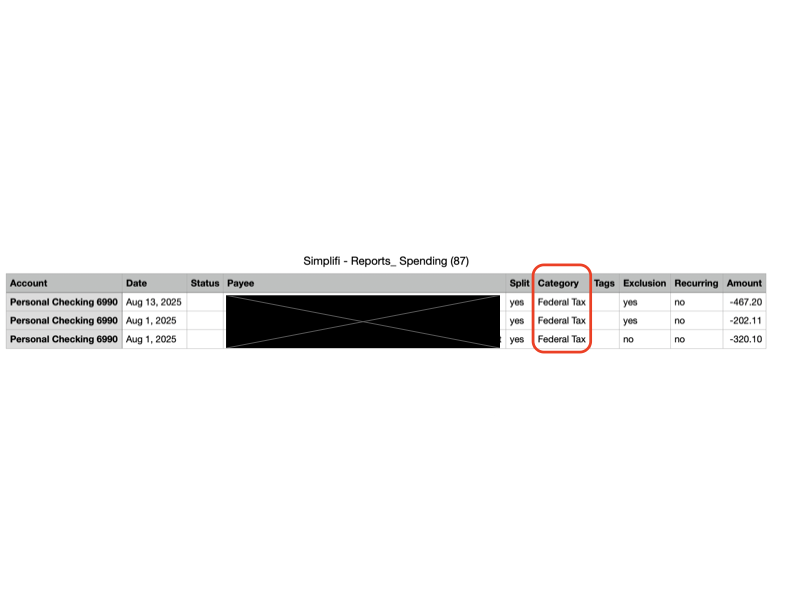
Spending Report export: The expense split shows up with the subcategory only, not the main category

The subcategory shown in the above image, "Federal Withholding Tax," is a subcategory of "Taxes."
So I'm not seeing what you are seeing. Maybe you are exporting from a different part of the program. Can you tell me how you got the exported file that you showed? That way I can check to see if it works the same for me.
DryHeat
-Quicken Classic (1990-2020), CountAbout (2021-2024), Simplifi (2025-…)0 -
Hello @DryHeat,
Thanks for the reply. The results I posted were from exporting from Transaction Activity for an account. If you are just receiving the word Split in place of the actual splits, then it is indeed different from what I am seeing.
For the Income and Spending Reports, I am seeing what you see. The subcategory is showing instead of the main category, followed by the subcategory.
-Coach Jon
-Coach Jon
0 -
The results I posted were from exporting from Transaction Activity for an account. If you are just receiving the word Split in place of the actual splits, then it is indeed different from what I am seeing.
I'd like to figure out why we are seeing different things.
My current results look just like @PK Millen's for report exports. I don't know what PK Millen sees when exporting from Transaction Activity. FWIW, my Transaction Activity CSV files that I exported 4 months ago do look like what you posted. (My current version is 4.73.0, Early Access ON)
As I mentioned above, I am using QBP. Are you using QBP or QS? Could that be a difference?
(BTW, I get the same result whether I export from a single account's transaction activity list or from one of the higher level, combined lists — like "Banking." So that's not the difference.)
DryHeat
-Quicken Classic (1990-2020), CountAbout (2021-2024), Simplifi (2025-…)0 -
Hello @DryHeat,
Thanks for the reply. I am also using Quicken Business and Personal. I also tested in Quicken Simplifi and received the same results for Transaction Activity. If you sign out and back in or use another web browser, does the same issue occur for you when exporting Transaction Activity? I wonder if this may be an issue with the software used to open the CSV file after it is exported as well.
-Coach Jon
-Coach Jon
0 -
@Coach Jon — Good questions, but…
A different browser gives the same result.
I signed in on a different web browser (Edge instead of Chrome) and got the same result as before when exporting a CSV from an account's Transaction Activity list. What browser are you using?
The software is correctly interpreting the CSV file.
Here's how the relevant portion looks when I open the CSV file with Excel:

And here's how the raw CSV file looks when opened in a text editor:
"Aug 28, 2025",,XXXXXXXX Deposit,PERSONAL,"'--- Split ---",yes,,no,yes, XXXX.XX
As you can see, Excel's presentation of the contents of the CSV is correct.
Some questions:
1— I said earlier that I was using QBP version 4.73.0 with Early Access - ON. Are you doing the same?
2— Can you post the relevant portion of the raw CSV file that resulted in the image you shared earlier? I suspect that the difference in your file and mine is not the kind of thing that a browser or Excel could be responsible for. It seems much to intentional.
DryHeat
-Quicken Classic (1990-2020), CountAbout (2021-2024), Simplifi (2025-…)0 -
Hello @DryHeat,
Thank you for the reply. After testing, we came to the conclusion that the reason I was not able to reproduce what you are seeing is that I do not have the upcoming register enabled. Since you are only seeing "split" when exporting with the new register, and you are currently testing the new register, you will want to let Quicken Kirby know in the Quicken Simplifier Lounge post in regard to upcoming improvements to the transaction register.
-Coach Jon
-Coach Jon
0 -
Hi @Coach Jon
I informed Quicken Kirby of the issue with CSV exports from transaction activity registers (see link below).
I was not certain who should be pursuing the issue with CSVs from reports. I mentioned it to him, but it really doesn't seem related to the new transaction register. So I assume you will be following up on the report issue.
DryHeat
-Quicken Classic (1990-2020), CountAbout (2021-2024), Simplifi (2025-…)0 -
Hello @DryHeat,
Thanks for the follow-up. To clarify, the issue that we confirmed is with the new register is where split transactions export with just "split" for the category; I apologize for not being clearer about this yesterday. I see that you let Quicken Kirby know, which is excellent! For future reference, this is why we ask users to post about separate issues separately--to keep issues from becoming convoluted. At this juncture, we will await a response from @PK Millen to proceed with troubleshooting the issue they originally posted about.
-Coach Jon
-Coach Jon
0 -
I'm glad to hear that the issue with CSV reports exported from transaction registers is confirmed.
At this juncture, we will await a response from @PK Millen to proceed with troubleshooting the issue they originally posted about .
But just so my post confirming the other issue doesn't get lost, I reiterate that I see the same issue as @PK Millen when exporting CSV files from reports… i.e., for split transactions the CSV file contains the subcategory but not the main category. See my earlier post:
I will be on the road for a few days and may not be able to timely respond, so I wanted to make sure this was in the mix.
DryHeat
-Quicken Classic (1990-2020), CountAbout (2021-2024), Simplifi (2025-…)0 -
[removed]
The recent Web Release 4.73.0 didn't fully fix the "Exporting a CSV from Reports does not include Parent Categories for Subcategories" that you reported earlier.
I just exported a Report/Expenses that had 4304 transaction lines of data. 264 of those lines of data did not show the "Parent:Subcategory" properly in the "Category" column. They just showed the Subcategory. This prevents me from using Excel to further drill down on things as my pivot tables don't pick up the data groups correctly without the "Parent."
Please have your engineering team look at things and hit me up if they want to see the data.
Here is a small sample of what I am talking about - AZ Van Insurance showed up both properly and not properly. AZ Tips should have Parent "AZ Life"
Category
AZ Life:AZ Utilities
AZ Life:AZ Utilities
AZ Life:AZ Van Insurance
AZ Life:AZ Van Insurance
AZ Life:AZ Van Property Tax
AZ Life:AZ Van Service
AZ Tips
AZ Van Insurance
AZ Van Insurance
AZ Van Insurance
AZ Van Insurance
AZ Van Insurance
0 -
The work-around looks like you can access the data in Simplifi from the "Net Worth" page and download all the transactions you have ever done. This shows the correct "Parent:Subcategory in the export. But you then have to parse the data for the date range you want. Whereas, if the export from Reports was used, you would have already defined your date range.
0 -
@NavyGolf, thanks for reaching out to the Community!
I think we will need to see a larger scope of your export to determine if the items in question are part of split transactions. If so, this issue is being discussed in a different thread:
Let us know!
-Coach Natalie
0 -
Hello @DryHeat and @PK Millen,
Thanks for the response. We were able to reproduce the issue with split transactions not showing the parent category in the exported CSV file, and have reported it to our product team. We will be sure to provide status updates here as we receive them!
-Coach Jon
SIMPL-29183
-Coach Jon
0 -
Coach Natalie,
YES, that is exactly what is happening. Only the split transactions are messed up.
Reading thru the pasted Thread, Coach Jon has reproduced this same error and transferred to the Product Team, so hopefully we will get a resolution shortly.
Thanks for your help and direction. And thanks to PK Millen for seeing the connection.
1 -
Hello everyone!
Our product team was able to supply a fix for this issue that should be implemented with the Quicken Simplifi Web Version 4.76.0 release. Be sure to let us know if it is resolved for you when that version rolls around.
-Coach Jon
-Coach Jon
0 -
Hello everyone,
Quicken Simplifi Web Version 4.76.0 is now released. The fix should be implemented for this issue, so be sure to let us know if the issue persists for you.
-Coach Jon
-Coach Jon
0


