Payee - Can’t Find to Correct (edited)

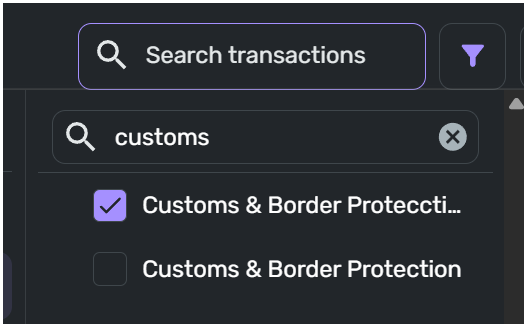
In my list of Payees, there is a Payee that is incorrect but cannot be found. The incorrect Payee is “Customs & Border Protecction” but it should be “Customs & Border Protection” – just one “c”.
When the Transactions is selected, then the filter for Payees is search for “customs” and the incorrect payee is displayed. When this payee is selected, the list of payees is “empty” and there is nothing. So, how can this payee be corrected?

Dick Davis
Wanting to Migrate from Quicken Classic Premier to Simplifi
Comments
-
that comes from one of your prior transactions.. search and replace of the incorrect entry should fix that.
—
Rob Wilkens
0 -
@RobWilk, thank you for the suggestion. When tried, I did not see the misspelled from a Payee.
Dick Davis
Wanting to Migrate from Quicken Classic Premier to Simplifi
0 -
Besides payees on existing transactions, there are a few other places payee suggestions come from, for example one place I know is recurring reminders. Perhaps someone else can suggest where-else to look.
—
Rob Wilkens
0 -
@RobwWilk, I have searched and walk through all the reminders as well. Nothing can be found. Coaches is this something can be see from your level?
Dick Davis
Wanting to Migrate from Quicken Classic Premier to Simplifi
0 -
Hello @Dick_Davis,
Thanks for reaching out! We would not be able to see your Payees from our side here in the community. The Payee you are seeing in your list was most likely downloaded from your financial institution at a point in the past and then corrected. I would make sure to remove all filters when searching, just to be sure. We also have this idea post requesting the ability to add a Payees list/section that you may be interested in voting for:
-Coach Jon
-Coach Jon
0

