Freedom Mortgage (Freedom Wholesale Mortgage) 103 error (edited)

The institution of Freedom Mortgage (freedommortgage.com) is found in the list of institutions for Add Account. It is displayed and can be selected. When selected, the “Quicken Simplifi uses Finicity, a Mastercard company, to link your accounts” is displayed with the option of “Next” to continue. The Freedom Mortgage Wholesale Division logo is displayed with the option to enter the Email Address and Password. Once these are entered, then the option to “submit” is displayed. Then the status will be “Validating identity…” and “Still working…” will be shown. After a few minutes, the error message screen appears and the ability to link the account is terminated. When searching for Freedom Mortgage, the searches and screens are not consistently working. Please test the various issues with this.
So, until this is resolved, then the only work around is to enter the account manually as well as treat all the transactions downloaded and associate with the account in a manual manner.


Dick Davis
Wanting to Migrate from Quicken Classic Premier to Simplifi
Comments
-
Hello @Dick_Davis,
Thanks for reaching out! Typically, users will receive error code 103 when an invalid username and password have been entered for the bank they are trying to connect with. I would try verifying the following steps to see if you can resolve the error this way:
- Verify the bank selected is the correct instance – You may see several different instances of your bank that you can add in the Add Account screen. Check to see if you’re using the correct one.
- Verify your login information is correct – Type your password/PIN into a text application to ensure you don’t have any typographical errors. Then, copy and paste your login information into Quicken Simplifi to ensure accuracy.
- Verify your login at the bank’s website – Try to sign in to your bank’s website using the same login credentials to ensure you've not locked yourself out of the account and the credentials are still valid.
- Check for an app-specific password – Some banks require users to use a specific app password when connecting to a third party. Check with your bank to see if you need to use an app-specific password.
- Update your credentials – Try temporarily updating your password on your bank's website and then try again to connect to Quicken Simplifi. We recommend NOT using the following special characters: & < > / \.
Let us know how this goes!
-Coach Jon
-Coach Jon
0 -
I have provided the results of the areas recommended as the results long with screen shots.
Verify the bank selected is the correct instance –
The only instance of the account is “freedommortgage.com” for the address taken from the selection in the account scree, I get the attached screen. (Image Screen from freedommortgage.com (Account Screen Simplifi))
The url that I use to login is and this then shows where the email address (login ID) and password can be entered. (image Screenshot 2025-06-09 222941) Once entered, the SMS Authentication is presented. (Image Screenshot 2025-06-09 223049) When the code has been received and entered, then the screen is presented. (image Screenshot 2025-06-09 223312)
Select View Account Details and the screen is presented. (Image Screenshot 2025-06-09 223642)
Verify your login information is correct –
I login with the same email and password that I enter when trying to add the account in Simplifi.
I do the past from NORD PASS in to the Simplifi Login area.
Verify your login at the bank’s website –
This where the difference is I get the , not the same URL as with Simplifi. So that is the difference that I see right off.
I am not locked out of the account
The credentials are valid.
Check for an app-specific password –
This is not the case with this website for Freedom Mortgage. The authentication is done by SMS Authentication.
Update your credentials –
Updated the password from the bank’s website, tried to long again and get the same message.
Did not use the characters of “&<>\/” in the new password. Used MMM-DD-YYYY#
Dick Davis
Wanting to Migrate from Quicken Classic Premier to Simplifi
0 -
Hello @Dick_Davis,
Thanks for the requested information, and for completing those troubleshooting steps! I noticed you mentioned getting your password from a third party password manager. If you type out the password instead, do you get the same error when trying to connect again? If that still doesn't work, please provide the following information:
- Have there been recent changes in your banking website? If there are changes, what are those?
- What type of accounts are you adding (banking, investment, debt, etc.)?
- Document the FORMAT of your password (NOT the actual password!). For example, the password of "Quicken123$" would be "Xxxxxxx###$." Document the specific special character(s) in the password (AGAIN, NOT your actual password!).
We will also need logs to be sent to us!
- Log into the Quicken Simplifi Web App.
- Select Profile from the left-hand navigation bar.
- With the Profile menu open, hold down the Option key for Mac or the Alt key for Windows, and then click Send Feedback.
- Leave all boxes checked, add a brief description of the issue, and then click Send.
-Coach Jon
-Coach Jon
0 -
I'm having the same exact issue. These steps are not helping either.
0 -
Hello @SO1409,
Thanks for letting us know. If you can provide the same information, this will help us with the investigation of this issue. First, try the steps below:
And then if these steps do not work, please provide the following information:
- Have there been recent changes in your banking website? If there are changes, what are those?
- What type of accounts are you adding (banking, investment, debt, etc.)?
- Document the FORMAT of your password (NOT the actual password!). For example, the password of "Quicken123$" would be "Xxxxxxx###$." Document the specific special character(s) in the password (AGAIN, NOT your actual password!).
- A screenshot of the Accounts Summary page from the bank's website that lists all accounts and balances (feel free to redact any personal info) and has a wide enough scope to show the page URL (this must be taken from a web browser and not a mobile browser).
-Coach Jon
-Coach Jon
0 -
Evening, Jon
- Have there been recent changes in your banking website? If there are changes, what are those?
RESPONSE: I have not seen any recent change to the banking website. Thus, I can’t provide that information if there were changes.
- What type of accounts are you adding (banking, investment, debt, etc.)?
RESPONSE: I am trying to add a mortgage account with Freedom Mortgage.
- Document the FORMAT of your password (NOT the actual password!). For example, the password of "Quicken123$" would be "Xxxxxxx###$." Document the specific special character(s) in the password (AGAIN, NOT your actual password!).
RESPONSE: The format for the password is”Xxx-##-#####” and this is the format that has been used with other programs such as Monarch Money and Empower. Neither of these programs had any issues with accessing and downloading the data from Freedom Mortgage.
- A screenshot of the Accounts Summary page from the bank's website that lists all accounts and balances (feel free to redact any personal info) and has a wide enough scope to show the page URL (this must be taken from a web browser and not a mobile browser).
RESPONSE: there are two screen shots, one from Edge and one from Chrome as you might see a difference.
Dick Davis
Wanting to Migrate from Quicken Classic Premier to Simplifi
0 -
The reference id for the files is
489514449162036225
[removed image]
Dick Davis
Wanting to Migrate from Quicken Classic Premier to Simplifi
0 -
I have copied the pasword from the Nord Pass, then pasted in to Notepad, and I get the same results.
Dick Davis
Wanting to Migrate from Quicken Classic Premier to Simplifi
0 -
same here. does not work with 2FA.
0 -
Hello @Dick_Davis,
Thank you for the requested information! We did get this issue reported to our product team and will be sure to reach out here when we have further updates on this issue.
-Coach Jon
CTP-13491
-Coach Jon
0 -
Coach Jon, thank you for the update and let me know if there is other information such as screenshots, logs, etc. that are needed to finalize this resolution.
Dick Davis
Wanting to Migrate from Quicken Classic Premier to Simplifi
1 -
Hello @Dick_Davis,
We now have an alert you can follow for updates here for this issue:
We will be sure to post status updates there as we receive new information going forward. Thank you for your patience!
-Coach Jon
-Coach Jon
0 -
Being new to the alerts. How can I follow or is this done automatically?
Dick Davis
Wanting to Migrate from Quicken Classic Premier to Simplifi
0 -
Hello @Dick_Davis,
No problem! If you would like to be automatically notified of any updates regarding this issue, please "bookmark" this Alert by clicking the bookmark ribbon in the upper right corner of the alert.
-Coach Jon
-Coach Jon
0 -
Hello @Dick_Davis,
I am following up with an update from our product team. They would like you to try reconnecting to Freedom Mortgage within Quicken Simplifi, and let us know if you are still receiving the error reported here. If you are, please let us know and send us updated logs.
- Log in to the Quicken Simplifi Web App.
- Select Profile from the left-hand navigation bar.
- With the Profile menu open, hold down the Option key for Mac or the Alt key for Windows, and then click Send Feedback.
- Leave all boxes checked, add a brief description of the issue, and then click Send.
-Coach Jon
-Coach Jon
0 -
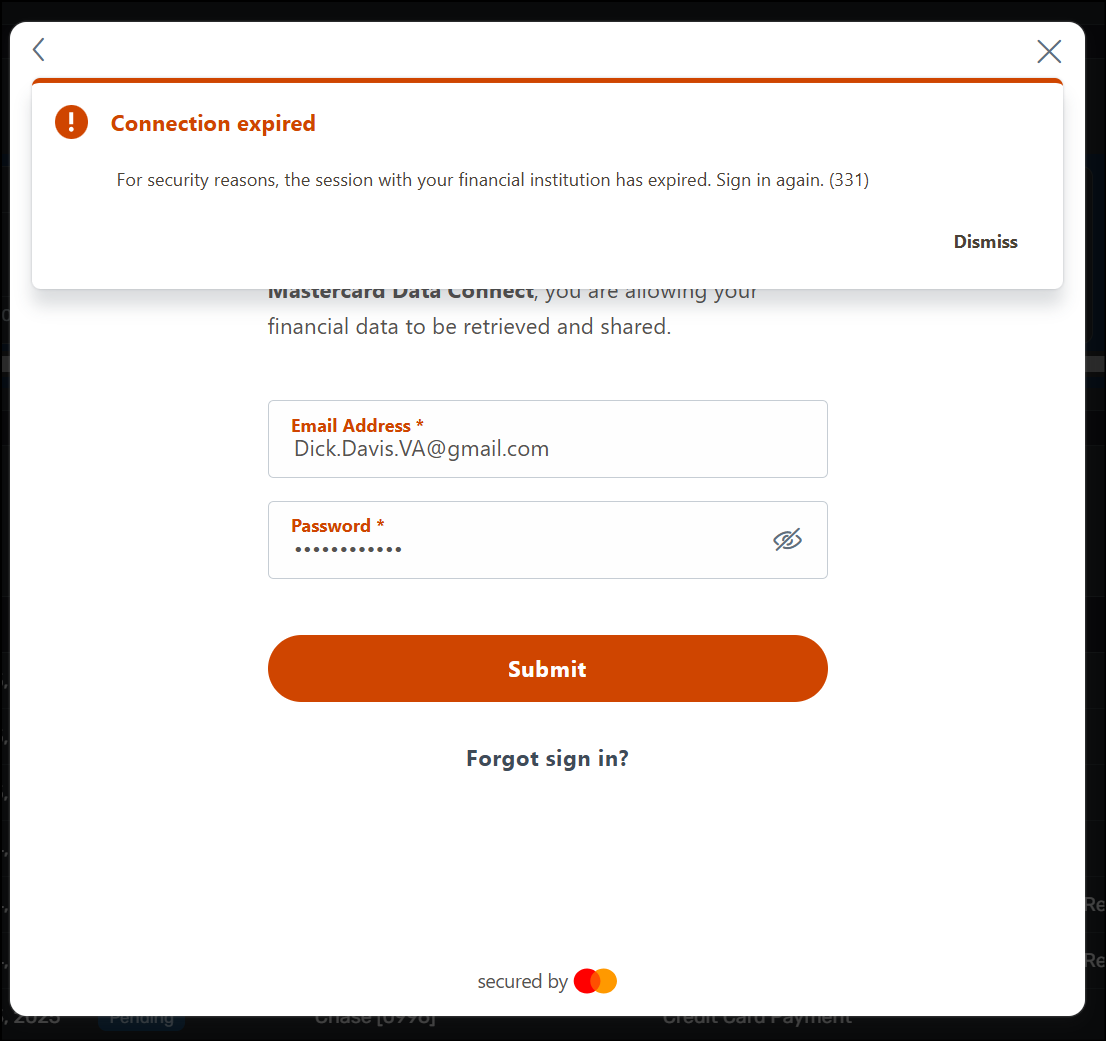
@Coach Jon, when trying to connect to Freedom Mortgage as requested, the error 131 is returned.
Dick Davis
Wanting to Migrate from Quicken Classic Premier to Simplifi
0 -
Hello @Dick_Davis,
Thanks for the reply! Error 331 generally appears when users take too long to answer a multifactor authentication question/prompt. Usually, you will have 5 minutes to answer the prompt. Can you please try connecting again to see if the 103 error is still occurring for you?
-Coach Jon
-Coach Jon
0 -
@Coach Jon, tried again as requested, no change with the error code of 331
Dick Davis
Wanting to Migrate from Quicken Classic Premier to Simplifi
0 -
Hello @Dick_Davis,
Please try connecting from another browser/incognito mode, as this error only appears when your session with the bank has expired. Let us know how this goes and if you receive the previous error you reported, the 103 error.
-Coach Jon
-Coach Jon
0 -
@Coach Jon, I have tried connecting from my work computer which is a different computer, web browser, etc. and the results are the same.
UPDATE: When I am back in the office on that computer, I will get new logs and send them. Also, should the logs be sent santized or unsantized?
Dick Davis
Wanting to Migrate from Quicken Classic Premier to Simplifi
0 -
Hello @Dick_Davis,
Thank you for the update. Can you please supply new logs so that we can report this development to our product team? Let us know once they have been sent!
- Log in to the Quicken Simplifi Web App.
- Select Profile from the left-hand navigation bar.
- With the Profile menu open, hold down the Option key for Mac or the Alt key for Windows, and then click Send Feedback.
- Leave all boxes checked, add a brief description of the issue, and then click Send.
-Coach Jon
-Coach Jon
0 -
Hello @Dick_Davis,
When sending the logs, you should select "Sanitize before sending". Let us know when that is done, please!
-Coach Jon
-Coach Jon
0 -
@Coach Jon, the logs have been sent as requested.
UPDATED 09/17: Coach Jon, I have received a schedule date (Oct 06 at 10:30am EST (7:30am PT)) to work with the developers on the issue with Delaware Life. Can you suggest to have the same to work with Freedom Mortgage?
Dick Davis
Wanting to Migrate from Quicken Classic Premier to Simplifi
0 -
Hello @Dick_Davis,
Thank you for the requested information. I reported this to our product team and will follow up when we have further updates!
-Coach Jon
-Coach Jon
0 -
Hello @Dick_Davis,
I am back with an update from our product team. Can you please verify your credentials by logging into the institution’s website and then trying to connect to Quicken Simplifi again? If the issue persists, please let us know and provide updated logs.
-Coach Jon
-Coach Jon
0 -
@Coach Jon, the log reference is 504163495512204289 and still receiving the error for Freedom Mortgage.
Dick Davis
Wanting to Migrate from Quicken Classic Premier to Simplifi
0 -
Hello @Dick_Davis,
Thank you for letting us know, and for providing updated logs! I sent this over to my product team and will follow up with any updates here.
-Coach Jon
-Coach Jon
0 -
Hello @Dick_Davis,
I am back with another update from our product team. They have confirmed with our service provider that the issue is still showing as invalid credentials. They would like you to please validate your credentials on the bank's website and then try connecting once again in Quicken Simplifi. If the issue persists, please change your password and do not include any special characters.
If you are still experiencing the error after that, please provide updated logs again, so that we can report back to our product team.
- Log in to the Quicken Simplifi Web App.
- Select Profile from the left-hand navigation bar.
- With the Profile menu open, hold down the Option key for Mac or the Alt key for Windows, and then click Send Feedback.
- Leave all boxes checked, add a brief description of the issue, and then click Send.
-Coach Jon
-Coach Jon
0 -
Afternoon, @Coach Jon .
Since there is the requirement by the site for one special character. Thus the action of changing the password without any special characters will not be achievable (see image attached). I was able to login in the site with the current password which has a special character, thus the further testing will be voided when the password is changed to not include special characters. Request the provider to provide the password that is sent through their logs, then we can clearly know what is being sent that is being requested.
Dick Davis
Wanting to Migrate from Quicken Classic Premier to Simplifi
0



