Incorrect balance in manual account

I have a manual account with an incorrect balance. The balance should be zero, but instead it is 39 cents (which is also the amount of the most recent transaction in that account). There are only 18 transactions in total in this account so it's easy to manually verify what the correct balance should be. I know there have been issues in the past in Simplifi with manual account balances being incorrect so I'm not sure if this is part of a more widespread issue or if it's just limited to this instance. I haven't noticed any other incorrect balances in any of my other manual accounts.
Comments
-
Hello @ejs,
Thanks for reaching out. For manual accounts, Quicken Simplifi calculates the balance based on the sum of all entered transactions. Since there are only 18 transactions, are you able to navigate to Transaction Activity for this account and select the "Select all visible transactions" checkbox? The sum of all the selected transactions should then display to the left of the "Search transactions" field. Does the number there match your account balance?
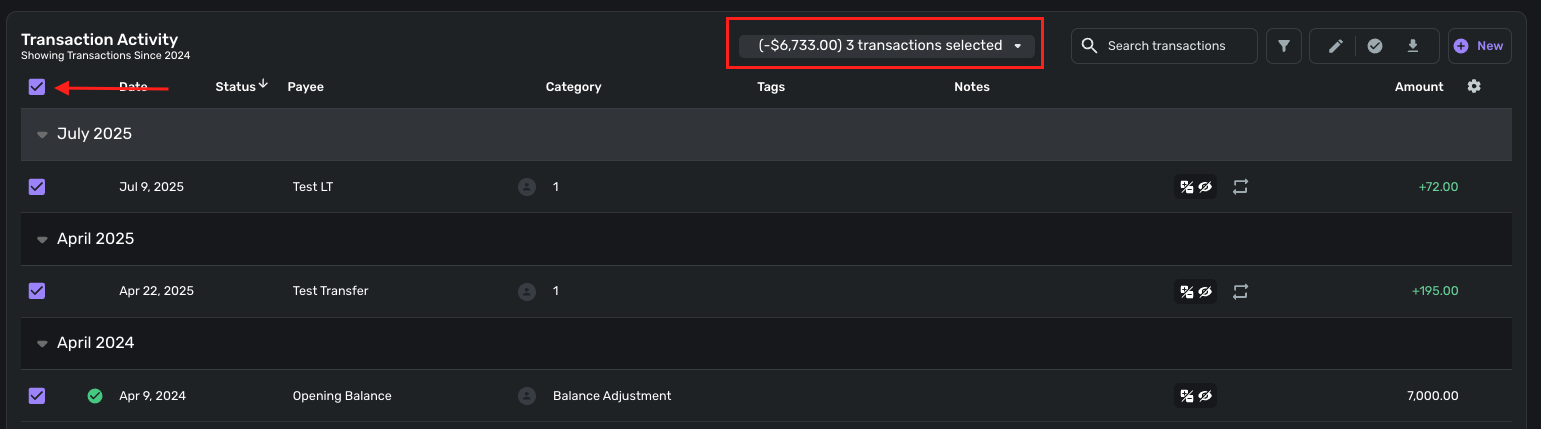
Let us know!
-Coach Jon
-Coach Jon
0 -
I have seen this behavior recently too, with my one open manual account, and i've seen it auto-correct the next day (perhaps after the next full sync which is every 4-6 hours). I know because i wind up creating an extra transaction to fix it, but then the next day i have to delete that extra transaction because the balance was over-corrected, to bring it back to normal.
—
Rob Wilkens
0 -
Yep, I've seen it too. The last time took more than 24 hours to resolve.
I have some theories why this happens to me. It often seems to be a post-dated transaction or one that is a transfer from a connected account. I am still pondering though.
Lately, I try to avoid linking the transfer until it has cleared both sides, and I eschew post-dated transactions except in connected accounts.
Steve
Quicken Simplifi (Safari & iOS) Since 2021
Quicken Classic (MacOS) Since 2009
MS Money (1991-2009) and Dollars & Sense (1987-1991)0 -
@Coach Natalie @Coach Jon —Please pass this along on the existing ticket - Sorry for @-ing you but I thought this info could help solve the problem.
—
TL;DR: The transfer transaction(s) is(are) being counted at its(their) original date, which added to a pre-calculated total manual account balance, and then counted again towards the balance in the manual account at the date it(they) was(were) reset to when synced on the connected account side. After the next total recalculation of balances it corrects. (plural version in parenthesis)
—The balance was on my manual credit card account was off by $23 and I noticed on the broken transactions (double counted) equalling the total it was off, 3 transactions totalling around $23 were re-dated after the other side cleared (the connected checking account side), and I suspect this is why it was off (in total two $8 payments and two $7 payments have today's date on them - $8+$8+$7 = $23 — those 3 transactions were re-dated on sync, the other $7 transaction was scheduled today. I suspect (know?) the automatic re-dating of transfer transactions on sync are what's breaking the manual account totals temporarily. I suspect the redating is causing the re-dated transactions on the manual side to be counted twice (original date and re-date).
This will eventually correct itself, likely the next time manual account balances are completely reclculated, which probably isn't after every single transaction change, but seems to be withing 24-48 hours.
—
Rob Wilkens
0 -
Hello everyone,
We now have an Alert for this issue that can be followed for updates:
The reason the balance corrects itself after some time is due to a job running each evening that recalculates manual account balances. Our team is researching why transactional changes aren't updating the balance immediately. Any news, including an expected resolution, will be posted to the Alert once available!
-Coach Natalie
1 -
The issue appears to be with transactions doubling, not that transactions aren't updating. It appears to happen (for me) after dates on the transactions have resynced to new dates from an account sync on the other, connected account (transaction dates update -after- a connected account syncs). Specifically, from when the manual transaction dates are replaced with synchronized posted dates. That's how it is for me, anyway, but I may be in the minority that manually enters at least some transactions.
-Rob
—
Rob Wilkens
0 -
To others in this topic: Is there even a chance that you might have manually entered the transfer transaction prior to it downloading and updating the date? I'm just trying to see if i'm the only one this would be happening this way to.
Edit : because if i am i may have to file a separate bug report as we may be seeing something different.
—
Rob Wilkens
0 -
The issue I had manually corrected at around 10:30am ET was corrected by Quicken Simplifi by at least 7:48pm ET, so I was able to delete the manual correction. I don't know exactly when the evening recalculation runs.
—
Rob Wilkens
0 -
Today, I the issue resolved by 4:30pm ET, even though around 10am I had to add a temporary fix transaction. This correction would seem to be before the "evening" recalculation would be done as it's not quite evening yet. Is there, by chance, a fix in place? Or at least more frequent recalculations?
I'm trying to determine whether it's worthwhile to put in temporary fixes, or just wait for the auto-correction.
—
Rob Wilkens
0 -
@RobWilk - not sure I followed what you are describing as the issue, but I did notice this error again for me and it was the case that the transaction amount appeared to be doubled (until it resolved itself the following day). This was for a manually entered transaction that I categorized as "Balance Adjustment."
0 -
If it was manually entered, double for maybe a day, and corrected - - this matches my issue.
-Simplifi totally recalculates the balances for manual accounts apparently around once/day.
-It looks (to me) like if the automatic-changing of a date (from downloading on the other side, for example, the checking account side is the connected side when i see it, where the manual side is the credit card paid) is causing:
(1) The original calculation from once/day includes the original dated transaction (the old date from manual entry)
(2) Now that the transaction has a new (non-manually-changed) date (updated to posted date), it is added/subtracted -again- on top of the daily calculation (without having been removed from that calculation prior to the recounting of it).
(3) The next time a total recalculation of manual account balances is done (once/day about), it corrects itself. (it is no longer double-counted)
I'm sorry if i'm not explaining this clear, it's probably not you, it's my ability to explain things I "understand" to others that may be the issue. I am a computer scientists by education and training, I think more in code, it's harder for me to speak plain english.
-Rob
—
Rob Wilkens
0 -
I think you are correct @RobWilk and we need the ability to force a re-summation of a manual account. Here is the suggestion, and it has 48 votes!
Steve
Quicken Simplifi (Safari & iOS) Since 2021
Quicken Classic (MacOS) Since 2009
MS Money (1991-2009) and Dollars & Sense (1987-1991)0 -
@RobWilk You are probably correct. I started one on re-summation last week I thought but it got merged into this or maybe I just thought I did. Should we start a new one?
Edit. Here's what Coach Natalie said when she turned it into a feature request:
"I have, however, turned this into an Idea post requesting the ability to manually update the balance of a manual account so other users can vote on it and our Product Team can review it. Please be sure to add your vote as well!"
Of course, what I would like is just be able to force a re-summation, but if I could put in the correct total, it would work out the same.
Steve
Quicken Simplifi (Safari & iOS) Since 2021
Quicken Classic (MacOS) Since 2009
MS Money (1991-2009) and Dollars & Sense (1987-1991)0 -
I went ahead and created a new feature request that would fix the problems we have been talking about in this conversation. Please upvote it.
Steve
Quicken Simplifi (Safari & iOS) Since 2021
Quicken Classic (MacOS) Since 2009
MS Money (1991-2009) and Dollars & Sense (1987-1991)1 -
Related: Values in Market Value graph for manual Other Asset account are date-shifted
The Market Values graph at the top of the page for a manual Other Asset account looks like a day by day representation of the value of the asset over the selected period. But it's not.
In reality, the graph doesn't count transactions based on the displayed transaction "Date." Instead, it treats the transaction as having happened on the date it was entered into Simplifi.
For example, today (Oct 4) I entered transactions dated August 31 and September 30 representing the gain in those two months. But the Market Value graph shows the increase in value from those two transactions as a single spike in value in October — on the date they were entered.
This is not a big deal for me, but it does skew the value graph and make it less accurate.
DryHeat
-Quicken Classic (1990-2020), CountAbout (2021-2024), Simplifi (2025-…)1




