Taxes Report Export/Print Display Suggestions (edited)

I just now started work through the Report – Taxes and have recommendations to make the PDF report. The screen display is very readable, clean and crisp to work from and with. While the PDF is not formatted in a readable manner that is of the same quality as the screen display and the export to Excel. The area that is marked in a red box are areas that can be lengthened as there is sufficient space for this. Also, by doing the lengthening, this will make the report more readable, presentation is better and will be better able to work with when the user is working review, validating, and checking that the categories have been marked for the various scheduled and lines within the schedules. Images are attached for a reference.
Dick Davis
Wanting to Migrate from Quicken Classic Premier to Simplifi
Comments
-
I thought there was already a suggestion to export reports to a PDF, but the closest I could find was this, which has ONLY 12 votes. I fear the suggestion is too specific about sharing PDFs instead of just exporting reports to PDF. If we can export, we can share.
Steve
Quicken Simplifi (Safari & iOS) Since 2021
Quicken Classic (MacOS) Since 2009
MS Money (1991-2009) and Dollars & Sense (1987-1991)0 -
@Dick_Davis, thanks for posting your suggestion to the Community!
I went to turn this into an Idea post, until I realized you are on the basic version of Quicken Simplifi and not QBP. I checked my basic account, and it looks like the Taxes Report has the Print and Export options that were recently added to QBP.
Since these options aren't supposed to be available in the basic version (as far as I'm aware, anyway), I have reached out to our product team to confirm. I will follow up here when I have an answer!
-Coach Natalie
1 -
@Coach Natalie Wow! I didn't realize PDF had been added to the Taxes report. And it's there for the Income and Expense Report as well. That's a great addition!
Hope it gets added for all reports. Now we can share those two with family members more easily.
Thanks!
PS My wife has access to the Simplifi file, but she never uses it. LOL
PPS I hope it's not a mistake, but even if it is, please let us keep it. 😀
Steve
Quicken Simplifi (Safari & iOS) Since 2021
Quicken Classic (MacOS) Since 2009
MS Money (1991-2009) and Dollars & Sense (1987-1991)1 -
I have confirmed that the Income & Expense and Taxes Reports can be printed/exported on the basic version of Quicken Simplifi. I have turned this back into an Idea post accordingly!
-Coach Natalie
1 -
@Coach Natalie, I understand and do appreciate your action.
Dick Davis
Wanting to Migrate from Quicken Classic Premier to Simplifi
1 -
Hi Dick_Davis, It's still in early access, meaning not everyone has it yet. We still don't feel like the PDF is as polished as we would like. Let us know your thoughts.
1 -
@Coach Marcus . The Income and Expense Report over all as a great layout and is easy to read and understand. Here are a few points to make it ever better. Using these points as style as a basis for all reports will have them to be uniform and able to be worked without issue.
- Under Income (bold) the next lines are idented by one character. This needs to be conducted for the categories, such as Employment under the Income (plain font) should be idented by one character. Then the category of “Employment” should be indented as well as the categories underneath. This format is for all on the Report.
- The Category should be like the category is established. All my categories carry the name of the category and then the Category Group. Example “Paycheck Dick (Income). This scheme also applies to the entire report.
- The categories on the screen are displayed correctly, but the Report does not carry this forward.
- The report should go to the end of the month rather than on the executed date. I understand the rationale but when working with the report, I would be working for the entire month. However, this might be a challenge as future transactions are being managed in Simplifi correctly but are handled as “reminders” no matter if the full transaction is entered.
- The graph should be able to be collapsed as on other reports. Thus, a consistency with how reports are shown and able to be worked with.
Dick Davis
Wanting to Migrate from Quicken Classic Premier to Simplifi
0 -
I voted for the first post in this thread, there are clearly some header fields that should span multiple columns.
—
Rob Wilkens
1 -
Printing reports is a great feature. Really need some basic formatting options though. For example, the ability to choose landscape or portrait. The Tax Report with my data would work better in landscape.
1 -
Dick, thanks for the detailed feedback. We have an entire team dedicated to reports, so lots of changes are coming. Stay tuned.
1 -
With Enhanced Reports, which are currently in Early Access and will soon be live for everyone, it appears that the Taxes Report now prints with the same layout as the screen display in Quicken Simplifi.
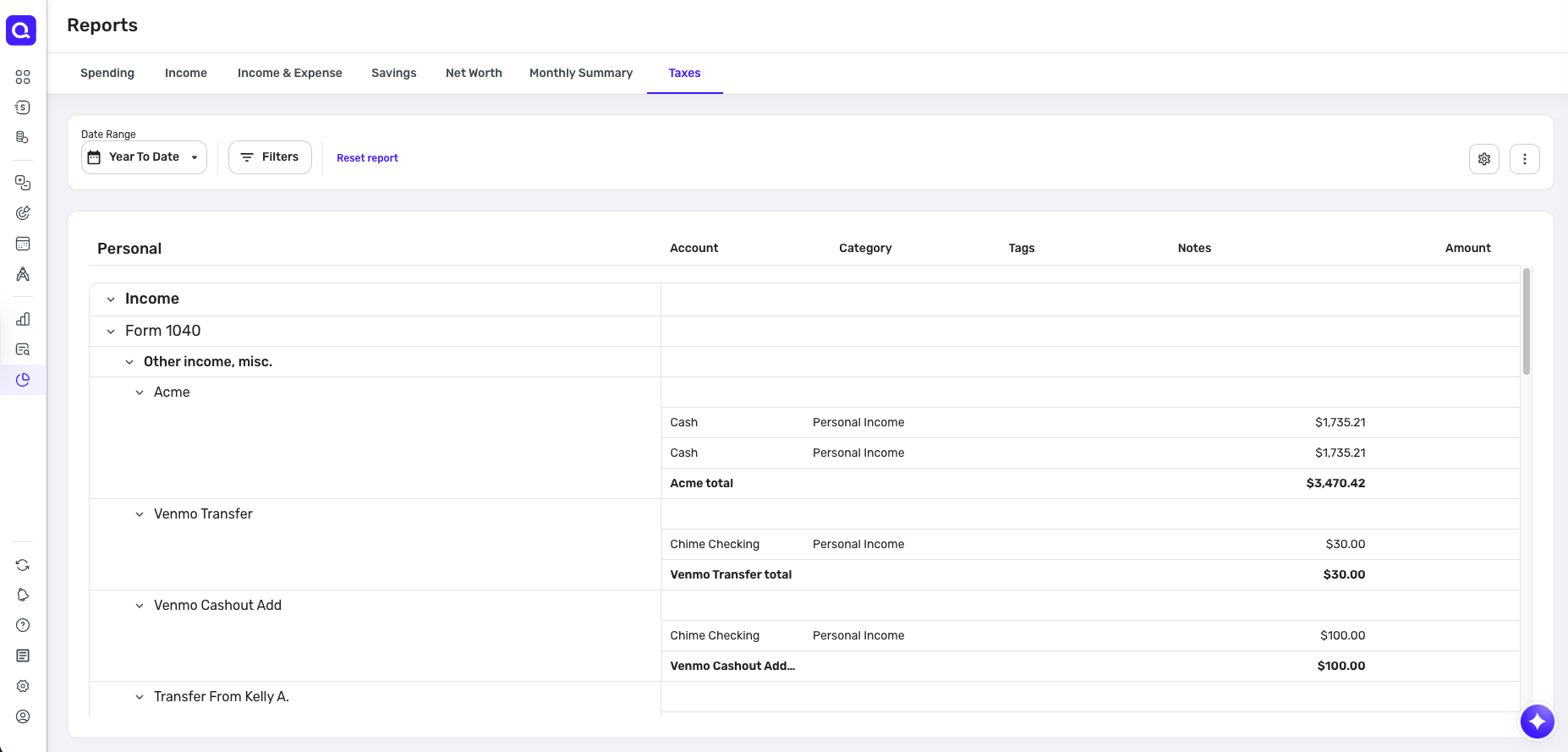
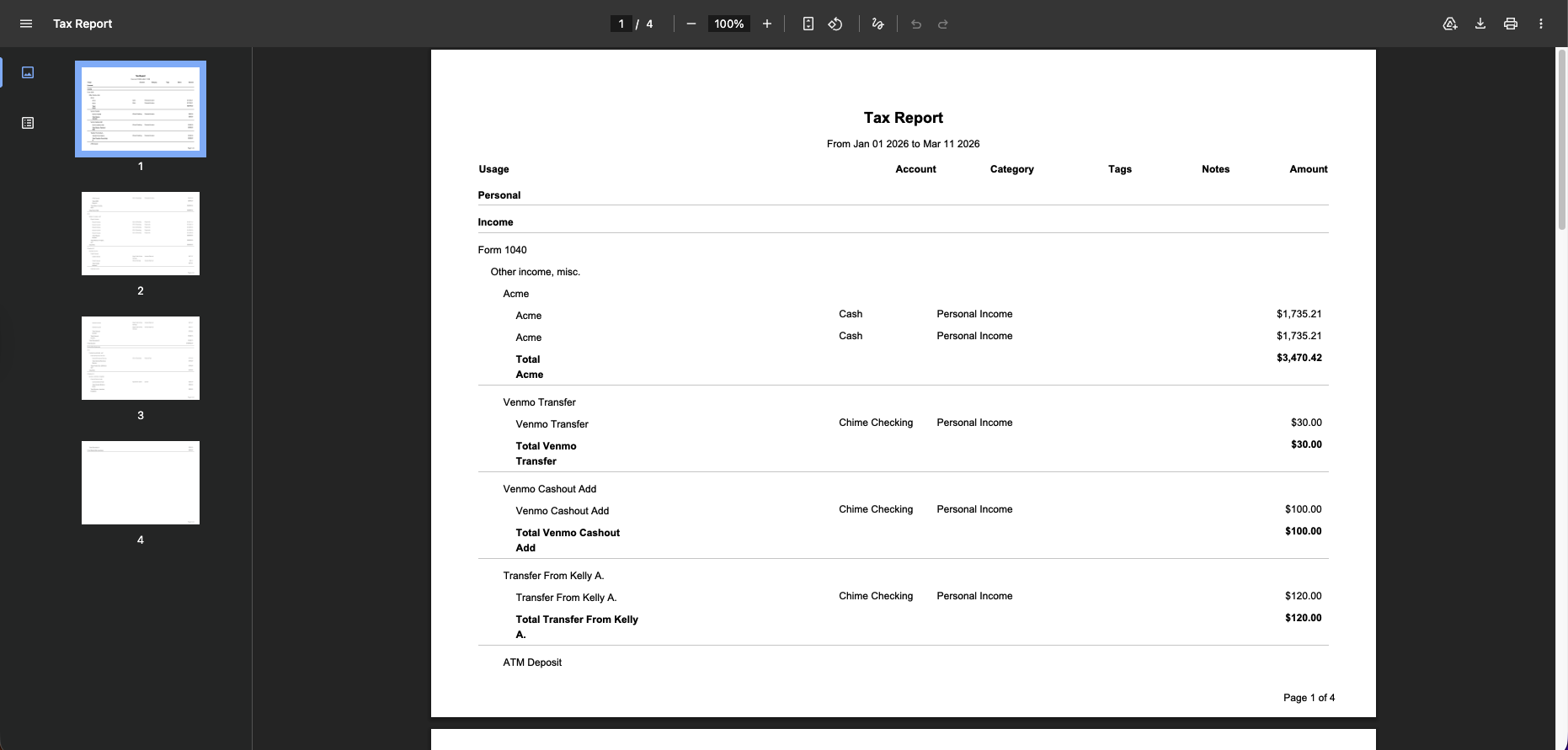
Thank you!
-Coach Natalie
0




