Quicken Simplifi - Stripe Workflow Question

Hi,
I've struggled with the Quicken Simplifi - Stripe workflow from the beginning for a variety of reasons. Some illustrated on previuos posts, here. I'm hoping a current problem I'm having will help me figure out how to work with the integration. Here's the situation:
- Created an invoice in QS on October 31st with total due amount of $875. Enabled payment through Stripe.
- Client paid that invoice on 11/6 and the payment hit my back account on 11/7.
- Client's payment was $875, minus fee of $5, then another separate Stripe fee of $1.50, so payout was $868.50.
- When attempting to link a payment from the Invoice screen, this +$868.50 transaction is not available to choose from.
So my question is, how do I apply the payment to an invoice if it's not showing up on the LInk To Transaction>Apply Payment window?
What makes this even more confusing is that yesterday, I had another Stripe payment hit my account. In this case, the invoice was for $625, which the client paid, and the payout $606.57, but QS matched the $606.57 transaction automatically to the correct invoice.
I suspect that there is something foundationally that I am doing wrong which accounts for these seemingly inconsistent results. My inclination is to either abandon this Stripe integration or go back to my old accounting system.
Best Answer
-
@GuerillaTime68, thanks for posting to the Community with this issue!
It is my understanding that when Stripe payments download, the amount of the transaction will be less than the invoice due to the fee. However, it should be a split transaction, where you can assign the split portion that is for the full amount to the invoice.
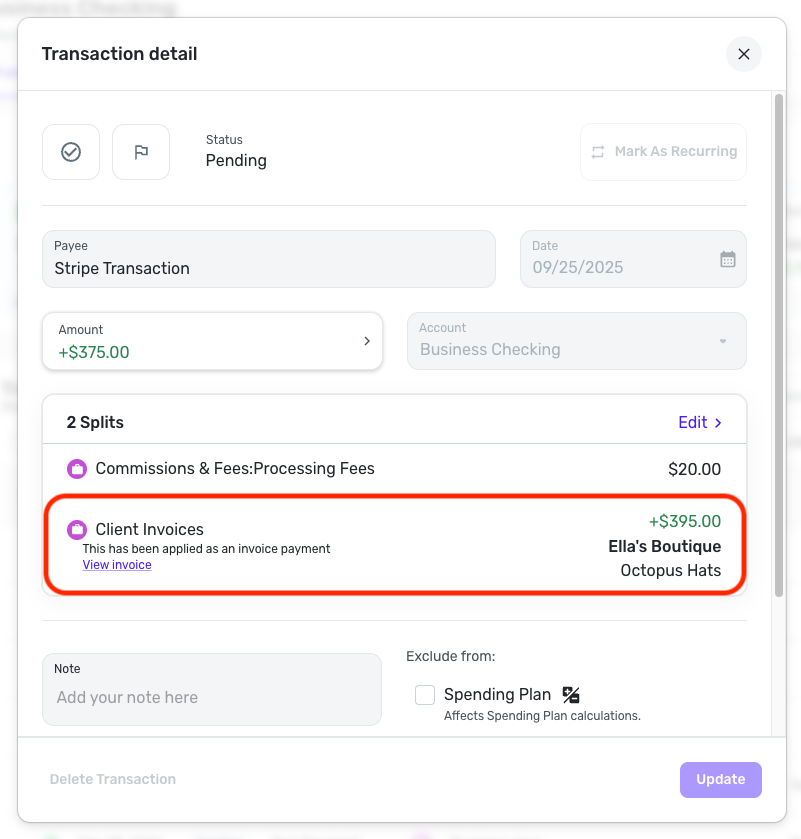
You should be able to assign the payment to an invoice directly from the transaction. Click the "Edit" button in the Splits part of the Transaction Detail view, and then you can use the 'Invoice payment' checkbox to do so:
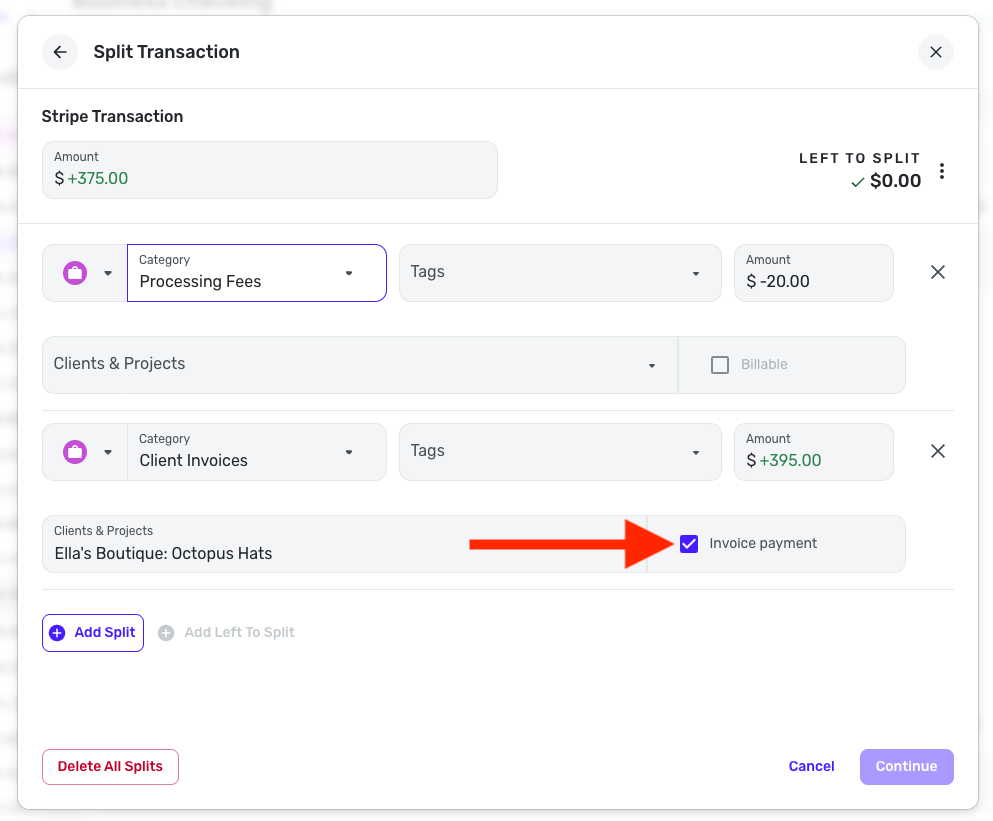
You can also uncheck this box to remove the transaction from being assigned as an invoice payment, such as the one you mentioned is incorrectly assigned.
Let us know if this works for you!
-Coach Natalie
0

Answers
-
Hi!
Thanks so much for the prompt reply! In the transaction I’ve referenced ($875/$868) did not capture the expense of the processing fee when it downloaded.
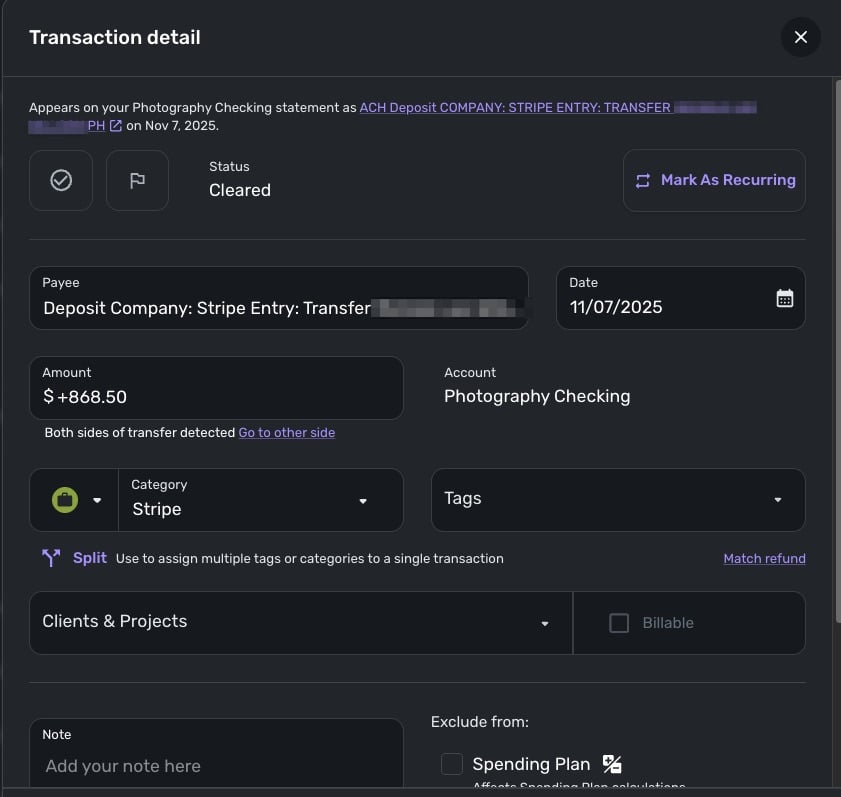
On the Transaction Detail window, I selected the Client:Project that the transaction was payment for. I then went in the Split window, added the missing split for the processing fee and selected the Invoice Payment box, but that doesn’t work.
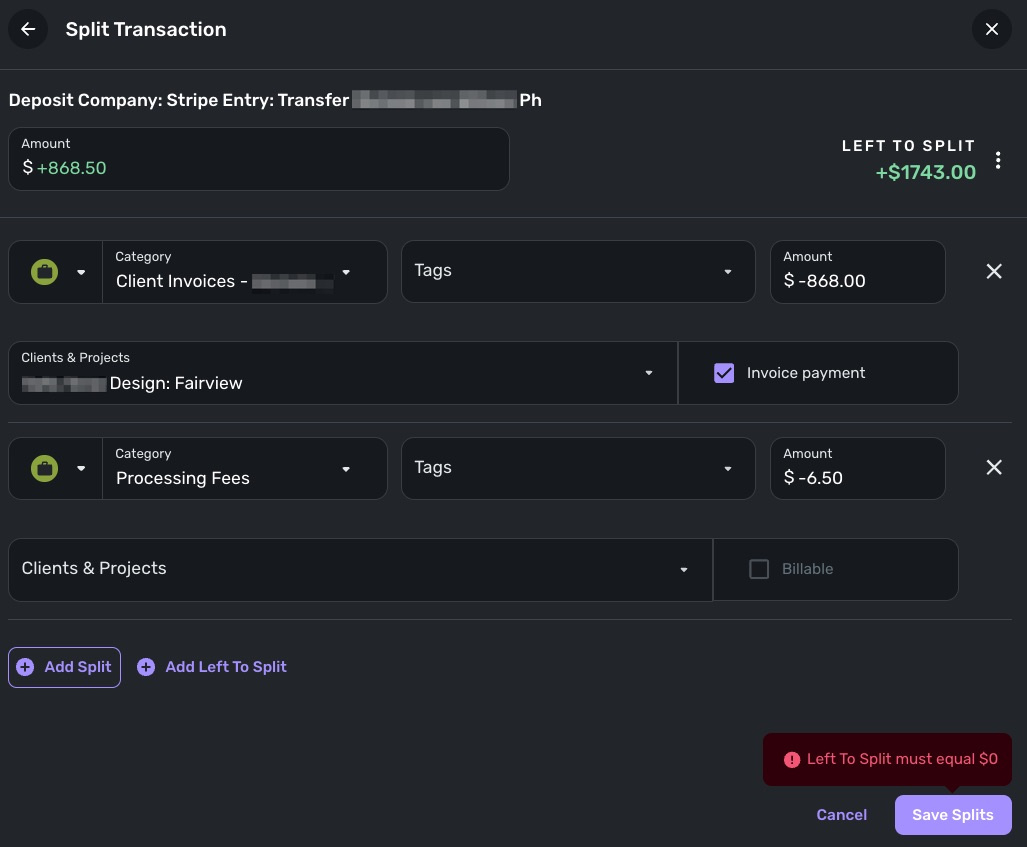
I have had other transactions work as expected, including one right before the $868.50 transaction we have been discussing. Here’s that transaction’s split:
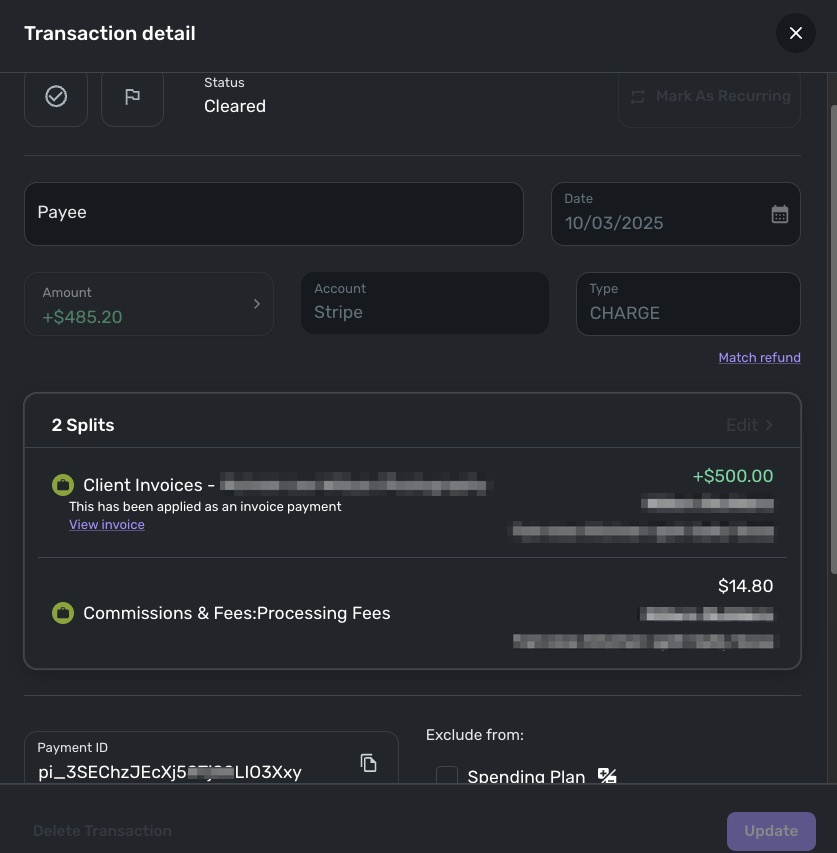
I made no changes to this. I simply matched the transaction to the invoice, which I think is how the system should work, right?
0 -
Hello @GuerillaTime68,
Thanks for the reply and screenshots! I am wondering if the transaction itself may have some kind of issue with it, and that is why it is not properly matching. Can you please try deleting the downloaded transaction and recreating it to see if you can then match the manually created transaction to the invoice?
This can be done directly from the Invoice itself by selecting Apply payment > Create Transaction.
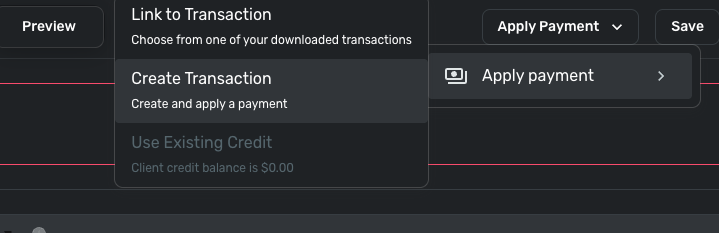
Let me know if that works!
-Coach Jon
-Coach Jon
0 -
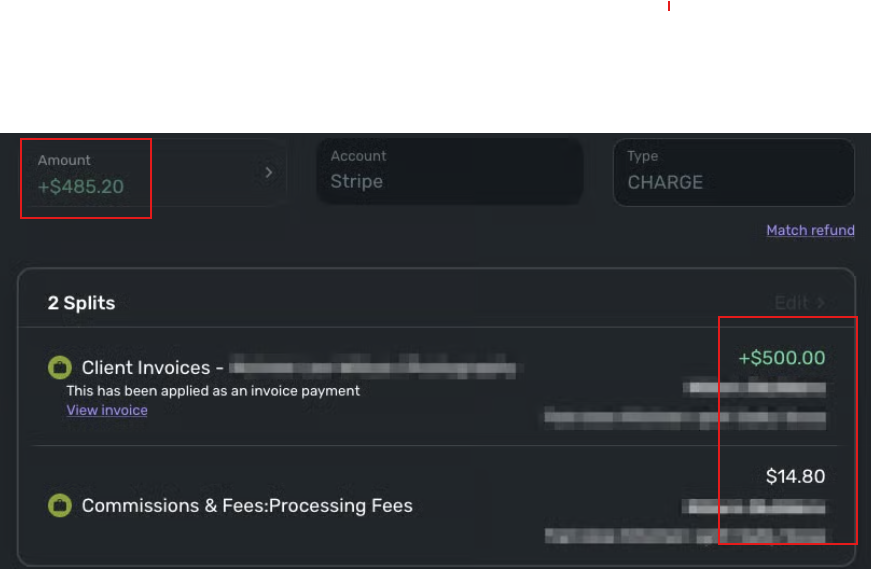
I notice that on the one that worked, the "Client Invoice" amount was a positive number (green, with a plus sign), which is what you would expect for an amount someone paid you. So you ended up with +$500.00 Client Invoices, -$14.80 "Commissions…", for a transaction amount of +$485.20. (see image)
While on the one that didn't work, the "Client Invoice" amount was a negative number (black, with a minus sign), which is what you would expect for an amount you paid to someone. So you ended up with -$868.00 "Client Invoices", -$6.50 "Processing Fees…", and a transaction Amount of +$868.50 — resulting in +$1743 "left to split." (see image)
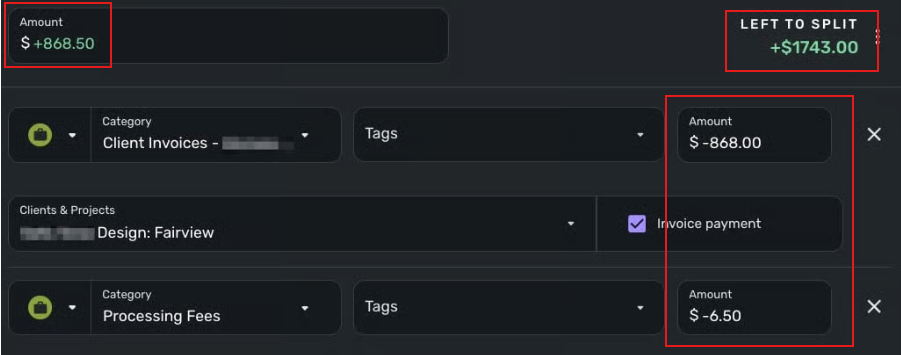
Try changing the Client Invoice amount to +$875 and leaving the Processing Fees at -$6.50. That should give you a transaction Amount of +$868.50 with $zero "Left to split."
Let me know if that works.
DryHeat
-Quicken Classic (1990-2020), CountAbout (2021-2024), Simplifi (2025-…)2 -
Thanks for weighing in, DryHeat! When I initially tried that, it would not take the + transaction. I just tried it right now, and it worked. Once I updated the transaction, I got the "You got paid" pop up window and the system asked if I wanted to apply it to the invoice. I clicked on "yes", and then checked the invoice and the invoice did not have a payment applied to it. I then went back to the transaction, to see if it would let me link to a transaction, and the menu item to link the transaction was not there. So, I then deleted the split to see if whatever action the system took when it asked me if I wanted to apply the payment. I saved it without the split, then recreated the split on the transaction. When I updated the transaction, I did not get the you've been paid message. And, I still can't link to the transaction from the invoice or link to the invoice from the transaction because the transaction does not come up as being able to be linked.
A quesiton for you @DryHeat and @Coach Jon / @Coach Natalie, with the inconsistencies I'm experiencing with the Stripe integration, should I not have any reservations about deleting downloaded transactions and recreate them manually? I've been attempting to make the integration work, thinking I must be doing something wrong, but I can't see any reason for one transaction working perfectly and payment being applied to the invoice, while another transaction goes sideways, like this one.0 -
Hello @GuerillaTime68,
Thanks for the update. Can you provide a screenshot of the invoice itself that you are trying to link the payment to, as well as the transaction that you edited/updated that was mentioned? Feel free to DM this information if you prefer.
-Coach Jon
-Coach Jon
0 -
Hi @GuerillaTime68,
I take it that means that adjusting the +/- symbols left you with a transaction with the correct Amount for "Client Invoices," the correct Amount for "Processing Fees," and the correct total Amount for the transaction as a whole. That's good.
As for the application of the payment to the invoice, I'm afraid I don't have anything to offer on that. Good luck.
DryHeat
-Quicken Classic (1990-2020), CountAbout (2021-2024), Simplifi (2025-…)0

