"Bank Balance" leads to omission of pending transactions from Cash Flow (edited)

PROBLEM: Any time you are viewing transactions using "Bank Balance", all of your cash flow projections disregard any pending transactions. However, the whole point of selecting "Bank Balance" is that the reported balance does not include pending transactions — and so, it would seem appropriate to credit/debit any pending transactions from the reported bank balance at the beginning of the Cash Flow.
EXAMPLE: Your bank balance is $5000. You have a pending debit of $4000. Under "Balance with Pending" your balance would show as $1000 at the beginning of your cash flow plot. However, under "Bank Balance", the $4000 pending debit disappears entirely — it is now reflected neither in the balance, nor in the cash flow projections — and so the end result is that your projections are all falsely inflated by $4000 from here forevermore.
This is a major problem and can lead to huge cash flow errors. This applies both to Recurring/Reminder transactions, pending transactions, and also A2A transfers.
Recommend fixing this ASAP!!!
Comments
-
However, the whole point of selecting "Bank Balance" is that the reported balance does not include pending transactions
If by "reported balance" you mean the balance the bank is reporting to Simplifi, then I think you may have the meaning of the options reversed. (Let me know if I misunderstood your post. It happens.)
The purpose of the "Balance Type" option is to allow you to correct the reported balance depending on whether your bank includes pending transactions in that balance.
- If the bank does not include pending transactions, use "Balance with Pending."
- If the bank does include pending transactions, use "Bank Balance (Default)."
Note: I posted what I hope is a clear explanation of how the Balance Types work here and one of the coaches confirmed that it is the correct understanding.
DryHeat
-Quicken Classic (1990-2020), CountAbout (2021-2024), Simplifi (2025-…)0 -
Sorry ... my verbiage may have been confusing, because there's what the bank is actually reporting, and what you select for each account in Simplifi, and what you select to be displayed.
To make this more clear, here are the steps to reproduce:
0 -
Hello @bob303727,
Thanks for the reply. I fear that it may have been incomplete, however. Can you let us know what you were trying to convey?
-Coach Jon
-Coach Jon
0 -
[[ @Coach Jon apologies for prior incomplete comment, unable to edit/delete in two browsers ]]
Sorry ... my verbiage may have been confusing, because there's (A) what the bank is actually reporting, (B) what you select for each account in Simplifi, and (C) what you select to be displayed in the global setting.
Furthermore, there are two types of pending transactions: (1) those reflected in Simplifi that are not yet reflected in the bank [e.g., manually entered Pending transactions, recurring transactions, and Simplifi-initiated A2A transfers]; and, (2) those reflected in the bank's records someway/somehow that are not yet settled. Simplifi should handle both types appropriately.
With that background, the exact problem I am reporting is:
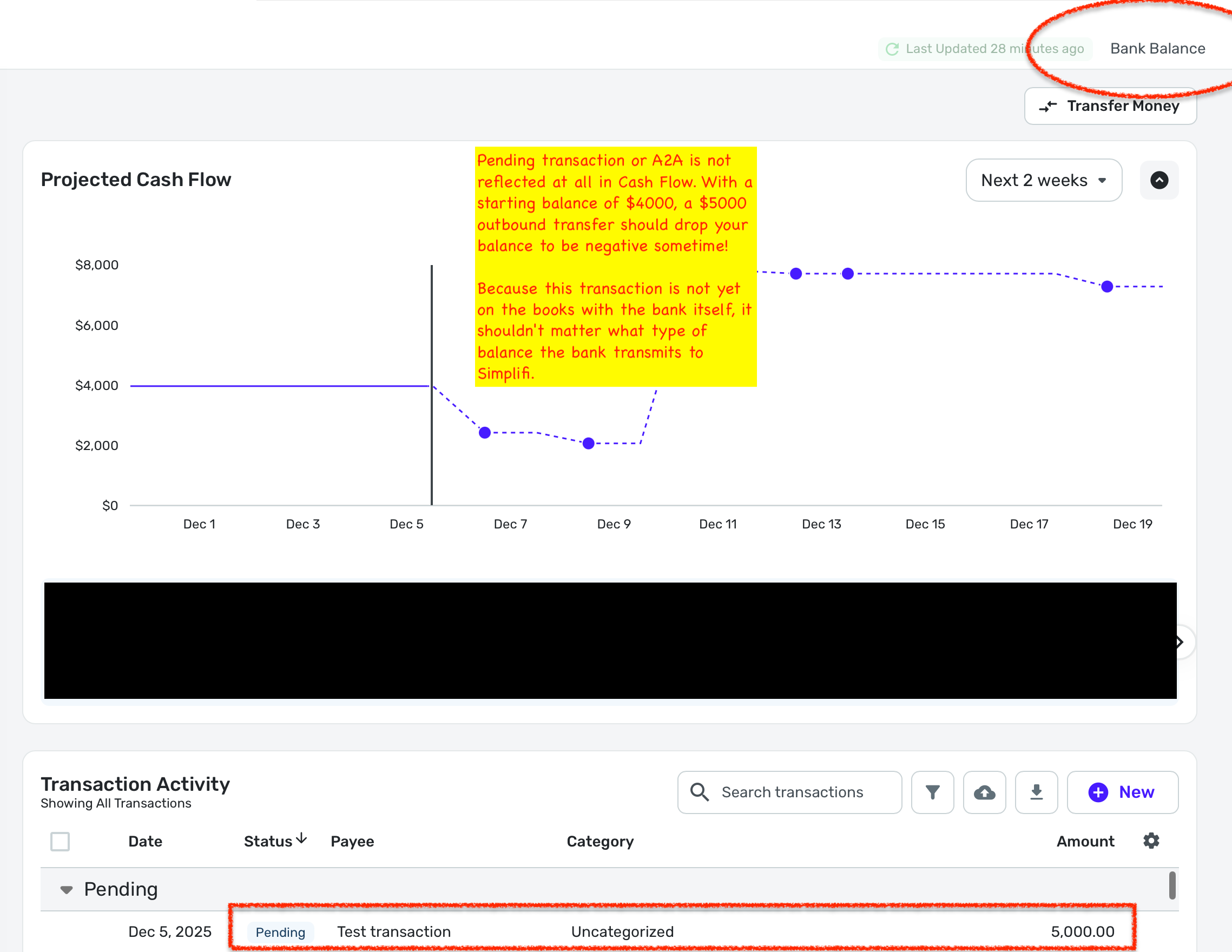
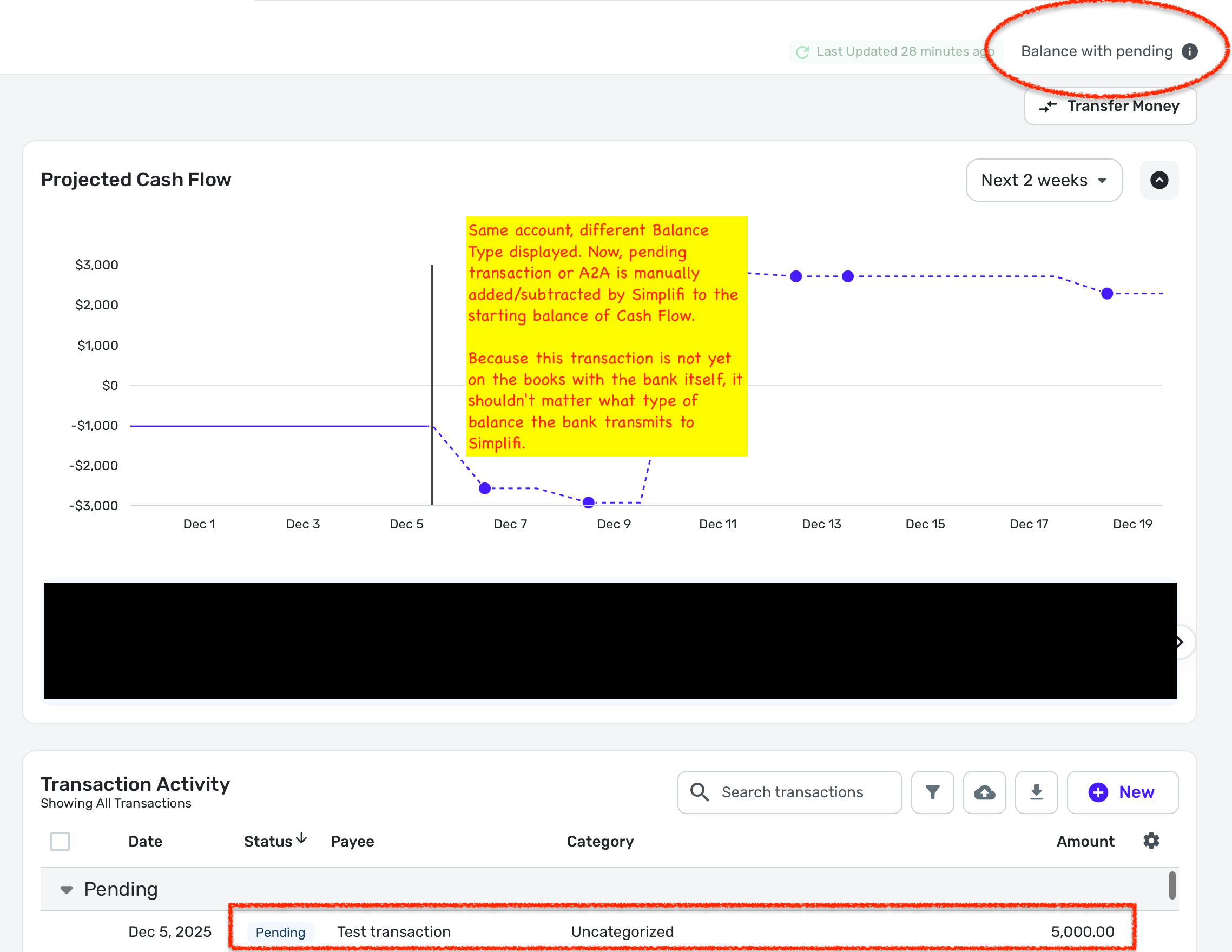
PROBLEM: User-created Pending entries in Simplifi -- either manually-created Pending transactions (that have not yet sync'd up with a statement line from the bank), or Simplifi-initiated A2A transfers -- are only reflected in Cash Flow when the Balance Type is set to "Balance with Pending", regardless of what the bank is actually reporting.
STEPS TO REPRODUCE:
- On Transactions page of a bank account, select "Balance Type" of "Bank Balance"
- a. Create an A2A transfer of $5000 to another account
– or –
b. Create a manual Pending transaction of $5000
EXPECTED OUTCOME: Under displayed balance type of "Bank Balance," the displayed account balance should stay unchanged, but the $5000 pending A2A or expense should appear as a "dot" in the Cash Flow that causes the projected balance to drop by $5000.
ACTUAL OUTCOME: Under displayed balance type of "Bank Balance," the $5000 pending A2A or expense is never reflected anywhere in Cash Flow. You have to change the balance type to "Balance with Pending" in order to "see" it -- in which case, the Pending transaction is manually added/subtracted BY SIMPLIFI to the balance it received from the bank.
See these two screenshots. Regardless of what balance type the bank is reporting, one of these Cash Flows ought not to exist.
 0
0 - On Transactions page of a bank account, select "Balance Type" of "Bank Balance"
-
EXPECTED OUTCOME: Under displayed balance type of "Bank Balance," the displayed account balance should stay unchanged, but the $5000 pending A2A or expense should appear as a "dot" in the Cash Flow that causes the projected balance to drop by $5000.
Projected Cash Flow will not show past transactions, even pending ones, no matter what Balance Type you select. It starts with your current balance and then shows the effect of future transaction reminders only.
The Projected Cash Flow graph will only give the correct projection if the starting balance for the Cash Flow — which is the balance shown in Simplifi — accounts for all pending transactions. If your bank balance counts the pending transactions, that's good. Otherwise, you have to change the Balance Type to "Balance with Pending" so that Simplifi will do the work of applying those pending transactions to your bank balance.
(EDIT: In your right-hand image you have done that and it seems to be working correctly.)
DryHeat
-Quicken Classic (1990-2020), CountAbout (2021-2024), Simplifi (2025-…)1 -
Hello @bob303727,
Thanks for the reply. When using Bank Balance, only downloaded transactions are considered when calculating the balances of your connected accounts. Manually entered transactions, even if marked as Cleared, will not affect those balances.
As for the Projected Cash Flow, at this time, it only accounts for Recurring Bill, Subscription, and Income Reminders, as well as future-dated transactions and expected Refunds. If the transaction you created is not dated in the future, as it appears not to be from the screenshot, it would not appear there. More information about using Projected Cash Flow in Quicken Simplifi can be found in our support Article here:
I hope this information helps!
-Coach Jon
-Coach Jon
0 -
Thank you both for the clarification!
Fundamentally, I think there's a mismatch between what the Cash Flow UI implies, what users expect of a tool called "Cash Flow", and how Cash Flow currently behaves. From a user's perspective, Cash Flow should reflect ALL known cash movements, not just recurring transactions & refunds.
As examples, user-entered pending debits—and, for that matter, Simplifi-initiated A2A transfers—all represent real changes in future cash, even if the bank hasn't posted it yet. Right now, these only appear if the displayed Balance Type is set to "Balance with Pending," which restricts Cash Flow accuracy to a viewing preference rather than to actual cash activity. For banks that report balances which already include "posted but pending" transactions, the "Balance with Pending" viewing preference isn't usable because it double-counts transactions. As such, Cash Flow becomes woefully inaccurate.
I understand this may be the intended behavior, but the design feels very counterintuitive for a feature called "Cash Flow." At minimum, the UI and documentation could clarify this; but ideally, Cash Flow should include all known pending activity regardless of the chosen balance display setting.
TL;DR: Cash Flow === "Given what I know is coming, what will my balance be?" If Simplifi can't answer that accurately unless you use a view setting that breaks certain accounts, then there is a design problem.
0 -
Hello @bob303727,
Thank you for the feedback. We will be sure to submit a request to have our documentation in our support article for Projected Cash Flow updated to reiterate what we talked about here regarding how Projected Cash Flow works with pending transactions and Balance Types.
You are also welcome to submit an idea post in regard to how you think Projected Cash Flow should work, so that other users can vote for and contribute their talking points to the idea.
-Coach Jon
-Coach Jon
0 -
Posted it as a "feature request" as requested, but just to be clear: from a user perspective, this isn't a new feature--it's a bug.
For users who must use "Bank Balance" on one or more accounts (due to their bank's reporting), Cash Flow includes some future transactions (e.g., recurring bills) while ignoring others (e.g., Simplifi-initiated A2A transfers). This breaks the resulting projections. The user has to toggle between balance types and do manual math to understand their actual cash flow. Otherwise, they are literally relying on incomplete information to make real money decisions.
0 -
[EDIT] You've posted a suggestion about this that is more specific about that the actual problem is, so I've deleted my comment here and moved it over there.
DryHeat
-Quicken Classic (1990-2020), CountAbout (2021-2024), Simplifi (2025-…)0 -
@DryHeat — I can confirm (through my overdraft fee!) that what you described at the end of your post (@DryHeat's original comment now moved here) is exactly what's happening:
Users with bank accounts that report balances that already take pending transactions into account are left to choose between two "balance type" viewing options that both lead to inaccurate cash flows.
This is especially infuriating in the case of Simplifi-initiated A2A transfers—it's the left hand not talking to the right. There is no known workaround I have found, other than to toggle between the two views, identify those transactions that are double-counted in the BalWithPending view but omitted entirely in the BankBal view, and then manually add/subtract those transactions yourself.
I'm being told that this is how it's "supposed" to work.
Fundamentally, IMO, if you can change a viewing option and suddenly alter your cash flow projections significantly, then that cash flow functionality is broken. We can debate about what displayed balances ought to reflect under various settings, but there is an immutable truth to cash flow projections that Quicken Simplifi violates.
0

