Ability to remove tags during bulk edit
Comments
-
The remaining differences would be:
- A transaction can have multiple tags, but only one flag.
- You can filter for transactions with no flags, but not with no tags.
1 -
I use flags and tags very differently. I use flags for temporary and review purposes while I use tags to supplement the transaction categories for things like each family member, specific vacations, etc. This allows me to analyze the data in much more flexible ways. This idea is still helpful as just yesterday I needed to remove tags from multiple transactions and had to do so one at a time. For me, this is much more of an exception use case though.
0 -
Good points!
0 -
@Jenny T I never used Flags and wanted to use Tags in the same way you use both Flags and Tags. I wanted to use tags as I could give it a name and just stay with a simple, single system to "tag" transaction. So I made a Tag for temporary actions, gave it a name like "needs review" etc.
I then went to bulk remove and couldn't do that.
Would be great for QS to fix the bulk removal and be able to name Flags (what was the Black and Red flag again? doh) Again, if they completely fixed Tags, I'd likely just use Tags.
@EL1234 filtering "untagged" would be awesome. This is a big reason why I'm parallel pathing another product that does not have flags, but can filter untagged, rename, bulk add and remove. It's a single system that covers how I monitor transactions.
QS has two incomplete features that in my mind could be simplified down one feature.
0 -
I'd want to be able to filter both for transactions without any tags, and for transactions without a specific tag. I'm pretty sure there's an idea post for either one of those if not both…
1 -
Reluctantly about to delete all my tags because the inability to remove tags when editing multiples makes the feature worthless. Really disappointed.
1 -
Please read this conversation before you delete tags tied to transactions. It can lead to other problems:
Steve
Quicken Simplifi (Safari & iOS) Since 2021
Quicken Classic (MacOS) Since 2009
MS Money (1991-2009) and Dollars & Sense (1987-1991)2 -
Argh! I deleted the tag because that's the only thing people said would work. I give up!
0 -
@juli7 Hope it isn't too many transactions. You can go through them one by one and delete the tag. But of course that's what you did not want to do. Sorry.
Steve
Quicken Simplifi (Safari & iOS) Since 2021
Quicken Classic (MacOS) Since 2009
MS Money (1991-2009) and Dollars & Sense (1987-1991)2 -
I would also like the ability to remove tags in bulk.
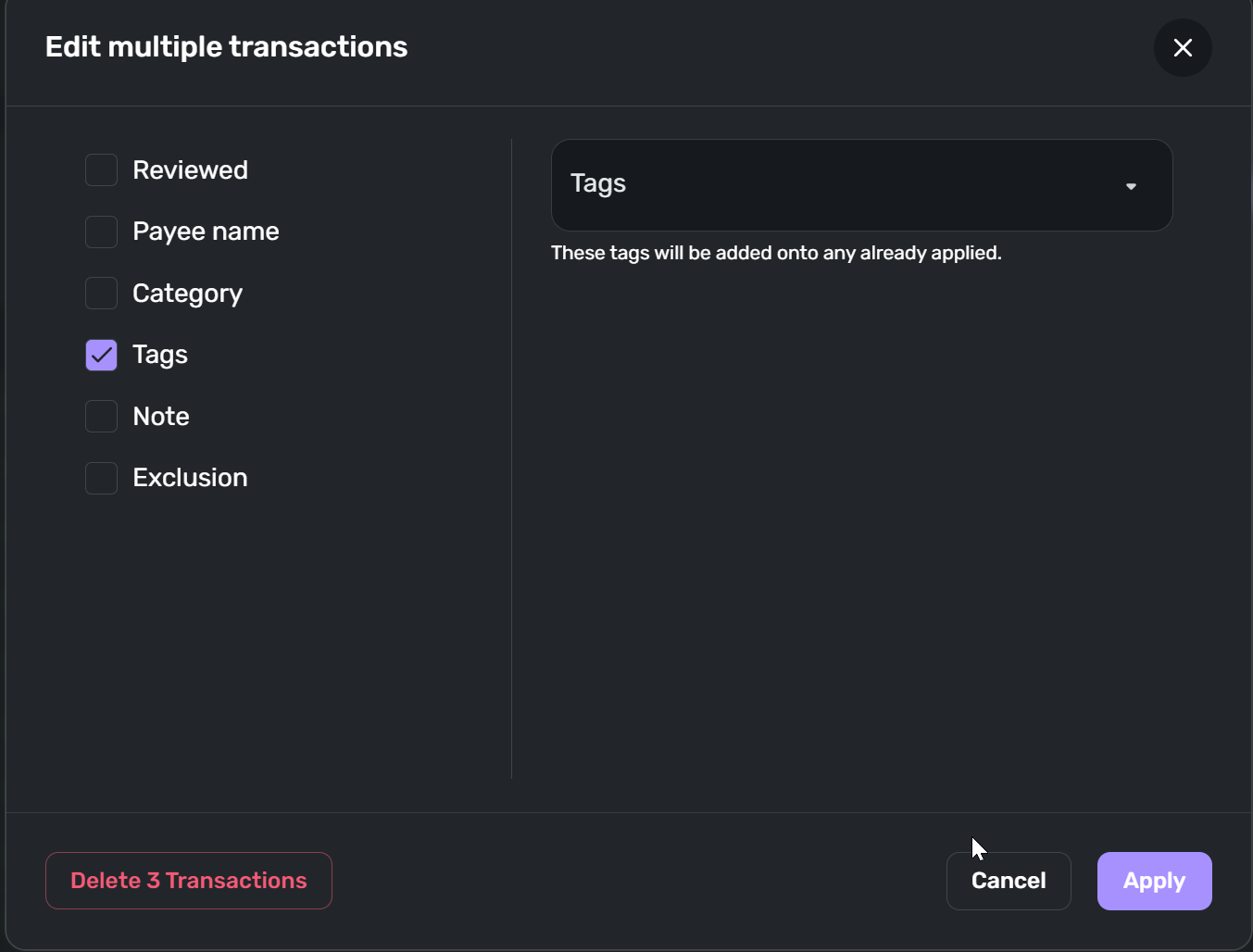
In the screenshot below, it would be nice to have a second Tags drop-down on the right-hand side with the phrase "These tags will be removed from any already applied" underneath it. Any Tags listed in that drop-down would get removed when you click the Apply button.
Tags are useful to me for expense reimbursements. For any expenses that I expect will get reimbursed by my company, they go into a "Reimbursable" Category. Then I have a "Reimb Cleared" tag to match up a reimbursement with the related receipts. But sometimes things get messed up and I need to remove "Reimb Cleared" from a bunch of transactions at the same time.
 2
2 -
I agree and want this ability as well.
Simplifi User Since Nov 2023
Minter 2014-2023
Questionable Excel before 2014 to present
1 -
Upvote
0 -
Since I just reconfigured my tagging system, I found it very easy to add tags, it would have been great to be able to remove old tags as well.
1