Chase pending transactions - delay in being counted toward balance (edited)

I've seen a new issue a couple of times recently. It only seems to come up between midnight and the next bank refresh.
Here's my situation right now:
I have 2 pending transactions (outgoing payments) that were entered on or before 12/30 with a date of 12/31. They were automatically converted to future reminders when I created them.
The clock struck midnight and now it's 12/31. What happens in Simplifi is that those two reminders were converted to pending transactions. Great! That's what it should do! The issue is: they are NOT reflected in the Balance with Pending or in the "You have a total of -$xxxx pending transaction in this account." tooltip.
The reason this is a problem: now that the transactions are no longer reminders for the future, but they aren't either subtracted from my bank balance at this time, my cash flow projection for today/tomorrow shows as much higher than it should and than it showed just a few minutes ago, before midnight.
I have seen the same issue over the last few weeks with one and with three transactions, and with income transactions (which leads to the opposite problem of cash flow showing lower than it should).
It always seems to be cleared up by the morning which is why I haven't posted about it until now.
I don't know if this issue is specific to Chase or not and am curious if anyone else has experienced this issue.
Thanks!
Comments
-
I think this is a longer term issue with Chase I used to be intimately familiar with (I don't remember the precise details anymore). It had something to do with when transactions occur outside of banking hours, it might match the transaction to the bank transaction, but maybe the downloaded balance from the bank did not update properly outside of business hours, so the result was simplifi's balance would be wrong. I think Quicken determined this was something Chase was doing and refused to change that caused this. At some point, I just accepted that after 9pm (?) until maybe 8-9am (?) (Eastern Time), and on holidays and weekends, Chase's balance couldn't be trusted in Simplifi.
—
Rob Wilkens
0 -
Try changing the date back to 12/30 to see if they will count now. Then change them back later.
I have discovered on occasion that Simplifi is confused early in the morning as to what the date is. This is something vague and I haven't checked it out much. I sense that it is Simplifi's problem and not the bank's.
And I think it will resolve itself in a few hours as you say.
Steve
Quicken Simplifi (Safari & iOS) Since 2021
Quicken Classic (MacOS) Since 2009
MS Money (1991-2009) and Dollars & Sense (1987-1991)1 -
Last time I reported this was about a year ago here:
The "resolution" to that issue was that this was the longer-term issue we already discovered (which i initially thought might've been fixed but was not):
—
Rob Wilkens
0 -
@RobWilk this seems to be a different thing since it's not transactions happening outside business hours, it's just on simplifi's end when reminders (but only the future transaction type) are changed to pending transactions once they hit their original date. It seems that simplifi needs to recalculate the total pending transactions at this time, and it's not doing that.
@SRC54 I changed them now to 12/30 and that fixed it, and then back to 12/31 and it stayed fixed. (I don't know if it would have done the same last night but I suspect yes).
1 -
Thanks for the information. It seems to confirm my suspicion that it is Simplifi's lag in realizing the date change. Perhaps because of Eastern versus Western time zones? Perhaps signing in and out of Simplifi would do it. I also never thought to check out the app since I do things mainly on my Mac.
I tested something out the other day for another user by moving a cleared transaction to Jan 1, 2026 expecting it to go into the Reminder bar. Nope, it disappeared entirely. I couldn't find it anywhere doing searches or going to Bills & Income, etc. It threw my balance off of course, and I figure it would show up on Jan 1. But I changed the date on my Mac to Jan 1, 2026, and there it was. I quickly fixed the date back to the 26 December and corrected my Mac's date. I won't do that again. Since it was a cleared transaction, it was just in limbo.
Steve
Quicken Simplifi (Safari & iOS) Since 2021
Quicken Classic (MacOS) Since 2009
MS Money (1991-2009) and Dollars & Sense (1987-1991)0 -
If this isn't filed as a bug report officially it should be, this sounds like a definite, fixable bug.
—
Rob Wilkens
0 -
I haven't seen the issue of future transactions disappearing and not showing as reminders. I use the browser version on windows.
0 -
The midnight issue seems easy to replicate, though, so hopefully it's something that support can fix.
A couple of weeks ago I tried changing the amount on the non-counted transaction and that didn't help, but at least changing the date is a good temporary fix if I want to see an accurate cash flow without waiting until the morning.
0 -
Hello @EL1234,
Thanks for reaching out! I am glad you were able to resolve the issue with the help of some of the members of the community here. It sounds like from the original post that you entered these transactions manually, correct? If so, please let us know if this happens again the next time you try this, and if it clears up by the morning with the next refresh. If it does not, screenshots showing the issue from your side would be very helpful for troubleshooting purposes.
-Coach Jon
-Coach Jon
0 -
Hi @Coach Jon yes, the transactions were entered manually. I'll try it out and send you screenshots. Do you want to tell me which screenshots to provide? Or else I'll try and guess.
Thanks!
0 -
Okay, I'll try and get screenshots for before/after midnight so you can see what happens. Thanks!
1 -
This was a cleared transaction, and it is not something anyone would do except me. LOL. I think if it is pending, it wouldn't be a problem.
Steve
Quicken Simplifi (Safari & iOS) Since 2021
Quicken Classic (MacOS) Since 2009
MS Money (1991-2009) and Dollars & Sense (1987-1991)0 -
Oh interesting! I don't remember trying it with a cleared transaction. Did it come back on the transaction date?
0 -
12/31 before midnight:
I'm testing this out with my Capital One checking account which I don't really use, to see if it's just a Chase issue. (It's also a simpler example since there are no legit pending transactions.)
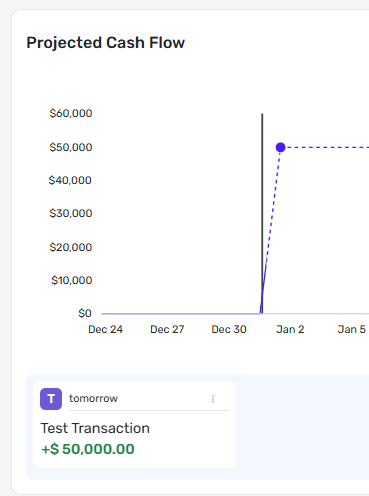
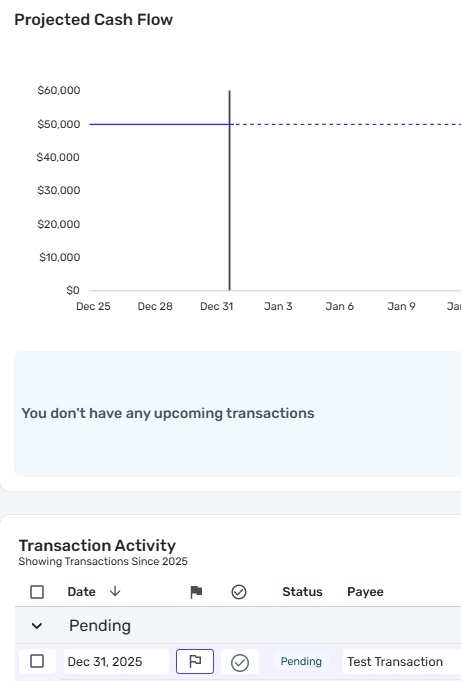
I created a fake transaction today (12/31) with tomorrow's date (1/1) for $50,000.
Here's a screenshot of the reminder and the projected cash flow:
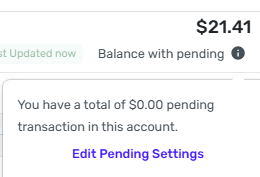
and here you can see the Balance with Pending and that there are no pending transactions (yet):
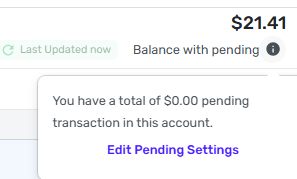
The above screenshots are before midnight.
Okay now it's midnight. Happy new years!
Here are some new screenshots showcasing the issue:
Projected cash flow is down to ~$20 with no upcoming reminders:

One (fake) pending transaction:

But the Balance with pending doesn't reflect it!

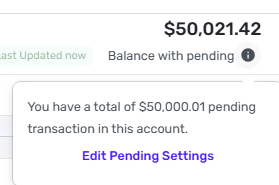
This means that my projected cash flow for today isn't $50,021.41 like it should be (well, as it should be if that transaction was legit), since the pending transaction isn't counted in the pending transactions tooltip. I think because Simplifi didn't actually refresh its data from the bank, so it didn't realize that it needs to recalculate the pending transactions.
Changing the amount of the pending transaction didn't help fix the issue.
But changing the date to yesterday (12/31) did change it so that the transaction is now counted in the pending transactions and reflected in the cash flow:
And… I changed it back to 1/1 and now it's not counted anymore (I'm pretty sure this is different than what happened with my chase account last night):
Marking it as Cleared didn't help either!

And just for fun I set the date of the (now) cleared transaction to 1/2, and the reminder is back!

That's all for now, I hope the info and screenshots will help debug and solve this! Thanks!
0 -
@EL1234 All very interesting. I am surprised that changing the date didn't work, so maybe it was just too early in the morning.
Also, when you cleared the transaction, it would no longer be counted in the balance since this is a connected account, right?
But when you made the cleared transaction a reminder by setting the date forward, it appeared as a reminder, which is not what happened to me when I did that. It just disappeared altogether although it was there and it came back once I changed the date on my computer.
My guess is this morning, it will count if you move it back to 1/1.
Steve
Quicken Simplifi (Safari & iOS) Since 2021
Quicken Classic (MacOS) Since 2009
MS Money (1991-2009) and Dollars & Sense (1987-1991)0 -
It's weird because 2 nights ago with Chase, moving the date twice kept it fixed, but last night with Capital One it didn't. The timing was pretty much identical. They are both connected accounts. When did your future cleared transaction disappear? Was it a while ago? Maybe that's a bug that got fixed.
I deleted the fake transaction already so I can't test moving it back to 1/1 now.
0 -
The other times I tested this, the transaction counted properly by the morning even without doing anything.
1 -
I did it a couple of days ago as I was advising another user and I wanted to see what would happen if I advanced a cleared downloaded transaction to a future date. I expected it to go into the Reminder bar but it just went down a rabbit hole. Nothing worked. Signing in / Signing out; refreshing, searching and it was the same in the app. Of course, it is not something I will do again.
The only reason to do so is when something comes in on the last day of the month and you want it to count on the next month. I will wait from now on to do it until the date has arrived.
Steve
Quicken Simplifi (Safari & iOS) Since 2021
Quicken Classic (MacOS) Since 2009
MS Money (1991-2009) and Dollars & Sense (1987-1991)0 -
So strange! But did it come back on that date? If not then I definitely wouldn't do that.
By the way it seems that we can now change a cleared transaction back to pending, so that could be an idea if you want to convert it to a future reminder. Maybe then it won't disappear.
0 -
Yeah, it would have come back. I hurried it along by changing the date on my iMac so I could get it back faster and change it.
Yep, if I ever want it to be a future reminder again, I will change it to Pending. I don't contemplate having to do this again, I hope. 😁
Steve
Quicken Simplifi (Safari & iOS) Since 2021
Quicken Classic (MacOS) Since 2009
MS Money (1991-2009) and Dollars & Sense (1987-1991)0 -
Cool!
0 -
Just discovered that with a connected account, you can change the downloaded pending to cleared, but you cannot change a downloaded cleared transaction back to pending. I know because I tried it with my Apple Cash account and got the notice from Simplifi.
I had to delete the transaction and recreate it as Pending, which it really was.
LOL @me the guinea pig. But now I know.
Steve
Quicken Simplifi (Safari & iOS) Since 2021
Quicken Classic (MacOS) Since 2009
MS Money (1991-2009) and Dollars & Sense (1987-1991)0 -
Interesting! I had thought they changed it, but maybe it just works for manual transactions.
0 -
Hello @EL1234,
Thank you for the screenshots and time spent testing. From what I can tell, this was all done around midnight. Did you wait to see if this ended up working correctly/clearing up by the next successful refresh with the account in the morning?
-Coach Jon
-Coach Jon
0 -
Hi, with this set of screenshots I didn't check it in the morning (I deleted the transaction after testing) but the other few times I tested it, it always cleared up by morning. Thanks!
0 -
Hello @EL1234,
Thank you for your prompt response! Since the issue is resolving with the next successful bank refresh, it appears that this is likely just a timing issue rather than a bug. If this problem persists without clearing up after the next refresh, please let us know!
-Coach Jon
-Coach Jon
0 -
Wouldn't it be a bug that is a timing issue? I respectfully disagree that it's not a bug :)
0 -
Thanks @Coach Jon !
If it was a one time thing then I wouldn't have said anything since sometimes there are occasional glitches, but since it's reproducible and happens often between midnight and morning, I do think it should be considered a bug. Hopefully the product team will agree with me!
0


