In expense report, why are subcategories not grouped with their main category?

Last year when I printed a year-end expense report, my subcategories were listed alphabetically directly underneath their main category. Now, they are printing by themselves, mixed in with all the other categories. For example, I have a category "Farm Expenses" with subcategories of "Equipment Repair," "Seed," etc. I want to see them all together, not scattered throughout the report. How can this be fixed?
Comments
-
I don't quite understand but I tried to reproduce this but couldn't. It seemed to work as expected for me.
The change you see may be because of recent enhancements made to Reports that are in Early Access. Try turning off "Try New Reports (Beta)" to see if it prints the way you want. If this fixes it, you may want to comment about your situation in the official conversation regarding Enhanced Reports:
Steve
Quicken Simplifi (Safari & iOS) Since 2021
Quicken Classic (MacOS) Since 2009
MS Money (1991-2009) and Dollars & Sense (1987-1991)0 -
Sorry, let me try to explain it better. In last year's Expense Report, the category "Farm Expenses" printed in the following order alphabetically by subcategory:
Farm Expenses: Chemicals
Farm Expenses: Crop Insurance
Farm Expenses: Equipment Repair
Farm Expenses: Fungicide.
The subcategories were all together alphabetically under the main category, so I could see all our Farm Expenses together.
This year, it is alphabetizing by subcategories rather than by category. So I have:
Farm Expenses: Chemicals
Shopping: Clothing
Dining & Drinks: Coffee Shops
Farm Expenses: Crop Insurance
Everything is jumbled together since it is not taking into account the main Category. If I want to see all my Farm Expenses, I have to locate them amongst all the other categories. This is not workable for analyzing my year-end expenses.
It needs to be alphabetized by the Main Category first and then the subcategory secondarily so they all stay together.
I can't understand why they would do it sensibly last year and then not do it this year. It's very frustrating.
0 -
I wonder if you are using QBP although its reports ought to be essentially the same.
My Spending Report does show the Categories in Alphabetical Order with the Subcategories also in alphabetical order and subtotaled. In fact, it is beautiful. My only complaint is that it doesn't show the tags as a field.
When I filter for just one category, in this case Automobiles, I get this:
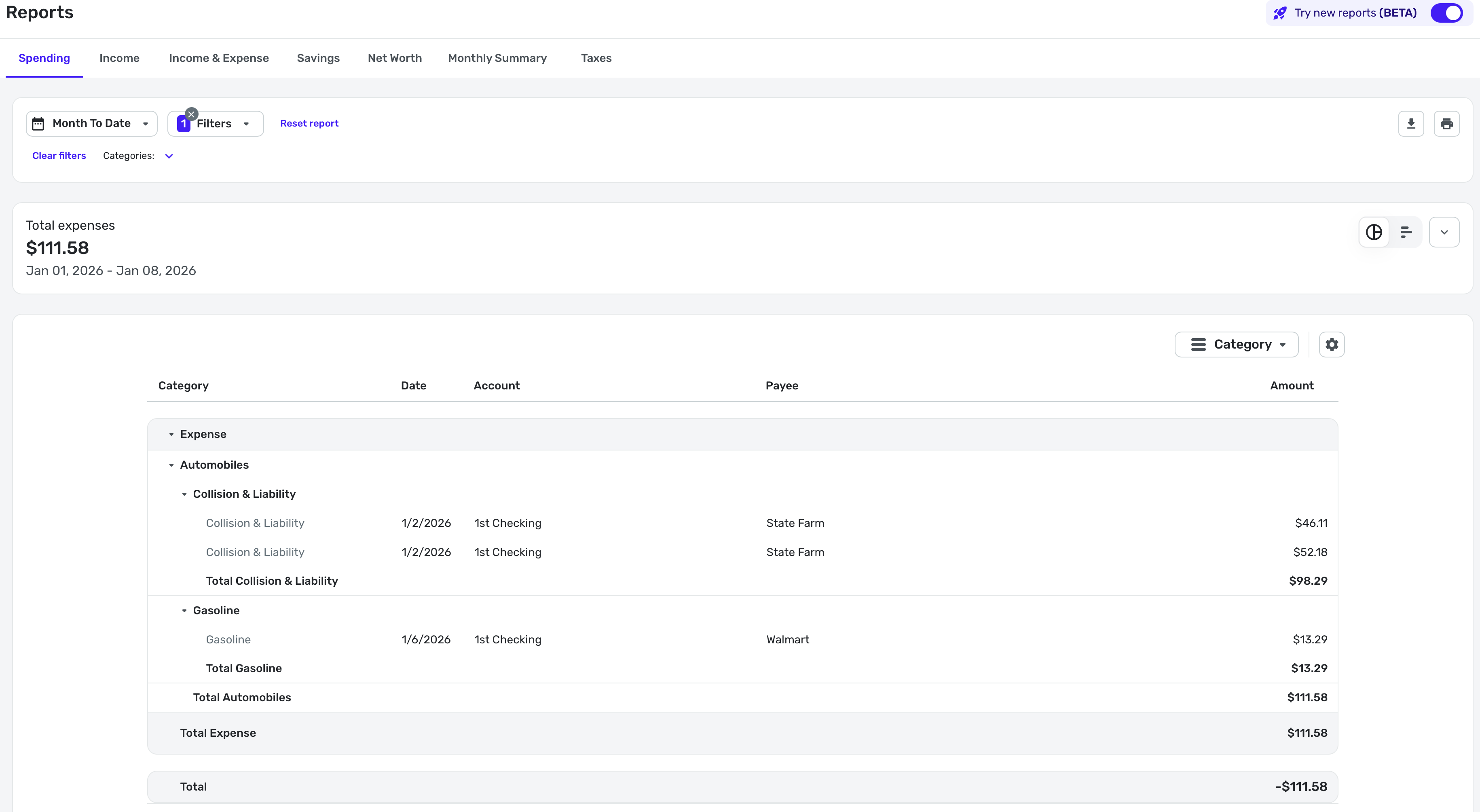
I do wish it showed the tags, because my report would make more sense. Anyhow, sorry I was of no help to you.
Steve
Quicken Simplifi (Safari & iOS) Since 2021
Quicken Classic (MacOS) Since 2009
MS Money (1991-2009) and Dollars & Sense (1987-1991)0 -
But you were helpful. You are correct, I did switch to the business version because they took away something (I can't remember what) from the Personal version's transaction register that I wanted and couldn't have unless I switched to the Business platform. Now I find that the reports are WORSE in the business platform. Might be time to switch to [removed - competitor mention].
0 -
Well, thank you for saying so.
Maybe we should post this in the QBP section so some of those users will see and verify it is a QBP issue. Also Reports are undergoing enhancements and you could post this in that section of commentary. Maybe they will change it.
Here's where to comment:
Here's another conversation about Enhanced Reports in case this applies to QBP.
I am sorry to be so ignorant about whether Enhanced Reports even pertain to QBP. I ought to know. Good luck!
Steve
Quicken Simplifi (Safari & iOS) Since 2021
Quicken Classic (MacOS) Since 2009
MS Money (1991-2009) and Dollars & Sense (1987-1991)0 -
I called the help number and the rep was quite helpful. He agreed that the expense report wouldn't show the way I wanted with all subcategories listed with and beneath the main category. But he showed me that they do list that way in the Income and Expense Report. This may be enough for me, even though it doesn't show all the annual transactions, it does show monthly totals. The rep was very knowledgeable and helpful. Thumbs up for customer service.
1 -
Great. BTW, you can show the Income and Expense Report that you can do it by the year instead of months. At least in Regular Simplifi you can with Beta Reports.
Steve
Quicken Simplifi (Safari & iOS) Since 2021
Quicken Classic (MacOS) Since 2009
MS Money (1991-2009) and Dollars & Sense (1987-1991)0
