Vancity is down Care code: FDP-102

Looking to see when this connection will be fixed. It has been down two days.
Comments
-
Hello @Not a User,
Thanks for reaching out! From our side, I can see the FDP-102 error you are receiving when trying to connect. with Vancity Credit Union. Can you let us know if you are trying to connect your accounts for the first time in Quicken Simplifi, or if you are trying to update already existing accounts in Quicken Simplifi?
For the latter, I would try the following steps to see if they work in resolving the issue:
- Make all of the accounts with the bank manual by following the steps here.
- Once you see the account(s) listed in the Manual Accounts section under Settings > Accounts, go back through the Add Account flow to reconnect to the bank.
- If the connection is successful, carefully link the account(s) found to your existing Quicken Simplifi account(s) by following the steps here.
Let us know!
-Coach Jon
0 -
I have been having the same issue. I went through all the suggested fixes and worked with Customer Care. No solutions as of yet. They are saying the issue is with Vancity.
They had me change my existing accounts to manual, then attempt to link them back up, but it did not work (I continued to get the same error message). Now the account is manual and I do not know if manually adding transactions is going to make things even more complicated.
1 -
Hello @EH_25,
Thanks for reaching out! I can see the ticket you worked on today with our chat support team. I would definitely suggest following up with them for further troubleshooting if you would like to, since they have already started the process with that ticket.
-Coach Jon
0 -
I think I have solved the issue for Simplifi. Now, it's a matter of waiting until the update is made.
Vancity recently updated its website and members' experience. The old URL that is on Simplifi's account card is going to a page that no longer exists:
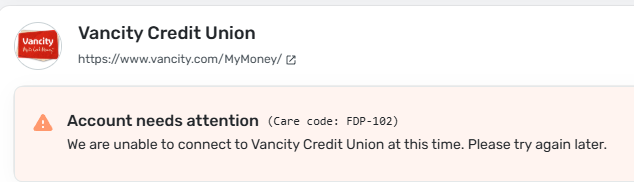
Instead Simplifi needs to change the URL to one of these two:
https://my.vancity.com/banking/home
or
I do accept discounts for doing the tech work 😜
1 -
Thank you for your reply @Not a User,
The URL displayed on the Add Account screen is generally the customer service URL provided by the financial institution, and is not the same URL that we use to connect and update accounts. Did Vancity Credit Union recently make any changes to their website or URL?
To help troubleshoot, please confirm if you're trying to add this account in Quicken Simplifi, or trying to update an account which was previously connected and working. If it's the latter, please follow the troubleshooting from @Coach Jon's earlier post.
I look forward to your reply!
-Coach Kristina
0 -
- trying to connect an already existing account.
- Yes, Vancity recently updated its website and login experience.
- And making the accounts manual and then adding and reconnecting the bank does not fix the issue.
Do I delete the institution after making the accounts all manual?
1 -
Thank you for your reply,
You shouldn't need to delete the financial institution after making the accounts manual.
You mentioned that they recently updated their website and login experience. Did the URL change at all?
To help us further investigate this issue, please send logs. To do that, follow these steps:
- Log into the Quicken Simplifi Web App.
- Select Profile from the left-hand navigation bar.
- With the Profile menu open, hold down the Option key for Mac or the Alt key for Windows, and then click Send Feedback.
- Leave all boxes checked, add a brief description of the issue, and then click Send.
Thank you!
-Coach Kristina
0 -
Yes, they did change their URL. I put it in both email to support and included in this thread.
Good I do not have to delete it.
1 -
I followed up my ticket with the help agent. I provided the proof of the error that you found and provided the corrected URL. This was the response:
Checking on this, since the URL is different in Simplifi the Financial Institution will have to notify the change so we can update the access on the platform. An agent from the bank will need to go to this linkand make the reportSimplifi will not do a thing until that is done.
1 -
@EH_25 Thank you for the update! Looks like this'll be awhile.
I wish I didn't change the accounts to manual. This has made it more of a pain in the backside than it needs to be I think.
0 -
Hello @Not a User,
We can definitely continue to investigate this issue from our side if you wish. We would just need the following information:
- The name of the account(s), as it appears in Quicken Simplifi.
- The name of the account(s), as it appears on the bank's website.
- Have there been any recent changes made to the bank's website or its sign-in process?
- What type of account(s) are you attempting to connect in Quicken Simplifi?
- A screenshot of the Accounts Summary page from the bank's website that has a wide enough scope to show the full page URL. This is the landing page after signing in, and typically lists all accounts and balances. You will want to take this from a web browser and not a mobile browser, as well as redact any private info such as account numbers.
We will need logs as well!
- Log in to the Quicken Simplifi Web App.
- Select Profile from the left-hand navigation bar.
- With the Profile menu open, hold down the Option key for Mac or the Alt key for Windows, and then click Send Feedback.
- Leave all boxes checked, add a brief description of the issue, and then click Send.
Let us know!
-Coach Jon
0 -
Hi Jon,
I have done this already previously and provided the screenshots and bank URLs. Please email me directly if you need anything further!
Thank you for following-up :)
0 -
Hello @Not a User,
Thanks for the reply. I am not seeing the information I have requested in this thread. If you can provide it to me, we can work on further troubleshooting! Feel free to DM the information I requested.
-Coach Jon
0 -
I sent in the report about two days ago. A new report has been sent to you DM with the reference number. Thanks again for the help. I hope we can solve this quickly.
0 -
Hello @Not a User,
Thank you for sending that information over. It still looks like we are missing some information I requested. We still need:
- The name of the account(s), as it appears in Quicken Simplifi.
- The name of the account(s), as it appears on the bank's website.
- What type of account(s) are you attempting to connect in Quicken Simplifi?
Let us know when that additional information can be sent!
-Coach Jon
0 -
I sent the information in DM. I am a little surprised that it doesn't list my accounts in the file I sent through the support page. Anyways, please DM me if you need anything else.
0 -
Alright, not great news. I just got off the phone with Vancity and they said that Quicken Simplifi is no longer compatible with their system. It is a known issue that Simplifi will have to correct. Until then, manual imports are the only way to get the information in.
So, the question to Simplifi is, what is the ETA until it gets fixed?
Thanks!
2 -
Hello @Not a User,
Thanks for the reply and the DM. I know you stated that the URL had changed, but have there been any other recent changes made to the bank's website or its sign-in process? Let us know!
Besides that, it looks like our team is aware of this issue and is currently working on a resolution at this time.
-Coach Jon
1 -
From my experience, there have been no other changes when I log in. It still asks for the last 10 digits of the card number and my password. Only the URL is different on our end.
Has your team updated the URL?
1 -
Hello @EH_25 and @Not a User,
Thanks for the information and replies! This has been escalated to our product team, and they are working on a resolution for this issue with Vancity. I will be sure to follow up with any status updates here as we receive them.
In the meantime, you can track the account manually by adding manual transactions, which will keep your records up-to-date. Here are the steps to do so: Managing Transactions in Quicken Simplifi | Quicken Simplifi Help Center
CTP-16113
-Coach Jon
2 -
Same issue, I have an old account / connection with Vancity which syncs fine as usual and the two accounts transitioned to VanCity new digital experience which stopped sync. It unfortunate, that the paid users are made beta testers for Canadian banks. I have Wealthsimple accounts that don't sync also.
0 -
@Coach Jon is there any estimate when the URL will be updated? I am still seeing the old one.
1 -
Hello everyone,
We now have an alert that you can follow while our product team works on a resolution to this issue with Vancity Credit Union.
Thank you all for your patience!
-Coach Jon
1 -
14 days into it and I am losing the ability to track my finances effectively. Is there an estimated time of completion yet? Weighing if I just build my own tracker since I have to do everything manually and refund my annual subscription? I can probably wait this week.
1 -
I’m really frustrated with this connection issue, especially since my main account is with Vancity - that was actually the primary reason I purchased the app. I’d appreciate a status update on a fix or if that’s not possible a refund. Thanks!
1 -
I am also incredibly frustrated with the lack of updates and support. Have any Vancity users found another app or program that works well? I am happy to pay for a service, but this service is not being provided. I am going to start looking for an alternative if nothing is being done here to fix this issue or properly update paying subscribers.
0 -
Sadly, I just did a quick search of the community for FDP-102 errors, and there appear to be many. Quite a few are recent, many are older, and though I didn't read all the threads, I did not see any successfully resolved. There are many frustrated paying subscribers, and those who requested a refund were given a standard line to phone or start a chat. This is quite disheartening.
1 -
I have started seeing this issue as of today, so this message is a "me too".
FWIW, I have a little insight into what the issue is here. A month or so ago, Vancity started migrating customers to a "new system". This new system gets a new phone app (the old one no longer works) and gets a complete website facelift. The migration is a per-customer flag…. I was upgraded to the "new system" yesterday and can no longer download transactions into Simplifi with this FDP-102 error.
If it's of any use, I'm happy to work with a Simplifi support person to collect a HAR file to pass to the connection script developers (this was the procedure with BMO changes that took place a few months ago). Hopefully this is all that's required to kill this issue off.
cc @Coach Jon
1 -
The funny thing is I have been a paid subscriber to the Quicken Deluxe for years. It has been riddled with bugs that I found work arounds for, until I finally got frustrated enough to cancel my annual subscription. I chose to stay with Quicken and try the Simplifi. I had some reservations about going into the US partner version as the Quicken Deluxe is Canadian. The first little bit completely wowed me and made me very happy. It did what I needed it to do and corrected some of the bugs I consistently ran into in Deluxe. I felt I was getting ahead of my budgeting for the first time in a year and a bit because of the ease of use. I did lose some important functions, but the gains outweighed the losses. And then there is the change that happened with Vancity authentication, and now there is no ET in sight to restore connections. I hesitate to switch as it is likely any international aggregator has the same problem I would guess.
I'll probably go into the market for a Canadian service provider next week and get the refund for this if it isn't resolved soon. It would be fair for a prorated refund as I paid for the year in advance and will not use it.
1 -
Any update?
0


