CarMax Auto Finance FDP-108

I've had a CarMax Auto Finance account linked in simplifi for years but suddenly around 60 days ago it stopped updating. When I try to connect I get the following error:
To connect to your account, you must complete an action at the website for CarMax Auto Finance.
Care Code: FDP-108
I have logged into my CarMax Auto Finance account via my browser and cannot find anything there in regards to authorizing third party access. I have also tried updating my password and resetting my 2FA. Nothing has worked. Help?
Comments
-
@joat, thanks for reaching out to the Community with this issue!
I was able to confirm the FDP-108 error when checking your connection attempts with CarMax Auto Finance from our end. It looks like the error is occurring on an existing account in Quicken Simplifi — when did you first notice the error? I ask because I see this error listed as a known issue with our service provider, but it's been on the list since 2023, so I'm thinking it's not related.
As for troubleshooting, please follow these steps to establish a completely fresh connection with the bank. This will allow us to confirm whether the error is occurring on a new connection:
- Make all of the accounts with this bank manual by following the steps here.
- Once you see the account(s) listed in the Manual Accounts section under Settings > Accounts, go back through the Add Account flow to reconnect to the bank.
- If the connection is successful, carefully link the account(s) found to your existing Quicken Simplifi account(s) by following the steps here.
If the FDP-108 error persists after doing so, you'll next want to check for some form of action you need to take on the bank's website. This could be a prompt to update your security questions, or even marketing material that needs to be bypassed. If you don't see anything when signing in on your normal browser, try from a different browser or in incognito/private mode. I'd also recommend trying the bank's mobile app, if that's something you use.
Let us know how things go!
-Coach Natalie
0 -
Hi @Coach Natalie,
I noticed the error about 2 months ago. My Simplifi even says "last updated 62 days ago" on the CarMax Auto Finance account. Up until then, it had been working just fine for at least a couple of years.
I went through the troubleshooting steps you listed, and nothing changed. I also logged into my CarMax account on two different web browsers, in both regular and incognito mode, and through the mobile app. I looked through every menu and setting. I also updated my 2FA method again. Nothing changed. Still receiving the same error:
To connect to your account, you must complete an action at the website for CarMax Auto Finance.
Care Code: FDP-108Any further assistance?
0 -
@joat, thank you for giving those steps a try and posting back! I also appreciate the additional insight into when this issue started for you.
There are a couple more things for us to check, and then we can look into getting this issue escalated to our service provider.
- Are you prompted for MFA when signing into the bank's website? If so, are you also prompted to complete MFA when connecting in Quicken Simplifi? This may apply to both right now, when receiving the error, as well as before the error started occurring.
- Some banks require that users accept terms and conditions to link with third-party apps—is there anything like this on CarMax's website? If so, have you accepted the terms and conditions and enabled sharing?
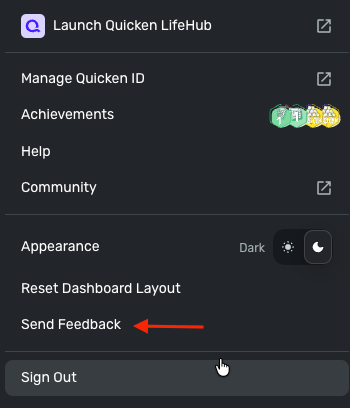
Please also provide your logs via the 'Send Feedback' option on the Quicken Simplifi Web App:
- Log in to the Quicken Simplifi Web App.
- Select Profile from the left-hand navigation bar.
- With the Profile menu open, hold down the Option key for Mac or the Alt key for Windows, and then click Send Feedback.
- Leave all boxes checked, add a brief description of the issue, and then click Send.
We look forward to hearing back from you!
-Coach Natalie
0 -
Are you prompted for MFA when signing into the bank's website? If so, are you also prompted to complete MFA when connecting in Quicken Simplifi? This may apply to both right now, when receiving the error, as well as before the error started occurring.
I am prompted for MFA when I sign in to my CarMax Auto Finance account via their website. This works as expected; I can log in without a problem when I go directly to CarMax via the web or their mobile app.
In Simplifi, when the connection to CarMax was previously working, it would prompt me: "Do you want a text or a phone call?" I would make my selection, then receive the MFA code and enter it into Simplifi to update my transactions.Now, with the connection to CarMax not working, Simplfi does not even get to the MFA step. It immediately throws up the FDP-108 error. Nothing I do gets me past that error.
Some banks require that users accept terms and conditions to link with third-party apps—is there anything like this on CarMax's website? If so, have you accepted the terms and conditions and enabled sharing?
I looked everywhere I could, through every menu and option, and could not find anything about linking to third-party apps. I logged in and checked both the CarMax website and through the mobile app. I even called CarMax account support myself and asked a service rep if I was missing anything, and the support rep told me they were not aware of any settings in the customer profile related to third-party linking.
Please also provide your logs via the 'Send Feedback' option on the Quicken Simplifi Web App:
Okay, done. Report created - reference id 524305676987247617.
0 -
@joat, thank you for the information!
I have gotten this issue escalated and will post back as soon as we receive an update.
EWC-12218568
-Coach Natalie
1 -
@joat, I've received an update from our service provider, and it looks like they need us to schedule a debugging session with you so we/they can capture a HAR file. If you're willing to participate, I will need to request the session with our engineering team, who will then reach out to you via email to confirm a date and time.
To request the session, we need:
- Confirm that the email address and phone number listed on your Quicken Simplifi Account are your best contact info.
- Provide your general availability over the next few weeks, and please also include your time zone with this.
We will also need the following additional piece of data to add to the new session request ticket:
- A screenshot of the Accounts Summary page from the bank's website that has a wide enough scope to show the full page URL. This is the landing page after signing in, and typically lists all accounts and balances. You will want to take this from a web browser and not a mobile browser, as well as redact any private info such as account numbers.
Much appreciated!
-Coach Natalie
0 -
-
@joat, I wanted to reach out one last time to see if you're interested in proceeding with the session. If we don't hear back from you by Monday, 2/23/26, we will have to close out the escalation.
Thanks!
-Coach Natalie
0 -
@joat, since we didn't hear back from you, I went ahead and got the escalation closed out.
Hopefully everything is working properly for you now!
-Coach Natalie
0
