Aimloan connection not working (1415 Finicity error)

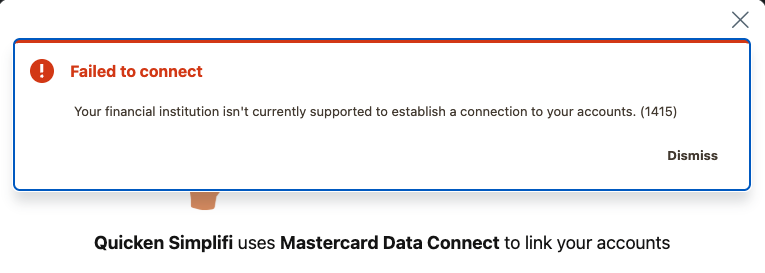
Hello, I'm trying to add an account with aimloan. When the connection window opens, I get an error message that says "Your financial institution isn't currently supported to establish a connection to your accounts. (1415)".
Comments
-
Hello @kmorkos,
Thank you for reaching out! To better assist, please provide the full URL that you use when logging into your account directly through the financial institution website.
When I check in my Quicken Simplifi, the only financial institution that comes up when I search for Aimloan is American Internet Mortgage. Is that the connection you've been trying to use?
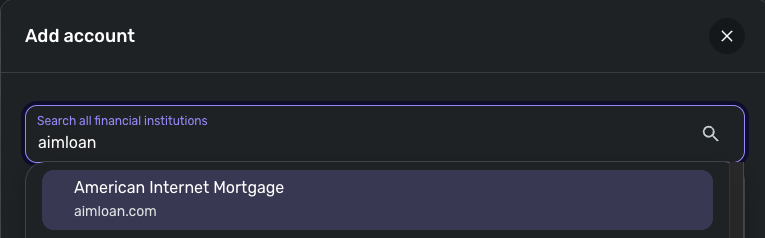
If it is, then is this the error message you're seeing?
I look forward to your response!
-Coach Kristina
0 -
Apologies for the delayed response here. The URL I use to log in is https://loansphereservicingdigital.bkiconnect.com/aimloan/#/login.
The connection you shared is the one I've been trying to use, and the error message matches what I'm seeing.
0 -
@kmorkos, thank you for confirming!
It looks like the recommended action for a 1415 is to file a support ticket. To do so, we will need to gather the following data from you:
- Has there been any activity in the account in the last 90 days?
- Has the bank made any recent changes to its website or sign-in process?
- Are you the owner of the account?
- The name of the account, as it appears on the bank's website.
- A screenshot of the Accounts Summary page from the bank's website that has a wide enough scope to show the full page URL. This is the landing page after signing in, and typically lists all accounts and balances. Please use a desktop browser, not a mobile browser, and redact any private information, such as account numbers.
Please also submit your logs via the 'Send Feedback' option:
- Log in to the Quicken Simplifi Web App.
- Select Profile from the left-hand navigation bar.
- With the Profile menu open, hold down the Option key for Mac or the Alt key for Windows, and then click Send Feedback.
- Leave all boxes checked, add a brief description of the issue, and then click Send.
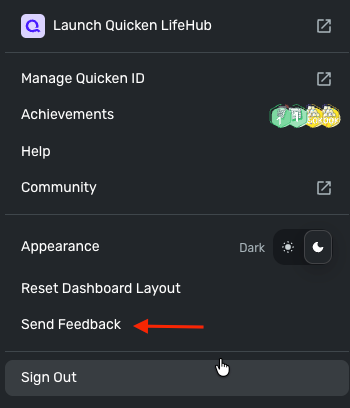
Much appreciated!
-Coach Natalie
0 -
Where do I file a support ticket?
0 -
@kmorkos, you wouldn't file a support ticket; Support would do that. You can either provide the information that was requested above here in the Community, so we can file the escalation:
Or you can contact our Chat/Phone Support team directly, and they can file the issue for you as well. This option allows for a private interaction versus a public one here in the Community:
I hope this helps to clarify! Let us know how you'd like to proceed.
-Coach Natalie
0

