ADP Retd. Services - FDP-101 error

This discussion was created from comments split from: ADP Retirement Services - Care Code: Not found / FDP-103 (edited).
Comments
-
i’m having the same problem with my ADP connection
0 -
Hello @jf300,
Thanks for reaching out. You will also need to try the following steps to verify if they resolve the issue for you. Let us know!
- Verify the bank selected is the correct instance – You may see several different instances of your bank that you can add in the Add Account screen. Check to see if you’re using the correct one.
- Verify your login information is correct – Type your password/PIN into a text application to ensure you don’t have any typographical errors. Then, copy and paste your login information into Quicken Simplifi to ensure accuracy.
- Verify your login at the bank’s website – Try to sign in to your bank’s website using the same login credentials to ensure you've not locked yourself out of the account, and the credentials are still valid.
- Check for an app-specific password – Some banks require users to use a specific app password when connecting to a third party. Check with your bank to see if you need to use an app-specific password.
- Update your credentials – Try temporarily updating your password on your bank's website and then try again to connect to Quicken Simplifi. We recommend NOT using the following special characters: & < > / \.
-Coach Jon
0 -
I’ve performed the steps listed and still unable to connect. When I log into the ADP site directly with my credentials, it works fine.
Something changed on the ADP side recently where it waits for you to select an authentication option after your password - to send a prompt to their mobile app for verification or txt message. Txt msg was the only option previously.
When I try to make the connection in Simplify, I no longer get a code via txt msg like I use to, and just fails.
I think the connection login script just needs to add that extra step to choose send txt message
0 -
Hello @jf300,
Thank you for the reply! After checking from our side, I can see that your most recent attempts are returning an FDP-101 error. Is this also the error you are seeing from your side?
The error typically resolves itself within 24-48 hours, but if you continue to see this error after 48 hours, please let us know and provide the following information:
- The name of the account(s), as it appears in Quicken Simplifi.
- The name of the account(s), as it appears on the bank's website.
- What type of account(s) are you attempting to connect in Quicken Simplifi?
- A screenshot of the Accounts Summary page from the bank's website that has a wide enough scope to show the full page URL. This is the landing page after signing in, and typically lists all accounts and balances. You will want to take this from a web browser and not a mobile browser, as well as redact any private info such as account numbers.
We will also need logs:
- Log in to the Quicken Simplifi Web App.
- Select Profile from the left-hand navigation bar.
- With the Profile menu open, hold down the Option key for Mac or the Alt key for Windows, and then click Send Feedback.
- Leave all boxes checked, add a brief description of the issue, and then click Send.
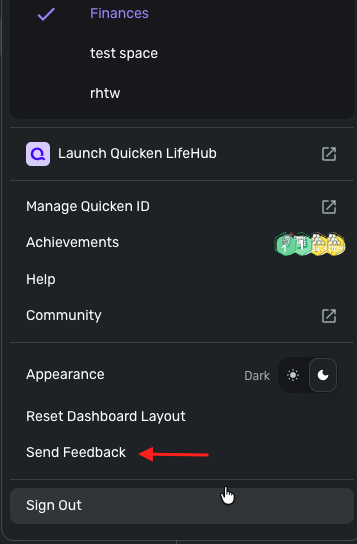
-Coach Jon
0 -
Thanks, the connection just started working again today.
1

