HealthEquity HSA Investment Account Missing

I can now add my HealthEquity HSA savings account to Simplifi, but my investment account is missing. Is Quicken working with HealthEquity to make investment accounts available?
Comments
-
Legacy users on desktop still have access to password login. I'm in the same situation as aqua: Simplifi sees the cash account but not the investment account.
0 -
It looks like HealthEquity is gradually rolling out passkey authentication, so soon we'll all be in the same boat. Hopefully Simplifi will quickly resolve the issues with their interface that are blocking passkey authentication.
1 -
Hello everyone,
Thanks for keeping us updated! For anyone missing their investment accounts with HealthEquity when connecting, can you please try the following steps to see if it resolves the issue:
- Make all of the accounts with the bank manual by following the steps here.
- Once you see the account(s) listed in the Manual Accounts section under Settings > Accounts, go back through the Add Account flow to reconnect to the bank.
- If the connection is successful, carefully link the account(s) found to your existing Quicken Simplifi account(s) by following the steps here.
If those steps do not work in resolving the issue, please supply the following information:
- Has there been any activity in the account in the last 90 days?
- Is the account considered an external account (i.e., are you redirected to a different website when selecting the account on the bank's website)? If so, what URL are you redirected to?
- Is the account a subtype of a different account?
- Has the bank made any recent changes to its website or sign-in process?
- Are you the owner of the account?
- The name of the account, as it appears on the bank's website.
- If the issue is occurring on an existing Quicken Simplifi account, the name of the account as it appears in Quicken Simplifi.
- A screenshot of the Accounts Summary page from the bank's website that has a wide enough scope to show the full page URL. This is the landing page after signing in, and typically lists all accounts and balances. You will want to take this from a web browser and not a mobile browser, as well as redact any private info such as account numbers.
- A screenshot of the Add Account screen in Quicken Simplifi showing that the account in question is missing at account discovery.
We will also need logs:
- Log in to the Quicken Simplifi Web App.
- Select Profile from the left-hand navigation bar.
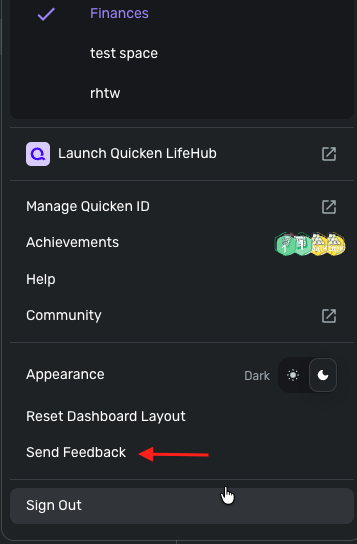
- With the Profile menu open, hold down the Option key for Mac or the Alt key for Windows, and then click Send Feedback.
- Leave all boxes checked, add a brief description of the issue, and then click Send.
Thank you!
-Coach Jon
0
