Net Worth Feature: Share your feedback here!
Comments
-
@pst, your post has been merged with the official feedback thread for the new Net Worth feature, which is currently in Early Access testing. This feedback thread is being monitored by our product team.
Thanks for sharing your feedback with us!
-Coach Natalie
0 -
Currently I have seen only options to either include the whole account balance or remove/hide it completely in considering for Net Worth. Does anyone know of a way to consider only a % of the account balance for Net Worth. Say, an investment properly co-owned by a Business Partner. If I include the property it is including the whole properly value and the mortgage on it into Net Worth calculation. I want to consider only 50% of both, because I own only half of both. Is this possible?
0 -
Love the new page, very helpful and it was the one thing I was most missing after coming over from Empower Personal Capital. A couple of comments I hope can get incorporated:
(1) When viewing the asset Breakdown donut chart to the right when it’s set to percentages instead of the default dollars, nobody really needs decimal precision here, just round to the nearest whole number and display that. Or if you must use decimals, please use the same decimal precision for all categories for consistent, intuitive reading when glancing at the data.
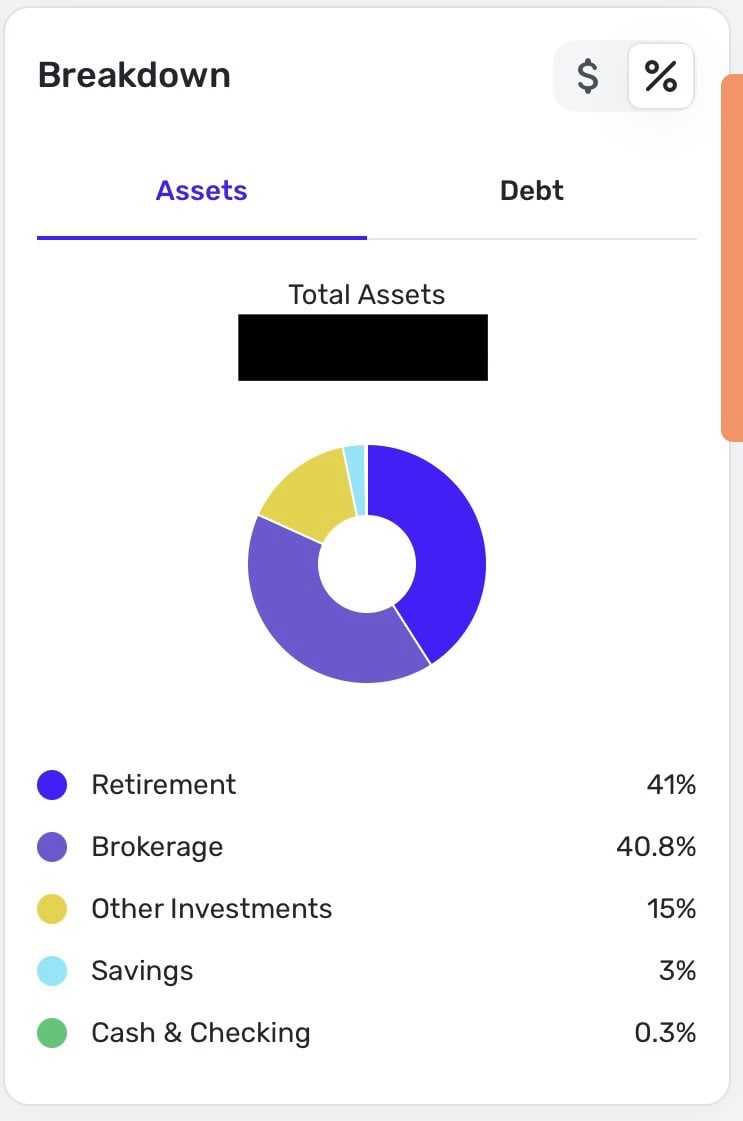
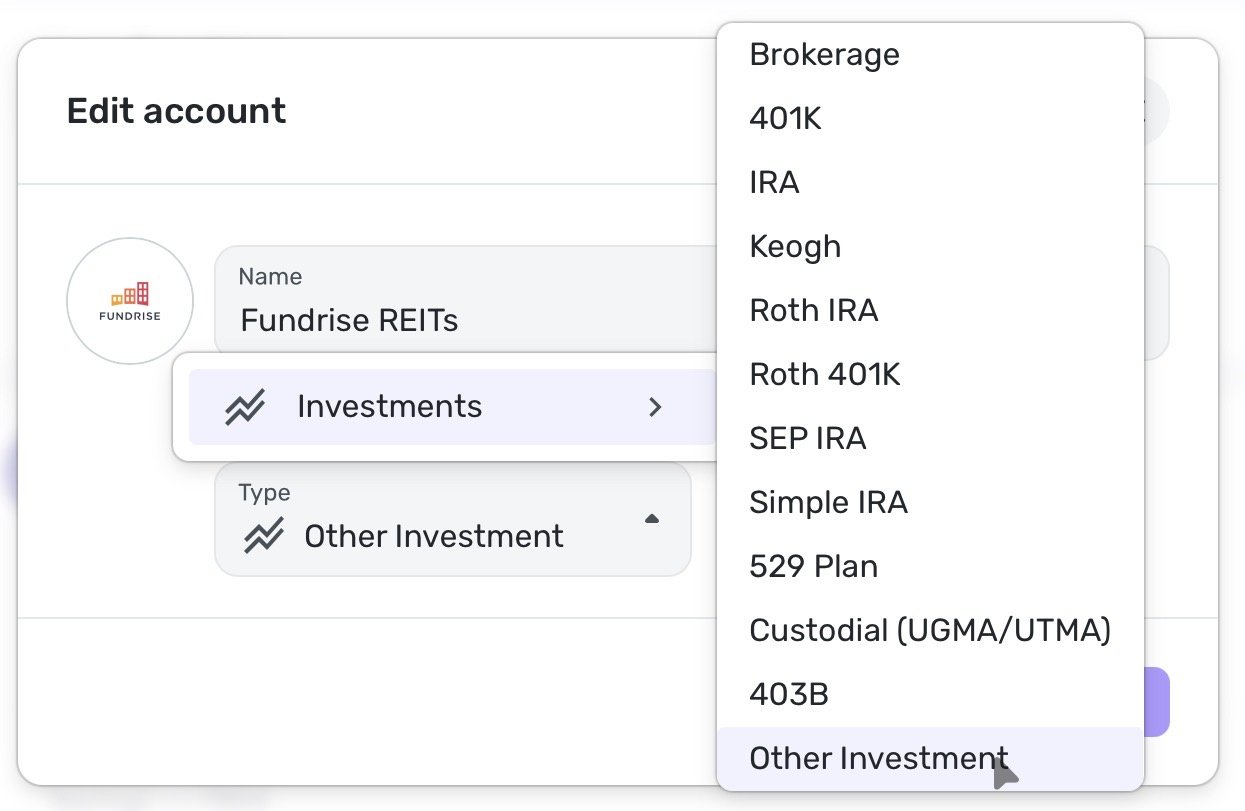
(2) Could you pretty pretty please add additional investment types to the options in this screenshot below. For example, I would really rather categorize my Fundrise holdings as “Real Estate”/“REITs”/etc rather than having to resort to “Other Investment”. I could see another very useful category of “Private Placement” for Accredited Investors like myself who hold a lot of non-publicly traded assets and would be immensely useful to see those separated out by category to see how they’re performing relative to other asset types over time:
 0
0 -
@Shibin Ishaque, your post has been merged with the official feedback thread for the new Net Worth feature, which is currently in Early Access testing.
Although there is not currently a way to count a partial account value toward your net worth, our product team will see your feedback in this thread. I also found this Idea post that you and other users may be interested in voting for:
Thank you!
-Coach Natalie
0 -
Personally, I think going to one decimal place is fine. Especially in a case like yours where the "Cash and Checking" would otherwise show 0%… that wouldn't be helpful at all.
-1 -
In a case like mine, when I’m dealing with large percentages of other assets like my retirement and brokerage categories being 40+% each, knowing if my cash is 0.3% instead of 0% is completely inconsequential in the big picture, which is exactly what a graph like this should be imparting. It’s exactly the same reason that it really makes no meaningful difference to see if my brokerage account is “40.8%” vs “41%”. I’d be totally fine with a simple catch all “<1%” for any minuscule category amounts at the bottom.
0 -
Love the Net worth feature. Great add!
0 -
Hey there! Our product team is asking for a video of the following:
- The dashboard page showing both the all accounts list value and the Net Worth dashboard card values, and please toggle bank balance/balance with pending on the accounts list to rule that out as a source of change
You should be able to compress the video to upload it here in the Community, but if needed, I can also email you a link to our Secure File Exchange.
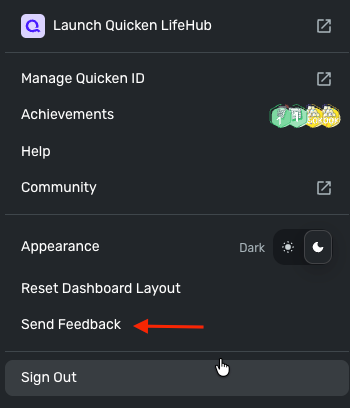
We also need logs to be submitted via the 'Send Feedback' option:
- Log in to the Quicken Simplifi Web App.
- Select Profile from the left-hand navigation bar.
- With the Profile menu open, hold down the Option key for Mac or the Alt key for Windows, and then click Send Feedback.
- Leave all boxes checked, add a brief description of the issue, and then click Send.
Thank you!
-Coach Natalie
0 -
The following fixes and enhancements have been released:
- The historical balance upload fix is now live on both mobile and web
- Updated copy for the debt-to-asset ratio is now available
- Improvements to the Y-axis scaling labels have also been released
Additionally, Net Worth has been released to QBP users in Early Access. Let us know what you all think!
-Coach Natalie
0 -
Hi @Coach Natalie !
I recorded the video requested by Simplifi's product team. Please email me a link to your Secure File Exchange so I can upload it that way.
As requested, I also submitted logs via the 'Send Feedback' option: reference id 526431177771860482
Thanks!
0 -
-
Thanks @Coach Natalie ! I just uploaded the video using the upload link you emailed.
0 -
-
Please add the YTD (Year-to-Date) option to the mobile app. This is a simple addition that would allow users to easily view their net worth changes throughout the year.
1 -
I noticed the new net worth feature and the old net worth report are both there. The new feature seems to reflect daily balances, whereas the old one (under reports) tends to show per-month over longer periods.
Is the old report going away now that it has been essentially duplicated (and improved)?
-Rob
—
Rob Wilkens
0 -
@RobWilk I've wondered too. My guess is the report will remain and maybe get some more features.
The Net Worth feature isn't much good to me because I created last year new accounts for the house and the cars to connect them to Zillow and Kelly Blue Book. I never used the net worth report as I could always see the total in the menu bar, and I am a bottom line kind of person.
But now with the feature, I see this big jump in my Net Worth last May and no amount of importing historical data seems to make any difference to the Net Worth Feature. Oh well.
Steve
Quicken Simplifi (Safari & iOS) Since 2021
Quicken Classic (MacOS) Since 2009
MS Money (1991-2009) and Dollars & Sense (1987-1991)0 -
I added a real estate asset and it properly adjusted my net worth, however the date was set to when I added the asset in the system (ie. today) and when i adjusted the date of the asset transaction to the past, the net worth didn't adjust accordingly. It still shows my net worth changing on the day that I added the asset, not from the date of the asset transaction.
1 -
@jgentes Yes, for Net Worth purposes, and I was one of the first ones to request this to be changed, only starts on the date you created the account in Quicken Simplifi and never before that date, which is frustrating when trying to get a historical bigger picture.
Vote here - but there are over 90 votes already - here was my idea:
—
Rob Wilkens
0 -
Yep, and I voted for it and see that I actually commented on it recently. I made sure though. I have one account that includes all my possessions going back to 1972. But I would be happy if I could get everything to go back to 1/1/21 when I started with Simplifi.
Steve
Quicken Simplifi (Safari & iOS) Since 2021
Quicken Classic (MacOS) Since 2009
MS Money (1991-2009) and Dollars & Sense (1987-1991)0 -
Great new feature!
However, I have some MASSIVE shifts that don't correlate to any transactions. I'm not sure if it's the issue with manual accounts noted by others or what, but at some point I see a ~50% decrease in net worth which I can't match to anything, either in investments or transactions.
I love the concept, but I wish we had just a little more visibility into what's causing these massive shifts so we could try to correct them, assuming there's some bad data somewhere.I'd love to be able to click and drag on the graph to "highlight" a time period, which would then filter the "accounts" data underneath. For example, if I highlighted a span in ~March 2025, it would be nice to see the changes in each account for that historical time period.
0 -
With the Net Worth report, this needs to be for the overall, then for Personal and then for each business. Also, this needs to be able to be downloaded to Excel for further working with.
Also, the network worth should be able to go back in time like to the previous year, quarter, month or day within the past using the date range.
Dick Davis
Wanting to Migrate from Quicken Classic Premier to Simplifi
0 -
I had a similar issue and the best way to find out where the disconnect is would be to filter out your graph by account categories individually (Savings, investments, checking & cash, etc", then once you determine the account category the huge change is, you can do the same for each account in that category.
You should be able to see the daily account balance of that account in the "Net Worth" report under the reports section. From there, you should be able to use that data to see what needs to be adjusted and import the correct data into that account.
I've done this multiple times to get my account data accurate back to when I started using Mint back when.
0 -
@KDC1996 Thanks for sharing. I was able to find a few disconnects I didn't know I had and now my 5 yr is fairly close. I made the mistake, however, in importing some values for my house going back to 2009 so my lifetime is messed up. I should have only done the house back to 2021!
I guess to fix that I have to create a new House account and just go back to 1/1//21. Not sure I will bother. Just keep it on 5 YR. 1 YR is still off because I didn't import values for 1/1/24. Again I don't think I will bother.
Steve
Quicken Simplifi (Safari & iOS) Since 2021
Quicken Classic (MacOS) Since 2009
MS Money (1991-2009) and Dollars & Sense (1987-1991)0 -
It's a nice addition. A few suggestions:
1. Custom time range: Let user enters the time range or show the time range.
2. The composition of the net worth: How much does each account contribute over time.
3. Easier access for account selection: Now it's hidden behind the three dots. It would be great to see it.
4. Manual account: there are some issues with the manual account value.0 -
Another idea, something that would make this a killer new feature is if you presented a checkbox option to turn on an overlay line graph of the S&P 500 or other broad indexes. That would make comparing your net worth performance to the broader market a breeze!
1 -
Am not sure if anyone has pointed this out yet but the YTD calculation is wrong. Say I had a networth of $274 on Dec 31st 2025. And Today I have a Net worth of $259. Simplifi says my Networth gained in 2026. Why? Because simplifi calculates YTD based on ending balance of Jan 1st (Which is $254 and so the gain), instead of calculating from ending balance of Dec 31st. Why am I the only one pointing this out? Please fix this. Data Accuracy is more important than features. Please help fix this. @Coach Natalie @Coach Jon
0 -
I'm glad simplifi is adding new features, but this one doesn't seem to be much different from the net worth report you could already make.
It would be great to get a feature that broke the financial investments down into buckets for roth retirement totals, non-roth retirement totals, and brokerage totals. I'm sure that would be somewhat difficult since many accounts (I'm thinking TSP and Fidelity) show totals in the account and might not have api's that break out the account totals by roth vs. non-roth. But that would be something to explore for future features.
0 -
I started using the new NeytWorth feature. Using the Web everything is fine. But on iPhone it gives me the net worth twice as high as it included 2 of my brokerage accounts twice. I can’t seem to find a way to remove them. When you go to the account list in NetWorth it says:
7 accounts (incorrect amount)
But then underneath it has only the 2 valid accounts and there is no way to see what this “7 accounts” means. Please help to straighten it out
0 -
@yrabover, your post has been merged with the official feedback thread for the new Net Worth feature, which is currently in Early Access testing, so it can be viewed by our product team.
I think, for your particular case, it would be helpful to have screenshots of the issue so our team can try to reproduce it or determine whether it's user-specific.
Thanks!
-Coach Natalie
0 -
The Net Worth Breakdown part of the Net Worth page is awesome (i.e. showing Assets broken down by bucket, and Debt broken down by bucket). It would be great to be able to pair up assets to their debt. That way there could be a Breakdown by Net Worth.
Simple example:
Assets
$250K Brokerage$250K Retirement
$1.0M Real Estate
Debt
$700K Mortgage → user links this Liability to the Real EstateNet Worth
$250K Brokerage$250K Retirement
$300K Real Estate
In other words, a levered breakdown may be more meaningful depending on perspective.
2