Credit Card Details: Share your feedback here!

This discussion was created from comments split from:
Budgeted vs. Actual Report for the Spending Plan [edited] (1 Merged Vote).
We’d love to hear from you! How is the new Credit Card Details feature improving your Quicken Simplifi experience?
You can check out our announcement with more details here:
Comments
-
We’d love to hear from you! How is the new Credit Card Details feature improving your Quicken Simplifi experience?
You can check out our announcement with more details here:
-Coach Natalie
0 -
This is great! I will no longer need to rely on emails from my credit card company to remind me of statement balance and due dates.
The other task I do regularly is review transactions from the most recent statement. This requires me to remember the statement period start/end dates and enter them on the Transactions - Spending tab to generate a graph and a list. It would be really amazing if Simplifi "knew" those dates and made it easy to generate this type of report.
3 -
I like it! I did notice that at least one of my credit cards shows the due date off by one day. The date in Simplifi is one day before the due day on the bank (amex) website.
0 -
I am also curious how often it updates, is it every time that account refreshes? Sometimes the statement balance can change (for example, if you get a refund for a return) and I usually need to manually update the reminder amount. I do this currently by comparing the amount to the bank's website.
2 -
Really cool! Two issues:
Some of my credit cards show a statement balance and minumum payment as "+" (Chase, Citi) and others (Amex) "-".
One of my cards (Best Buy Citi Card) shows the Statement Balance the same as the Total Balance (which is not accurate).
0 -
Super helpful - great idea!
1 -
This is a great start. It would be great to be able to add details such as the opening and closing date of an account.
TiggerTrainer
Quicken Simplifi user since January 2025
Quicken Classic (Premier) user since 2004 - 2025 (21 years)
1 -
Really love this feature!!! I wonder if credit card rewards details can be captured, even if this is something manually entered. For example 3% cash back or points for purchase types, etc. With this data you could even make suggestion on which credit cards to use for different types of purchases in the future.
2 -
It would be great if we were able to track credit card rewards in Simplifi, but that would not be on the top of my list of enhancements at the moment.
Additionally, it would be nice to have a credit card aggregation summary to see total available credit and % used.
TiggerTrainer
Quicken Simplifi user since January 2025
Quicken Classic (Premier) user since 2004 - 2025 (21 years)
2 -
Amex "credit used" is incorrect and lists as 100% even though I do not have a limit on my card.
0 -
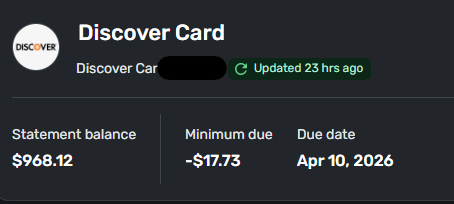
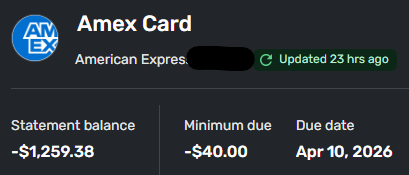
I've also noticed that different credit card detail cards report balances differently. Some report the statement balance as a + value, and other report as a - value. I reported this as feedback via the web app, as it's not an issue on the mobile app.
1 -
this feature is available for credit cards connected via supported aggregators (currently Intuit)
What aggregators does Simplifi use?
How do we tell which aggregator is used for a particular account?
DryHeat
-Quicken Classic (1990-2020), CountAbout (2021-2024), Simplifi (2025-…)0 -
You can tell during the Add Account flow for the financial institution (Finicity is the Mastercard one).
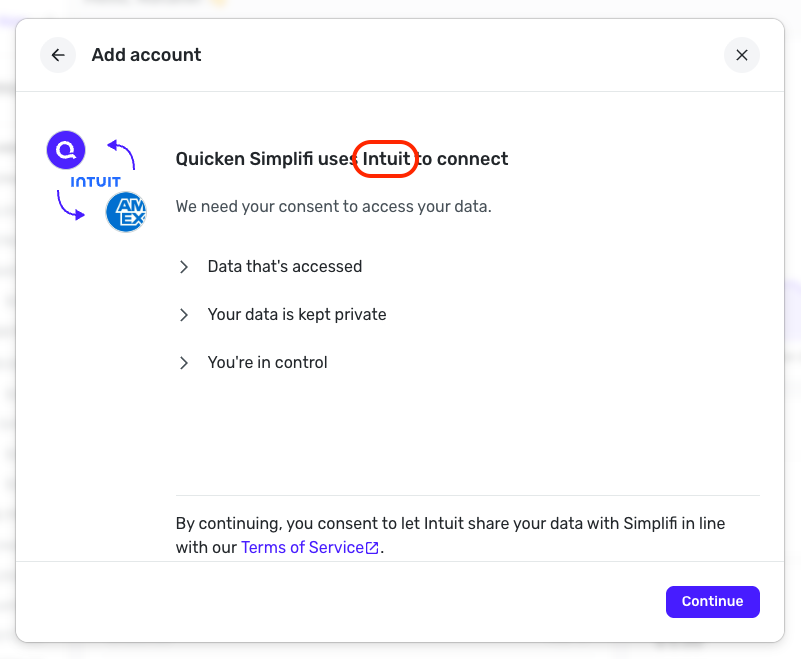
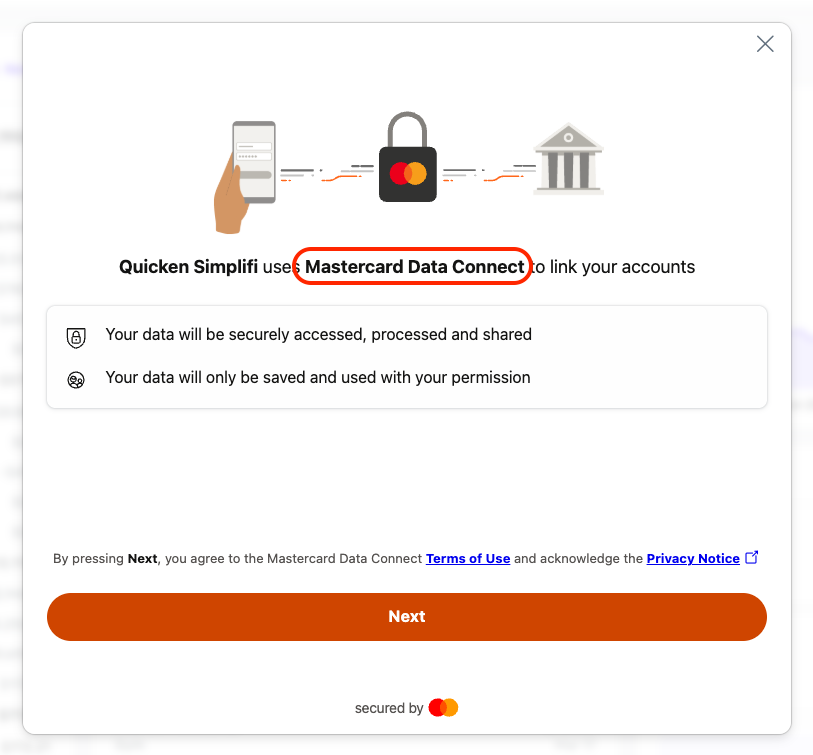
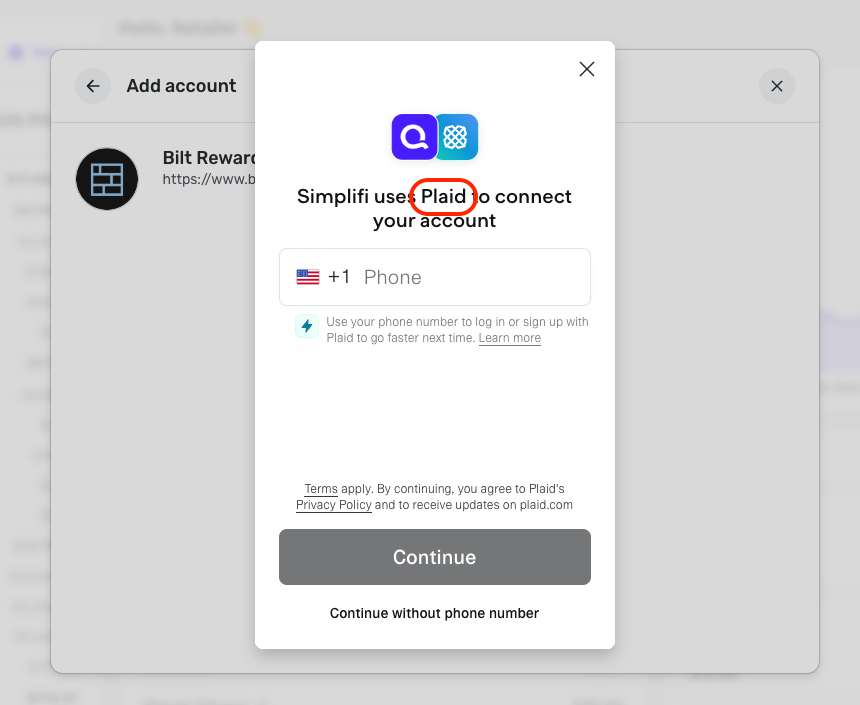
I will say that most bank presences in Quicken Simplifi/Quicken Business & Personal are under Intuit, though some work better or are only supported by another aggregator, so Plaid or Finicity may be the only option for that bank.
We are also looking at integrating this feature with the other aggregators in the future!
-Coach Natalie
0 -
You can tell during the Add Account flow for the financial institution (Finicity is the Mastercard one).
Thanks. I assume that means that if we have already added our accounts — and don't want to disconnect and re-connect them — we can determine the aggregator in some cases by seeing if credit limit information is available (which would mean Quicken is in use). Otherwise we can't tell.
BTW, I think this answers the question I asked earlier about my REI Cap One Mastercard lacking credit limit information. If Finicity is used for all Mastercard connections, and only Quicken supports credit limits, then it is Finicity, not Cap One, that is the problem.
DryHeat
-Quicken Classic (1990-2020), CountAbout (2021-2024), Simplifi (2025-…)0 -
You can go through the Add Account flow for any bank at any given time, and see what aggregator it uses before even entering login credentials, regardless of whether you already have accounts connected to that bank. But no, you cannot tell the aggregator by looking at the already connected accounts themselves. And yes, if the credit usage info is available, it is definitely connected through Intuit! For now, anyway.
Capital One is not aggregated through Finicity. They actually use their own OAuth API, which runs through Intuit. I believe Finicity is owned by Mastercard or vice versa, which is why it says "Mastercard Data Connect" in Quicken Simplifi. This does not mean that Mastercard accounts will only connect through the Finicity aggregator.
I hope this helps to clarify!
-Coach Natalie
1 -
You can go through the Add Account flow for any bank at any given time, and see what aggregator it uses before even entering login credentials,
Thanks! I had not thought of going through the flow without a real account.
DryHeat
-Quicken Classic (1990-2020), CountAbout (2021-2024), Simplifi (2025-…)1 -
This is great feature. It will be even more helpful to show the total of my expected monthly payments for all my credit cards. Options could include minimum payment or pay balance in full options at the bare minimum. It will help me understand my monthly credit card payment due amount easily from one place rather than trying to add up every month to ensure there is enough money left in my account.
0 -
This is excellent. Good step in the right direction. A couple observations/suggestions: when I hover over the pie/circle graph, it pops up some additional data. That's good, but the data are partially hidden by an orange tab that says "Card Details Feedback." So I can't read everything; it partially covers up the numbers. Hopefully that's very temporary! If not, the tab needs to go, or be moved elsewhere, or there's no reason the hover pop-up can't be slightly moved to the left so it's not covered up by the orange tab.
Also, the few additional data in the popup would all fit comfortably on the heading line, negating the need to hover. The line now shows Statement balance, Minimum due, and Due date, then a lot of dead space, with Credit used at the right edge. There's plenty of room to include Credit limit and Available credit on the line without needing to pop it up by hovering. I suppose the Credit used could also be listed, as it's occasionally a different figure than the account balance listed above. The circle graph already shows the % utilization, so no need to hover for that. I'm totally fine with the hover pop-up, which could list data such as account number, CVV, expiration date, monthly closing date, date opened, customer service phone #, and whatever else people want could be included in the hover list. But my main point is that most and probably all that is currently shown via hovering can easily fit now on the header without the need for hovering.
1 -
Hey - the orange feedback tab has been updated to be lower - sorry for the trouble, and thanks for letting us know! (It 's temporary, and will go away soon).
And thanks for all of the great feedback! We're definitely open to changing what data we display in different areas, as well as what additional info we can display. So your feedback, along with everyone else's, is super helpful as we continue with this feature. Keep it coming!2 -
I love it, and I like the direction it's headed! Are there any plans to allow manual input for credit card usage or due dates for manual accounts?
0 -
This is definitely something we're discussing! We're also trying to gauge which pieces of data to add or be editable. So everyone's feedback so far has been super helpful and insightful!
0 -
I like it. There is an issue with two accounts at synchrony. it's showing the account number and used credit properly, but the due date, min balance and statement balance is shared between them? hard to tell because one of the cards is not used and has been 0 for a while. worth mentioning though
0 -
I wish date/time could be set independently across time zones for local synchronization. I have a similar issue too.
0 -
I've noticed that the connected credit cards Balance no longer says anything, eg., "Balance with Pending". (This now seems to be reserved for checking and savngs accounts.) Was that a change made with this feature or did I miss its going away before? Probably the latter.
I know that Chase Credit Card and sometimes AmEx was slow clearing transactions after updating the balance. So just wondering.
Steve
Quicken Simplifi (Safari & iOS) Since 2021
Quicken Classic (MacOS) Since 2009
Dollars & $ense (DOS) and MS Money (Windows) 1987-20090 -
Really nice touch with this feature!
0 -
I noticed the same but didn't remember if it used to be available for credit cards. If yes, was the setting removed or just the way to access it?
0 -
@EL1234 i am pretty sure it used to say Balance with Pending. I’m sure there is a reason for the change. And not sure when it happened.
Steve
Quicken Simplifi (Safari & iOS) Since 2021
Quicken Classic (MacOS) Since 2009
Dollars & $ense (DOS) and MS Money (Windows) 1987-20091 -
I noticed that my Target Redcard / Circle card shows the wrong statement balance for the upcoming payment date of 3/28.
Here's what's really weird - I searched Simplifi for the amount it shows, and that's the amount that my payment was on 3/28/2025! And then I noticed that the due date listed in the new section with the statement balance says 3/28/2025. So it's technically correct, it's just a year off…
My upcoming payment due is also on 3/28 but is for a very different amount.
I hope you guys can fix this! Happy to DM screenshots if needed.
0 -
Love the addition, very useful. Funny that just the day before you rolled this out, I reviewed the due dates for my credit cards.
One thing I'd like to see: the statement balance should update after a payment is made. I don't always pay the whole balance at once, so having an accurate statement balance would be helpful.
ETA: Another thought on this - adding another field for the 'Remaining Balance' rather than updating the existing Statement Balance would give us both bits of data.
0 -
Great addition. Is it possible to show credit card interest rate? This would be very useful to plan debt reduction, etc as the legacy Quicken allows.
Thanks
0