Ability to deactivate or hide a category that is no longer in use

The goal would be to "hide" or "deactivate" categories so that they no longer show up in the list of categories available to add to new transactions, but without deleting them completely so that old transactions with those categories can keep them.
An example would be I have a wedding category, and we got married and so it's no longer relevant, but the algorithm still tries to auto categorize things to that category. So I have to manually fix it.
Comments
-
Agree!
Chris
Quicken Simplifi user since 2021.
Quicken Desktop user since 2014.
Spreadsheet user since forever.0 -
I like this idea. It might make sense for tags, too, but categories would be more important.
0 -
I upvoted as well. For some strange reason, there is one category that lately QS insists that we have although it makes no sense. It serves no purpose and is not used anywhere in QS that I have found. Apparently, it is used in QBP. I want to delete it, but definitely need to hide it and move it so I can more easily ignore it!
I expected to have total control of my categories and payees and accounts when I started with Simplifi. It is one of the reasons I chose the product.
Steve
Quicken Simplifi (Safari & iOS) Since 2021
Quicken Classic (MacOS) Since 2009
Dollars & $ense (DOS) and MS Money (Windows) 1987-20090 -
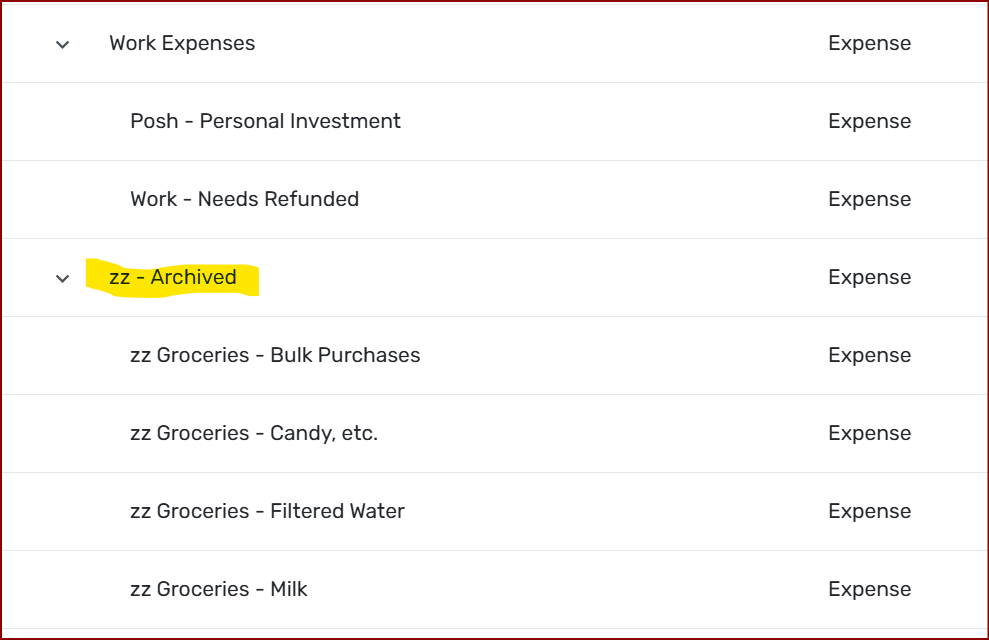
This is a workaround, not a long-term solution, but this is how I've handled categories I don't need anymore, but am not quite ready to get rid of, yet.
This is the best you can do with the current build.
Chris
Quicken Simplifi user since 2021.
Quicken Desktop user since 2014.
Spreadsheet user since forever.0

