Lake Trust Credit Union Personal is no longer available to connect to (edited)

Sadly seems this bank is no longer working with Simplifi. Please add it or fix! Thank you.
Comments
-
Hello @Colonel Snafu,
Thanks for reaching out! From our side, I can see that you are receiving an FDP-530 error when attempting to connect with Lake Trust Credit Union. This error generally happens when we attempt to create a secure connection with your bank, but the bank’s server does not complete the process.
Can you please try the following steps to see if they work in resolving the issue:
- Make all of the accounts with the bank manual by following the steps here.
- Once you see the account(s) listed in the Manual Accounts section under Settings > Accounts, go back through the Add Account flow to reconnect to the bank.
- If the connection is successful, carefully link the account(s) found to your existing Quicken Simplifi account(s) by following the steps here.
If those steps do not work, please provide a screenshot of the error from your end, as well as a screenshot of the Accounts Summary page from the bank's website that has a wide enough scope to show the full page URL. This is the landing page after signing in, and typically lists all accounts and balances. You will want to take this from a web browser and not a mobile browser, as well as redact any private info such as account numbers.
Thank you!
-Coach Jon
0 -
I also am no longer able to sync accounts with Lake Trust CU.
I tried the make manual then re-Add above to no avail. When re-adding there is no option to select Lake Trust - Personal Banking, only Lake Trust CU - Business Banking and Lake Trust - My Mortgage.
They did recently switch to a less robust/feature set online banking app/web experience for users while eliminating Direct Connect.
See screen shots attached.
0 -
Jon, My Mortgage does not work for my Personal accounts.
I just added (screenshot) the logged in URL and account page after successful sign on to Lake Trust - Personal on the web.
0 -
Hello @JC.,
Are you able to send logs as well as provide a screenshot of the error code you're receiving when trying to connect?
- Log in to the Quicken Simplifi Web App.
- Select the Profile icon in the upper-right corner of the screen.
- With the Profile menu open, hold down the Option key (Mac) or the Alt key (Windows), and then click Send Feedback.
- Leave all boxes checked, add a brief description of the issue, and then click Send.
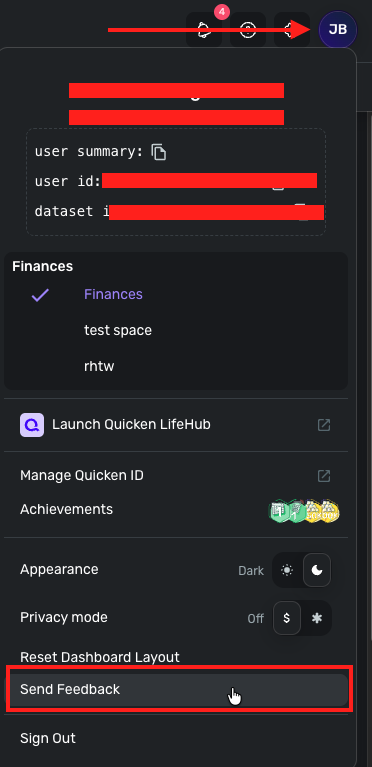
-Coach Jon
0 -
Logs sent.
The only error is on the account screen when trying to reconnect, it states in a generic message that The Server is unavailable. No error code is listed. I cannot send a screen shot as I had made those accounts manual when trying to reconnect them per the above instructions.
0 -
Hello @JC.,
Thank you for the reply and the logs! Can you share a screenshot of the error message you see when trying to connect to Lake Trust CU - Business Banking, as you mentioned above? We want to be able to nail down the specific issue that is occurring so that we can possibly escalate. Let us know!
-Coach Jon
0 -
The Lake Trust CU - Business login is now working. I change my password and was able to connect after readding that account. I edited that out of my original post, apologies
1 -
Simply to clarify what is no longer working is the "Lake Trust CU - Personal Banking" account sync.
The screenshots I submitted above on Apr 3 identify how they separate personal banking and business banking logins. There is no option in Simplifi to add Lake Trust CU - Personal Banking when adding a new account. In addition, the URL displayed after logging into Lake Trust CU - Personal Banking from their website laketrust.org.
0 -
Yes sir! The only issue is Lake Trust - Personal Banking
Thanks
0 -
Hello @JC.,
Just to clear up any confusion on this matter, can you please confirm if you were able to connect your personal accounts under the "Lake Trust CU - Business" instance in Quicken Simplifi? If you were able to, that would mean the Personal Banking instance would not be needed in this case.
Thank you!
-Coach Jon
1 -
No I was not able to connect my personal accounts under the business login instance within Simplifi. Only my business accounts were able to use the business instance ( I have both personal and business accounts at Lake Trust).
0 -
Hello @JC.,
Thank you for clarifying! So the main issue at this point is that you cannot populate your personal accounts with Lake Trust into Quicken Simplifi via the "Lake Trust CU - Business" instance, correct? Can you please provide the following information to assist us with troubleshooting:
- Has there been any activity in the account in the last 90 days?
- Is the account considered an external account (i.e., are you redirected to a different website when selecting the account on the bank's website)? If so, what URL are you redirected to?
- Is the account a subtype of a different account?
- Has the bank made any recent changes to its website or sign-in process?
- Are you the owner of the account?
- The name of the account, as it appears on the bank's website.
- If the issue is occurring on an existing Quicken Simplifi account, the name of the account as it appears in Quicken Simplifi.
- A screenshot of the Accounts Summary page from the bank's website that has a wide enough scope to show the full page URL. This is the landing page after signing in, and typically lists all accounts and balances. You will want to take this from a web browser and not a mobile browser, as well as redact any private info such as account numbers.
- A screenshot of the Add Account screen in Quicken Simplifi showing that the account in question is missing at account discovery.
You are welcome to send this information via DM if you prefer!
-Coach Jon
0 -
Hello @JC.,
Thanks for the DM! That is exactly the information we wanted. To further clarify your answers, can you confirm that all 5 accounts you listed were originally connected under the Lake Trust - Personal Banking instance in Quicken Simplifi? Additionally, can you remember the last time that instance was available and working for you?
Can you also share new logs since the last ones sent were from over a week ago?
- Log in to the Quicken Simplifi Web App.
- Select the Profile icon in the upper-right corner of the screen.
- With the Profile menu open, hold down the Option key (Mac) or the Alt key (Windows), and then click Send Feedback.
- Leave all boxes checked, add a brief description of the issue, and then click Send.
Thank you!
-Coach Jon
0 -
Yes sir all 5 accounts were connected active and syncing. Looking at the busiest of those accounts the Checking shows a last entry in Simplifi on March 12 and that would have been auto sync'd and not manual.
I usually try to connect every few days so anytime relatively close to after that date. I included a partial Lake Trust email that went out regarding logging into Online Banking and the Mobile app prior to March 13 as that was their cutover date to their new online banking app for Personal Accounts. Hopefully that narrows it some. Logs will be submitted as requested.
Not sure if the logs are stored locally but I use a desktop and two laptops depending on where I am at. I can submit logs from the other 2 machines also if helpful.
0 -
Hello @JC.,
Thanks for the requested information! I did get this reported to our product team and will follow up here when they have any status updates going forward.
In the meantime, you can track the account manually by adding manual transactions, which will keep your records up-to-date. Here are the steps to do so: Managing Transactions in Quicken Simplifi | Quicken Simplifi Help Center
CTP-16967
-Coach Jon
0 -
Thanks Jon!!
1 -
Hello @JC.,
I am back with an update from our product team. It looks like the financial institution is no longer supported in Quicken Simplifi at this time. The accounts for this bank will need to be manually tracked within Quicken Simplifi going forward.
You can track the account manually by adding manual transactions, which will keep your records up-to-date. Here are the steps to do so: Managing Transactions in Quicken Simplifi | Quicken Simplifi Help Center
Since the financial institution decided to remove support, you will need to contact them for any additional information about this loss of support.
I wish I had a better answer to give you. Thank you!
-Coach Jon
0 -
Okay thanks Jon. Time to switch CU's it looks like. Their new online banking experience is lacking several basic features that were previously implemented with the prior experience and users are screaming about it.
Thanks again, have a great rest of the week!!
2



