How do you reconcile the bank statement with opening and ending balances ?

When I receive the bank statement there is an OPENING value and an ENDING value.
After each transaction from the bank statement is REVIEWED how do i know in dollar value how many more are left to be reviewed to balance with listed transactions on the statement to arrive at the same ending balance as the bank shows as ENDING balance on the statement ?
I am transitioning from a simple MS Money software that is handling that question very easily.
Thank you
Best Answers
-
Well, there isn't true reconciliation in Simplifi. Since it works (as Mint did for example), by taking the balance from your bank's website and subtracting any pending transactions to calculate the Balance. Thus unlike MS Money or Quicken Classic, the balance should always be right.
So you have to employ a workaround.
Some people use the Review checkmark as a replacement. When they get their statement they go through and check the review box for each one. If they find a missing transaction, they enter it, clear it and check the box. In that way, they "reconcile" the statement.
I don't bother to do that with my connected accounts. I just check the transactions as they come in to show that I reviewed it and I accepted it was a transaction I made. I also enter my pending transactions manually for accounts that don't download them.
What I do instead is periodically check to make sure I haven't missed any transactions by confirming the total amount of my transactions with the balance that Simplifi shows. It works with any account and not just connected ones (though theoretically with the new feature to "re-sync" manual accounts it shouldn't be necessary for those since the re-sync re-totals the transactions).
For this to work, you need to have set a beginning balance for your accounts (unless of course it was $0.00). Here's a screenshot of my "reconciliation" of my Apple Cash account:
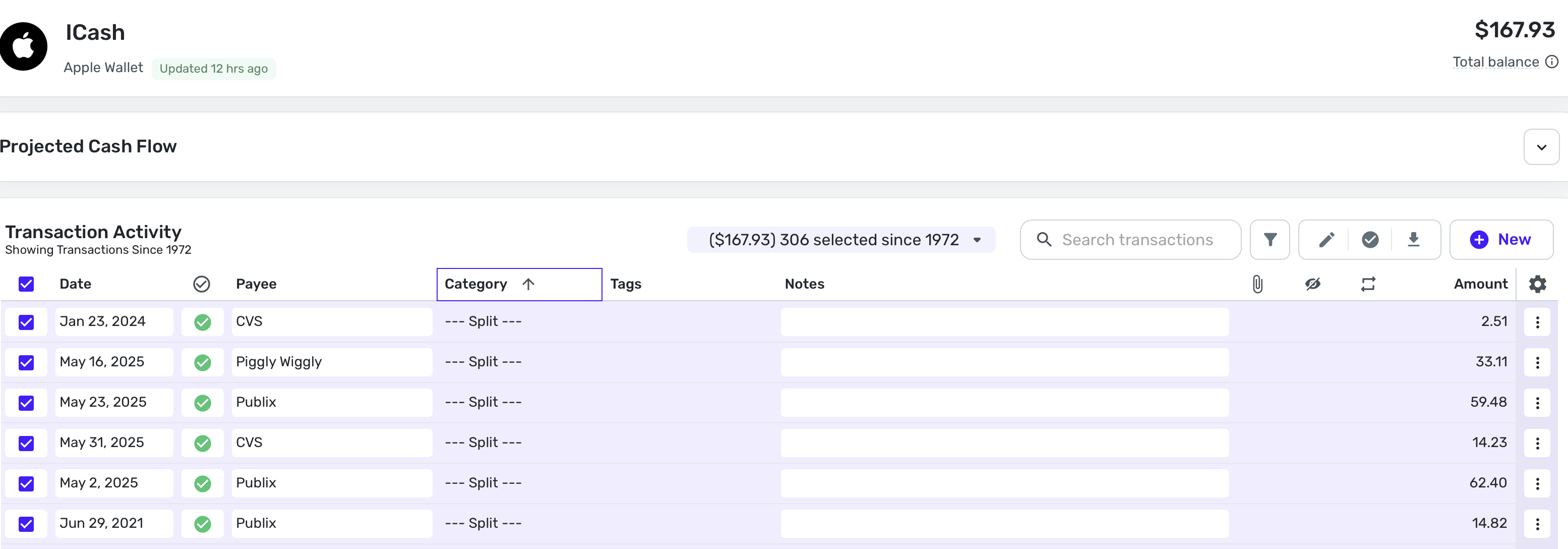
Here you see that my downloaded balance of $167.93 equals Simplifi's total of all my 306 transactions, which I chose using the selection button on the far left. Note that I first sorted the account by category. You could choose another column except date. This sorting forces Simplifi to open up all the transactions so you can choose them all at once using the selection box in the column header.
Now I have confirmed that I am not missing any transactions. I do this with all my connected accounts from time to time.
Hope this helps.
Steve
Quicken Simplifi (Safari & iOS) Since 2021
Quicken Classic (MacOS) Since 2009
Dollars & $ense (DOS) and MS Money (Windows) 1987-20090 -
Thank you very much @SRC54 for the detailed explanation.
I am not connected to my bank which is TD (Toronto Dominion) in Canada and not it is listed here as it is not a US bank and I didn't need to create a manual connection to the bank.
I only reconcile my statement to see which of my transactions did not go through the bank at the end of the month. So, my reconciliation process is easy.
When I will receive my March 2026 statement (in early April) I will use your suggested method with the REVIEWED checkbox.
Once again, Thank you
1

Answers
-
It seems amazing to me that an application, whose sole purpose is to keep track of finances via financial accounts, has no account reconciliation feature, and/or (preferably 'and') display a running balance or at least show a ledger balance to compare with the bank balance.
Im amused by the comment; " unlike MS Money or Quicken Classic, the balance should always be right." Yes, and the sun should always shine. But guess what?
Also I'd like more information on how to "periodically check to make sure I haven't missed any transactions by confirming the total amount of my transactions with the balance that Simplifi shows" Implying you run a tape for an account that's been open for three years? How far back do y
The method using the Reviewed flag method is a kludge at best, as transaction download. I review them (check) and change the status from pending to cleared. (Because that's what actually happened
I've been using (and loving) Quicken since DOS version 2.1. Given the relatively straightforward functionality and its near-universal utility, I strongly urge Quicken to include an Account reconciliation feature. I sincerely cannot believe you'd ship a financial product without it
<Rant off> Thanks
1 -
I agree with you that Simplifi needs a reconciliation feature. The process @SRC54 described works but is time consuming and needlessly difficult.
Im amused by the comment; " unlike MS Money or Quicken Classic, the balance should always be right." Yes, and the sun should always shine. But guess what?
@SRC54's comment is true in most circumstances. Simplifi does not calculate the balance by totaling up the transactions in the register but instead downloads the balance from the bank. Because Simplifi is displaying the balance from your bank, it "should always be right" in the sense that it should always match the bank.
But the way Simplifi and your bank handle pending transactions can foul that up. Your bank may or may not count pending transactions in the balance it reports. And, depending on the settings you choose, Simplifi may or may not subtract pending transactions from the balance reported by the bank. For an example of the problems this can cause, see the following comment:
DryHeat
-Quicken Classic (1990-2020), CountAbout (2021-2024), Simplifi (2025-…)1 -
@JMGPublic You may want to add your vote to this idea.
None of these finance apps that work like Simplifi (that I used), eg., Mint, Personal Capital, Buxfer offered true reconciliation. But maybe Quicken can figure out how to do add one to Simplifi.
Until then, I urge users to take some time each week to see if they have missed any transactions. Most people use a checking account or a Rewards Credit Card as their daily goto account.
I have my own system to confirm my transactions and I admit I rarely find that I am missing one. But when it happens, it's usually Fidelity investment account, and of course, Simplifi ignores those transactions. But I have usually entered it manually anyhow.
Edit: BTW, I don't use flags at all to "reconcile" or the review button either. These are methods other people use. I do the above, and as a further test, once a month or so, I total all my transactions to make sure they equal the balance.
Steve
Quicken Simplifi (Safari & iOS) Since 2021
Quicken Classic (MacOS) Since 2009
Dollars & $ense (DOS) and MS Money (Windows) 1987-20090
