Hanscom Federal Credit Union Care Code: QCS-0429-2, FDP-103 (edited)

When I try to add my bank account to Quicken Simplify, I get the following message:
"We are unable to update Hanscom Federal Credit Union at this time. Please try again later. If you continue to experience issues, please contact Simplify support.
Care Code: QCS-0429-2"
I believe the problem results from Hanscom implementing a NEW website with a NEW URL (digital.hfcu.org). The original website had the URL of online.hfcu.org or hfcu.org. I had NO problem connecting to the original Hanscom website
Comments
-
Hello @uvcatastrophe,
Thank you for letting us know you're seeing this issue. To troubleshoot the error you're encountering, please wait 24 hours, then try again.
Please let me know how it goes!
-Coach Kristina
0 -
I waited 24 hours and the problem remains. This time I got the error FDP-103. Please notify your technical team that Hanscom Federal Credit Union has revised their website with an NEW URL (digital.hfcu.org). I have revised my login to satisfy them.
0 -
Hello @uvcatastrophe,
Thanks for reaching out! I can see the FDP-103 error you are experiencing from our end as well. I did see that there were other instances within Quicken Simplifi with the URL you provided. Have you tried these to see if they work for you?
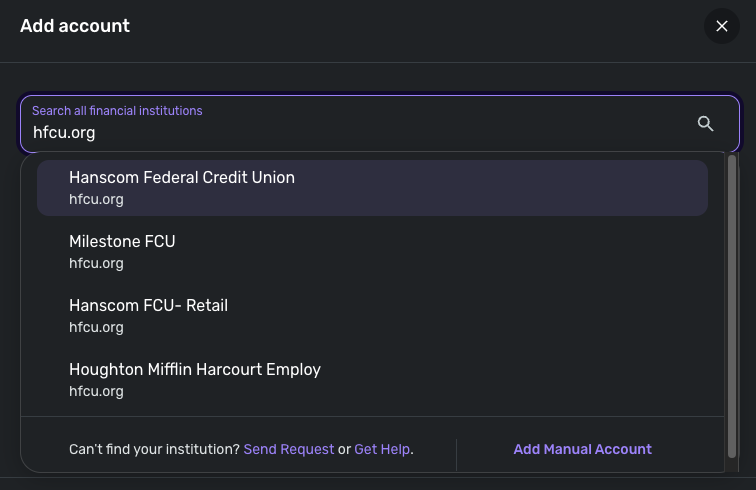
If any of those instances still don't work, please try the following steps:
- Verify that your login information is correct – Type your password/PIN into a text application to ensure you don’t have any typographical errors. Then, copy and paste your login information into Quicken Simplifi to ensure accuracy.
- Verify your login at the bank’s website – Try to sign in to your bank’s website using the same login credentials to ensure you've not locked yourself out of the account and that the credentials are still valid.
- Check for an app-specific password – Some banks require users to use a specific app password when connecting to a third party. Check with your bank to see if you need to use an app-specific password.
- Update your credentials – Try temporarily updating your password at your bank's website and then try again to connect in Quicken Simplifi. We recommend NOT using the following special characters: & < > / \.
Let us know!
-Coach Jon
0

