Splits in Recurring & Other Splits Enhancements: Share your feedback here!
Comments
-
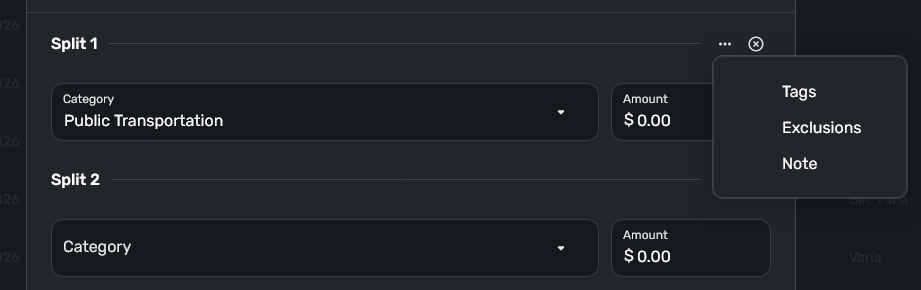
Having the option (e.g., in the Settings) to always show some of the additional fields (e.g., Tags) when splitting a transaction would save so many clicks, e.g., for users who split transactions purely for the sake of assigning different tags.
I.e., since the update, I now have to perform multiple clicks to reveal the Tags field for each new split, which quickly gets annoying.
0 -
@DryHeat
An update
1. I've filed the original match-overflow math oddity bug. (Sadly, I can't reproduce this so I'll need to reach out to get more details from you.)
2. It's a bug that we've fixed (and is on its way out to you next week) that you can't edit the overflow split line once it's matched.
We're interested and eager to find and fix the 'overflow' issue; thanks so much for reporting it.0 -
Hello @RickS & @MorganG48,
Your post has been merged with the official feedback thread for Splits in Recurring & Other Splits Enhancements, which is currently in Early Access testing, so it can be reviewed by our product team.
Thanks for sharing your experience!
-Coach Kristina
0 -
I love the new split functionality but It seems to have a minor bug.
My net pay amount typically fluctuates by 1 cent so when I set up the recurring split, I made the overflow line one of the payroll tax lines which made sense because the Medicare and OASDI lines fluctuate by 1 cent back and forth between each other from check to check. Since the actual transaction has now come through, I just now attempted to edit it and but I am unable to do so because it seems that the overflow line is hanging on to the 1 cent overage amount and I am unable to remove the 1 cent from that line. Hopefully I am making sense and maybe others have experienced this?
0 -
When I split my income recurring item with expense for taxes and insurance, its reducing the amount showing for Income in Spending Plan. On the other side its not showing these expenses as recurring bills. The net effect is the same, but its a confusing and to me inaccurate prediction of what's really going on.
In Spending Plan I'd rather see 'gross' income in the Income bucket and all deducted expenses under Bills. Otherwise its always 'undercounting' my expected gross income and corresponding expenses. I have to mentally make that adjustment whenever looking at total Income and Bills forecast.
1 -
Adding my dislike and frustration with this change.
I used to be able to see five, maybe as many as seven lines on a split. Including tags and amounts.Now, I can only see three at most, and that drops down to two once I have the split field enabled.
I have to click the three dots on every. single. line. In order to tag the splits.
This updated process is way slower, much more cumbersome, and offers less visibility for the split.
Please revert to the old method OR send this back to QC and the designers. I know you can do better.
Thanks for listening to the rant.
-1 -
My SS just came in and matched the split recurring income. I also moved the insurance and tax from Other Sprending (good tip😀). I echo the desire for expenses to show up under Bills not other.
Curious how you matched previous transactions to the new split which was not there in past months? Did you have to retrospectively modify the split start date to the past?
1 -
(These comments refer to splits in recurring transactions on QBP)
When I add expense splits to an upcoming recurring income transaction (to reflect withholding taxes, etc.) the expense splits are not showing up in the Spending Plan interface anywhere. In other words:
- The gross income split amount shows up under Income
- The withholding tax and insurance deduction split amounts do not show up under Bills, Planned Spend, or Other Spend.
This causes my "Left this month" figure to be artificially inflated, because Spending Plan is counting the gross income and ignoring the deductions.
I am countering this by setting up some expense series under Planned Spend to represent the deductions, but that means the deductions are being entered as part of the recurring series and as expense series.
DryHeat
-Quicken Classic (1990-2020), CountAbout (2021-2024), Simplifi (2025-…)1 -
I did the same thing with my income deductions. I set up Planned Spending for Withholdings and Medicare Plans. Otherwise, after the income is deposited, they would go into Other Spending.
Glad you got the feature now in QBP, and it appears to work the same as in QS.
Steve
Quicken Simplifi (Safari & iOS) Since 2021
Quicken Classic (MacOS) Since 2009
Dollars & $ense (DOS) and MS Money (Windows) 1987-20090 -
@RobI I had a workaround previously by tying the income to a bill for taxes, medical plans etc. so I could get both the income and withholdings in the Spending Plan without its being in Planned Spending or Other Spending. With the new feature, I deleted the old Bill recurring and retroactively added the Planned Spending buckets.
Like you, I hope they will in the future allow us to put it in the bills/subscriptions section.
Basically this is how Simplifi always worked, once you link a recurring income to a split transaction, it always put the income in the income section and the withholdings went into Other Spend or Planned Spending if you had the latter set up.
Steve
Quicken Simplifi (Safari & iOS) Since 2021
Quicken Classic (MacOS) Since 2009
Dollars & $ense (DOS) and MS Money (Windows) 1987-20090 -
Oh I deleted the prior planned spending items already so there is no longer anything to link to. Probably not worth worrying about. Thks
0 -
Basically this is how Simplifi always worked, once you link a recurring income to a split transaction, it always put the income in the income section and the withholdings went into Other Spend or Planned Spending if you had the latter set up.
The problem is the discrepancy in how a split transaction is treated and how a recurring split series is treated.
—With a split transaction, the various splits all show up somewhere — Income, Planned Spend, or Other Spend.
—With a recurring split series — before it is linked to a transaction — only the Income shows up. The expense splits remain invisible to Spending Plan until the recurrence is linked to a transaction.
Before we had splits in recurring series, I created a series in the amount of the net Income. So the calculation of "Left this month" was correct. Now, because I include the gross Income and the expense splits in the series, the calculation of "Left this month" is over-optimistic (by the amount of the expenses).
DryHeat
-Quicken Classic (1990-2020), CountAbout (2021-2024), Simplifi (2025-…)1 -
@DryHeat Yes, I see. I always had a bill for the withholdings and an income for the gross amount so they were both taken into account. Once I had the deposit, I linked it to bills and deleted the now superfluous income.
Now I have Planned Spending for the withholdings so that takes it into account. But you have to do one or the other.
The ideal (for me) would be for the Spending Plan to take it all into account, and once you made the deposit the withholdings went to Bills/Subscriptions.
Our workaround of having Planned Spending for the withholdings also works.
Steve
Quicken Simplifi (Safari & iOS) Since 2021
Quicken Classic (MacOS) Since 2009
Dollars & $ense (DOS) and MS Money (Windows) 1987-20090 -
Our workaround of having Planned Spending for the withholdings also works.
It works, but it's clumsy to use it to handle splits in recurring series, because you double the effort:
- If the amounts of the splits vary from month to month you of course have to adjust those amounts in the actual transaction after it downloads and matches.
- But if you are catching the expenses in Planned Spend you also have to adjust the amount there to match the actual amount of the split.
It's just an awkward solution. As we have discussed before, it would be better to (1) treat the Income splits like Income transactions (putting them under Spending Plan | Income) and (2) treat the expense splits like bill transactions (putting them under Spending Plan | Bills).
DryHeat
-Quicken Classic (1990-2020), CountAbout (2021-2024), Simplifi (2025-…)2 -
I probably should have commented on this sooner. I am having problems with splitting transactions with different exclusions.
In my car account, I had a transaction that included the cash price, trade-in, fees and sales taxes. The transaction was excluded from both Spending Plan and Reports. The first two were transfers, but I wanted the fees and sales taxes to be included in reports. Changing the exclusions for the last two splits works but I couldn't get them to show up in reports.
Deleting the transaction and starting over doesn't work either. It still doesn't work though everything shows correctly.
My work-around was to enter 4 transactions: Cash Payment, Trade-in, Sales Tax and Surcharges. That works fine.
I had four of these transactions: 2 in my wife's car account and 2 in mine. I managed to make it work for one in my wife's account.
I don't have any of these kind of splits in any other account; they are rare, and I suspect QS just cannot help excluding the transfers. BTW, un-excluding the transfers won't work either. I've included them in Spending Plan and Reports, and they don't show up anywhere.
Steve
Quicken Simplifi (Safari & iOS) Since 2021
Quicken Classic (MacOS) Since 2009
Dollars & $ense (DOS) and MS Money (Windows) 1987-20090 -
Spending plan total does not update when you edit recurring split transaction amount
I saw this with an income transaction that was originally $5000 in the income total. Spending plan income showed it correctly
However, I later went back in and modified the splits and totals to more accurately update the transaction elements and totals. However the Spending Plan still displayed the $5000 amount under income and impacted the available spend calculated amount. The only way to fix it was to delete the old recurring income split item and start over
0 -
Hello thread! I'm watching and we're working on issues you're noting. Thank you all so much for the reports large and small. I really appreciate it.
Here's an update:
- Working with you, we don't think there is an issue with overflow calculations. There was an issue with editing the overflow line. The most recent web deploy improved this so you can edit the Overflow line. (I still think we need another fix here but if you move the amount and reset the Overflow to $0, it will disappear. Probably better to let you delete it.)
- We are working on a way for those who use tags to set them to be shown always (and notes, etc).
- Adding some splits entry polish - padding changes and scrolling.
- For Income series with expense lines, here’s where we are now:
- Show Net Income for Reminders
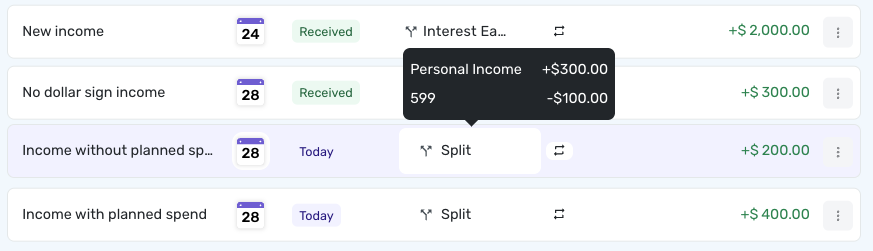
- Unless you have a Planned Spend amount for one of the expense lines (then you’ll need to add Planned Spend for all the expense lines)
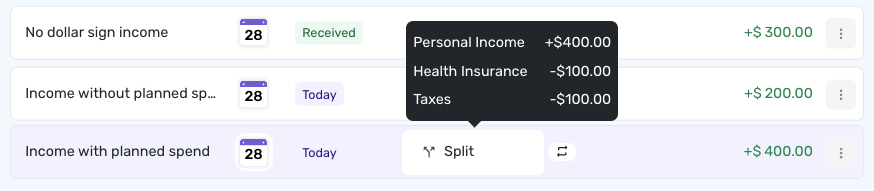
- Unless you have a Planned Spend amount for one of the expense lines (then you’ll need to add Planned Spend for all the expense lines)
- Show Net Income for Reminders
- I hear many of you that you’d prefer (esp when splitting a paycheck, right?) to track the expense lines in Bills (vs showing net amount when it’s a reminder and then showing expenses in Other Spend, unless you track in Planned Spend). This will need some additional design/work and I’ll reach out to discuss. We wanted to get a first version of splitting series out and tried to mostly keep the way that splitting transactions and the spending plan interactions the same as when you did it manually. Thanks so much for the feedback.
- Would love to follow up with as I couldn’t reproduce the issue without a bit more detail:
1 -
@Quicken Kirby As always, very clear, very useful and very reassuring. Thanks!
I would have had an overflow this month on my insurance bill but I saw this month it was 1 penny more and adjusted that instance. I started not to just to see how Simplifi would handle it.
Especially loved 2, 3 & 5 (and yes to 5 with paychecks especially).
Steve
Quicken Simplifi (Safari & iOS) Since 2021
Quicken Classic (MacOS) Since 2009
Dollars & $ense (DOS) and MS Money (Windows) 1987-20090 -
Splits in Recurring is now live in Early Access for Quicken Business & Personal users!
-Coach Natalie
0 -
@Quicken Kirby It was Spending under reports and I just checked and notes are now showing on transactions with no splits as well as transactions with splits.
1 -
@Quicken Kirby great update. I can't find the reminder view shown in item 4 with dates and split /hover over. Is this live yet in Early Access?
0 -
Hi there @RobI,
This should be live to EA. This information is shown on Reminders where net values can be shown (vs once things are a transaction and the split lines are shown instead).
Let me know if this answers the question! Thanks so much for being so engaged in our EA.0 -
I'd like to be able to add splits to previous recurring transactions but haven't figured out how to do that.
I added splits to my current monthly income transaction with effective date of today and no end date. I really wanted to add the splits effective January 1, 2026 but I was required to set the start date as today or later.
Ideally I'd go back and add splits to series for previous years, with start date of January 1 and end date December 31 for each year.
Is there a way to do this?
0 -
@lindsayla18,
There isn't a way to update prior transactions with the new series information.
We wanted to work on this long-requested (and pretty deeply intwined and complicated feature) and drew some v1 boundaries for it. I thought it was useful to get it out without historical updates being possible, although I surely see that updating history would be nice.
Thanks for the feedback!2 -
@Quicken Kirby Thanks I found it- I was looking at Reminders under Bills and Income rather than part of Spending Plan Income
0 -
Yes, I think this would be very useful if the note transfers to the other side, because if not, it's double the work to put notes on the split and notes on the destination of transfer, which seems counterintuitive and more work. I feel it defeats the purpose of notes because when you go back to reference the note, if they don't match, you don't recall which one was the right note.
0 -
@Quicken Kirby thank you! I understand completely. I'll keep my fingers crossed for a future enhancement. 😀
0 -
I have referenced this conversation here because I think this problem may relate to this early access feature.
User is downloading a transaction and splitting it with a transfer to a manual account. The transaction is pending on both sides. When the user attempts to clear the split in the manual account, he gets a warning that he cannot do it but must go to the other side. Even after it clears there, the user is unable to clear the split in the manual account.
This appears to be a bug to me. So please review this.
I have created sample splits in my checking account with a transfer to a manual cash account, and I can confirm that I get the same behavior.
Thanks!
Steve
Quicken Simplifi (Safari & iOS) Since 2021
Quicken Classic (MacOS) Since 2009
Dollars & $ense (DOS) and MS Money (Windows) 1987-20091 -
Thanks for posting here, @SRC54, and we'll debug and get back to the thread!
1 -
Agreed - Tags previously showed on the split transaction editing screen - this was Perfect. Now I have to click 3 buttons on every split to show the tag. This takes a lot more time. Please return the functionality to what it was previously. If you are showing tags on your main transaction editing screen, then by default show the tags on the split editing screen. How can I submit this as a feature request or product improvement.
0