Raymond James FDP-102 (edited)

FB – 102 error
I followed recommended process long after 48 hours of trying to reconnect to the bank moving to Manuel and then bringing back to connect again. The 102 error is persistent. It’s been 3+ weeks since the Raymond James link worked. been 3+ weeks since the Raymond James worked.
Comments
-
Hello @michael_popovich,
I can see the FDP-102 error you are experiencing from our end. Thank you for letting us know that you have also tried waiting 48 hours, making the account manual, and re-linking.
Can you please supply a screenshot of the Accounts Summary page from the bank's website that has a wide enough scope to show the full page URL? This is the landing page after signing in, and typically lists all accounts and balances. You will want to take this from a web browser and not a mobile browser, as well as redact any private info such as account numbers.
Please also submit your logs via the 'Send Feedback' option:
- Log in to the Quicken Simplifi Web App.
- Select the Profile icon in the upper-right corner of the screen.
- With the Profile menu open, hold down the Option key (Mac) or the Alt key (Windows), and then click Send Feedback.
- Leave all boxes checked, add a brief description of the issue, and then click Send.
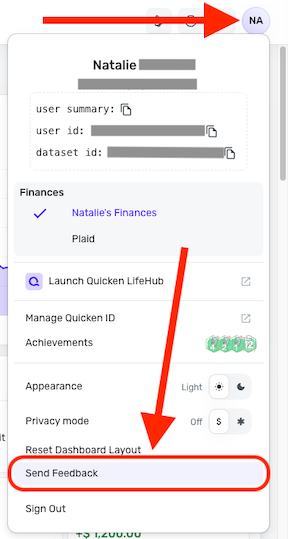
-Coach Jon
0 -
I switched to [removed competitor mention]. It connects to Raymond James just fine. I took Simplifi's suggestion of removing the account and readding. Now I can't get it into my portfolio at all.
1 -
I'm having the same issue with Simplifi and Raymond James. The account synch. was working fine until it wasn't. When logging into the Raymond James website directly, there's no issue. I've not changed my password, and I also used a trial subscription of [removed competitor mention] and their application was able to synchronize with Raymond James just fine. Please address this quickly Simplifi! There's competition for my $$$.
1 -
Hello @EF1 and @TheBrowns07,
Thank you for reaching out as well! We are aware of the FDP-102 error known issue with Raymond James, and have an alert you can follow for updates as we work to resolve the issue here:
In the meantime, you can track the account manually by adding manual transactions, which will keep your records up-to-date. Here are the steps to do so: Managing Transactions in Quicken Simplifi | Quicken Simplifi Help Center
If the account is an investment account, the manual tracking steps are a little different:
- Make the account manual so you can add and edit Holdings: How to Make an Account 'Manual' | Quicken Simplifi Help Center
- Add/edit your Holdings to keep accurate records: Tracking Investments in Quicken Simplifi | Quicken Simplifi Help Center and Tracking Investments in Quicken Simplifi | Quicken Simplifi Help Center
-Coach Jon
0
