Manually entered transactions are not being matched to downloaded ones (edited)

Can someone please help me understand this…..
If I manually enter a transaction, Q will not "link" that to an uploaded transaction when it occurs?
I have several "pending" items from the beginning of April that I manually added so that my balances would be correct…..
How long do they sit there? Do I have to go and link them so that they clear? Do I just need to delete them?
It seems that the software should be able to match via name, date, amt and link the manually entered transaction to the downloaded transaction……
thank you all.
Comments
-
Do you mean that the manual transaction won't automatically link to a recurring transaction when it later matches to a downloaded transaction?
I hadn't really ever thought about it, but yes, if you enter a manual transaction, you have to link it yourself to a recurring transaction.
The manual transaction should match with the downloaded transaction if they are the same amount. This doesn't always work but usually does. I don't have much problem with that.
A downloaded transaction that matches to a manual transaction won't link to a recurring because QS logically thinks they are different transactions. At least, that is my experience.
If you mean something else, please clarify. And I apologize if I have misunderstood.
Steve
Quicken Simplifi (Safari & iOS) Since 2021
Quicken Classic (MacOS) Since 2009
Dollars & $ense (DOS) and MS Money (Windows) 1987-20090 -
If you're entering a transaction manually and then linking it to a recurring series, it may be fewer steps to mark the reminder as paid (via the three dot menu) and then editing whatever details you want in the transaction it creates for you.
0 -
I don't think you are talking about recurring series, but I could be wrong about that. I think what you are saying is something like this:
- You enter a manual transaction to represent, for example, a payment made from an account,
- Later, Simplifi downloads transactions from that account, including one that represents that same payment,
- Simplifi does not recognize that both transactions (manual and downloaded) represent the same payment,
- So Simplifi does not merge them into one transaction and you end up with two transactions in the account.
Is that what is happening?
FWIW, in my experience Simplifi almost always merges such transactions but occasionally fails. But I don't manually enter very many transactions. @SRC54 does a lot of that, so he may be able to help.
DryHeat
-Quicken Classic (1990-2020), CountAbout (2021-2024), Simplifi (2025-…)1 -
I've seen the same, and if you select both transactions there should be a button at the top to merge them.
1 -
@DryHeat yes, you are correct in your understanding of my question.. I apologize to @SRC54 for not explaining it better...
I guess it really doesn't make sense to me why "software" does not/cannot match a downloaded transaction from that same account, same amount, same date. I also use Quickbooks for my business and it functions this way. I prev used YNAB and it worked this way.
From a financial perspective, if I spend money and the transaction(s) do not appear for a few days and I review my accounts during that few days... What quicken presents is not a true picture of funds available.
Which then means I am reviewing my bank accounts to verify the correct amounts available… which in turn makes me question the need for this service.
Thank you all for the help.
0 -
No need to apologize. I take a stab and often I miss. 😀
I don't get too many that don't match, but it does happen. In my case, Simplifi usually correctly matches with my manual transaction. However, my local bank then downloads the transaction again a day later with that day's date instead of the actual date of the transaction, and that confuses Simplifi.
f I cannot merge them, I delete the second one. However, I have found that if I keep both, when it clears, Simplifi will often fix it. It's a mystery.
Thanks for updating us. I hope you can find a way to make Simplifi work for you.
You could also file a bug report since Simplifi is SUPPOSED to match manual transactions correctly. Good luck.
Steve
Quicken Simplifi (Safari & iOS) Since 2021
Quicken Classic (MacOS) Since 2009
Dollars & $ense (DOS) and MS Money (Windows) 1987-20090 -
It may help if you create a rule for the downloaded transaction that changes the Payee to something that matches the Payee you use for the manually entered transaction.
I say this because I have been told by staff that having the "Payee after rule applied" match the Payee on a recurring series assists the matching engine in making the match. It may work the same way for matching a manually entered transaction.
See thread below:
DryHeat
-Quicken Classic (1990-2020), CountAbout (2021-2024), Simplifi (2025-…)1 -
so I took a better look at these and they are all transfers for reimbursable expenses (see post from 03/19).. not sure how to link. (the account is "Shea Reimburse/Transfer"
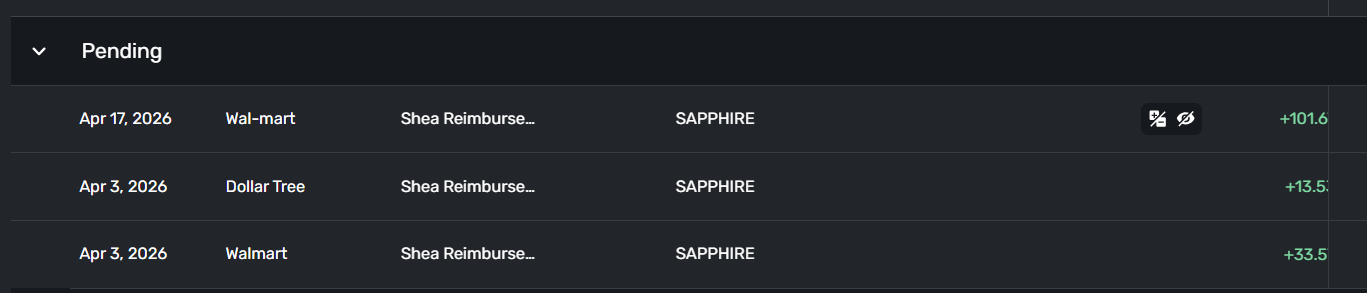
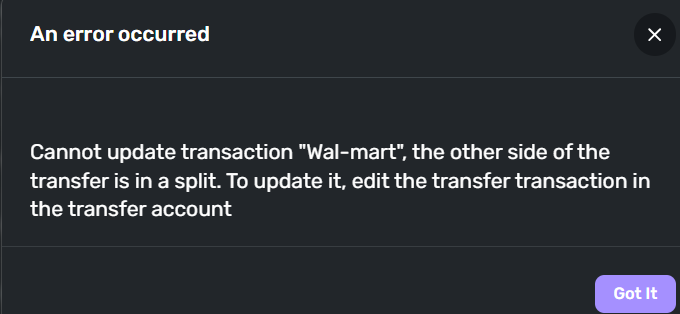
When I go in and try to "clear" them… I get this error message:
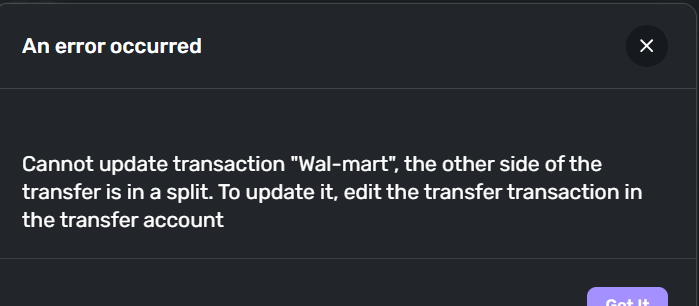
so I go to the transfer side and get the same error:
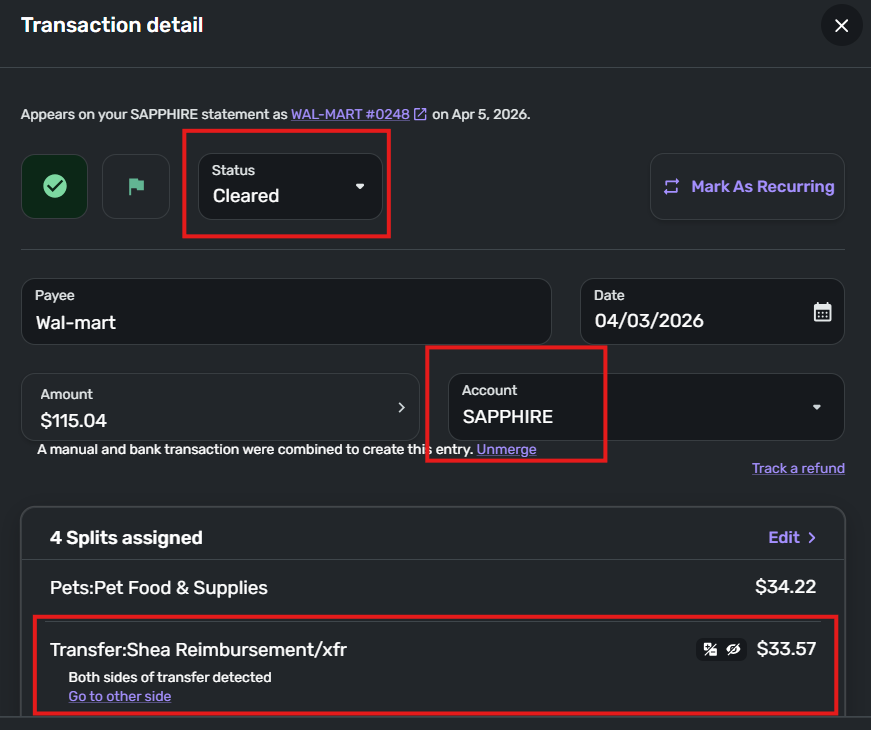
this is the 3rd transaction on the list: and it shows "cleared" - as do all of them…
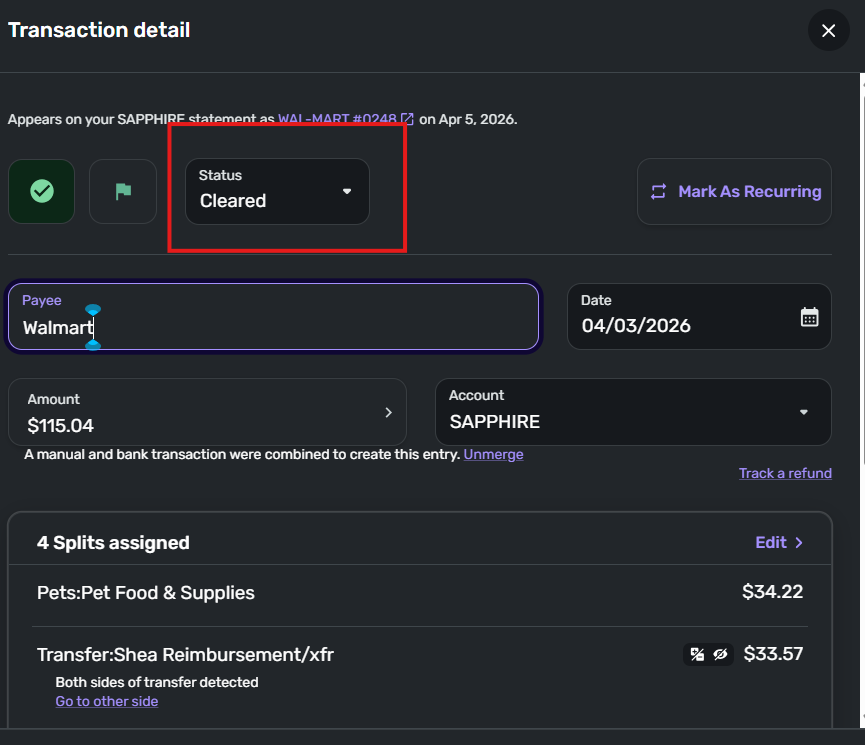
How do I get these transactions to clear?
ty
0 -
I've lost the plot here … I'm not sure what you are saying is happening here.
Merging Problem
I thought the problem was that you were entering manual transactions and they weren't merging with the appropriate downloaded transaction. But the "Transaction detail" window you show above says:

So did you only have a manual transaction in the SAPPHIRE account and not in the "Shea Reimburse/Transfer" (or is it "Shea Reimbursement/xfr") account? And did the matching/merging problem get solved somehow?
Clearing Problem
It sounds like the current problem is that when you edit either side of the transfer transaction (by marking the Status as Cleared and then clicking the Update button) you get an error message saying "the other side of the transfer is in a split." Is that right?
But in reality, only one side of the transfer transaction is actually in a split — the side in the SAPPHIRE account. Is that right? (You could post an image of the "Transaction detail" window for the Shea Reimburse… side to illustrate that.)
If that is the case — Simplifi claims both sides are in splits only one is — I think one of the coaches will have to weigh in on whether this is a bug in the program. It doesn't make sense to me.
PS: Your clearing problem may be related to the one discussed here:
DryHeat
-Quicken Classic (1990-2020), CountAbout (2021-2024), Simplifi (2025-…)0 -
@DryHeat I am sooo confused right now.
I did manually enter it bcuz… if you look at the walmart entry… it says "walmart" and not "wal-mart" which is how it appears when it is downloaded automatically. (I know you said to create a matching payee but I am unsure how to do that or if it will solve this particular issue).
I did attempt to update the payee name in the "shea/xfr acct), thinking maybe Q would link, but received this error: —- can't update it in the "sapphire" acct bcuz it is already "Wal-mart"… there is nothing to update.
I never even saw the "manual and bank transaction" message - maybe I should just unmerge and see what happens?
It is "pending" in the "shea transfer account-(as a credit)… but it is "cleared" in the "sapphire" acct as a debit. And no, it has not resolved itself. Still shows pending.
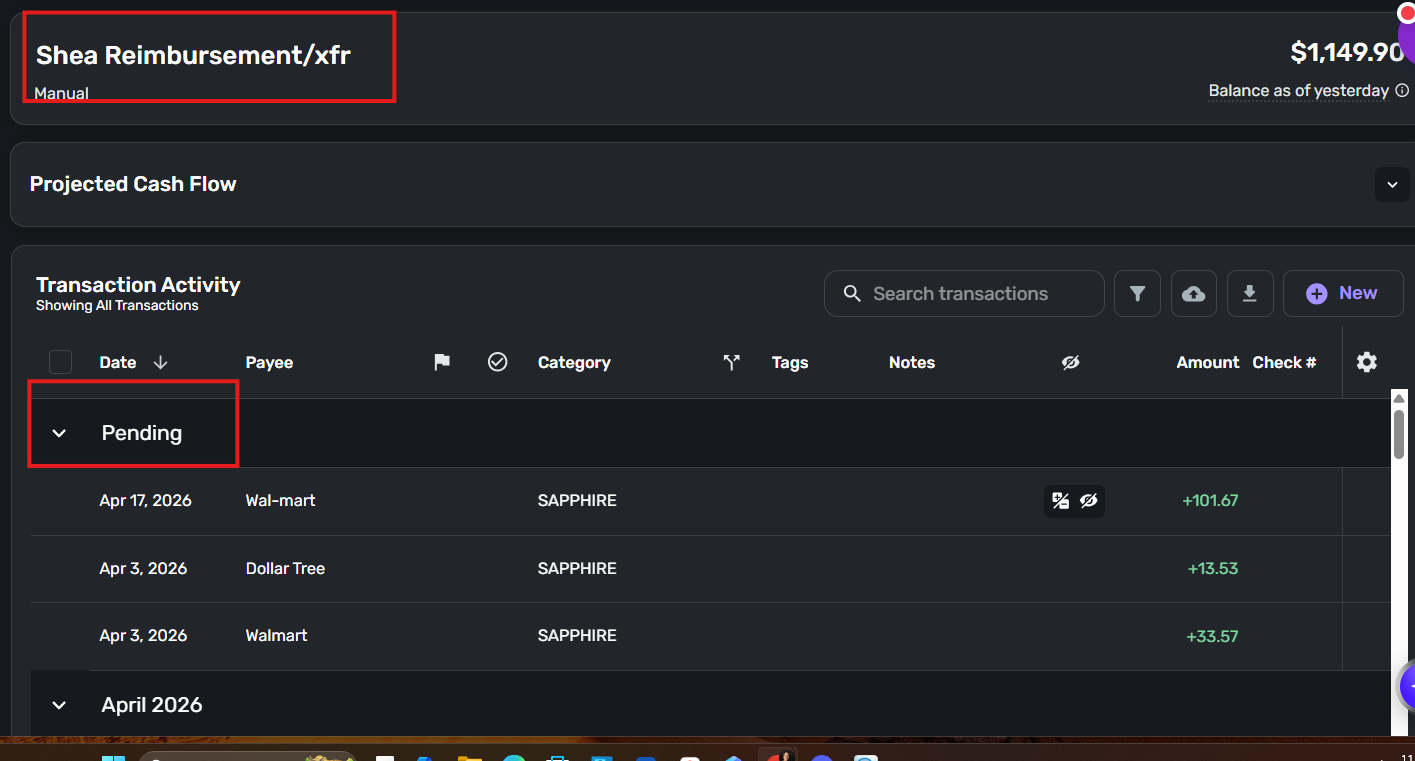
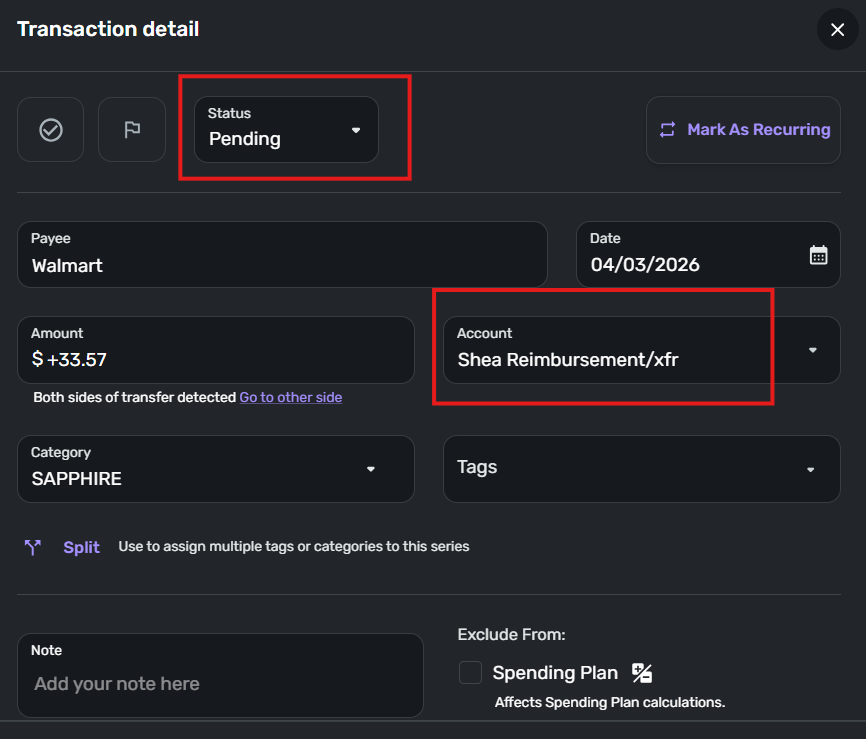
When I click on that purple message above: "go to the other side" …. I get the error message
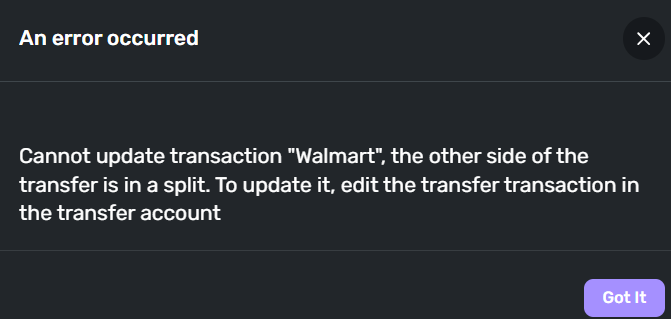 0
0 -
In the other thread I linked above, I made the following suggestion:
This is a shot in the dark, but did you try marking the (merged and cleared) transaction containing the splits as Pending and then marking it as Cleared again?
In your case, that would mean marking the transaction in the SAPPHIRE account as "Pending," then clicking Update, then editing it again and marking it as "Cleared" and clicking Update.
Have you tried that?
DryHeat
-Quicken Classic (1990-2020), CountAbout (2021-2024), Simplifi (2025-…)0 -
Hello @shely6875,
Thanks for reaching out! I admit I am a bit confused about the specific issue here. Is the issue that you created manual transactions, and they couldn't be merged with the downloaded ones? Are you able to delete the manually created transactions in this case, if the transactions were able to be downloaded anyway? Or is there another issue occurring? Let us know!
-Coach Jon
0


