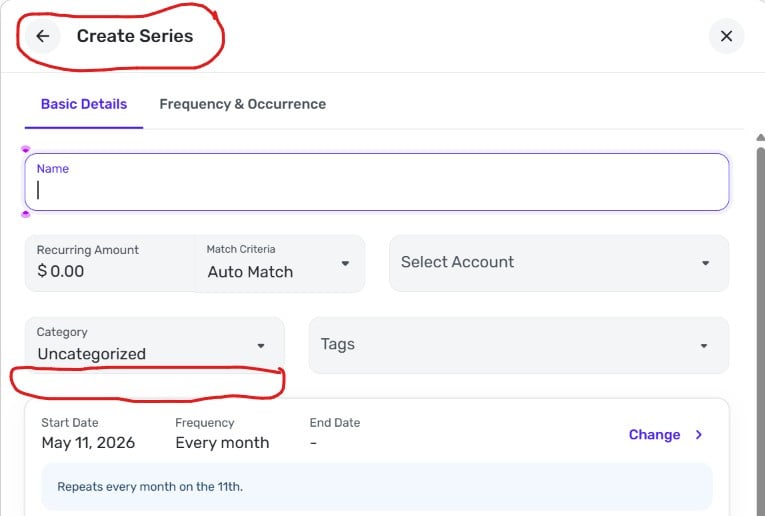
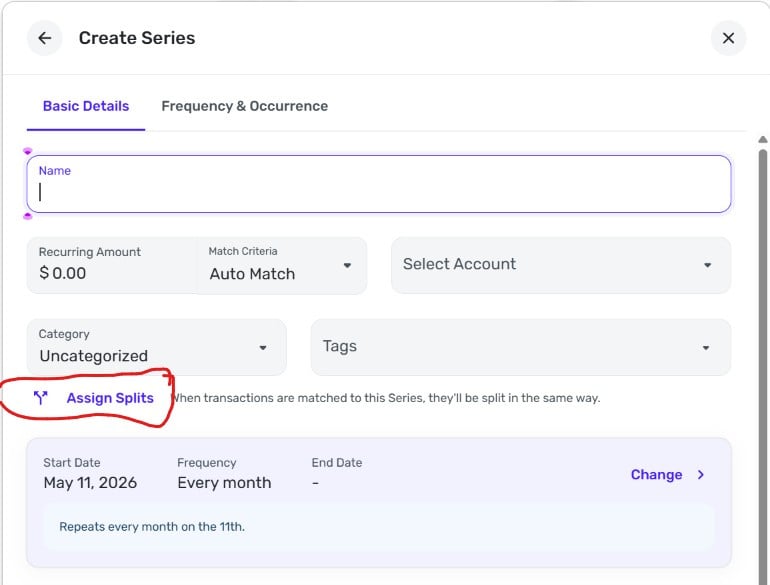
Splits in Recurring & Other Splits Enhancements: Share your feedback here!
Comments
-
@jb.blankenship Thanks for the feedback - we've got the request and we are working to allow those who use tags to have them visible all the time.
@SRC54 and @Stranger0715 We are working on the manual transfer issue and I'll let you know when we have an update on timing.
1 -
Thanks! @Quicken Kirby
Steve
Quicken Simplifi (Safari & iOS) Since 2021
Quicken Classic (MacOS) Since 2009
Dollars & $ense (DOS) and MS Money (Windows) 1987-20090 -
It would be great if loan and credit card payments/transfers could be set up to split by a percentage based on the card's APR. That way it would be easy to see how much of the payment went to the principal and how much was spent on interest.
0 -
Splits in Recurring is now live for all users!
-Coach Natalie
0 -
-
I was able to use this today. Love not having to enter every category for my paycheck. I will try this again in two weeks with my next paycheck.
I have transfers for 401a and 457 (similar to 401k's) and I originally had it marked to not be included in my spending plan, but found out that it then did not include both sides of the transaction (which lead to higher income in spending plan.) I went in and make the transaction to be "included" in the spending plan and that fixed it. The investment side stayed "not to include in spending plan". I will see how it works next time.
TiggerTrainer
Quicken Simplifi user since January 2025
Quicken Classic (Premier) user since 2004 - 2025 (21 years)
1 -
Is there any chance that you are still looking into recurring splits being able to be done retroactively?
It would nice if you could relink a transaction to a recurring reminder and for the splits to be brought across. I have a lot of existing paychecks that need to be split From the beginning of the year.
Steve B
Ex Fortran, Cobol, Basic, MS Access and Visual Basic for Applications (VBA) programer
Been using Simplifi since Dec 2025.
0 -
Is there a guide for the update for recurring split transactions and how to appropriately enter a transfer to 401k account and how it should be treated in the spending plan?
I tested this last week and originally on the "reminder" for the spending plan it net's the transfers in the income portion. I think this is appropriate. That said, it appears that the transfers are being net in income, but are also being included in the "bills" section. After the transaction posted last week, the income portion of the spending plan shows the full amount that went into checking and was not netting the transfers. It also removed the transfers from the "bills" section and I had to add those back in so that they were reflected.
This might be user error on my part so I just want to make sure I have things entered correctly so that I can use the feature without having to put in a lot of effort to make sure it is correct.
Thanks!
TiggerTrainer
Quicken Simplifi user since January 2025
Quicken Classic (Premier) user since 2004 - 2025 (21 years)
0 -
it appears that the transfers are being net in income, but are also being included in the "bills" section.
That's not what happens with mine. I see two different phases with split recurring reminders. Here's what happens with one that has income and deductions, for example:
(1) While the transaction is still a "reminder" (before download from bank), it only shows up in the Income section of the Spending Plan. The amount there is the "net" and the deductions don't show up anywhere in Spending Plan.
(2) After the download,
- the gross amount of income shows up in the Income section
- nothing at all shows up in Bills
- the deductions show up either in Planned Spend (if they match a category tracked there) or in Other Spend.
I'm not sure why your deductions were or are showing up in Bills. And I don't understand what you mean by "It also removed the transfers from the 'bills' section."
Can you provide an image of an upcoming split income reminder and an image showing how the deductions from that split reminder show up in Bills as transfers before the transaction is downloaded? That might help.
DryHeat
-Quicken Classic (1990-2020), CountAbout (2021-2024), Simplifi (2025-…)1 -
Perhaps it is user error on my part. I used a previous reminder. I will delete that one and create a new reminder and will see if that resolves it.
Thanks for pointing me in the right direction.
TiggerTrainer
Quicken Simplifi user since January 2025
Quicken Classic (Premier) user since 2004 - 2025 (21 years)
1 -
I am not a fan of the updated splits screen…
I have transactions that might have 5-10 different splits and also need tags assigned to the split. This new method requires too many clicks to open the tags section, then scroll, then add the tags. It takes a considerable increase in clicks, scrolls, and time to enter the full details on a split transaction.
Also, the split view is so small (real estate-wise), usually only 2-3 tags can be seen at a time. In addition to the extra clicks, there is a lot of scrolling and searching for my place on the screen when working in the split.
Again - not a fan of this update at all. This is much more work on splits.
Thanks for allowing the feedback.1 -
I used a previous reminder. I will delete that one and create a new reminder and will see if that resolves it.
Good idea. Let me know if works differently from the way I described. There are still a lot of unknowns on these split reminders.
DryHeat
-Quicken Classic (1990-2020), CountAbout (2021-2024), Simplifi (2025-…)0 -
It isn't perfect. But it's a step in the right direction. I expect they will refine it as we go forward.
Steve
Quicken Simplifi (Safari & iOS) Since 2021
Quicken Classic (MacOS) Since 2009
Dollars & $ense (DOS) and MS Money (Windows) 1987-20090 -
I really dislike the new series automatically splits. I wish there was a way to opt in or out, and disable it for a series and do manual splits. My paycheck series frequently needs different splits. I sometimes get overtime and expense reimbursements in my same weekly paycheck deposit, and I used to be able to easily split into the appropriate categories and amounts. Now, the series will only split fixed amounts and one overflow category, which does not work for my use case. Please make this an optional series feature. This seriously messes with my budgeting categories, and now my only option is to turn off and loose my income projections.
I do like the overflow feature, but I don’t like that it doesn’t count towards the minimum 2 splits. Having one category for the usual expected amount, and another category for the overflow (ex overtime) is a valid use case, but the series split does not accept it because there needs to be a minimum 2 “normal” splits. So I have to make two splits for the same category and put 1 cent in the second split. Which is pointless.
0 -
I do like the overflow feature, but I don’t like that it doesn’t count towards the minimum 2 splits.
I agree. I can think of various cases where you might want the fixed amount to go to one category and all overflow to go to another.
I really dislike the new series automatically splits. I wish there was a way to opt in or out … I used to be able to easily split into the appropriate categories and amounts.
I'm not sure I understand what you mean. What we "used to be able" to do is create a non-split series for a single fixed amount and then split the transaction after it downloads. We can still do that, in the same way as before. You are not required to split a series ... it's optional.
DryHeat
-Quicken Classic (1990-2020), CountAbout (2021-2024), Simplifi (2025-…)1 -
In the Split Transaction and Split Series modals, users can now set their preference for which additional fields they'd like to always have shown. This enhancement is live in Early Access!
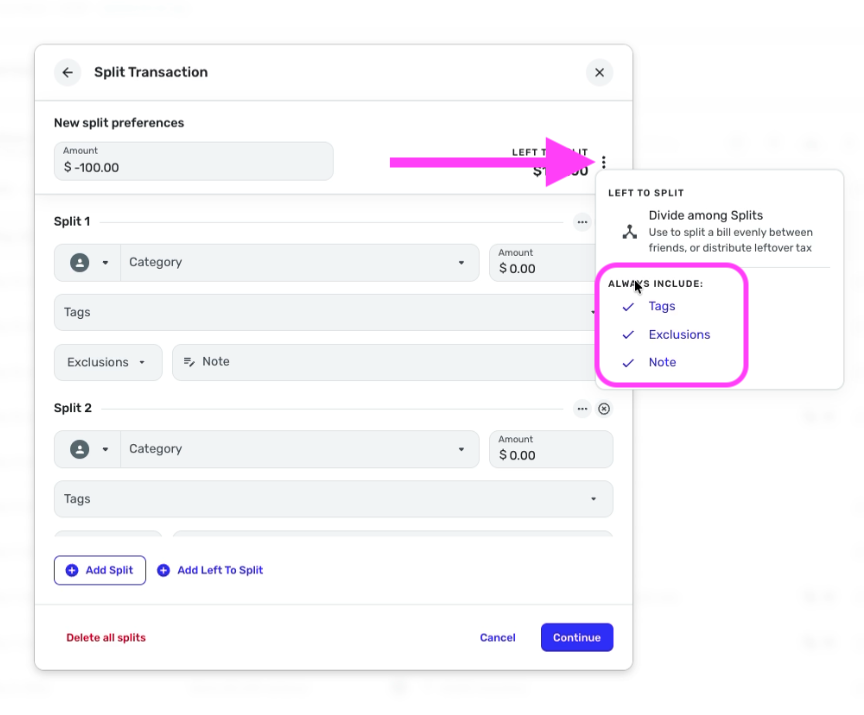
-Coach Natalie
3 -
Wow. Very nice!
I checked Tags and Notes since the default exclusions will usually work, and when I need to use them, I can adjust on a case by case basis.
Steve
Quicken Simplifi (Safari & iOS) Since 2021
Quicken Classic (MacOS) Since 2009
Dollars & $ense (DOS) and MS Money (Windows) 1987-20090 -
That's a great addition! Thank you!!
0 -
This is a really good feature! I generally use the Notes field but rarely use the others. This makes it much easier to do that, and because it shows the Note field automatically it is a good reminder for me to use it.
DryHeat
-Quicken Classic (1990-2020), CountAbout (2021-2024), Simplifi (2025-…)0 -
Question, When entering a paycheck and having transfers to a 401k. I want it to deduct from the spending plan, but obviously we only want the expense part of the transfer to decrease the spending plan and the increase to the 401k to not be included. What is the proper way to enter into the recurring transaction. Do you mark the 401k as "do not include in spending plan" or do you treat it like any other expense and Simplifi automatically figures out the correct treatment?
I just want to make sure I add the paycheck transaction correctly.
@DryHeat It is possible that I marked the 401k transfer as "do not include" in spending plan last time and that might be what messed things up.
TiggerTrainer
Quicken Simplifi user since January 2025
Quicken Classic (Premier) user since 2004 - 2025 (21 years)
0 -
This is great!
TiggerTrainer
Quicken Simplifi user since January 2025
Quicken Classic (Premier) user since 2004 - 2025 (21 years)
0 -
I started using this feature last month for my paycheck. Even though I have the net pay set to "Personal Income: Paycheck," the amount is not showing up as income in reports. All other months use the same category and show up in reports. Please advise.
0 -
If your income is not showing up in say the Income & Expense Report, check the filters to make sure all your categories are included or reset the report altogether.
To be clear, are you setting up a reminder for your paycheck and making deductions for taxes, etc?
Also, is the income not showing up in the spending plan or reports or both? It won't show up in reports until there is a transaction linked to it.
Does your split recurring look something like this:
Salary Income +$1500
Tax Expense $200
401K Transfer $100
Transaction Total +$1200When you get your paycheck, it should link to the recurring income and show up in Reports. You may have to link it manually if Simplifi doesn't do it automatically.
Does any of this help? Good luck.
Steve
Quicken Simplifi (Safari & iOS) Since 2021
Quicken Classic (MacOS) Since 2009
Dollars & $ense (DOS) and MS Money (Windows) 1987-20090 -
Really like the direction here and improvements that have come and are coming to splits. It's great to have the ability to set splits for recurring transactions, however, is there any consideration being given to setting up recurring transactions with splits based on percentages? I see it's just fixed amounts that can be set today.
It'd be great if there was a toggle where I could do the assignments based on fixed amount or percentage. I have quite a few series where the amount each month varies so a fixed amount recurring split doesn't work well for me.
1 -
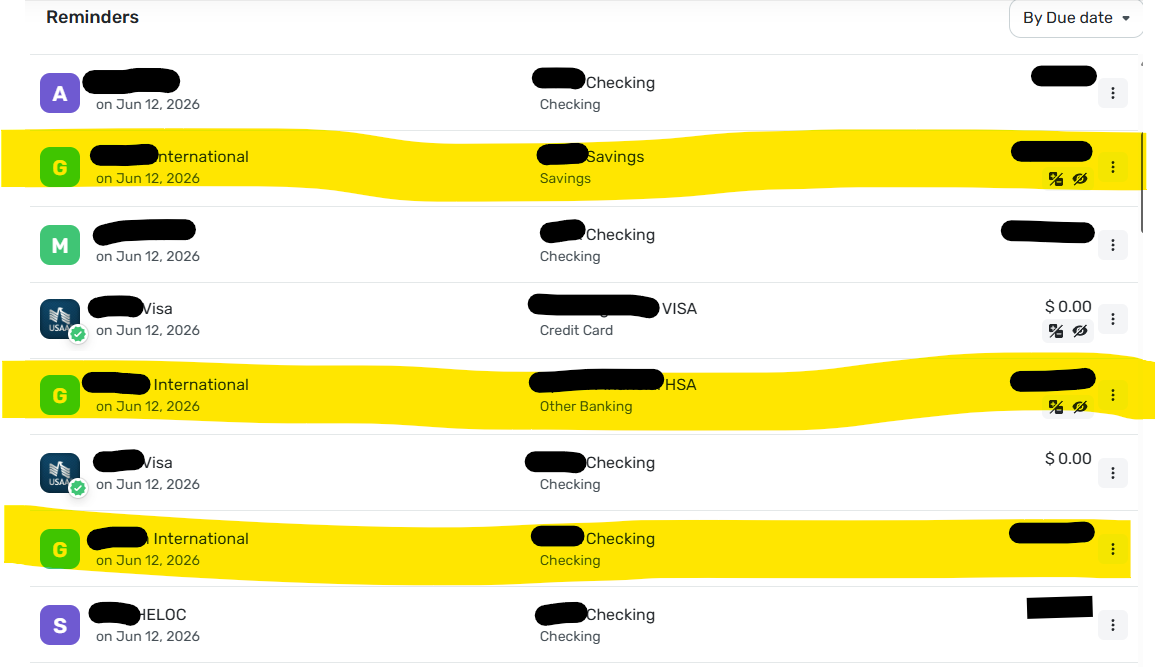
In Bills & Income, when sorting By Due Date, transaction splits on the same date are not grouped together in a way that makes them connected and easy to review. Splits are separated when they should be grouped. I’d like this bug fixed to group same-day splits are displayed.
My specific example screenshot is below. The 3 highlighted items are from the same paycheck split and scheduled on 6/12 and they should be grouped together as they are all part of the same action, but instead the paycheck, split to savings and split to HSA have other items planned for 6/12 in between them.
In addition, since it is pretty standard for banks to process same day deposits for the account before processing payments, why on 6/12 am I seeing 3 payments on 6/12 before both the paycheck splits "G" and my spouses paycheck "M"?
📣Please fix the sorting issues to make this more usable.
Tim from Maine
Former Quicken Classic user for over 20+ years
Quicken Simplifi user since May 20260 -
@sea_compgeek I am not seeing this with my income or expense recurring reminders with splits. They are just one entry until they are entered showing the total amount of the transaction. Perhaps because my income splits have just one income and the others are expenses?
I'll do a test reminder and report back.
Edit: I did a split with two accounts and there were two that showed up, but they stayed together.. But it may just be because it is just this instance. But one instance probably isn't enough to make it show up. I'll keep at it.
I do think it would make more sense not to show the different splits in Bills and Incomes when it is still a recurring reminder.
Steve
Quicken Simplifi (Safari & iOS) Since 2021
Quicken Classic (MacOS) Since 2009
Dollars & $ense (DOS) and MS Money (Windows) 1987-20091 -
To add, I have also deleted and recreated these paycheck with splits series and they continue to appear as in the screenshot when viewing Bills & Income; Overview as well as Bills & Income; Cash Flow. I see do not see the same experience in Bills & Income; All Series; All Active as the seem to roll up and display —- Split—.
I am seeing this experience in web version: 6.21.0 and in iOS app version 6.20.1.Tim from Maine
Former Quicken Classic user for over 20+ years
Quicken Simplifi user since May 20261 -
@sea_compgeek I was able to verify that they don't show up together in July. Below is the screenshot with my dummy income splits. I have it defined as $1000 wages with deposits of $800, $100 and $100 in three accounts.
I admit it is a bit disconcerting to see them separated by other reminders. But I guess Simplifi sees it as 3 deposits.
I would prefer this show as one reminder as the expense reminders do.
@Coach Kristina This feedback should probably be merged with the Feedback for Splits in recurring so that the development team sees it:
Steve
Quicken Simplifi (Safari & iOS) Since 2021
Quicken Classic (MacOS) Since 2009
Dollars & $ense (DOS) and MS Money (Windows) 1987-20092