Computershare FDP-102 (edited)

Receiving error FDP-102 (bank connectivity issues) on trying to update my Computershare accounts. Anyone else having this problem? Thanks.
Comments
-
Hello @pjholland,
Thanks for reaching out! I can see the FDP-102 error you are receiving from our end. Generally, a user will receive error code FDP-102 when our connection with their bank is being throttled by the bank, limiting the number of successful connection attempts. Users will still be able to access their bank’s website directly, and this error typically resolves itself after 24-48 hours.
I would suggest waiting 48 hours for the issue to resolve itself. If the issue still persists afterward, please try the following steps:
- Make all of the accounts with the bank manual by following the steps here.
- Once you see the account(s) listed in the Manual Accounts section under Settings > Accounts, go back through the Add Account flow to reconnect to the bank.
- If the connection is successful, carefully link the account(s) found to your existing Quicken Simplifi account(s) by following the steps here.
Let us know how this goes!
-Coach Jon
0 -
I've been getting same error for 13 days.
0 -
Hello @MightyIrish,
Thanks for reaching out as well! Did you try the steps I shared above to see if they work to resolve the issue for you?
- Make all of the accounts with the bank manual by following the steps here.
- Once you see the account(s) listed in the Manual Accounts section under Settings > Accounts, go back through the Add Account flow to reconnect to the bank.
- If the connection is successful, carefully link the account(s) found to your existing Quicken Simplifi account(s) by following the steps here.
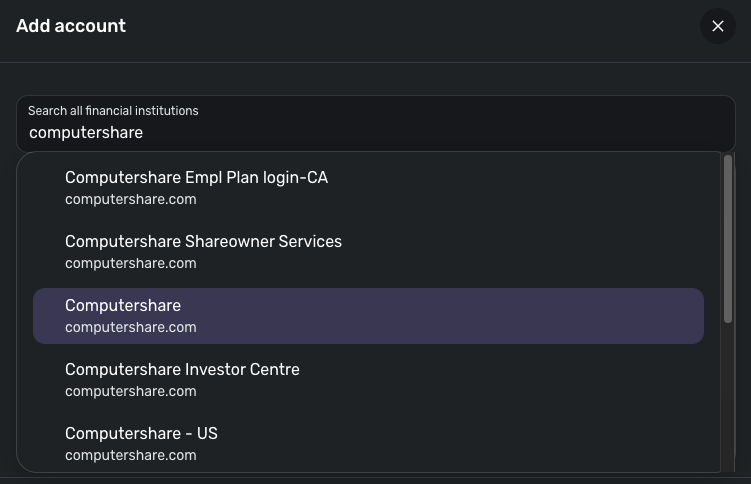
If they do not, I would also check whether the other Computershare instances available in Quicken Simplifi work better for you.
Let us know how this goes!
-Coach Jon
0 -
I've completed those steps and issue persists.
0 -
Hello @MightyIrish,
Thank you for the update! Can you please provide a screenshot of the error you are receiving from your end, as well as the Accounts Summary page from the bank's website that has a wide enough scope to show the full page URL? This is the landing page after signing in, and typically lists all accounts and balances. You will want to take this from a web browser and not a mobile browser, as well as redact any private info such as account numbers.
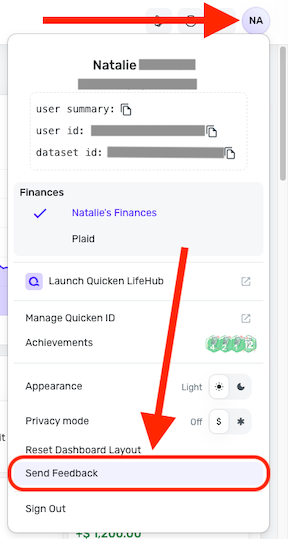
Please also submit your logs via the 'Send Feedback' option:
- Log in to the Quicken Simplifi Web App.
- Select the Profile icon in the upper-right corner of the screen.
- With the Profile menu open, hold down the Option key (Mac) or the Alt key (Windows), and then click Send Feedback.
- Leave all boxes checked, add a brief description of the issue, and then click Send.
-Coach Jon
0
