SchoolsFirst FDP-103 (edited)

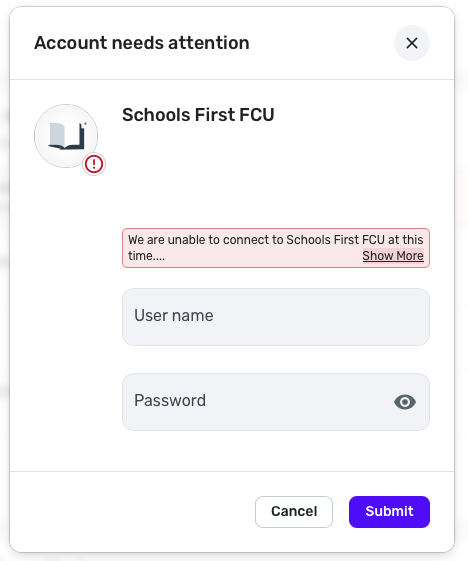
The update yesterday said the connection issue to SchoolsFirst FCU was resolved however, I am still getting this response when I try to reconnect:
[edited image to reduce size]
Comments
-
Hello @Tim Etherington,
Thanks for reaching out! I can see that you are experiencing an FDP-103 error. I would have you try the following steps to see if they can help resolve this issue for you:
- Make all of the accounts with the bank manual by following the steps here.
- Once you see the account(s) listed in the Manual Accounts section under Settings > Accounts, go back through the Add Account flow to reconnect to the bank.
- If the connection is successful, carefully link the account(s) found to your existing Quicken Simplifi account(s) by following the steps here.
If these steps do not work, you can proceed with the following steps to verify the login credentials:
- Verify the bank selected is the correct instance – You may see several different instances of your bank; check to see if you’re using the correct one.
- Verify that your login information is correct – Type your password/PIN into a text application to ensure you don’t have any typographical errors. Then, copy and paste your login information into Quicken Simplifi to ensure accuracy.
- Verify your login at the bank’s website – Try to sign in to your bank’s website using the same login credentials to ensure you've not locked yourself out of the account and that the credentials are still valid.
- Check for an app-specific password – Some banks require users to use a specific app password when connecting to a third party. Check with your bank to see if you need to use an app-specific password.
- Update your credentials – Try temporarily updating your password at your bank's website and then try again to connect in Quicken Simplifi. We recommend NOT using the following special characters: & < > / \.
If either of these steps do not work in resolving the issue, please supply the following information:
- The name of the account(s), as it appears in Quicken Simplifi.
- The name of the account(s), as it appears on the bank's website.
- Have there been any recent changes made to the bank's website or its sign-in process?
- What is the exact URL you use to log in to your account on the bank's website?
- What type of account(s) are you attempting to connect in Quicken Simplifi?
- A screenshot of the Accounts Summary page from the bank's website that has a wide enough scope to show the full page URL. This is the landing page after signing in, and typically lists all accounts and balances. You will want to take this from a web browser and not a mobile browser, as well as redact any private info such as account numbers.
- The format of your password (DO NOT provide your actual password!). For example, "Quicken123$" would be coded as "Xxxxxxx###$", where a capital "X" indicates a capital letter, a lowercase "x" indicates a lowercase letter, and a "#" indicates numbers; the actual special characters used will need to be provided.
Feel free to DM this information if you prefer!
-Coach Jon
0 -
Hey Jon, been there, tried most of that.
Rather than make the account manual and back, I did the Reset Connection and that fixed it. Wish I had done that first. A little embarrassing now. :) Thanks.1 -
Hello,
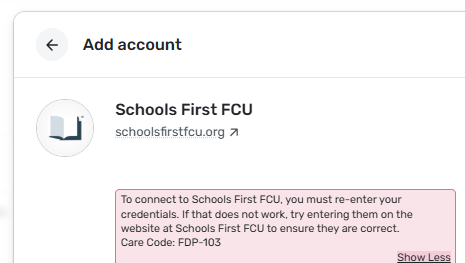
I am still receiving this error message and made the accounts manual. In resetting the connection, this failed and received this Care Code: FDP-103
 0
0 -
@gcry700024, thanks for posting on this topic!
To clarify, making the accounts manual and reconnecting is different from resetting the connection. Which steps did you perform? If the latter, let's have you perform a full make manual/re-link by following these steps, which will allow us to confirm the error with a brand new connection:
- Make all of your Schools First accounts manual by following the steps here.
- Once you see the account(s) listed in the Manual Accounts section under Settings > Accounts, go back through the Add Account flow to reconnect to the bank.
- If the connection is successful, carefully link the account(s) found to your existing Quicken Simplifi account(s) by following the steps here.
Let us know how it goes!
-Coach Natalie
0 -
Hello Coach Natalie,
I followed the steps that you outlined and am still receiving the same error message and followed those steps to begin with.
0 -
Hello,
This is finally resolved and everything is synced
0 -
Awesome! Glad to hear you are connected again.
-Coach Natalie
0

