Bank of America Credit Card Payments cause merge of pending/cleared which breaks rules

I have a BoA checkings account that I use to pay my BoA CC. This has been a source of annoyance for past couple months.
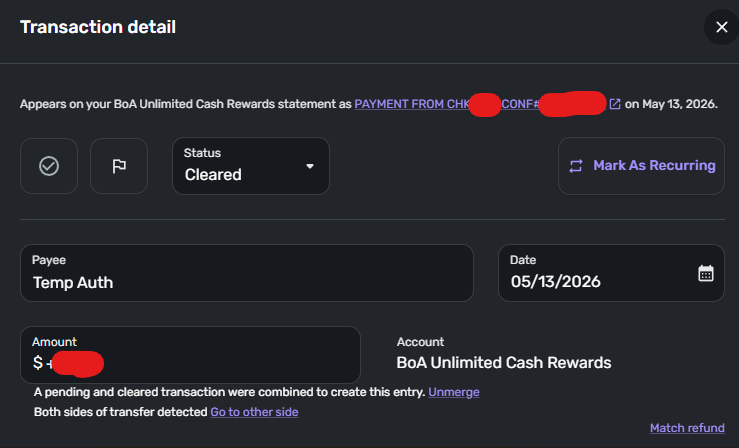
On the day of the payment, there's a pending transaction. On the next day, rather than going from pending to cleared, it appears that it gets merged. When this happens, the pending transaction actually gets prioritized, so all I see is "Temp Auth".
Without any rules, "Temp Auth" by itself is already a problem. With rules, they won't work, because it doesn't actually match "payment from chk". If I unmerge the entries, the pending transaction has "Temp Auth", and the cleared one will have "payment from chk". So there's something with these type of transactions that prevent rules from working.
Creating a new rule just for "Temp Auth", even if it works, doesn't seem right here.
Can you please investigate? Thanks.
Comments
-
Hello @bling,
Thanks for reaching out! Upon reviewing the issue, it appears that you already reached out to our support team to troubleshoot this issue, and they are waiting on some information from you in order to escalate the issue. They requested screenshots and for logs to be sent if possible.
Since you have already completed most of the troubleshooting with our support team, I suggest reaching back out to them with the information they requested so this issue can be escalated for you.
-Coach Jon
0 -
The last time I reached out to support was over a year ago for something else… I did not contact them for this issue.
0 -
Hello @bling,
Thanks for the reply! I apologize, for some reason, the ticket you previously worked on was showing as active. We can continue troubleshooting here in that case.
I would check to see if a fresh connection to the financial institution works to resolve the issue seen here. Please try the following steps:
- Navigate to the bank's website, sign in, and then remove Quicken's access from the bank's third-party linked apps.
- Navigate back to Quicken Simplifi, and make all of the accounts with the bank manual by following the steps here.
- Once you see the account(s) listed in the Manual Accounts section under Settings > Accounts, go back through the Add Account flow to reconnect to the bank.
- If the connection is successful, carefully link the account(s) found to your existing Quicken Simplifi account(s) by following the steps here.
Let us know how this goes!
-Coach Jon
0 -
Hello. I followed the step above. Initially I was optimistic because on the BoA side, there were actually two entries of granting Quicken access. However, after revoking both, reconnecting once, and another test payment, the exact same behavior happened. On both accounts, a pending and cleared transaction were merged and on the CC side, it says "Temp Auth".
0 -
Thank you for your reply,
To help us further investigate, please provide screenshots of what you are seeing (please redact any personal information). Please also send logs.
To send logs, please follow these steps:
- Log in to the Quicken Simplifi Web App.
- Select the Profile icon in the upper-right corner of the screen.
- With the Profile menu open, hold down the Option key (Mac) or the Alt key (Windows), and then click Send Feedback.
- Leave all boxes checked, add a brief description of the issue, and then click Send.
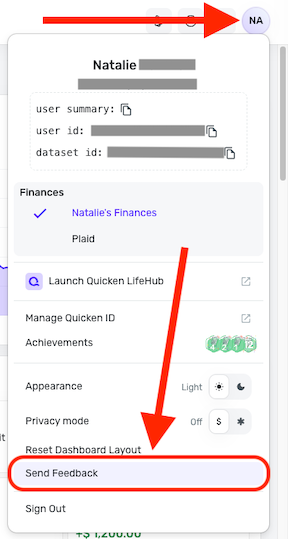
Thank you!
-Coach Kristina
0 -
As another test, I deleted the rule I use to rename these transactions and the same thing happened.
I only opened this here because BoA is a big bank and so presumably a lot of people are probably hit by this.
Is there no way to troubleshoot further without sending in feedback? The "Simplifi file" contains account names and transactions. Even if I sanitize it I'm not sure what's the point because you know it's coming from me. If there was something like "only past week of data" I'd be more comfortable but in its current statement I have major privacy concerns.
0 -
And it looks like even if I wanted to fix it with an additional rule to rename "Temp Auth", it can't match the transaction.
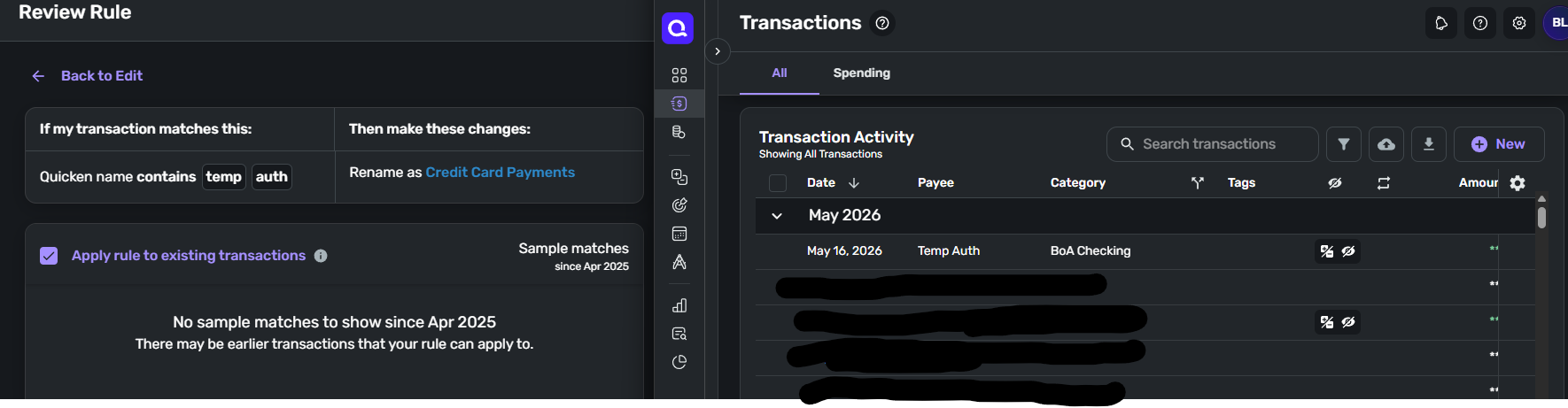 0
0 -
Hello @bling,
Thanks for the replies! While we certainly understand your hesitation about sending logs and screenshots, we need this information to escalate the issue. Without this additional information, we will unfortunately be unable to proceed with further troubleshooting. Be sure to let us know how you wish to proceed!
-Coach Jon
0

