Principal Financial Group - balances not updating unless a reset is performed (edited)

[removed]
Hi -
I have 2 401Ks at Principal Financial Group. Starting earlier this year, while updates successfully completed without any connection error, the balances on these two 401K accounts were not getting updated. When I contacted you, you suggested that I reconnect to Principal. I tried this and it worked, but only temporarily.
For the past several months, the only way for me to get my balances for these 2 401Ks to update is to reconnect to Principal. Otherwise, the balances do not update at all. When I reconnect, the reconnection dialog shows the current and correct balances and then updates the balances on the list of accounts. Without doing this, the balances do not update.
As I stated above, the connection does not get any errors and the account page indicates that Prudential has successfully been updated. But the balance values do not change.
This problem occurs on both a web browser (Chrome - latest version 148.0.7778.179) or on the Android app latest version 6.20.0
I can send you some screenshots if you want, but I am 100% sure that this is an problem either originating from Simplifi or Prudential.
Can you please investigate and fix this problem?
Thank you
Comments
-
Hello @rjg5060,
Thanks for reaching out! If you can provide those screenshots you mentioned, I am sure they would be helpful! I would also have you try the following steps to see if they work better in resolving the situation:
- Navigate to the bank's website, sign in, and then remove Quicken's access from the bank's third-party linked apps.
- Navigate back to Quicken Simplifi, and make all of the accounts with the bank manual by following the steps here.
- Once you see the account(s) listed in the Manual Accounts section under Settings > Accounts, go back through the Add Account flow to reconnect to the bank.
- If the connection is successful, carefully link the account(s) found to your existing Quicken Simplifi account(s) by following the steps here.
Let us know how this goes!
-Coach Jon
0 -
Thank you @Coach Jon
I followed your 4 steps. I'll see tomorrow and into next week if the balances update.
Is there a way I can send you the screenshots without having to publish them for public viewing?
0 -
I sent screenshots directly to you in a separate message. Please let me know if you have not received them.
Regarding setting the 2 Principal 401K accounts to manual and then reconnecting them: I did this last Friday but then on Saturday the account balances did NOT update. Same problem. Unfortunately, this did not resolve the problem.
I'm wondering if this problem is due to my having 2 separate 401K accounts at Principal. The 2nd account was set-up earlier this year right around the time this balance update problem began.
Please send this problem to your technical team so it can be fixed.
Thank you,
Richard
0 -
@rjg5060, thank you for sending over some information!
I think we can move forward with an escalation for this issue, as I'm not finding any open tickets or known issues. To do so, we will need the following additional data:
- A screenshot of the Accounts Summary page from the bank's website that has a wide enough scope to show the full page URL. This is the landing page after signing in, and typically lists all accounts and balances. You will want to take this from a web browser and not a mobile browser, as well as redact any private info such as account numbers.
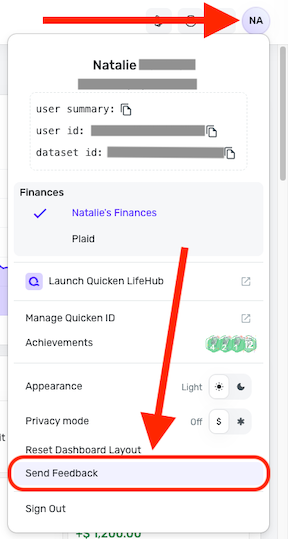
Please also submit your logs via the 'Send Feedback' option:
- Log in to the Quicken Simplifi Web App.
- Select the Profile icon in the upper-right corner of the screen.
- With the Profile menu open, hold down the Option key (Mac) or the Alt key (Windows), and then click Send Feedback.
- Leave all boxes checked, add a brief description of the issue, and then click Send.
Much appreciated!
-Coach Natalie
0 -
I sent you the requested screenshot to you via a direct message.
Also, I sent feedback as requested with a note identifying the title of this discussion.
Please escalate and resolve.
Thank you.
0 -
@rjg5060, thank you for the DM and logs!
I have filed a ticket for this issue and will let you know as soon as we receive an update by posting back here.
CTP-17429
-Coach Natalie
0 -
Thank you @Coach Natalie
I hope this gets resolved soon as I now have to reset the connections for both Principal accounts each time I want to see updated balances & transactions.
As I stated before, the problem might be due to my having 2 separate 401K accounts at Principal. The 2nd account was set-up earlier this year right around the time this balance update problem began. Perhaps Simplifi is not correctly handling multiple accounts.
0

