Can not change Investment Transaction Category with $0 Total Amount (edited)

SQ loaded 4 Investment transactions with a Zero Dollar amount. SQ arbitrarily selected Coffee Shops for the Category. You can change the Category but, when you select Update you are required to put a $$ amount in the Total amount, which should be Zero.

Note the Category has been changed and the Total amount is now highlighted in red after selecting UPDATE.
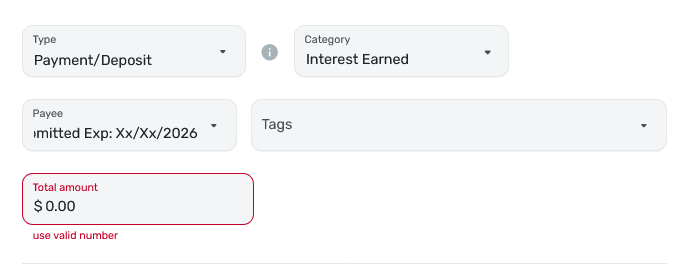
I commented on this phenomena sometime in 2025, or, maybe 2024.
Comments
-
Hi @neon45,
Thank you for reaching out!
You can update the category of a $0 transaction directly from the register without any issues.
To do this, instead of using the three-dot menu on the right side of the transaction, simply click on the transaction’s current category in the register and select a new category from the dropdown menu. The change will save automatically.

Please let us know if you have any additional questions. We’re happy to help!
-Coach Laura
0 -
I was able to change category inline or in the entry box of a $0.00 transaction.
However, I do see that one cannot have a split for $0.00.
Edit: I see a coach already answered your question.
Steve
Quicken Simplifi (Safari & iOS) Since 2021
Quicken Classic (MacOS) Since 2009
Dollars & $ense (DOS) and MS Money (Windows) 1987-20090 -
Thanks coach Laura… Fascinating. I can indeed change the category as you mention, but, you can Not do it from the Transaction Detail page.
Just to make sure we are on the same page, I am working in the Investments, and not in Banking or Credit module.
Thanks…
0 -
@neon45, thanks for the reply!
We are glad to hear you were able to edit the category of $0 Investment Transactions by editing them inline in the register. It appears that this is not supported in the Transaction Detail modal, as even creating a $0 transaction from this modal doesn't work:
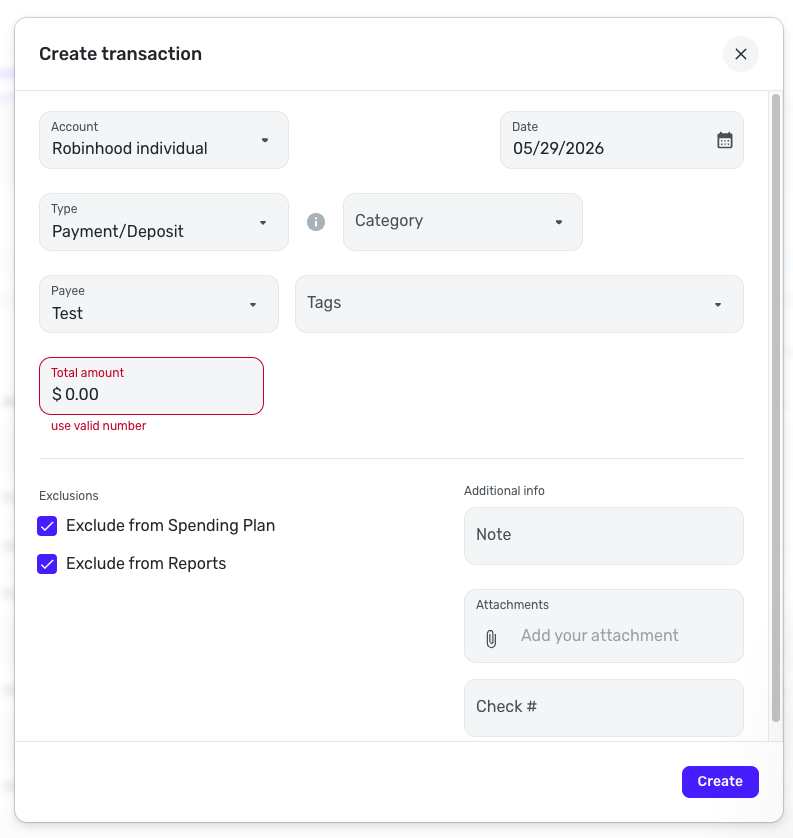
Let us know if we can help with anything further!
-Coach Natalie
1 -
Very interesting. I am glad to know one can edit a transaction inline to $0.00 if I ever need to do so.
And since Investment accounts don't allow Splits (Ugh), you cannot as you can in other accounts have a split transaction that adds up to 0.00. I don't think I've ever tried before to do a $0.00 transaction that wasn't a split.
Apparently the true limitation is that a category must be at least $.001 even if it is uncategorized (which is itself a category) when using the transaction modal.
Edit: And one cannot edit a downloaded transaction's amount inline. This only works for a manual account.
Complicated stuff. Thanks.
Steve
Quicken Simplifi (Safari & iOS) Since 2021
Quicken Classic (MacOS) Since 2009
Dollars & $ense (DOS) and MS Money (Windows) 1987-20090