Unlinking a transaction from a series should put the old reminder back

A very similar thing to what I posted before in this thread just happened to me again:
It didn't get as weird as last time (yet). But the gist is: I have a reminder for my credit card payment. The series amount is $1 but the actual amount is set using CC Bill Connect (and I modify it manually if needed, which does come up if I have returns).
A refund for a return just posted to that account. The amount was completely different from the reminder amount, and the payee name was as well, but it got linked to the series anyways. The date was different too as the CC is due on 6/18
I unlinked it from the series (good thing I noticed) but the old reminder is gone!! This means that my cash flow projection is thrown off and if I hadn't noticed that the old reminder is missing, things could have gone very wrong. To clarify, the reminder is missing from the carousel in both accounts (my CC and my checking account) and it doesn't show up in Bills and Income either.
Ideally, if a transaction is automatically linked to a reminder, wrongly, and I unlink it, the old reminder should be restored. Even if Simplifi can't restore it to the amount it was, at least put it back to the series amount so I'll see it and know that it needs updating!
That's one of the two issues. The other issue is why the transaction got linked when the payee, date, and amount are all so different.
Thanks.
Comments
-
Hello @EL1234,
Thank you for letting us know this issue happened again. To help troubleshoot the issue, please let us know the date/payee/amount for the incorrectly matched transaction, as well as the reminder it was linked to. If you're not comfortable sharing that in this discussion, please DM the information.
There is an Idea post requesting that the original Reminder be restored when an incorrectly linked transaction is unlinked. Please take a look, and add your vote if it's something you'd like to see implemented:
I look forward to your reply!
-Coach Kristina
0 -
Thanks for your response. I'll dm you that info. I didn't realize there was already a thread for that - I upvoted it. Hopefully other people will see it now also and upvote as well.
1 -
And meanwhile I changed the series from Auto Match to Limited Range in case it'll help at all.
1 -
Thank you for your reply,
Amount matching is intended to help correct issues with incorrect matching. See the article for more information: .
The details you sent seem fairly similar to what you shared in the earlier discussion. Was it the same payee and same reminder series as last time?
Thank you!
-Coach Kristina
0 -
Thanks @Coach Kristina
Yes, it was the same payee and same series as last time, with different amounts.
I understand about amount matching but I would think that the date and payee should have to match or be pretty similar as well…
I'll see if amount matching helps going forwards. Thanks!
1 -
Can I assume that the limited range matching will base it on the Reminder amount and not the Series amount?
0 -
Thank you for your reply,
The article doesn't specify, but the tooltip in Quicken Simplifi says the options let you control how much can be matched to the series.
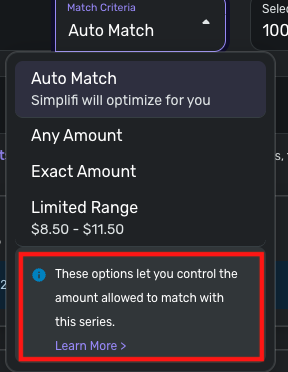
I hope this helps!
-Coach Kristina
0 -
Right, I know that. I was just asking if I can assume that it's based on the reminder amount (which is the amount due) and not the series amount (which is set to $1 until it gets updated).
0
