Bank of America Account Not Downloading Transactions

I recently updated my Bank of America account connections using the new connection procedure. Initially, everything appeared to work correctly — Quicken downloaded transactions that had been missing from the previous week when the original error first occurred.
However, after that first successful update, one of my two Bank of America credit card accounts stopped downloading new transactions. The last transaction downloaded for that account was on 13 May, even though I have continued using the card regularly since then.
What is confusing is that Quicken does not show any error messages. One Bank of America credit card account continues to update normally, while the other appears to refresh successfully but downloads no new transactions.
Has anyone else experienced this issue where one Bank of America account updates correctly but another account under the same login stops downloading transactions without any error?
Comments
-
Hi @dudgeonc,
Thanks for reaching out to the Simplifi Community and for letting us know that you are missing transactions!
Please try following these steps from our article on missing transactions:
First, I suggest confirming that the account is sorted by Date.To do so:
- From the Transaction Activity screen, click the Date column header.
- To display your most recent transactions at the top of the Transaction Activity list, ensure the Date column header shows a downward arrow next to it.

If the issue persists, I also suggest checking your filters:
- Navigate to the Filter icon to the right of the Search transactions field.
- Click the X icon to clear any active filters.

If the transactions are still missing, I have a few questions to better understand the issue:
- Was the transaction recently deleted by mistake?
- Are you missing a transaction from a previous year?
- Are the missing transactions older than 90 days?
- Are the missing transactions still pending with the bank?
Let me know how it goes. I look forward to your reply!
- -Coach Carlos
0 -
Same thing was happening to me. Then I realized the Brave Browser had high security blocking filters on. Now the issue seems to have resolved.
2 -
Thank you for the suggestions.
I confirmed that the account is sorted by Date (newest transactions at the top) and there are no active filters.
To answer your questions:
- No, the missing transactions were not deleted.
- No, the issue is not related to transactions from a previous year.
- No, the missing transactions are not older than 90 days. In fact, all transactions since 13 May are missing from this account.
- The transactions are not just pending transactions. Even after they fully clear and post at Bank of America, they still do not download into Quicken.
Additional information:
- I have two Bank of America credit card accounts connected under the same Bank of America login.
- One account is downloading transactions normally and remains up to date.
- The second account has not downloaded any new transactions since 13 May.
- Quicken reports no errors and indicates the account is up to date.
- As a workaround, I have been downloading transactions directly from Bank of America and importing them into Quicken for the affected account.
0 -
Thank you for your reply,
The next step is to try making the problem account manual, then add it and link it to the existing account in Quicken Simplifi. You can make the account manual by following these steps from our article on making an account manual:
- Move your cursor to the top right and click Settings (gear icon).
- Select Accounts.
- Locate the Account you'd like to make "manual" and click the three dots at the end of it.
- Select Make manual.
- Click Make manual to confirm.

Once done, the account will be moved down to the Manual Accounts section.
To add and link the account, please follow these steps from our articles on adding and linking accounts:
- Type your bank’s name into the search bar.
- If your bank appears under the Popular Financial Institutions section, click on the image.
- Once you've selected your bank, you'll see a message regarding consent. Click Continue.
- Enter the User ID and Password used to sign in to your bank's website, then click Connect.
- Quicken Simplifi locates the accounts associated with your bank's login and displays the account name and account type. Review the accounts found. You’ll see each account’s:
- Account Name
- Account Type
- Action that Quicken Simplifi will take
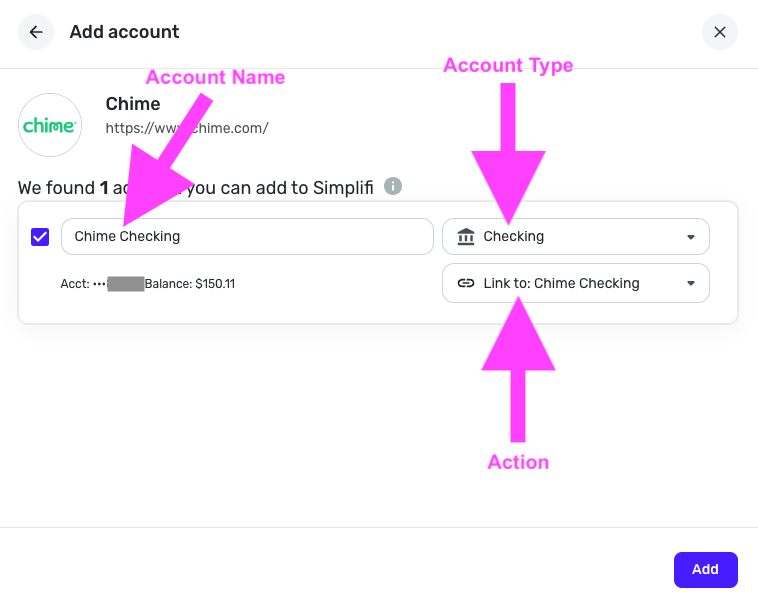
- Open the Action dropdown and choose the existing Quicken Simplifi account that the bank account should link to. Important: If you leave the Action set to “Add as New (no link)”, Quicken Simplifi will create a duplicate account.
- Ignore accounts you don’t want to add
If there’s an account you don’t want to connect, simply uncheck the box next to it.

Please let me know how it goes!
-Coach Kristina
0