NetX Investor connects but doesn't download holdings or transactions

This issue grew out of another issue about and FDP error:
https://community.simplifimoney.com/discussion/16542/new-5-26-26-netexchange-investor-netxinvestor-fis-missing-accounts-fdp-106
I made a new account and can now connect to netxinvestor.com (without an FDP-106 error), but the new account doesn't download any transactions or holdings.
Comments
-
Hello @phlsphr,
Thank you for reaching out! I am glad that you are no longer receiving the FDP-106 error, at least. Let's have you try the following steps to see if they work in resolving the issue for you:
- Make all of the accounts with the bank manual by following the steps here.
- Once you see the account(s) listed in the Manual Accounts section under Settings > Accounts, go back through the Add Account flow to reconnect to the bank.
- If the connection is successful, carefully link the account(s) found to your existing Quicken Simplifi account(s) by following the steps here.
If these steps do not work in providing the missing transactions/holdings, please supply the following information. Feel free to send this to me via DM if you prefer:
- The name of the account, as it appears in Quicken Simplifi.
- The balance for the account in the Accounts List in Quicken Simplifi (this is the list of all accounts and balances on the left side of the Dashboard on the Quicken Simplifi Web App, or the list of all of your accounts when you select "Accounts" from the Quicken Simplifi Mobile App).
- The balance for the account in the Investments Portfolio in Quicken Simplifi (if you have multiple investment accounts, you'll want to filter the page to just this account).
- The balance for the account as displayed on the bank's website.
- A screenshot of the holdings for the account in Quicken Simplifi (if you have multiple investment accounts, you'll want to filter the page to just this account).
- A screenshot of the holdings on the bank's website for a comparison.
- The Date, Payee, and Amount of a few example transactions that are currently missing in Quicken Simplifi.
- A screenshot of the example transactions from the bank's website.
- A screenshot of the corresponding register in Quicken Simplifi showing that the transactions are missing.
- Confirm whether the missing transactions are impacting the balance in Quicken Simplifi or not.
We will also need logs to be submitted:
- Log in to the Quicken Simplifi Web App.
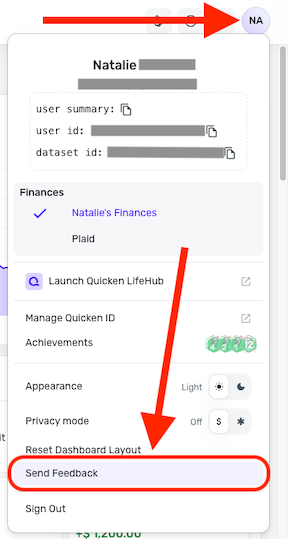
- Select the Profile icon in the upper-right corner of the screen.
- With the Profile menu open, hold down the Option key (Mac) or the Alt key (Windows), and then click Send Feedback.
- Leave all boxes checked, add a brief description of the issue, and then click Send.
-Coach Jon
0 -
Hi,
I made a new netxinvestor.com account and yes, it successfully connected and retrieved my holdings. Thanks yo you and the team for fixing this.
Carl
1
