Filtering by Payment/Deposit in Investment Transactions does not work (edited)

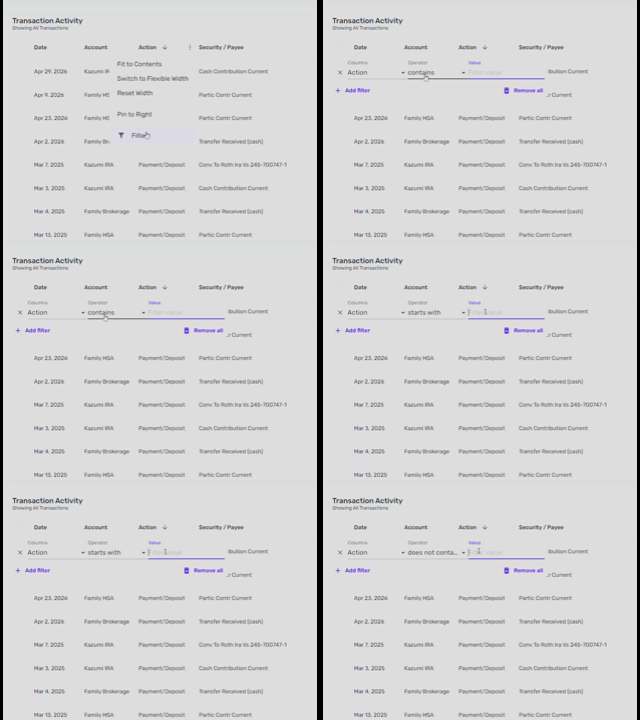
Within my Fidelity accounts are transactions where the Action is "Payment/Deposit". Filtering on any combination of that combined term does not work.
See video of it in action.
Comments
-
My workaround is to sort by Payment/Deposit. Than way you can see them all together. I fear this is not considered a bug, but just a missing feature. Investments in QS lack many of the features that are in Classic Quicken.

I don't think you can bulk change Actions. You have to do those one by one but once they are Payment/Deposits, you can bulk change categories and payees.
If you want your dividends to be included in the Spending Plan, for example, you will have to create your own investment categories.
When I am doing this, I can see all the Dividend Income together, change them to payment/deposit and then use my payees (instead of symbols) and my categories. It's tedious at first but I just worked my way backwards. Now I do them as they come in.
Steve
Quicken Simplifi (Safari & iOS) Since 2021
Quicken Classic (MacOS) Since 2009
Dollars & $ense (DOS) and MS Money (Windows) 1987-20090 -
I also ended up by sorting.
It is a bug because filtering works on other named actions (buy, sell, etc) but doesn't work for the words Payment or Deposit.
1 -
Hi @bobbiesmith,
Thank you for reaching out and sharing your observations regarding the filter feature. I’ll be sure to pass this information along to the appropriate team for further review.
We appreciate your feedback!
-Coach Laura
0 -
Thank you. In general filtering and searching is wonky and doesn't provide expected results. Searching for 583.00 might bring up transactions with amounts of 583.86. Filtering for contains "sell" will bring up results with action "sell" but not "sell short". Are you all aware of these inconsistencies?
0 -
@bobbiesmith I am hopeful that soon the programmers will turn to beefing up the Investments. Not only do we need an easier way to change to payment/deposit, but we need splits and recurring transactions in Investments for those who have cash management accounts. We also need for pending transaction to be taken into account. You'll notice that there aren't pending or cleared transactions in Investment accounts.
Investments are pretty barebones in Simplifi but maybe it will be their next big thing.
Steve
Quicken Simplifi (Safari & iOS) Since 2021
Quicken Classic (MacOS) Since 2009
Dollars & $ense (DOS) and MS Money (Windows) 1987-20091 -
Agree 100% with this. I've had to make my Fidelity Brokerage account ( which I mainly use for cash mgt) a regular Bank account to get the granular transaction management feature it needs. But my other brokerage account with Vanguard is missing these capabilities
1 -
Have you tried filtering the action using “Short” as the criteria instead? That may allow you to properly filter by short sell transactions.
Also, I’ve included the two ideas I believe @SRC54 mentioned so you can add your vote and follow their progress:
Please feel free to let me know if that helps or if you need any further assistance.
-Coach Laura
1 -
@Coach Laura I should have thought to do that myself! 😀 Thanks.
Steve
Quicken Simplifi (Safari & iOS) Since 2021
Quicken Classic (MacOS) Since 2009
Dollars & $ense (DOS) and MS Money (Windows) 1987-20090 -
My point was just that search and filtering throughout Simplifi, not just in investments is wonky and has unexpected results.
0